extending partition?

I tried using my PM now and it did expand the D partition.
I do have recovery disks, and have used them before to repair a booting problem. That is when I noticed that there were no restore points in my system. Figuring D was out of room I wanted to expand it, assuming that was where the restore points reside.

The Factory Recovery partition is not supposed to be added to at all as it could impair its function. It contains the files to run a full factory recovery from within the OS or by tapping the F11 key at bootup to Run Factory Recovery as shown in this video
:


If you made the Recovery Disks off of this partition, they are likewise used to boot to restore the computer to Factory condition. They are not the same as the repair disk used to repair Win7 if it will not start: http://www.sevenforums.com/performance-maintenance/51100-repair-cd-system-repair-disk.html

All of this is separate from System Restore, which is a Win7 feature that can return your OS to an earlier state before problems occurred: http://www.sevenforums.com/tutorials/700-system-restore.html

So your restore points have nothing to do with the Recovery partition and are always stored on the OS drive unless you move them which would mess them up.

Please continue to ask any questions so we can clear up any remaining confusion, which is common between Restore<>Repair<>Recovery.
 
Thank you, whs, I found it.
@ gregrocker:
So you are saying I wasted that unallocated space on a partition that need not be any larger, right? But it was the only adjacent option! Is it correct to expect that now that I extended that D partition I may not be able to do a factory restore if needed one day?
 

My Computer

Computer Manufacturer/Model Number
HP p6347c
OS
W7
CPU
AMD Athlon(tm) II X4 630 Processor
Motherboard
AMD RS780/RS880
Memory
8 GB
Graphics Card(s)
ATI Radeon HD 4200
Sound Card
Realtek High Definition Audio
Monitor(s) Displays
HP w2338h (HP w2338h Wide LCD Monitor)
Hard Drives
WDC WD6400AAKS-65A7B SCSI Disk Device
You can still use the space for a second storage and backup partition separate from the C primary. The recovery partition you had been looking at inbetween is generally hidden from view and often found at either the start or back end of the drive. How it ended up in the middle of the drive is.... ??? your guess there!

The recovery partition especially while under warranty and not having a set of recovery disks made for the preinstalled 7 would be something to consider as far as moving to the back. Did you previously shrink the C volume down and then move that as well?

As for where restore points go by default that would be the "System Volume Information" folder you typically see at the root of the hard drive. That's a system protected folder and won't generally allow any direct access to it while booted in Windows.
 

My Computers

System One System Two

  • Computer type
    PC/Desktop
    Computer Manufacturer/Model Number
    Custom builds = 2
    OS
    W7 Ultimate x64/W10 Pro x64/W11 Pro Triple Boot - Main PC W7 Remote PC Micro ATX W7 Pro x64/W11 Pro
    CPU
    AMD Phenom II X4 975 Deneb 3.6ghz - 965 2nd remote pc
    Motherboard
    Gigabyte GA-790XTA-UD4-Gigabyte GA-880GM-D2H remote pc
    Memory
    Kingston Hyper X DDR3 1600 1.5v 16gb - Hyper X Fury 8gb 2nd
    Graphics Card(s)
    MSI HD Radeon 5750 1gb - MSI HD Radeon 6450 on mini tower
    Sound Card
    Creative Labs X-Fi Xtreme Audio P - Realtek onooard 2nd case
    Monitor(s) Displays
    ASUS VW199T-P 19" HP 2082a Main-HP 2082a 20" remote pc
    Screen Resolution
    Asus 1440x900 - HP 1600x900
    Hard Drives
    WD Black 1TB HD per OS W7, W10, and pending W11 presently on 500gb OS Drive - Pending Triple 1TB HDs for Spanned Storage/backup volume
    Single 2TB external USB enclosure, single 1TB System 7 Host/Boot drive, Pending 8TB external HD for system image b
    PSU
    Corsair 750TX - primary / Corsair CX600 - second
    Case
    Antec 900-2 - SSD compatible / NZXT Vulcan mini tower
    Cooling
    Zalman CNPS9900A
    Keyboard
    AZIO L70 Backlit Letters Gaming - ONN Cordless/USB
    Mouse
    MSI DS200 Programmable, Logitech Cordless
    Internet Speed
    30mbps upgrade - primary hard wired - mini tower usb WiFi
    Antivirus
    GFI VIPRE Internet Security 2014 on W7 2016 beta on W10,
    Browser
    Cyberfox, WaterFox 64bit FF variants, FireFox x64, Pale Moon
    Other Info
    Accomdata fan cooled usb 2.0 PIDE/Sata II, III external enclosure.
    Sambient usb/eSata PATA/Sata II, III external enclosure.
  • Computer type
    PC/Desktop
    System Manufacturer/Model Number
    CUSTOM ASSEMBLY
    OS
    W7 Pro x64/W11 Pro
    CPU
    AMD Deneb 3.6ghz - 965
    Motherboard
    Gigabyte GA-880GM-D2H remote pc
    Memory
    Kingston Hyper X Fury 8gb
    Graphics Card(s)
    MSI HD Radeon 6450 DVI Output
    Sound Card
    Realtek onooard Creative or Other separate PENDING
    Monitor(s) Displays
    VIZIO 32" LCD TV Separate LCD Pending
    Screen Resolution
    1600x1080
    Hard Drives
    WD 500GB OS Host/Boot WD Green 1TB Storage/Backup
    PSU
    Corsair 600W - THERMALTAKE 600W spare case
    Case
    NZXT Vulcan mini tower
    Cooling
    Twin 120mm Top Fans - 240mm Side Cover
    Keyboard
    ONN Cordless/USB Logitech Cordless
    Mouse
    ONN USB/Cordless - Logitech Cordless
    Internet Speed
    DSL 5G
    Browser
    MS Edge, FireFox, WaterFox x64, FireFox Nightly
    Other Info
    OS Testing-Remote Access to Main TeamViewer
Did you previously shrink the C volume down and then move that as well?
I took a chunk of the C partition when I tried to create space for XP as a second OS. Dropped that idea and bought a second drive for it instead.
That left me with an unneeded partition.
 

My Computer

Computer Manufacturer/Model Number
HP p6347c
OS
W7
CPU
AMD Athlon(tm) II X4 630 Processor
Motherboard
AMD RS780/RS880
Memory
8 GB
Graphics Card(s)
ATI Radeon HD 4200
Sound Card
Realtek High Definition Audio
Monitor(s) Displays
HP w2338h (HP w2338h Wide LCD Monitor)
Hard Drives
WDC WD6400AAKS-65A7B SCSI Disk Device
So you are saying I wasted that unallocated space on a partition that need not be any larger, right? But it was the only adjacent option! Is it correct to expect that now that I extended that D partition I may not be able to do a factory restore if needed one day?

I gave you the steps earlier to use free Partition Wizard bootable CD to slide the Recov partition over to the far right of the HD which would swap the Unallocated to where you can use it in your WIn7 partition. If you had questions about doing this then you needed to ask back not proceed with doing something which everyone suggested not to.

Make your Recovery Disks and then you don't have to worry about deleting the Recovery partition or moving it to the end of the drive. There are no boot files on it.

If you decide to move it, use free Partition Wizard bootable CD which is tool we use to help hundreds of similar operations here. http://www.sevenforums.com/tutorials/93322-partition-wizard-use-bootable-cd.html

In this case, boot PW CD, rightclick Factory Recovery then Click/hold and slide the whole partition intact to the right end of the HD, click OK. Next rightclick Win7 partition and drag the left grey border all the way to the right to take up the space OK, Apply.

Or use it as a separate storage partition as Nighthawk suggests.

Either way, I would shrink the Recov partition by exactly as much space as you extended it to put it back to where it was.
 
The first things now to look at before making any further changes to the partition scheme you have now would be 1)back everything up 2) get busy creating the set of recovery disks!

During the move over and/or resize of C if not going for a second D partition the partition table could end up being mush! You could lose the recovery partition as well as C. In fact someone just informed me about getting the giveaway of Easeus Partition Manager and going to shrink the C primary and the drive instead becoming a "Raw" volume!

(so much for giveaways I guess while that could still happen with any drive tool!)
 

My Computers

System One System Two

  • Computer type
    PC/Desktop
    Computer Manufacturer/Model Number
    Custom builds = 2
    OS
    W7 Ultimate x64/W10 Pro x64/W11 Pro Triple Boot - Main PC W7 Remote PC Micro ATX W7 Pro x64/W11 Pro
    CPU
    AMD Phenom II X4 975 Deneb 3.6ghz - 965 2nd remote pc
    Motherboard
    Gigabyte GA-790XTA-UD4-Gigabyte GA-880GM-D2H remote pc
    Memory
    Kingston Hyper X DDR3 1600 1.5v 16gb - Hyper X Fury 8gb 2nd
    Graphics Card(s)
    MSI HD Radeon 5750 1gb - MSI HD Radeon 6450 on mini tower
    Sound Card
    Creative Labs X-Fi Xtreme Audio P - Realtek onooard 2nd case
    Monitor(s) Displays
    ASUS VW199T-P 19" HP 2082a Main-HP 2082a 20" remote pc
    Screen Resolution
    Asus 1440x900 - HP 1600x900
    Hard Drives
    WD Black 1TB HD per OS W7, W10, and pending W11 presently on 500gb OS Drive - Pending Triple 1TB HDs for Spanned Storage/backup volume
    Single 2TB external USB enclosure, single 1TB System 7 Host/Boot drive, Pending 8TB external HD for system image b
    PSU
    Corsair 750TX - primary / Corsair CX600 - second
    Case
    Antec 900-2 - SSD compatible / NZXT Vulcan mini tower
    Cooling
    Zalman CNPS9900A
    Keyboard
    AZIO L70 Backlit Letters Gaming - ONN Cordless/USB
    Mouse
    MSI DS200 Programmable, Logitech Cordless
    Internet Speed
    30mbps upgrade - primary hard wired - mini tower usb WiFi
    Antivirus
    GFI VIPRE Internet Security 2014 on W7 2016 beta on W10,
    Browser
    Cyberfox, WaterFox 64bit FF variants, FireFox x64, Pale Moon
    Other Info
    Accomdata fan cooled usb 2.0 PIDE/Sata II, III external enclosure.
    Sambient usb/eSata PATA/Sata II, III external enclosure.
  • Computer type
    PC/Desktop
    System Manufacturer/Model Number
    CUSTOM ASSEMBLY
    OS
    W7 Pro x64/W11 Pro
    CPU
    AMD Deneb 3.6ghz - 965
    Motherboard
    Gigabyte GA-880GM-D2H remote pc
    Memory
    Kingston Hyper X Fury 8gb
    Graphics Card(s)
    MSI HD Radeon 6450 DVI Output
    Sound Card
    Realtek onooard Creative or Other separate PENDING
    Monitor(s) Displays
    VIZIO 32" LCD TV Separate LCD Pending
    Screen Resolution
    1600x1080
    Hard Drives
    WD 500GB OS Host/Boot WD Green 1TB Storage/Backup
    PSU
    Corsair 600W - THERMALTAKE 600W spare case
    Case
    NZXT Vulcan mini tower
    Cooling
    Twin 120mm Top Fans - 240mm Side Cover
    Keyboard
    ONN Cordless/USB Logitech Cordless
    Mouse
    ONN USB/Cordless - Logitech Cordless
    Internet Speed
    DSL 5G
    Browser
    MS Edge, FireFox, WaterFox x64, FireFox Nightly
    Other Info
    OS Testing-Remote Access to Main TeamViewer
I gave you the steps earlier to use free Partition Wizard bootable CD to slide the Recov partition over to the far right of the HD which would swap the Unallocated to where you can use it in your WIn7 partition. If you had questions about doing this then you needed to ask back not proceed with doing something which everyone suggested not to.
Since several methods to deal with my question were suggested, I may have picked the wrong one. However, that is water under the bridge now.
Either way, I would shrink the Recov partition by exactly as much space as you extended it to put it back to where it was.
I don't remember the EXACT size it was in MB. Would it be safe to use the Partition Recovery Wizard in PW? And does it know how much to shrink it back?
 

My Computer

Computer Manufacturer/Model Number
HP p6347c
OS
W7
CPU
AMD Athlon(tm) II X4 630 Processor
Motherboard
AMD RS780/RS880
Memory
8 GB
Graphics Card(s)
ATI Radeon HD 4200
Sound Card
Realtek High Definition Audio
Monitor(s) Displays
HP w2338h (HP w2338h Wide LCD Monitor)
Hard Drives
WDC WD6400AAKS-65A7B SCSI Disk Device
The first things now to look at before making any further changes to the partition scheme you have now would be 1)back everything up 2) get busy creating the set of recovery disks!
So I can toss out the old rescue CDs I have, right? I'll make a BU run now, and new rescue CDs.
 

My Computer

Computer Manufacturer/Model Number
HP p6347c
OS
W7
CPU
AMD Athlon(tm) II X4 630 Processor
Motherboard
AMD RS780/RS880
Memory
8 GB
Graphics Card(s)
ATI Radeon HD 4200
Sound Card
Realtek High Definition Audio
Monitor(s) Displays
HP w2338h (HP w2338h Wide LCD Monitor)
Hard Drives
WDC WD6400AAKS-65A7B SCSI Disk Device
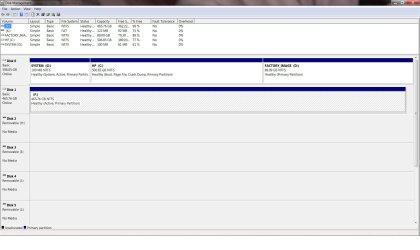
The Recovery partition was 11.08gb in first screenshot. If you extended it then I would shrink it back to the same exact size using the same utility you originally used to decrease possibility of files copying differently

Then if you want to slide it to the end of the HD study PW CD tutorial below and the use steps I gave:
http://www.sevenforums.com/tutorials/93322-partition-wizard-use-bootable-cd.html
In this case, boot PW CD, rightclick Factory Recovery then Click/hold and slide the whole partition intact to the right end of the HD, click OK. Next rightclick Win7 partition and drag the left grey border all the way to the right to take up the space OK, Apply.

If you have any other questions please post back a screenshot of your full Disk Mgmt drive map along with them.

I would not throw out any disks, just label them carefully so you know exactly what they are and do. What "Rescue disks" do you have?
 
Last edited:
If you have the factory recovery disks already there wouldn't be any need to create a new set except to have spares onhand in case any original disks are damaged or lost. Recovery partitions typically are small in size while the continued resizing could result in seeing it lost.

A look at the first screen on this thread however shows it as 11.08gb which sounds like it never saw any resizing but was simply moved over when first deciding to make room for an XP install on a second primary. I would simply move it back to it's original location.
 

My Computers

System One System Two

  • Computer type
    PC/Desktop
    Computer Manufacturer/Model Number
    Custom builds = 2
    OS
    W7 Ultimate x64/W10 Pro x64/W11 Pro Triple Boot - Main PC W7 Remote PC Micro ATX W7 Pro x64/W11 Pro
    CPU
    AMD Phenom II X4 975 Deneb 3.6ghz - 965 2nd remote pc
    Motherboard
    Gigabyte GA-790XTA-UD4-Gigabyte GA-880GM-D2H remote pc
    Memory
    Kingston Hyper X DDR3 1600 1.5v 16gb - Hyper X Fury 8gb 2nd
    Graphics Card(s)
    MSI HD Radeon 5750 1gb - MSI HD Radeon 6450 on mini tower
    Sound Card
    Creative Labs X-Fi Xtreme Audio P - Realtek onooard 2nd case
    Monitor(s) Displays
    ASUS VW199T-P 19" HP 2082a Main-HP 2082a 20" remote pc
    Screen Resolution
    Asus 1440x900 - HP 1600x900
    Hard Drives
    WD Black 1TB HD per OS W7, W10, and pending W11 presently on 500gb OS Drive - Pending Triple 1TB HDs for Spanned Storage/backup volume
    Single 2TB external USB enclosure, single 1TB System 7 Host/Boot drive, Pending 8TB external HD for system image b
    PSU
    Corsair 750TX - primary / Corsair CX600 - second
    Case
    Antec 900-2 - SSD compatible / NZXT Vulcan mini tower
    Cooling
    Zalman CNPS9900A
    Keyboard
    AZIO L70 Backlit Letters Gaming - ONN Cordless/USB
    Mouse
    MSI DS200 Programmable, Logitech Cordless
    Internet Speed
    30mbps upgrade - primary hard wired - mini tower usb WiFi
    Antivirus
    GFI VIPRE Internet Security 2014 on W7 2016 beta on W10,
    Browser
    Cyberfox, WaterFox 64bit FF variants, FireFox x64, Pale Moon
    Other Info
    Accomdata fan cooled usb 2.0 PIDE/Sata II, III external enclosure.
    Sambient usb/eSata PATA/Sata II, III external enclosure.
  • Computer type
    PC/Desktop
    System Manufacturer/Model Number
    CUSTOM ASSEMBLY
    OS
    W7 Pro x64/W11 Pro
    CPU
    AMD Deneb 3.6ghz - 965
    Motherboard
    Gigabyte GA-880GM-D2H remote pc
    Memory
    Kingston Hyper X Fury 8gb
    Graphics Card(s)
    MSI HD Radeon 6450 DVI Output
    Sound Card
    Realtek onooard Creative or Other separate PENDING
    Monitor(s) Displays
    VIZIO 32" LCD TV Separate LCD Pending
    Screen Resolution
    1600x1080
    Hard Drives
    WD 500GB OS Host/Boot WD Green 1TB Storage/Backup
    PSU
    Corsair 600W - THERMALTAKE 600W spare case
    Case
    NZXT Vulcan mini tower
    Cooling
    Twin 120mm Top Fans - 240mm Side Cover
    Keyboard
    ONN Cordless/USB Logitech Cordless
    Mouse
    ONN USB/Cordless - Logitech Cordless
    Internet Speed
    DSL 5G
    Browser
    MS Edge, FireFox, WaterFox x64, FireFox Nightly
    Other Info
    OS Testing-Remote Access to Main TeamViewer
I don't remember the EXACT size it was in MB. Would it be safe to use the Partition Recovery Wizard in PW? And does it know how much to shrink it back?
It does not really have to be that exact. An approximation is good enough. It is only ashame to waste all that space in D where it is useless. As already suggested, I would make it a new partition and move my user data there - it is a lot safer if seperate from the OS. But if you want to do that, post back and we will give you detailed guidance on how to do that. It is a little tricky.
 

My Computer

Computer Manufacturer/Model Number
HP, Dell, Gateway, Toshiba - 4 laptops and 2 desktops
OS
Vista, Windows7, Mint Mate, Zorin, Windows 8
CPU
from 1.6GHz Duo to i7
Monitor(s) Displays
2x HP w2207
Hard Drives
5x HDD, 7x SSD, 12x Externals
Keyboard
with trackball - no mices
Mouse
Trackball mice
Internet Speed
DSL 6000
The Recovery partition was 11.08gb in first screenshot. If you extended it then I would shrink it back to the same exact size using the same utility you originally used to decrease possibility of files copying differently
I used my resident PW.
What "Rescue disks" do you have?
I still have them all: one labeled Repair Disc W7 64bit, which I successfully used twice, another labeled Rescue W7 64bit, plus a set of 3 CDs labeled W7 Recovery Disk 1, 2, and 3. I guess I got overly careful and made a new set each time I was reminded of it by the system!
 

My Computer

Computer Manufacturer/Model Number
HP p6347c
OS
W7
CPU
AMD Athlon(tm) II X4 630 Processor
Motherboard
AMD RS780/RS880
Memory
8 GB
Graphics Card(s)
ATI Radeon HD 4200
Sound Card
Realtek High Definition Audio
Monitor(s) Displays
HP w2338h (HP w2338h Wide LCD Monitor)
Hard Drives
WDC WD6400AAKS-65A7B SCSI Disk Device
I made a new backup, but I forgot how I made the restore disks in the past!
 

My Computer

Computer Manufacturer/Model Number
HP p6347c
OS
W7
CPU
AMD Athlon(tm) II X4 630 Processor
Motherboard
AMD RS780/RS880
Memory
8 GB
Graphics Card(s)
ATI Radeon HD 4200
Sound Card
Realtek High Definition Audio
Monitor(s) Displays
HP w2338h (HP w2338h Wide LCD Monitor)
Hard Drives
WDC WD6400AAKS-65A7B SCSI Disk Device
If the repartitioning was all set and your second drive had been for storage and backup I would have recommended the idea of seeing a full system image created and stored there. That will restore the entire drive in case of any mishaps even when booted live from the repair or Disk #1 likely of the recovery disks where the restore option is seen when going to use the repair tools.

The support site or user guide that came with the system is where you would find the instructions for creating a new set of recovery disks. For a fast repair tools cd the option for that is seen in the Control Panel>Backup & Restore section there.
 

My Computers

System One System Two

  • Computer type
    PC/Desktop
    Computer Manufacturer/Model Number
    Custom builds = 2
    OS
    W7 Ultimate x64/W10 Pro x64/W11 Pro Triple Boot - Main PC W7 Remote PC Micro ATX W7 Pro x64/W11 Pro
    CPU
    AMD Phenom II X4 975 Deneb 3.6ghz - 965 2nd remote pc
    Motherboard
    Gigabyte GA-790XTA-UD4-Gigabyte GA-880GM-D2H remote pc
    Memory
    Kingston Hyper X DDR3 1600 1.5v 16gb - Hyper X Fury 8gb 2nd
    Graphics Card(s)
    MSI HD Radeon 5750 1gb - MSI HD Radeon 6450 on mini tower
    Sound Card
    Creative Labs X-Fi Xtreme Audio P - Realtek onooard 2nd case
    Monitor(s) Displays
    ASUS VW199T-P 19" HP 2082a Main-HP 2082a 20" remote pc
    Screen Resolution
    Asus 1440x900 - HP 1600x900
    Hard Drives
    WD Black 1TB HD per OS W7, W10, and pending W11 presently on 500gb OS Drive - Pending Triple 1TB HDs for Spanned Storage/backup volume
    Single 2TB external USB enclosure, single 1TB System 7 Host/Boot drive, Pending 8TB external HD for system image b
    PSU
    Corsair 750TX - primary / Corsair CX600 - second
    Case
    Antec 900-2 - SSD compatible / NZXT Vulcan mini tower
    Cooling
    Zalman CNPS9900A
    Keyboard
    AZIO L70 Backlit Letters Gaming - ONN Cordless/USB
    Mouse
    MSI DS200 Programmable, Logitech Cordless
    Internet Speed
    30mbps upgrade - primary hard wired - mini tower usb WiFi
    Antivirus
    GFI VIPRE Internet Security 2014 on W7 2016 beta on W10,
    Browser
    Cyberfox, WaterFox 64bit FF variants, FireFox x64, Pale Moon
    Other Info
    Accomdata fan cooled usb 2.0 PIDE/Sata II, III external enclosure.
    Sambient usb/eSata PATA/Sata II, III external enclosure.
  • Computer type
    PC/Desktop
    System Manufacturer/Model Number
    CUSTOM ASSEMBLY
    OS
    W7 Pro x64/W11 Pro
    CPU
    AMD Deneb 3.6ghz - 965
    Motherboard
    Gigabyte GA-880GM-D2H remote pc
    Memory
    Kingston Hyper X Fury 8gb
    Graphics Card(s)
    MSI HD Radeon 6450 DVI Output
    Sound Card
    Realtek onooard Creative or Other separate PENDING
    Monitor(s) Displays
    VIZIO 32" LCD TV Separate LCD Pending
    Screen Resolution
    1600x1080
    Hard Drives
    WD 500GB OS Host/Boot WD Green 1TB Storage/Backup
    PSU
    Corsair 600W - THERMALTAKE 600W spare case
    Case
    NZXT Vulcan mini tower
    Cooling
    Twin 120mm Top Fans - 240mm Side Cover
    Keyboard
    ONN Cordless/USB Logitech Cordless
    Mouse
    ONN USB/Cordless - Logitech Cordless
    Internet Speed
    DSL 5G
    Browser
    MS Edge, FireFox, WaterFox x64, FireFox Nightly
    Other Info
    OS Testing-Remote Access to Main TeamViewer
Please post back another screenshot of your full Disk Management drive map so we can see where you are.

If you used Partition Wizard (PW) CD to Resize the partition, you'll want to use it to Resize it again to 11.08gb, this time resizing it to where you want it to be on the HD - I suggest all the way to the right in the less desirable address. I can give you exact steps if it helps more.

I am still not clear you have made your Recovery disk set off of this partition. You said earlier that you made them and have used them to repair Windows. These disks are only used to restore the hard drive to factory condition, not repair Windows. You use a Win7 repair disk to do that.

About Repair/Recovery disks: You will always need a Repair CD to repair Win7 if it won't start.

Then you have Factory Recovery Disks made off of the Recovery Partition, which restore all of the bloatware that came with the computer to the exact state it was when you got it. Best to use these only if you want to sell the computer and keep your retail Win7, or need to ship it back for warranty service.

The valuable Recovery for you is to make a Win7 backup image stored externally so that if your Win7 ever becomes irreparable, you simply boot the Repair CD, select "Recover Using An Image" to let it detect the image on external, then it reimages the HD or a replacement in 15 minutes to your own configuration at the time you saved the image.
 
If the repartitioning was all set and your second drive had been for storage and backup I would have recommended the idea of seeing a full system image created and stored there. That will restore the entire drive in case of any mishaps even when booted live from the repair or Disk #1 likely of the recovery disks where the restore option is seen when going to use the repair tools.
That is something I always wanted, but I think one would need 2 drives of equal size for that. My drive 2 is only 500GB.
 

My Computer

Computer Manufacturer/Model Number
HP p6347c
OS
W7
CPU
AMD Athlon(tm) II X4 630 Processor
Motherboard
AMD RS780/RS880
Memory
8 GB
Graphics Card(s)
ATI Radeon HD 4200
Sound Card
Realtek High Definition Audio
Monitor(s) Displays
HP w2338h (HP w2338h Wide LCD Monitor)
Hard Drives
WDC WD6400AAKS-65A7B SCSI Disk Device
Please post back another screenshot of your full Disk Management drive map so we can see where you are.
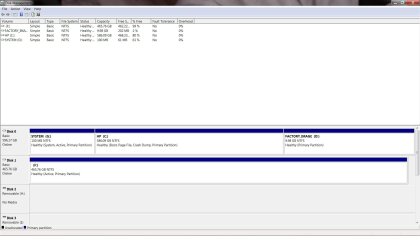
Ok, here it is.
If you used Partition Wizard (PW) CD to Resize the partition, you'll want to use it to Resize it again to 11.08gb, this time resizing it to where you want it to be on the HD - I suggest all the way to the right in the less desirable address. I can give you exact steps if it helps more.
I used PW on my HD, not the CD.
I am still not clear you have made your Recovery disk set off of this partition.
No, not of the current one. I didn't remember how to do it.
You said earlier that you made them and have used them to repair Windows. These disks are only used to restore the hard drive to factory condition, not repair Windows. You use a Win7 repair disk to do that.
Correct, I used the "Repair" disk twice when W7 gave me booting problems. I also did a factory restore a longer
while ago, using the "rescue" CD or the 3 "Recovery" disks, can't remember which.
Then you have Factory Recovery Disks made off of the Recovery Partition, which restore all of the bloatware that came with the computer to the exact state it was when you got it.
That is very likely what I did.
The valuable Recovery for you is to make a Win7 backup image stored externally so that if your Win7 ever becomes irreparable, you simply boot the Repair CD, select "Recover Using An Image" to let it detect the image on external, then it reimages the HD or a replacement in 15 minutes to your own configuration at the time you saved the image.
That's the ideal, but don't I need an equal size drive for that? Many years ago I used to have an IBM app which allowed me to make a HD image on to a FLOPPY, of all things, that could do that same thing. Unfortunately, it worked on IBM drives only.
 

Attachments

  • screen01.jpg
    screen01.jpg
    158.2 KB · Views: 4

My Computer

Computer Manufacturer/Model Number
HP p6347c
OS
W7
CPU
AMD Athlon(tm) II X4 630 Processor
Motherboard
AMD RS780/RS880
Memory
8 GB
Graphics Card(s)
ATI Radeon HD 4200
Sound Card
Realtek High Definition Audio
Monitor(s) Displays
HP w2338h (HP w2338h Wide LCD Monitor)
Hard Drives
WDC WD6400AAKS-65A7B SCSI Disk Device
Use PW CD version which is safer for copying data as it will this time, rightclick Recovery partition, select REsize, grab left grey border to slide it to the right until size of partition is 11.08 gb, OK. Then rightclick Win7 partition, Resize, slide right grey border to the right to take up the space made, OK, apply all steps.

It sounds like you already have the Recovery Disk set since you used them successfully before. If you know they work you can even delete the Recovery partition (but I would test booting them first to see that they boot and cue up Recovery correctly). Or you can store your Win7 backup image there instead, although it is recommended that it be on a secondary or external HD in case your OS HD fails.

The WIn7 backup image utility only uses the actual used space on the partition imaged: http://www.sevenforums.com/tutorials/663-backup-complete-computer-create-image-backup.html

You can make your image smaller by placing the User folders on another data partition which also keeps them safer in case OS fails: http://www.sevenforums.com/tutorials/18629-user-folders-change-default-location.html
 
With the backup tool in 7's CP or a 3rd party imaging program you can select one drive namely the 7 host drive or add the second XP drive into an even larger image. Or you can create a second image for the second drive.

These would be stored either on a 3rd drive added in or externally like gregrocker pointed out. For moving any partition that has no free space after it would be the need to shrink it down first before using the move option.

If it's the same as seen in the image you posted at the top of the thread at 11.08gb you would simply use the move option to increase the space in front of it reducing the space behind it at the same time. Another image of how things look now however would be a good idea.

If you are going to be using PW for moving the recovery partition over then you will want to review the screens as well as instructions for Move/Resize Partition

You'll find that looks very much like how GParted works for moving partitions as well when you take a close look at how the gui works. One 3rd party reference shows how that is done in the free Linux program. Task 6: Move partition
 

My Computers

System One System Two

  • Computer type
    PC/Desktop
    Computer Manufacturer/Model Number
    Custom builds = 2
    OS
    W7 Ultimate x64/W10 Pro x64/W11 Pro Triple Boot - Main PC W7 Remote PC Micro ATX W7 Pro x64/W11 Pro
    CPU
    AMD Phenom II X4 975 Deneb 3.6ghz - 965 2nd remote pc
    Motherboard
    Gigabyte GA-790XTA-UD4-Gigabyte GA-880GM-D2H remote pc
    Memory
    Kingston Hyper X DDR3 1600 1.5v 16gb - Hyper X Fury 8gb 2nd
    Graphics Card(s)
    MSI HD Radeon 5750 1gb - MSI HD Radeon 6450 on mini tower
    Sound Card
    Creative Labs X-Fi Xtreme Audio P - Realtek onooard 2nd case
    Monitor(s) Displays
    ASUS VW199T-P 19" HP 2082a Main-HP 2082a 20" remote pc
    Screen Resolution
    Asus 1440x900 - HP 1600x900
    Hard Drives
    WD Black 1TB HD per OS W7, W10, and pending W11 presently on 500gb OS Drive - Pending Triple 1TB HDs for Spanned Storage/backup volume
    Single 2TB external USB enclosure, single 1TB System 7 Host/Boot drive, Pending 8TB external HD for system image b
    PSU
    Corsair 750TX - primary / Corsair CX600 - second
    Case
    Antec 900-2 - SSD compatible / NZXT Vulcan mini tower
    Cooling
    Zalman CNPS9900A
    Keyboard
    AZIO L70 Backlit Letters Gaming - ONN Cordless/USB
    Mouse
    MSI DS200 Programmable, Logitech Cordless
    Internet Speed
    30mbps upgrade - primary hard wired - mini tower usb WiFi
    Antivirus
    GFI VIPRE Internet Security 2014 on W7 2016 beta on W10,
    Browser
    Cyberfox, WaterFox 64bit FF variants, FireFox x64, Pale Moon
    Other Info
    Accomdata fan cooled usb 2.0 PIDE/Sata II, III external enclosure.
    Sambient usb/eSata PATA/Sata II, III external enclosure.
  • Computer type
    PC/Desktop
    System Manufacturer/Model Number
    CUSTOM ASSEMBLY
    OS
    W7 Pro x64/W11 Pro
    CPU
    AMD Deneb 3.6ghz - 965
    Motherboard
    Gigabyte GA-880GM-D2H remote pc
    Memory
    Kingston Hyper X Fury 8gb
    Graphics Card(s)
    MSI HD Radeon 6450 DVI Output
    Sound Card
    Realtek onooard Creative or Other separate PENDING
    Monitor(s) Displays
    VIZIO 32" LCD TV Separate LCD Pending
    Screen Resolution
    1600x1080
    Hard Drives
    WD 500GB OS Host/Boot WD Green 1TB Storage/Backup
    PSU
    Corsair 600W - THERMALTAKE 600W spare case
    Case
    NZXT Vulcan mini tower
    Cooling
    Twin 120mm Top Fans - 240mm Side Cover
    Keyboard
    ONN Cordless/USB Logitech Cordless
    Mouse
    ONN USB/Cordless - Logitech Cordless
    Internet Speed
    DSL 5G
    Browser
    MS Edge, FireFox, WaterFox x64, FireFox Nightly
    Other Info
    OS Testing-Remote Access to Main TeamViewer
I think we've done it. Thanks for all your patience and help!
 

Attachments

  • scree02.jpg
    scree02.jpg
    103 KB · Views: 6

My Computer

Computer Manufacturer/Model Number
HP p6347c
OS
W7
CPU
AMD Athlon(tm) II X4 630 Processor
Motherboard
AMD RS780/RS880
Memory
8 GB
Graphics Card(s)
ATI Radeon HD 4200
Sound Card
Realtek High Definition Audio
Monitor(s) Displays
HP w2338h (HP w2338h Wide LCD Monitor)
Hard Drives
WDC WD6400AAKS-65A7B SCSI Disk Device
Back
Top