Greetings,
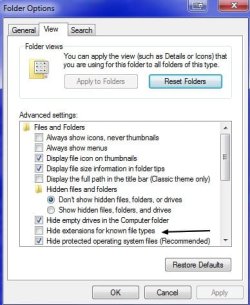
I just noticed today that all my files have extensions added on to them.
A Microsoft Word document that was was just titled Document (for example) is now titled Document.doc
Same with music and video files - they were just the song title or video name, but now it is Back In Black.mp3 or Star Wars.avi
They still open as they always did, but with Windows 7 updates no longer happening, how did this change happen to my files? Did I maybe click on something and not even realize it?
Even when I save a now like a jpg from online, it will add the .jpg to the file name when confirming that I want to save this file.
I would greatly appreciate any feedback.
Thanks,
HM
I just noticed today that all my files have extensions added on to them.
A Microsoft Word document that was was just titled Document (for example) is now titled Document.doc
Same with music and video files - they were just the song title or video name, but now it is Back In Black.mp3 or Star Wars.avi
They still open as they always did, but with Windows 7 updates no longer happening, how did this change happen to my files? Did I maybe click on something and not even realize it?
Even when I save a now like a jpg from online, it will add the .jpg to the file name when confirming that I want to save this file.
I would greatly appreciate any feedback.
Thanks,
HM
Last edited:
My Computer
At a glance
Windows 7 Professional - 64 Bit
- Computer type
- PC/Desktop
- OS
- Windows 7 Professional - 64 Bit