
External crashed asks to reformat cannot reformat

supermasterpig

New member
Local time
11:37 AM
Messages
80
I dont know if this is the right place but sounds right, My wd 1 tb my book has gone weird, yesterday it randomly popped up saying the drive needs to be formatted to be used. It already had 100 gb's worth of files on it. I tried reformating it but it said it failed. Now I cannot even get it to load on my computer. I unoinstalled the driver reinstalled it and then it pretty much freezes my computer up. once i unplug the drive it pops up saying i need to format the drive and my computer speeds right back up. Im so frustrated! I just want to reformat it so I can use it again.
 

My Computer My Computer

Computer Manufacturer/Model Number
Dell/ Studio 1747
OS
Windows 7 Home Premium x64
CPU
i7-q740 1.73-2.93 ghz
Memory
6.00Gb
Graphics Card(s)
Ati Mobility Radeon HD 4650
Sound Card
Sound Blaster X-fi
Hard Drives
500 gb, 1.5 tb external
Internet Speed
10 mbps or 15 mbps
Any one? I would like to solve this problem so I dont have to buy a new one
 

My Computer My Computer

Computer Manufacturer/Model Number
Dell/ Studio 1747
OS
Windows 7 Home Premium x64
CPU
i7-q740 1.73-2.93 ghz
Memory
6.00Gb
Graphics Card(s)
Ati Mobility Radeon HD 4650
Sound Card
Sound Blaster X-fi
Hard Drives
500 gb, 1.5 tb external
Internet Speed
10 mbps or 15 mbps
Check, if the drive gets power (listen if it spins up). When my 500gb crashed, the electronic of the enclosure was faulty.
The drive inside is just a regular WD, so you could always put it in a desktop as a slave or just get a new enclosure.

-DG
 

My Computer My Computer

Computer Manufacturer/Model Number
HP m8000n
OS
Windows 7 Ultimate x86
CPU
DualCore AMD Athlon 64 X2, 2600 MHz 5200+
Motherboard
Asus M2N68-LA (Narra)
Memory
Samsung 2GB DDR2
Graphics Card(s)
Onboard NVIDIA GeForce 6150SE nForce 430
Sound Card
Onboard nVIDIA nForce 6100-430 (MCP61P)
Monitor(s) Displays
Westinghouse 19" LED
Screen Resolution
1280x1024
Hard Drives
SATA II Seagate Barracuda 500GB
USB II WD Elements 500GB
USB II WD My Book 1TB
USB II WD My Book 2TB
PSU
Stock (HP)
Case
Stock (HP)
Cooling
Stock
Keyboard
Logitech Classic KB 200
Mouse
Standard HP opticle USB mouse
yea it powers up you can hear it spins. hmm well its under warranty for walmart and I could get a 2 tb one in exchange so ill probably do that. I've never had this problem before.
 

My Computer My Computer

Computer Manufacturer/Model Number
Dell/ Studio 1747
OS
Windows 7 Home Premium x64
CPU
i7-q740 1.73-2.93 ghz
Memory
6.00Gb
Graphics Card(s)
Ati Mobility Radeon HD 4650
Sound Card
Sound Blaster X-fi
Hard Drives
500 gb, 1.5 tb external
Internet Speed
10 mbps or 15 mbps
Well im giving it one last ditch effort before I hopefully ship it back. im using diskpart and I can select it as drive 1 and but when i type clean it hangs up and wont clean it. I'm going to let it try over night but im guessing its not going to go. Any one think of a better way to reformat it? If i click on it while in explorer or my computer it just freezes the whole computer.
 

My Computer My Computer

Computer Manufacturer/Model Number
Dell/ Studio 1747
OS
Windows 7 Home Premium x64
CPU
i7-q740 1.73-2.93 ghz
Memory
6.00Gb
Graphics Card(s)
Ati Mobility Radeon HD 4650
Sound Card
Sound Blaster X-fi
Hard Drives
500 gb, 1.5 tb external
Internet Speed
10 mbps or 15 mbps
Trading it in for a new one sounds like a great deal. Getting a free 2TB.
Never actually had the problem before, but like Sledge said, you could always just toss the HDD inside of it into your computer.
 

My Computer My Computer

Computer Manufacturer/Model Number
Alienware Aurora ALX
OS
Windows 7 Ultimate x64
CPU
Intel i7 970 3.20GHz
Memory
3 x 4GB G.Skill Ripjaws
Graphics Card(s)
2x ATI Radeon HD 5670
Monitor(s) Displays
Asus VH238H
Hard Drives
OCZ Vertex3 - Main SSD
Corsair CSSD-F60GB2 - Old SSD
1TB HDD
320 HDD ( Can't remember company )
Internet Speed
30m/b - 5m/b
Well im running it on a laptop otherwise i would skip the hassle and put in it my computer. Only problem with trading it in is its through walmarts replacement program and I have to send it out through ups so im assuming I have to get a box and blablabla. Looks like if this diskpart doesnt work thats how I will spend my saturday.
 

My Computer My Computer

Computer Manufacturer/Model Number
Dell/ Studio 1747
OS
Windows 7 Home Premium x64
CPU
i7-q740 1.73-2.93 ghz
Memory
6.00Gb
Graphics Card(s)
Ati Mobility Radeon HD 4650
Sound Card
Sound Blaster X-fi
Hard Drives
500 gb, 1.5 tb external
Internet Speed
10 mbps or 15 mbps
Haha, yeah. I unno, just drive up to a FedEx store or something, and do it like that. Kinda sucks you can't exactly drive up to a Walmart and do it that way, but stuff happens. I personally don't know whats up with the external, I'm sure i'd probably have a whack at it if i messing with it in real life, but yeah. that 2TB sounds real nice compared to a 500Gb. ;) Only problem i've had computer wise so far is some bsod's here and there, and Killer Xeno Pro and Windows Live messenger not getting along.
 

My Computer My Computer

Computer Manufacturer/Model Number
Alienware Aurora ALX
OS
Windows 7 Ultimate x64
CPU
Intel i7 970 3.20GHz
Memory
3 x 4GB G.Skill Ripjaws
Graphics Card(s)
2x ATI Radeon HD 5670
Monitor(s) Displays
Asus VH238H
Hard Drives
OCZ Vertex3 - Main SSD
Corsair CSSD-F60GB2 - Old SSD
1TB HDD
320 HDD ( Can't remember company )
Internet Speed
30m/b - 5m/b
Yeah I tried to let it clean while i slept but four gours later and nothing still saying try to clean and the externals lights are flashing like its trying to do something. Another weird thing is that it says its got only 451 kb of memory available if u right click on it and press properties. but in diskpart it sholws all 931 ( 1 tb).Ill just switch it out 1 tb for a 2 tb. I dont know if I want to get a WD though. Also would it be worth it to get another 1 tb but its esata? I have one port on my laptop and read that for externals usb are just as fast.
 

My Computer My Computer

Computer Manufacturer/Model Number
Dell/ Studio 1747
OS
Windows 7 Home Premium x64
CPU
i7-q740 1.73-2.93 ghz
Memory
6.00Gb
Graphics Card(s)
Ati Mobility Radeon HD 4650
Sound Card
Sound Blaster X-fi
Hard Drives
500 gb, 1.5 tb external
Internet Speed
10 mbps or 15 mbps
Have you tried running the WD hard drive diagnostic?
 

My Computer My Computer

Computer Manufacturer/Model Number
Too many to describe...
OS
Windows 7 x64 pro/ Windows 7 x86 Pro/ XP SP3 x86
Yeah only my internal hard drive shows up the os and the recovery partitions. It wont show the external.
 

My Computer My Computer

Computer Manufacturer/Model Number
Dell/ Studio 1747
OS
Windows 7 Home Premium x64
CPU
i7-q740 1.73-2.93 ghz
Memory
6.00Gb
Graphics Card(s)
Ati Mobility Radeon HD 4650
Sound Card
Sound Blaster X-fi
Hard Drives
500 gb, 1.5 tb external
Internet Speed
10 mbps or 15 mbps
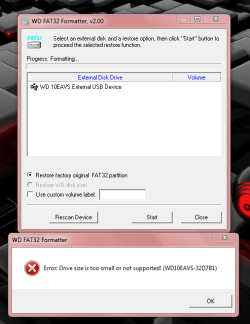
Ok well I tried the WD fat 32 formatter and It says its to small I'll post a snao shot of it.
 

Attachments

  • Capture.PNG
    Capture.PNG
    31.7 KB · Views: 7

My Computer My Computer

Computer Manufacturer/Model Number
Dell/ Studio 1747
OS
Windows 7 Home Premium x64
CPU
i7-q740 1.73-2.93 ghz
Memory
6.00Gb
Graphics Card(s)
Ati Mobility Radeon HD 4650
Sound Card
Sound Blaster X-fi
Hard Drives
500 gb, 1.5 tb external
Internet Speed
10 mbps or 15 mbps

My Computer My Computer

Computer Manufacturer/Model Number
Too many to describe...
OS
Windows 7 x64 pro/ Windows 7 x86 Pro/ XP SP3 x86
The hp link didn't connect through, the easeus couldnt run becuase of some restriction, fat32format was there and gone in a second couldnt get it to stay and the gui version couldnt detect the external.

Nvm downloaded the hp one it says its formatting at the moment I'll let you know if it just hangs up or actually formats.

It failed saying device media is protected?
 

My Computer My Computer

Computer Manufacturer/Model Number
Dell/ Studio 1747
OS
Windows 7 Home Premium x64
CPU
i7-q740 1.73-2.93 ghz
Memory
6.00Gb
Graphics Card(s)
Ati Mobility Radeon HD 4650
Sound Card
Sound Blaster X-fi
Hard Drives
500 gb, 1.5 tb external
Internet Speed
10 mbps or 15 mbps
Nvm I tried a full format and I got the protected error then i tried quick and it worked! The whole 1 tb is back and its read by everything. Thank you so much I tried everything I was going to ship it back but now that its fixed I wont worry about it to much hassle. This is the second time windows 7 has asked me to format my external do you have any clue how this happens? The second time it started after i stopped a defrag on it. I keep losing hundreds of files there just media files but still.
 

My Computer My Computer

Computer Manufacturer/Model Number
Dell/ Studio 1747
OS
Windows 7 Home Premium x64
CPU
i7-q740 1.73-2.93 ghz
Memory
6.00Gb
Graphics Card(s)
Ati Mobility Radeon HD 4650
Sound Card
Sound Blaster X-fi
Hard Drives
500 gb, 1.5 tb external
Internet Speed
10 mbps or 15 mbps
Well, AFAIK, one reason it happens is because a dirty flag is generated if E.g. the drive is pulled out without using Safe Eject. What kind of volume policy do you have on this drive- i.e. is it set for safely remove hardware or quick removal? I set my externals to Optimize for quick removal, that way i can just yank them out, but I take care that I close all opens files and folders before doing that.
 

My Computer My Computer

Computer Manufacturer/Model Number
Too many to describe...
OS
Windows 7 x64 pro/ Windows 7 x86 Pro/ XP SP3 x86
Ah good call Im running wd data lifeguard extended test becuase it failed the quick test this will take hours. But after that I will set it to quick removal since I connect it to a laptop. I usually safetly eject it if i dont already shut my computer off.

Update- 14 min into test it said to many bad sectors detected O.o should i be worried? Should I do the write zeros application and do a full erase? theres nothing on it at the moment though.
 

My Computer My Computer

Computer Manufacturer/Model Number
Dell/ Studio 1747
OS
Windows 7 Home Premium x64
CPU
i7-q740 1.73-2.93 ghz
Memory
6.00Gb
Graphics Card(s)
Ati Mobility Radeon HD 4650
Sound Card
Sound Blaster X-fi
Hard Drives
500 gb, 1.5 tb external
Internet Speed
10 mbps or 15 mbps
That does look like the drive is dying, although you can try running the repair feature etc. You can run a chkdsk /r but that wont repair a dying drive, it may just make the drive usable for a bit longer by remapping the bad sectors (assuming there are enough good spare ones). After that zeroing the drive may extend the life somewhat but it'll be like a time bomb, you never know when it might go off. I would find that pretty uncomfortable, so best to replace the drive.
 

My Computer My Computer

Computer Manufacturer/Model Number
Too many to describe...
OS
Windows 7 x64 pro/ Windows 7 x86 Pro/ XP SP3 x86
awww man thats not good still means I have to return it through ups. I'll think about it. I will probably send it back.

Also what are sectors? like I get that they can go bad and you only have so many but are they corrupt spots in the drive itself?

And whats your take one size and speed should i go with a 2 tb isb or a 1 tb esata? Will the esata make any difference?
 

My Computer My Computer

Computer Manufacturer/Model Number
Dell/ Studio 1747
OS
Windows 7 Home Premium x64
CPU
i7-q740 1.73-2.93 ghz
Memory
6.00Gb
Graphics Card(s)
Ati Mobility Radeon HD 4650
Sound Card
Sound Blaster X-fi
Hard Drives
500 gb, 1.5 tb external
Internet Speed
10 mbps or 15 mbps
Back
Top