Solved External drive displayed in C:\

trimmer

New member
Local time
2:49 AM
Messages
21
I have "my user" files (with sub-folders) just below "Libraries", but I didn't add my "Toshiba Canvio Hard Drive (K) to library's. When I'm browsing my pictures...etc. when I scroll down my folders to "T" it has my 'Toshiba' drive with full access to every file & folder on it. This is no shortcut, it just got added to my list of files/folders on C:\ - I'm afraid to do anything with it because it has many GB of audio/video files mainly. I use AOMEI to back up K:\ to my Seagate GoFlex (1.8 GB) F:\ drive.

I was in libraries and looked at all four categories 'properties' and see where I have included some folders. I was hoping to find an option to remove K: drive, with no luck. It's really doing no harm but it confuses me. Best regards,
-Roy
 

My Computer My Computer

At a glance

Windows 7 SP 1 Home Premium x642.90 Ghz4 GBATI Radeon HD 4200
Computer type
PC/Desktop
Computer Manufacturer/Model Number
HP Pavillion p6550z CTO
OS
Windows 7 SP 1 Home Premium x64
CPU
2.90 Ghz
Motherboard
FOXCONN
Memory
4 GB
Graphics Card(s)
ATI Radeon HD 4200
Hard Drives
Western Digital
TOSHIBA External USB 3.0 USB 1TB
Antivirus
Avast free
Browser
IE 11
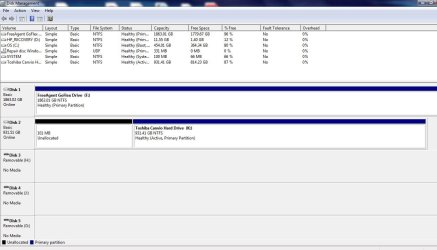
Can you take a screenshot of "disk management"? Just type it in the search function in the start menu.
 

My Computer My Computer

At a glance

Windows 7 Ultimate x64Intel i5-6600K 3.50GHzCorsair DDR4 2x8GBMSI GeForce GTX1070 Gaming X
Computer type
PC/Desktop
Computer Manufacturer/Model Number
Custom build
OS
Windows 7 Ultimate x64
CPU
Intel i5-6600K 3.50GHz
Motherboard
Asus Pro Z170 Gaming
Memory
Corsair DDR4 2x8GB
Graphics Card(s)
MSI GeForce GTX1070 Gaming X
Sound Card
On board Realtek
Monitor(s) Displays
Dell SP2309W
Screen Resolution
1920x1080
Hard Drives
OS Samsung 850 EVO 500GB SATA III SSD
2x Hitachi Deskstar 1GB SATA data drives
1x Western Digital Caviar Black 1TB SATA data drive
PSU
Corsair HX650W
Case
CoolerMaster CM 690 III
Cooling
Coolermaster Hyper 212 EVO 1x200mm 1x140mm 2x120mm case fan
Keyboard
Logitech usb keyboard
Mouse
Logitech G500 $27 bargain :)
Internet Speed
ADSL2
Antivirus
Microsoft Security Essential, MalwareBytes
Browser
SRWare Iron, Internet Explorer
Other Info
Very happy with this buid.
I struggled a lot to find all compatible parts since I wanted an Intel 1151 based motherboard so to be able to install Windows 7.
I chose this case because it has amazing air flow, it's sturdy and looks good.
The case included 1x 200mm front and 1x 120mm back fans, I added 1x 200mm on the top and 1x120 bottom fans and modded the panels with black stockings for women s
I hope the image is OK, and thanks for the QUICK reply. I didn't know whether to attach, I think this is right. I don't know, I can't read it very well.
 

Attachments

  • My disc managemt-12-19-17.jpg
    My disc managemt-12-19-17.jpg
    77.3 KB · Views: 8

My Computer My Computer

At a glance

Windows 7 SP 1 Home Premium x642.90 Ghz4 GBATI Radeon HD 4200
Computer type
PC/Desktop
Computer Manufacturer/Model Number
HP Pavillion p6550z CTO
OS
Windows 7 SP 1 Home Premium x64
CPU
2.90 Ghz
Motherboard
FOXCONN
Memory
4 GB
Graphics Card(s)
ATI Radeon HD 4200
Hard Drives
Western Digital
TOSHIBA External USB 3.0 USB 1TB
Antivirus
Avast free
Browser
IE 11
I hope the image is OK, and thanks for the QUICK reply. I didn't know whether to attach, I think this is right. I don't know, I can't read it very well.
The screenshot is ok but I don't understand your description of the problem.
But if you want to delete the "K" from the window you took the screenshot right click with the mouse on "Toshiba Canvio Hard drive K" and choose "delete volume".
HOWEVER this isn't the right way to do because this task makes no sense, when you delete a volume the physical drive is still there, you just don't see it but the drive is there in your computer.
Bare in mind that when playing with disk management you take a serious risk if you don't know what you're doing!
Think twice before making any change!
 

My Computer My Computer

At a glance

Windows 7 Ultimate x64Intel i5-6600K 3.50GHzCorsair DDR4 2x8GBMSI GeForce GTX1070 Gaming X
Computer type
PC/Desktop
Computer Manufacturer/Model Number
Custom build
OS
Windows 7 Ultimate x64
CPU
Intel i5-6600K 3.50GHz
Motherboard
Asus Pro Z170 Gaming
Memory
Corsair DDR4 2x8GB
Graphics Card(s)
MSI GeForce GTX1070 Gaming X
Sound Card
On board Realtek
Monitor(s) Displays
Dell SP2309W
Screen Resolution
1920x1080
Hard Drives
OS Samsung 850 EVO 500GB SATA III SSD
2x Hitachi Deskstar 1GB SATA data drives
1x Western Digital Caviar Black 1TB SATA data drive
PSU
Corsair HX650W
Case
CoolerMaster CM 690 III
Cooling
Coolermaster Hyper 212 EVO 1x200mm 1x140mm 2x120mm case fan
Keyboard
Logitech usb keyboard
Mouse
Logitech G500 $27 bargain :)
Internet Speed
ADSL2
Antivirus
Microsoft Security Essential, MalwareBytes
Browser
SRWare Iron, Internet Explorer
Other Info
Very happy with this buid.
I struggled a lot to find all compatible parts since I wanted an Intel 1151 based motherboard so to be able to install Windows 7.
I chose this case because it has amazing air flow, it's sturdy and looks good.
The case included 1x 200mm front and 1x 120mm back fans, I added 1x 200mm on the top and 1x120 bottom fans and modded the panels with black stockings for women s
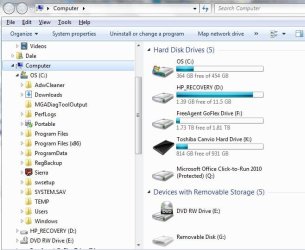
Here's what I'm talking about, I hit K: to make sure there were fewer files. This looks exactly as if I added it to libraries - I don't think you can add a USB flash drive or this either. It's not doing anything, I guess I'll leave it alone. I never had this happen. K: is at the bottom, the little black icon/drive.
I'll check tomorrow, got to go to bed, it's goin' on 2 AM
 

Attachments

  • Image of K on C.jpg
    Image of K on C.jpg
    59.4 KB · Views: 6

My Computer My Computer

At a glance

Windows 7 SP 1 Home Premium x642.90 Ghz4 GBATI Radeon HD 4200
Computer type
PC/Desktop
Computer Manufacturer/Model Number
HP Pavillion p6550z CTO
OS
Windows 7 SP 1 Home Premium x64
CPU
2.90 Ghz
Motherboard
FOXCONN
Memory
4 GB
Graphics Card(s)
ATI Radeon HD 4200
Hard Drives
Western Digital
TOSHIBA External USB 3.0 USB 1TB
Antivirus
Avast free
Browser
IE 11
Here's what I'm talking about, I hit K: to make sure there were fewer files. This looks exactly as if I added it to libraries - I don't think you can add a USB flash drive or this either. It's not doing anything, I guess I'll leave it alone. I never had this happen. K: is at the bottom, the little black icon/drive.
I'll check tomorrow, got to go to bed, it's goin' on 2 AM
Could you take a screenshot of Computer? Start menu/computer.
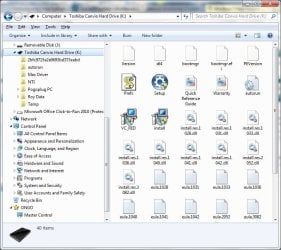
And also I would like to see the top root of the Toshiba Canvio drive.
You can delete the 'K" volume (or drive) and format it so you'll have a clean drive (backup backup!) and start clean but firstly lets see the other screenshots.
 

My Computer My Computer

At a glance

Windows 7 Ultimate x64Intel i5-6600K 3.50GHzCorsair DDR4 2x8GBMSI GeForce GTX1070 Gaming X
Computer type
PC/Desktop
Computer Manufacturer/Model Number
Custom build
OS
Windows 7 Ultimate x64
CPU
Intel i5-6600K 3.50GHz
Motherboard
Asus Pro Z170 Gaming
Memory
Corsair DDR4 2x8GB
Graphics Card(s)
MSI GeForce GTX1070 Gaming X
Sound Card
On board Realtek
Monitor(s) Displays
Dell SP2309W
Screen Resolution
1920x1080
Hard Drives
OS Samsung 850 EVO 500GB SATA III SSD
2x Hitachi Deskstar 1GB SATA data drives
1x Western Digital Caviar Black 1TB SATA data drive
PSU
Corsair HX650W
Case
CoolerMaster CM 690 III
Cooling
Coolermaster Hyper 212 EVO 1x200mm 1x140mm 2x120mm case fan
Keyboard
Logitech usb keyboard
Mouse
Logitech G500 $27 bargain :)
Internet Speed
ADSL2
Antivirus
Microsoft Security Essential, MalwareBytes
Browser
SRWare Iron, Internet Explorer
Other Info
Very happy with this buid.
I struggled a lot to find all compatible parts since I wanted an Intel 1151 based motherboard so to be able to install Windows 7.
I chose this case because it has amazing air flow, it's sturdy and looks good.
The case included 1x 200mm front and 1x 120mm back fans, I added 1x 200mm on the top and 1x120 bottom fans and modded the panels with black stockings for women s
Your screenshot from disk management doesn't show all the details but it seems drive k is set as active so the boot drive but it doesn't show drive c to work out if that is also set active
 

My Computer My Computer

At a glance

win 8 32 bit
Computer type
PC/Desktop
OS
win 8 32 bit
Hi trimmer,

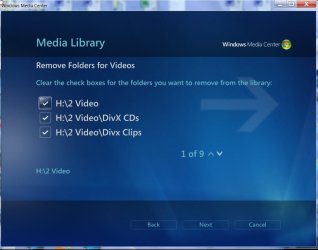
Open Windows Media Center > Tasks > Settings > Media Libraries and check whether you/or someone else have/has added those to the library. ( These will appear in Windows Explorer under Library) If yes, you can remove those from the Windows Media Center Library.

19-12-2017 20-14-48.jpg
 

My Computer My Computer

At a glance

Windows 7 Home Premium 32 bit
OS
Windows 7 Home Premium 32 bit
Jumanji, I opened Media Center and I haven't added anything from K:, only C: - I like MS Media Center, that's why I didn't dump it along with other so-called "crapware". It surprised me, it's not a resource hog, thanks for your input, I didn't think of this.
 

My Computer My Computer

At a glance

Windows 7 SP 1 Home Premium x642.90 Ghz4 GBATI Radeon HD 4200
Computer type
PC/Desktop
Computer Manufacturer/Model Number
HP Pavillion p6550z CTO
OS
Windows 7 SP 1 Home Premium x64
CPU
2.90 Ghz
Motherboard
FOXCONN
Memory
4 GB
Graphics Card(s)
ATI Radeon HD 4200
Hard Drives
Western Digital
TOSHIBA External USB 3.0 USB 1TB
Antivirus
Avast free
Browser
IE 11
To Looked: I'm a CERTIFIED DUMB-ASS, I posted the screenshots but have no idea where they are. It's the "new post" and "quick reply", I don't understand that at all, and editing some post can take forever. I really appreciate your and everyone's help. Frankly, I'm wasting the forum's time, mine to.
 

My Computer My Computer

At a glance

Windows 7 SP 1 Home Premium x642.90 Ghz4 GBATI Radeon HD 4200
Computer type
PC/Desktop
Computer Manufacturer/Model Number
HP Pavillion p6550z CTO
OS
Windows 7 SP 1 Home Premium x64
CPU
2.90 Ghz
Motherboard
FOXCONN
Memory
4 GB
Graphics Card(s)
ATI Radeon HD 4200
Hard Drives
Western Digital
TOSHIBA External USB 3.0 USB 1TB
Antivirus
Avast free
Browser
IE 11
I hope I got this right, the locations. First off, back last spring I uninstalled COMODO System-Cleaner 3.0.172659.53, it' a good older cleaner. I just got familiar w/it & know exactly what & what not to delete, I have presets saved. For some reason I did a fresh unist./install. Well, it removed a driver and I'm having to use a boot disk to start t/PC. I immediately called Microsoft, they told me I needed another PC running W 7 SP 1 or higher. He gave me a link to the original (registered) .ISO. It's 3 GB. If I could I'd have one of my relatives bring their laptop I'd already have restored it.....it's hard to get help. I never ever heard of having to copy A FILE to another PC to factory restore one. I could have ran the .ISO from K: - I'm reformatting this PC soon, and decided to leave things where they're at. BUT, I'd appreciate ALL replies to a fix to remove K: from where it's at.

My dad is almost dead from skin cancer, we're putting him in hospital this evening. I have to wait on him had & foot, but I'll check back here on & off all I can. You guys are sure eager to help, fast also. I have ADHD, I know I'm confusing some of you.
 

Attachments

  • My Toshiba K.jpg
    My Toshiba K.jpg
    79.1 KB · Views: 1
  • My Computer.jpg
    My Computer.jpg
    47.8 KB · Views: 17

My Computer My Computer

At a glance

Windows 7 SP 1 Home Premium x642.90 Ghz4 GBATI Radeon HD 4200
Computer type
PC/Desktop
Computer Manufacturer/Model Number
HP Pavillion p6550z CTO
OS
Windows 7 SP 1 Home Premium x64
CPU
2.90 Ghz
Motherboard
FOXCONN
Memory
4 GB
Graphics Card(s)
ATI Radeon HD 4200
Hard Drives
Western Digital
TOSHIBA External USB 3.0 USB 1TB
Antivirus
Avast free
Browser
IE 11
I'm reformatting this PC soon, and decided to leave things where they're at. BUT, I'd appreciate ALL replies to a fix to remove K: from where it's at.
As another user said it's still not clear what is the boot drive so the one which loads Windows and lets you use the computer.
To be 100% sure could load into the BIOS and check the boot priority?
To do this there are several keyboard keys so you need to try one by one until you can get in the BIOS, so as soon as the computer restarts and shows the black screen (before Windows starts loading) hit either F1 or F2 or F8 or F10 or Delete and if Windows loads, try again until you get in the BIOS.
When in the BIOS you need to check the boot priority, for example the BIOS might displays the "C" drive (and the brand of the drive) on top of the list or it might displays the "K" drive on the top and so on.
If the boot priority is assigned to the "C" drive, then restart the computer (exit the BIOS) and copy everything you need from the drive "K" and format it.
DO NOT make any changes in the BIOS!
 

My Computer My Computer

At a glance

Windows 7 Ultimate x64Intel i5-6600K 3.50GHzCorsair DDR4 2x8GBMSI GeForce GTX1070 Gaming X
Computer type
PC/Desktop
Computer Manufacturer/Model Number
Custom build
OS
Windows 7 Ultimate x64
CPU
Intel i5-6600K 3.50GHz
Motherboard
Asus Pro Z170 Gaming
Memory
Corsair DDR4 2x8GB
Graphics Card(s)
MSI GeForce GTX1070 Gaming X
Sound Card
On board Realtek
Monitor(s) Displays
Dell SP2309W
Screen Resolution
1920x1080
Hard Drives
OS Samsung 850 EVO 500GB SATA III SSD
2x Hitachi Deskstar 1GB SATA data drives
1x Western Digital Caviar Black 1TB SATA data drive
PSU
Corsair HX650W
Case
CoolerMaster CM 690 III
Cooling
Coolermaster Hyper 212 EVO 1x200mm 1x140mm 2x120mm case fan
Keyboard
Logitech usb keyboard
Mouse
Logitech G500 $27 bargain :)
Internet Speed
ADSL2
Antivirus
Microsoft Security Essential, MalwareBytes
Browser
SRWare Iron, Internet Explorer
Other Info
Very happy with this buid.
I struggled a lot to find all compatible parts since I wanted an Intel 1151 based motherboard so to be able to install Windows 7.
I chose this case because it has amazing air flow, it's sturdy and looks good.
The case included 1x 200mm front and 1x 120mm back fans, I added 1x 200mm on the top and 1x120 bottom fans and modded the panels with black stockings for women s
autorun on your Toshiba Canvio hard drive K: Do you know what it does? Is it there for a purpose? Will you be better off without it? Just a thought.
 

My Computer My Computer

At a glance

Windows 7 Home Premium 32 bit
OS
Windows 7 Home Premium 32 bit
It's not doing any harm, I just never have seen a complete drive in my folders. It's not in C:\my-user files. Seems like it got added (like I have my folders) in a sorta' jump list. I had to restore this several yr.'s ago, then go to "Libraries", click on properties and add folders so they were easy to access...I think that's right.? Anyhow I had to go to my-user (?) and/or My Documents to see the the files I my-user folder..........I can't say for sure, it's been a long time.

I decided to leave it alone, I'm not getting any error(S), and I'm going to restore the PC, it needs it. A patch wrecked Windows Live mail, and a few NEEDED apps, I'm using Mozilla Thunderbird now, it's a good email client. Thanks for all help. For: To be 100% sure could load into the BIOS - I'm nor that experienced. I'll wait a few days, and if there are no more replies I'll mark as solved.
 

My Computer My Computer

At a glance

Windows 7 SP 1 Home Premium x642.90 Ghz4 GBATI Radeon HD 4200
Computer type
PC/Desktop
Computer Manufacturer/Model Number
HP Pavillion p6550z CTO
OS
Windows 7 SP 1 Home Premium x64
CPU
2.90 Ghz
Motherboard
FOXCONN
Memory
4 GB
Graphics Card(s)
ATI Radeon HD 4200
Hard Drives
Western Digital
TOSHIBA External USB 3.0 USB 1TB
Antivirus
Avast free
Browser
IE 11
Back
Top