External hard drive corrupted, CHKDSK stalls at 76% complete

mmpfs

New member
Local time
2:10 PM
Messages
6
I am trying to fix a new Toshiba Canvio 3.0 1.5TB drive that has errors. Each time I plug it in, I'm directed to run CHKDSK, but CHKDSK fails to complete with the /f parameter. The process stalls at 76%. If I run CHKDSK without the /f parameter, I get the following result:
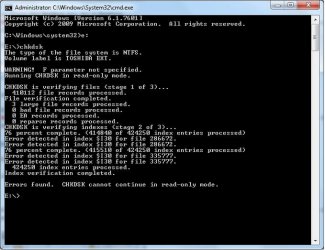
CHKDSK FAILURE.jpg

Again, if I run CHKDSK /f, the process stalls at 76% and hangs forever. I've left the process to run overnight with no progress.

I've looked for solutions on Toshiba's website, but haven't found a solution. Any help or ideas are appreciated.

By the way, I'm not super tech-savvy, so if you have a technical solution, please give me as many detail as possible. Thank you!
 

My Computer My Computer

At a glance

Windows 7 Ultimate 64-bitIntel Core2 Duo4 GB
Computer type
Laptop
Computer Manufacturer/Model Number
HP
OS
Windows 7 Ultimate 64-bit
CPU
Intel Core2 Duo
Memory
4 GB
Antivirus
Computer Associates Total Defense
I had a drive with a bad sector that would stall with CHKDSK /f. It was at the very end of the drive. I repaired the drive by formatting with Gparted or Partition Magic, one of the two, don't remember. When complete SMART reported 2 reallocated sectors and 99% health, been running fine ever since.
 

My Computer My Computer

At a glance

Win8/8.1,Win7-U64, Vista U64, uncounted Linux...AMD and Intell, 9590, 8350, i5 3570kCorsair G SkillCrossfired Sapphire HD 7950 Vapor-X, ASUS R9 ...
Computer type
PC/Desktop
Computer Manufacturer/Model Number
Custom, Dell and Lenono LT's
OS
Win8/8.1,Win7-U64, Vista U64, uncounted Linux distor's
CPU
AMD and Intell, 9590, 8350, i5 3570k
Motherboard
CFVFZ, GA990FXA, Z77e-itx
Memory
Corsair G Skill
Graphics Card(s)
Crossfired Sapphire HD 7950 Vapor-X, ASUS R9 280X TOP
Sound Card
Realtek ALC889
Monitor(s) Displays
ViewSonic VX2770SMH 27" / ViewSonic VX2433 LCD 24"
Screen Resolution
1080i HD
Hard Drives
Samsung SSD 840 Pro
OCZ Agility 3's
OCZ Vector's
WD's Blue, red, green, Velociraptors
Seagate USB3 & Hybrid's
ASUS Blu-Ray
ASUS DVD
PSU
Corsair AX1200i, Seasonice 850 Gold
Case
Cooler Master HAF 922 & HAF 932, Lian Li Train case.
Cooling
Air, Glacer 240L expanded, custom EK loop with duel D5's
Keyboard
Microsoft SideWinder X4 USB Keyboard / Logitech 250 PS2
Mouse
Logitech G500 / MS wireless 5000
Internet Speed
Best of 5ms / 75+ dn / 12+ up More or less.
Antivirus
MS esentials-MalwareBytes
Browser
Firefox Chromebook
Hi mmpfs,

Format it with HP USB Disk Storage Format Tool 2.2.3 HP USB Disk Storage Format Tool Free Download

It is a nice tool to have in one's kitty and as easy as A B C to use.

(Right click on the small exe file and run it as administrator. Remove all other USB drives so that you don't make a mistake of choosing the wrong drive - applies to any partitioning/formatting tool. Check that the correct drive is chosen.)
 

My Computer My Computer

At a glance

Windows 7 Home Premium 32 bit
OS
Windows 7 Home Premium 32 bit
madcratebuilder

Were you able to run this program without losing data? I ask because I have about 400GB of data backed up to the external drive. I'll have to copy it onto my computer and some other device because I don't have enough space left on my laptop.

Thanks for your advice and help.
 

My Computer My Computer

At a glance

Windows 7 Ultimate 64-bitIntel Core2 Duo4 GB
Computer type
Laptop
Computer Manufacturer/Model Number
HP
OS
Windows 7 Ultimate 64-bit
CPU
Intel Core2 Duo
Memory
4 GB
Antivirus
Computer Associates Total Defense
jumanji;

Sort of a stupid question, but I assume that when I run the reformat, I'll lose all of my existing data? I'll start copying the 400GB of data from the drive to other devices just in case.

Appreciate your help and directions!
 

My Computer My Computer

At a glance

Windows 7 Ultimate 64-bitIntel Core2 Duo4 GB
Computer type
Laptop
Computer Manufacturer/Model Number
HP
OS
Windows 7 Ultimate 64-bit
CPU
Intel Core2 Duo
Memory
4 GB
Antivirus
Computer Associates Total Defense
Yes, if you have data to be recovered, then do not format.

I would rather like to see how your problem drive looks in Windows Disk Management. Post a screenshot.
 

My Computer My Computer

At a glance

Windows 7 Home Premium 32 bit
OS
Windows 7 Home Premium 32 bit
madcratebuilder

Were you able to run this program without losing data? I ask because I have about 400GB of data backed up to the external drive. I'll have to copy it onto my computer and some other device because I don't have enough space left on my laptop.

Thanks for your advice and help.

It well destroy any data you have on the disk. Back up as needed then you can do a repair that writes to each sector. This well force it to reallocate any bad sectors it finds. After you repair this hhd run SMART and you well see how many sectors were bad and reallocated. 2 or 3 sectors reallocated is not unusual, any more than that is a intication the hhd is dieing and should not be used for mission critical data.
 

My Computer My Computer

At a glance

Win8/8.1,Win7-U64, Vista U64, uncounted Linux...AMD and Intell, 9590, 8350, i5 3570kCorsair G SkillCrossfired Sapphire HD 7950 Vapor-X, ASUS R9 ...
Computer type
PC/Desktop
Computer Manufacturer/Model Number
Custom, Dell and Lenono LT's
OS
Win8/8.1,Win7-U64, Vista U64, uncounted Linux distor's
CPU
AMD and Intell, 9590, 8350, i5 3570k
Motherboard
CFVFZ, GA990FXA, Z77e-itx
Memory
Corsair G Skill
Graphics Card(s)
Crossfired Sapphire HD 7950 Vapor-X, ASUS R9 280X TOP
Sound Card
Realtek ALC889
Monitor(s) Displays
ViewSonic VX2770SMH 27" / ViewSonic VX2433 LCD 24"
Screen Resolution
1080i HD
Hard Drives
Samsung SSD 840 Pro
OCZ Agility 3's
OCZ Vector's
WD's Blue, red, green, Velociraptors
Seagate USB3 & Hybrid's
ASUS Blu-Ray
ASUS DVD
PSU
Corsair AX1200i, Seasonice 850 Gold
Case
Cooler Master HAF 922 & HAF 932, Lian Li Train case.
Cooling
Air, Glacer 240L expanded, custom EK loop with duel D5's
Keyboard
Microsoft SideWinder X4 USB Keyboard / Logitech 250 PS2
Mouse
Logitech G500 / MS wireless 5000
Internet Speed
Best of 5ms / 75+ dn / 12+ up More or less.
Antivirus
MS esentials-MalwareBytes
Browser
Firefox Chromebook
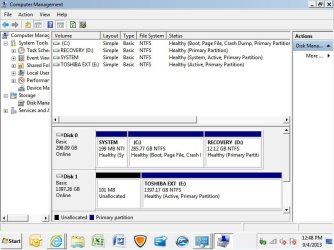
Jumanji; Here is a screen shot of Windows Disk Manager:

Windows Disk Management.jpg

Disk 1 shows "Healthy". Any other thoughts before I start to save my data to other devices? Thanks.
 

My Computer My Computer

At a glance

Windows 7 Ultimate 64-bitIntel Core2 Duo4 GB
Computer type
Laptop
Computer Manufacturer/Model Number
HP
OS
Windows 7 Ultimate 64-bit
CPU
Intel Core2 Duo
Memory
4 GB
Antivirus
Computer Associates Total Defense
The drive is marked as Active which means Windows thinks there's boot files on the drive. Windows will place handles to the drive to suppress certain activities. You might try running CHKDSK with the /x parameter instead of /f. This performs the same function but breaks any handles to the drive first.
 

My Computer My Computer

At a glance

Windows 7 Pro-x64i7-2600 3.4GHz - 3.8GHz Turbo8Gb - 2x4GB, Muskin 991770 PC3-1333Integrated Intel HD 2000
Computer type
PC/Desktop
Computer Manufacturer/Model Number
Built 2/11/2011
OS
Windows 7 Pro-x64
CPU
i7-2600 3.4GHz - 3.8GHz Turbo
Motherboard
Intel DH67BL-B3
Memory
8Gb - 2x4GB, Muskin 991770 PC3-1333
Graphics Card(s)
Integrated Intel HD 2000
Sound Card
Integrated Intel 10.1 HD, RealTek ALC892
Monitor(s) Displays
Asus LCD VH222H, Haier HL24XSL2a
Screen Resolution
1920x1080, 1920x1080
Hard Drives
Crucial SSD C300-128Gb,
Western Digital WD5002AALX - 500Gb,
Western Digital WD7501AALS - 750Gb
PSU
Seasonic 650W 80+ Gold Modular
Case
Rosewill Defender
Cooling
Stock CPU, Four 120mm case fans, PCH fan added
Keyboard
Logitech EX100 Y-RBH94 Wireless
Mouse
Logitech EX100 M-RCE95 Wireless
Internet Speed
3.0/1.5 Mbs
Antivirus
Microsoft Security Essentials
Browser
Microsoft Internet Explorer 11
Other Info
Antec Veris Premier-Multimedia IR Station,
Cyber Accoustics-3602 Speakers,
AFT XM-5U Card Reader,
Hauppauge TV-HVR-2250,
Sony LX300 USB Turntable
Yep, try what carwiz says.

Try setting that particular partition in the external drive inactive.

Though it can be done with Diskpart, you may find it easy to do with Partition Wizard Home Edition 8 Free download Magic Partition Manager Software, partition magic alternative, free partition magic, partition magic Windows 7 and server partition software - Partition Wizard Online

Install and run Partition Wizard. Right click on the selected external drive partition > Modify > Set Inactive and then APPLY ( top menu)

If you want to do it with diskpart, read How do i make a disk inactive? - Microsoft Community Not very difficult but be careful to select the right disk and right partition. ( If you get unnerved, do it with Partition Wizard. Easy GUI, which I always prefer. And it is a good partitioning/formatting tool too.)
 
Last edited:

My Computer My Computer

At a glance

Windows 7 Home Premium 32 bit
OS
Windows 7 Home Premium 32 bit
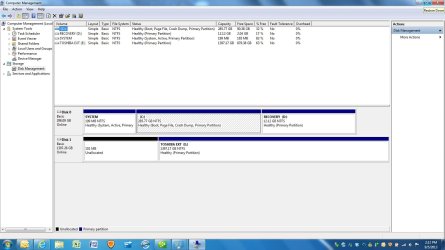
I downloaded Partition Wizard (neat little tool) and set the drive as inactive:

Disk Management.jpg


Then I ran chkdsk /x. Same results; freeze up at 76%. I ended up running chkdsk via both the command prompt (with the /x) and through Properties>Tools on my E drive. I noticed that each time I run chkdsk, the number of index entries processed gets a little higher. The history is: 415298 index entries processed, 415338, 415347, 415352, 415392. Does this mean anything?
 

My Computer My Computer

At a glance

Windows 7 Ultimate 64-bitIntel Core2 Duo4 GB
Computer type
Laptop
Computer Manufacturer/Model Number
HP
OS
Windows 7 Ultimate 64-bit
CPU
Intel Core2 Duo
Memory
4 GB
Antivirus
Computer Associates Total Defense
Looks like it was still running. Did you stop it? It will take quite a while on 1TB drive.
 

My Computer My Computer

At a glance

Windows 7 Pro-x64i7-2600 3.4GHz - 3.8GHz Turbo8Gb - 2x4GB, Muskin 991770 PC3-1333Integrated Intel HD 2000
Computer type
PC/Desktop
Computer Manufacturer/Model Number
Built 2/11/2011
OS
Windows 7 Pro-x64
CPU
i7-2600 3.4GHz - 3.8GHz Turbo
Motherboard
Intel DH67BL-B3
Memory
8Gb - 2x4GB, Muskin 991770 PC3-1333
Graphics Card(s)
Integrated Intel HD 2000
Sound Card
Integrated Intel 10.1 HD, RealTek ALC892
Monitor(s) Displays
Asus LCD VH222H, Haier HL24XSL2a
Screen Resolution
1920x1080, 1920x1080
Hard Drives
Crucial SSD C300-128Gb,
Western Digital WD5002AALX - 500Gb,
Western Digital WD7501AALS - 750Gb
PSU
Seasonic 650W 80+ Gold Modular
Case
Rosewill Defender
Cooling
Stock CPU, Four 120mm case fans, PCH fan added
Keyboard
Logitech EX100 Y-RBH94 Wireless
Mouse
Logitech EX100 M-RCE95 Wireless
Internet Speed
3.0/1.5 Mbs
Antivirus
Microsoft Security Essentials
Browser
Microsoft Internet Explorer 11
Other Info
Antec Veris Premier-Multimedia IR Station,
Cyber Accoustics-3602 Speakers,
AFT XM-5U Card Reader,
Hauppauge TV-HVR-2250,
Sony LX300 USB Turntable
carwiz, how do I "stop" the drive? If I take it offline, I can't access the drive to run CHKDSK. So I leave the disk Online, but make it Inactive with MiniTool Partition Wizard. Then I run CHKDSK, and the process hangs. The light on the HD goes off, and nothing happens after the process reaches 76% complete.

If I'm missing something obvious, please let me know. Again, I'm not an expert. Thanks!
 

My Computer My Computer

At a glance

Windows 7 Ultimate 64-bitIntel Core2 Duo4 GB
Computer type
Laptop
Computer Manufacturer/Model Number
HP
OS
Windows 7 Ultimate 64-bit
CPU
Intel Core2 Duo
Memory
4 GB
Antivirus
Computer Associates Total Defense
What I mean is; did you stop chkdsk? I would expect it to run for a couple of hours on a 1.5TB drive.

After you marked drive E: Inactive, did you mark C: as Active and reboot? Repost an image of your Disk Manager as it stands right now. Then don't touch anything else. :)
 

My Computer My Computer

At a glance

Windows 7 Pro-x64i7-2600 3.4GHz - 3.8GHz Turbo8Gb - 2x4GB, Muskin 991770 PC3-1333Integrated Intel HD 2000
Computer type
PC/Desktop
Computer Manufacturer/Model Number
Built 2/11/2011
OS
Windows 7 Pro-x64
CPU
i7-2600 3.4GHz - 3.8GHz Turbo
Motherboard
Intel DH67BL-B3
Memory
8Gb - 2x4GB, Muskin 991770 PC3-1333
Graphics Card(s)
Integrated Intel HD 2000
Sound Card
Integrated Intel 10.1 HD, RealTek ALC892
Monitor(s) Displays
Asus LCD VH222H, Haier HL24XSL2a
Screen Resolution
1920x1080, 1920x1080
Hard Drives
Crucial SSD C300-128Gb,
Western Digital WD5002AALX - 500Gb,
Western Digital WD7501AALS - 750Gb
PSU
Seasonic 650W 80+ Gold Modular
Case
Rosewill Defender
Cooling
Stock CPU, Four 120mm case fans, PCH fan added
Keyboard
Logitech EX100 Y-RBH94 Wireless
Mouse
Logitech EX100 M-RCE95 Wireless
Internet Speed
3.0/1.5 Mbs
Antivirus
Microsoft Security Essentials
Browser
Microsoft Internet Explorer 11
Other Info
Antec Veris Premier-Multimedia IR Station,
Cyber Accoustics-3602 Speakers,
AFT XM-5U Card Reader,
Hauppauge TV-HVR-2250,
Sony LX300 USB Turntable
Back
Top