
External Hard Drive not initialized

jeefster

New member
Local time
5:22 AM
Messages
3
Hi all,

I'm having an issue where my external hard drive (WD Passport Ultra 2TB) is not displaying in my computer and is not initialized in Disk Management. This occurred after my computer crashed while I was pulling out data from the external hard drive. Now when I plug in the external hard drive, it has a clicking sound for a few seconds then stops with a blinking light.

I have tried using the MiniTool Partition Wizard and it does not detect it. When I open up Disk Management, it says that I need to initialize the disk before I can access it. I read somewhere that I will lose my files if I initialize this, so I have not done so. The Disk Management also does not show any unallocated space in it. Please see attached image.
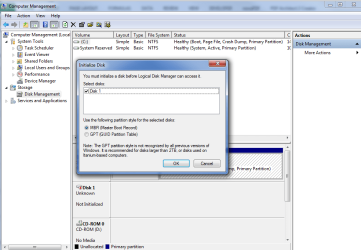
1.png


Currently I just want to take out all the data from this hard drive before I let this drive go if I can't save it. Is there any hope for me to save my files?

Best regards,
Jeefster


EDIT: I tried booting up puppy linux to see if it can detect the hard drive, but to no avail.
 
Last edited:

My Computer

Computer type
PC/Desktop
Computer Manufacturer/Model Number
custom build
OS
Windows 7 Ultimate x64
CPU
i7 920
Motherboard
ASRock X58 Extreme LGA 1366 Intel X58 ATX Intel Motherboard
Memory
16gb ram 4x4gb DDR3 1600
Graphics Card(s)
MSI GTX 970
Hello jeefster!

I'm sorry for your drive, I have experienced that same situation, I know how frustrating it can be. :/

Yes, you should not initialize the drive again, if you have data on it you want. This action will erase it.

It looks like the power-cut has caused damage to the drive, the clicking sound could be the motor head being stuck or even worse. It also looks like the external has lost the data on its file system or partition table, thus it's prompting you to Initialize.

I would suggest you try to boot to a Linux/Ubuntu Live CD and check if you could see your files through it. You could also try other data recovery programs in your home environment, still, please keep in mind this could cause even more damage both to the device and data. :/

Make sure you also try the drive on another PC and with a new cable and please, post back after these!

Good luck! :)

CK_WD
 

My Computer

Computer type
PC/Desktop
OS
Windows 7 Home Premium x64
Hi CK_WD,

Thanks for replying and helping.

I just finished booting up Ubuntu from a live CD. It could not detect the external hard drive. I've also tried it on other computers and using different USB cables. None of these works. The free program Recuva also couldn't detect it. :(

Since my Disk Management is asking me to initialize before I can access the drive, does it mean that my external hard drive is still usable?

Best regards,
Jeefster
 

My Computer

Computer type
PC/Desktop
Computer Manufacturer/Model Number
custom build
OS
Windows 7 Ultimate x64
CPU
i7 920
Motherboard
ASRock X58 Extreme LGA 1366 Intel X58 ATX Intel Motherboard
Memory
16gb ram 4x4gb DDR3 1600
Graphics Card(s)
MSI GTX 970
It could be usable, but it is possible that its surface is damaged and it could give you an error in return. It's a possibility.

Since your drive can't be recognized, you also can't take it out (I have to warn you, you will void the warranty like this and can't use the bare drive as its interior hardware is different and can't be connected via SATA :/)

If you want your data back you could contact a data recovery company, WD has data recovery partners. You could also check your warranty status if your external WD can be RMA-ed (WD Warranty policy), if the initializing doesn't work.

You could also try cloning the drive, to see if you could extract the cloned information from the clone.

Best of luck!

CK_WD
 

My Computer

Computer type
PC/Desktop
OS
Windows 7 Home Premium x64
Hi CK_WD,

I checked my warranty and it says I'm out of warranty. I decided to try and just initialize my drive and I got an I/O error. Looks like I'm somewhat out of options.

Thanks for your help CK_WD.

Best,
Jeefster
 

My Computer

Computer type
PC/Desktop
Computer Manufacturer/Model Number
custom build
OS
Windows 7 Ultimate x64
CPU
i7 920
Motherboard
ASRock X58 Extreme LGA 1366 Intel X58 ATX Intel Motherboard
Memory
16gb ram 4x4gb DDR3 1600
Graphics Card(s)
MSI GTX 970
You're welcome and I'm sorry you can't RMA the drive.. :/

Since you've received an I/O error you can't reuse the drive and you will have to get a new one. If you'd like though, you could try to write full zeros to it using the WD DLG software, may be after that you will be able to initialize it. You could also try (before or after the zeros) diskpart:

1. Open the Start Menu, type diskpart, press Enter
2. Type list disk, press Enter
3. Type select disk X (where X is the number the certain drive), press Enter
4. Type clean, press Enter
5. Type create partition primary, press Enter
6. Type format quick fs=ntfs, press Enter
7. Type assign letter=X, press Enter
8. Type exit, press Enter

It's a slim chance but worth of a shot. Even if it works by any chance, you will need to keep regular back ups. Good luck! :)

CK_WD
 

My Computer

Computer type
PC/Desktop
OS
Windows 7 Home Premium x64
Back
Top