External hard drive problem

chrisna

Banned
Local time
6:39 AM
Messages
37
Location
Indonesia
hello,,,

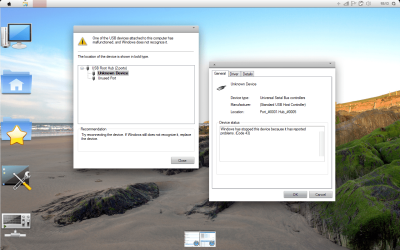
my Ext. HD is not working,,, until now, it said that it's not recognized... but the disk is running...... finish for checking cables but it's still not working...updated the driver, still not working i always keep it in the safe place,....
i give you the screenshot...
:cry::cry::cry::cry::cry:
anyone know about this problem???
 

Attachments
  • EXT.png
    EXT.png
    300 KB · Views: 55

My Computer

Computer Manufacturer/Model Number
Compaq Presario CQ40-419TX Notebook PC
OS
Windows 7 Home Premium 32bit.
CPU
Intel Dual Core 2.0 GHZ
Motherboard
Intergrated Motherboard
Memory
4 GB
Graphics Card(s)
nVidia GeForce 103 M
Sound Card
Intergrated Sound Card
Monitor(s) Displays
Intergrated Monitor
Hard Drives
Fujitsu 250 GB
Segate Portable hard Drive 320 GB
PSU
-
Case
-
Cooling
Fan Cooler
How many USB devices do you have installed? Most USB external drives use a 2 USB connection setup and an external power source as well so as not to put too much strain on the power available for USB devices. If there is another PC you could test it on that would let you know if the problem is the drive. I'm thinking you are having a USB port issue though.
 

My Computer

Computer Manufacturer/Model Number
DELL XPS Studio 435T
OS
Vista 64 Ultimate, Windows 7 64 Ultimate, Ubuntu 9.10
CPU
i7 975 3.3 GHz Extreme (Factory OC'd to 3.6 GHz)
Motherboard
DELL provided
Memory
18 Gb Tri-Channel 1066
Graphics Card(s)
ATI 5970 2048 Mb
Sound Card
X-Fi Extreme Gamer
Monitor(s) Displays
Vizio 37" HD-TV
Screen Resolution
1920 x 1080
Hard Drives
1.5 Tb HDD
1.5 Tb HDD
2.0 Tb Network Drive
512 Gb Crucial SSD
PSU
DELL Provided 475 watts
Case
DELL
Cooling
3 fans
Keyboard
Logitech Performance K350 Wireless
Mouse
Logitech Performance MX Wireless
Internet Speed
3 Mb up 750 Kb down
Other Info
Bamboo Fun Tablet, Belkin N+ Wireless router, Pioneer Dolby System Wireless Headphones, Bose 5.1 Dolby Surround Sound System, LifeCam VX 3000 Webcam, Blu-Ray/Hi Def DVD +RW combo and Blu-ray +RW,l 15 in 1 media card reader, Logitech Rumblepad 2, Hauppauge 2250 DTV Tuner with MS Media Center Remote

Laptop:Alienware M17x, Q9100 CPU, 8Gb RAM, 1920x1200 WUXGA LCD driven by 4870's in CrossFireX, Bl
A few things you can try:

1) Disconnect the usb device, power off the computer completely (remove the power cord from the wall outlet and if this is a notebook, remove the battery as well), wait for 10 minutes, re-power, reconnect the battery, then see if the drive is recognized.

2) Try out a different usb cable.

3) Right click on that "Unknown device", uninstall, then reboot the computer.
 

My Computer

Computer Manufacturer/Model Number
Too many to describe...
OS
Windows 7 x64 pro/ Windows 7 x86 Pro/ XP SP3 x86

Attachments

  • brys snap ?18 ?December ?2010 19h44m50s.png
    brys snap ?18 ?December ?2010 19h44m50s.png
    43.3 KB · Views: 16

My Computer

Computer Manufacturer/Model Number
packard bell IXTREME M5722
OS
Operating System : Windows 7 Home Premium Edition 6.01.7600 SP1 (x64)
CPU
Processor : Intel Core 2 Quad Q8300 @ 2500 MHz
Motherboard
Mainboard : Packard Bell (Acer EG43M )
Memory
Physical Memory :8GB Corsair4x 2GB 800MHz C5 DDR2
Graphics Card(s)
Video Card : XFX 6700 AMD
Monitor(s) Displays
Maestro 234DL - BenQ V2220 - BenQ VW2420H
Screen Resolution
Current Display :1920x1080p pixels at 60 Hz in HD LED
Hard Drives
Hard Disks : WDC (1000 GB)
Drive C: (Hard Disk) : 428 GB available on 491 GB
Drive D: (Hard Disk) : 426 GB available on 492 GB
SAMSUNG spinpoint HD103SJ 1000.2 GB
(X 2) KINGSTON SSD NOW V 30GB
PSU
XFX ProSeries 550W PSU
Case
PACKARD BELL IXTREME
Cooling
System Blower Current: 150mA Air Flow16CFM ;Akasa 90mm rear
Keyboard
Gigabyte Aivia K8100
Mouse
TRUST-Wireless Laser Mouse - Carbon edition MI-7770C
Internet Speed
TP-LINK > TL-WN951N / AV500 Gigabit Powerline Adapters
Browser
chrome dev
Other Info
EXTRA COOLING>(FAN CONTROLLER) PC Bay Cooler 3 x 40mm fans; Akasa AK-HD-BL Blue hard drive cooler 2 x 40 mm fan 4500 rpm 29.7 dBA
Bios> American Megatrends Inc.
Version : P01-A1
Date : 08/31/2009
Back
Top