
External Hard Drive will not let me reformat it any way I try

displayname2

New member
Member
Local time
2:50 AM
Messages
14
I'm having problems with my external hard drive (1 TB, pocket western digital) where
the hard drive shows up (with no indication of space left) and I'm not able to view any files or even get to a point where I can reformat it.

Here are my observations (hopefully you guys know the problem and can help me fix it):

When I insert it into my Windows 7 pc, it will show up in the following places:
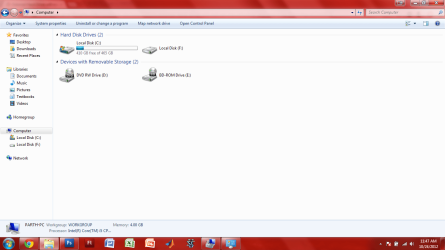
My Computer (as drive F: with no file space bar underneath)
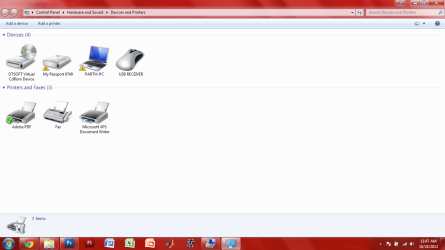
My Devices and Printers (recognized as a hard drive but needs troubleshooting)
The USB icon in the task bar comes up and recognizes something was inserted (along with the sound).

When I click on that hard drive to view files in My Computer, it loads for an insanely long time. The green loading bar at the top loads all the way until it reaches the middle of the button at the end so I'd say it loads 97% before it stops making any more progress.

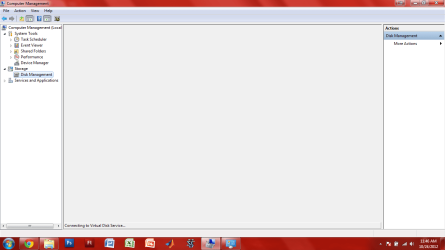
When right click on my computer and click on "Manage" to get into Disk Management, the Disk Management never loads and only says "Connecting to Virtual Disk service" in the notification bar at the bottom.

When I right click on the hard drive under Devices and Printers to troubleshoot it, it will take a long time to even load up the right click menu for me troubleshoot it.

I also noticed that my computer lags when I insert the external hard drive to the point where Google Chrome doesn't respond and sometimes Windows Explorer doesn't respond.

I have tried inserting the external HD to other windows computers with no luck. I did noticed that it works on a Mac and Ubuntu but really slow again.

I have never formatted this hard drive; I just started using it from day one adding files to it.

There was one time when I was able to get the hard drive to load...only when I copied all the files on to my desktop the file transfer rate was about 50KB/s and I had over 200 GB worth to transfer...the normal transfer rate on this external should be around 10-15 MB/s.

I also tried inserting the external HD, opened up the command prompt, and tried to start testdisk. But afterwards testkdisk never loaded up and I wasn't able to enter anything else in the command prompt so I just exited out of that.

As soon as I disconnect the external hard drive from my computer, everything goes back to normal...Google Chromes load faster, Disk Management shows my HDDs, etc...

On the hard drive itself, there is a blinking light. This light never used to blick and was completely solid when it was working fine.

Whenever I take out the hard drive from the usb slot, a window pops up saying that I need to reformat it with a button at the bottom that enable me to reformat. However, I already took out the hard drive so clicking that button will do no good. I'd have to reinsert it into the computer, wait a really long time for nothing to happen and as soon as I take out the external, the reformat will pop up again.

Hopefully you guys know a way for me to fix this. I really, really appreciate the help. Thanks!
 

My Computer My Computer

At a glance

Microsoft Windows 7 Home Premium 64-bit 7601 ...Intel(R) Core(TM) i5 CPU M 430 @ 2.27GHz4.00 GB(1) Intel(R) HD Graphics (2) ATI Mobility Rad...
Computer Manufacturer/Model Number
HP DV6t-3000se
OS
Microsoft Windows 7 Home Premium 64-bit 7601 Multiprocessor Free Service Pack 1
CPU
Intel(R) Core(TM) i5 CPU M 430 @ 2.27GHz
Motherboard
Hewlett-Packard 144A
Memory
4.00 GB
Graphics Card(s)
(1) Intel(R) HD Graphics (2) ATI Mobility Radeon HD 5470
Sound Card
(1) ATI High Definition Audio Device (2) High Definition A
Screen Resolution
1366 x 768 x 32 bits (4294967296 colors) @ 60 Hz
Hard Drives
Hitachi HTS725050A9A364 ATA Device
See if this helps.
-
Type cmd in start menu search box, right click Cmd.exe and select run as administrator
Type the following pressing Enter after each step.
diskpart
list disk
select disk x (make sure to select correct disk number)
format fs=ntfs quick
exit (closes diskpart)
exit (closes the Command Prompt)
 

My Computer My Computer

At a glance

Win7 H.Prem. 32bit+SP1
Computer Manufacturer/Model Number
Look in my Signature.
OS
Win7 H.Prem. 32bit+SP1
I tried Diskpart and after entering format fs=ntfs quick, diskpart gives the message:

"There is no volume selected.
Please select a volume and try again."

My external hdd showed up as Disk 1 and I did enter "select disk 1" and Diskpart gave me the message Disk 1 is now selected but apparently fs=ntfs quick couldn't see the disk was selected.
 

My Computer My Computer

At a glance

Microsoft Windows 7 Home Premium 64-bit 7601 ...Intel(R) Core(TM) i5 CPU M 430 @ 2.27GHz4.00 GB(1) Intel(R) HD Graphics (2) ATI Mobility Rad...
Computer Manufacturer/Model Number
HP DV6t-3000se
OS
Microsoft Windows 7 Home Premium 64-bit 7601 Multiprocessor Free Service Pack 1
CPU
Intel(R) Core(TM) i5 CPU M 430 @ 2.27GHz
Motherboard
Hewlett-Packard 144A
Memory
4.00 GB
Graphics Card(s)
(1) Intel(R) HD Graphics (2) ATI Mobility Radeon HD 5470
Sound Card
(1) ATI High Definition Audio Device (2) High Definition A
Screen Resolution
1366 x 768 x 32 bits (4294967296 colors) @ 60 Hz
Hard Drives
Hitachi HTS725050A9A364 ATA Device
When you selected disk 1, did you input format fs=ntfs quick
 

My Computer My Computer

At a glance

Win7 H.Prem. 32bit+SP1
Computer Manufacturer/Model Number
Look in my Signature.
OS
Win7 H.Prem. 32bit+SP1
I have just a similar experience - "no volume selected".
 

My Computer My Computer

At a glance

Win7 64 Home
OS
Win7 64 Home

My Computer My Computer

At a glance

Win7 H.Prem. 32bit+SP1
Computer Manufacturer/Model Number
Look in my Signature.
OS
Win7 H.Prem. 32bit+SP1
Did select the disk, but the disk has no volume to select.
 

My Computer My Computer

At a glance

Win7 64 Home
OS
Win7 64 Home
After it says disk # is the selected disk, type list partition and press enter. If it lists a partition, type select partition 1 and press enter, then put format fs=ntfs quick.
 

My Computers My Computers

  • At a glance

    Windows 11 ProRyzen 9 5900X32GB G Skill DDR4-3600EVGA RTX 3080 FTW 3 Ultra
    Computer type
    PC/Desktop
    Computer Manufacturer/Model Number
    ALWAYS UNDER CONSTRUCTION
    OS
    Windows 11 Pro
    CPU
    Ryzen 9 5900X
    Motherboard
    Asus X570 Crosshair Viii Hero
    Memory
    32GB G Skill DDR4-3600
    Graphics Card(s)
    EVGA RTX 3080 FTW 3 Ultra
    Sound Card
    On Board/Sennheiser PC37X Headset
    Monitor(s) Displays
    3 X Asus 27"
    Screen Resolution
    2560x1440
    Hard Drives
    2 X 1 TB NVME drives
    PSU
    EVGA 850
    Case
    Phanteks Eclipse P400A
    Cooling
    EVGA 280 AIO
    Keyboard
    Logitech G510s/ Logitech G13
    Mouse
    Logitech G502
    Internet Speed
    24/1
    Antivirus
    ESET/MBAM Pro/SAS Pro
    Browser
    Chrome/ Firefox/ Edge
  • At a glance

    Windows 11 ProIntel Ultra 9 288V32 GB LPDDR5X 8533
    Computer type
    Laptop
    System Manufacturer/Model Number
    Dell 16 Plus
    OS
    Windows 11 Pro
    CPU
    Intel Ultra 9 288V
    Memory
    32 GB LPDDR5X 8533
    Monitor(s) Displays
    16" Mini-LED HDR600 Touch 90 Hz
    Screen Resolution
    2560X1600
    Hard Drives
    1 TB NVME
Displayneame2: You know of course that the following commands will format your drive - right?
That means that any data on the drive will be erased.

You mentioned testdisk. What version did you download (stable version=6.13) and did you try running it in a command prompt?

Diskpart command-line-options says you must select a volume to format.

diskpart

list disk
select disk # (make sure it's the correct disk)
list disk (selected disk identified with *)


list volume
select volume (make sure it's the correct volume)
list volume (selected vol identified with *)

fs=ntfs quick
exit
exit
 

My Computer My Computer

At a glance

x64 (6.3.9600) Win8.1 Pro & soon dual boot x6...AMD A6-3420M APU with Radeon(tm) HD Graphics6.00 GBAMD Radeon(TM) HD 6520G
Computer type
Laptop
Computer Manufacturer/Model Number
HP Pavilion dv6-6c10us
OS
x64 (6.3.9600) Win8.1 Pro & soon dual boot x64 (6.1.7601) Win7_SP1 HomePrem
CPU
AMD A6-3420M APU with Radeon(tm) HD Graphics
Motherboard
Hewlett-Packard 1805
Memory
6.00 GB
Graphics Card(s)
AMD Radeon(TM) HD 6520G
Sound Card
(1) AMD High Definition Audio Device (2) IDT High Definiti
Monitor(s) Displays
HP W2072a 20" LCD (1600 x 900) @ 60 Hz
Screen Resolution
1366 x 768 x 32 bits (4294967296 colors) @ 60 Hz
Hard Drives
ST640LM0 00 HM641JI SATA Disk Device
Keyboard
Logitech k520 wireless KB
Mouse
Logitech m320 wireless mouse (bundled with KB)
Internet Speed
15/5 | 54 MB Wireless 'n'
Antivirus
Realtime: Defender or Avast | On-demand: Malwarebytes, ESET
Browser
IE 11 on Win8, IE 10 on win 7
Other Info
Media: [Gimp, Audacity, VLC] || Comm: [WEmail 2012, Skype] || Productivity: [OpenOffice,| Textpad] || Utils: [Sysinternals, cCleaner, Speccy, Defraggler]
Please provide more information on your system and the hard drive.

Use the Easy System Specs in my signature to fill in the information on the forum for you.

Look on the bottom or side of the ext HD for the complete model number - you can put that in specs too - under other.

Thanks, it helps
 

My Computer My Computer

At a glance

x64 (6.3.9600) Win8.1 Pro & soon dual boot x6...AMD A6-3420M APU with Radeon(tm) HD Graphics6.00 GBAMD Radeon(TM) HD 6520G
Computer type
Laptop
Computer Manufacturer/Model Number
HP Pavilion dv6-6c10us
OS
x64 (6.3.9600) Win8.1 Pro & soon dual boot x64 (6.1.7601) Win7_SP1 HomePrem
CPU
AMD A6-3420M APU with Radeon(tm) HD Graphics
Motherboard
Hewlett-Packard 1805
Memory
6.00 GB
Graphics Card(s)
AMD Radeon(TM) HD 6520G
Sound Card
(1) AMD High Definition Audio Device (2) IDT High Definiti
Monitor(s) Displays
HP W2072a 20" LCD (1600 x 900) @ 60 Hz
Screen Resolution
1366 x 768 x 32 bits (4294967296 colors) @ 60 Hz
Hard Drives
ST640LM0 00 HM641JI SATA Disk Device
Keyboard
Logitech k520 wireless KB
Mouse
Logitech m320 wireless mouse (bundled with KB)
Internet Speed
15/5 | 54 MB Wireless 'n'
Antivirus
Realtime: Defender or Avast | On-demand: Malwarebytes, ESET
Browser
IE 11 on Win8, IE 10 on win 7
Other Info
Media: [Gimp, Audacity, VLC] || Comm: [WEmail 2012, Skype] || Productivity: [OpenOffice,| Textpad] || Utils: [Sysinternals, cCleaner, Speccy, Defraggler]
A screenshot of Disk Management, with the drive attached, would also be helpful. Maximize the window and adjust columns and such to show as much data as possible, then take the screenshot and post it here.
 

My Computer My Computer

At a glance

Windows 7 Ultimate x64
OS
Windows 7 Ultimate x64
Sorry for the late reply.

Yes I did enter select disk 1 but still got the error of no volume selected. I'm going to try selecting the volume now as Slartybart wrote.


Displayneame2: You know of course that the following commands will format your drive - right?
That means that any data on the drive will be erased.

Yes I do know that the data will be erased. I was also hoping maybe I could recover the files with another software after formatting it.

However, I recently inserted this external HDD into a USB 3.0 port on a different computer and I got excited after the files showed up. I immediately copied over everything to the desktop but kept getting errors such as "file not transferrable" every now an then which I'd have to skip that file.

My plan now is to get as much data off the external HDD using that USB 3.0 port and then reformat it trying the select volume option.
 

My Computer My Computer

At a glance

Microsoft Windows 7 Home Premium 64-bit 7601 ...Intel(R) Core(TM) i5 CPU M 430 @ 2.27GHz4.00 GB(1) Intel(R) HD Graphics (2) ATI Mobility Rad...
Computer Manufacturer/Model Number
HP DV6t-3000se
OS
Microsoft Windows 7 Home Premium 64-bit 7601 Multiprocessor Free Service Pack 1
CPU
Intel(R) Core(TM) i5 CPU M 430 @ 2.27GHz
Motherboard
Hewlett-Packard 144A
Memory
4.00 GB
Graphics Card(s)
(1) Intel(R) HD Graphics (2) ATI Mobility Radeon HD 5470
Sound Card
(1) ATI High Definition Audio Device (2) High Definition A
Screen Resolution
1366 x 768 x 32 bits (4294967296 colors) @ 60 Hz
Hard Drives
Hitachi HTS725050A9A364 ATA Device
F5ing: This is going to be difficult - post# 1 indicates lots of pain trying to run much, including Disk Mgmnt, with the device attached. Not that a Disk Mgmnt screen wouldn't help :p

I've had some issues with WD ext HDs that I haven't seemed to be able to resolve. I don't think it's just WD though, Windows seems to have issues with large ext HD in general.

WDC Data Lifeguard Diagnostic for Windows
Don't worry about the HD referenced in the link, Lifeguard Diags are generic for WD drives. There should be an option to restore to factory settings. Just make sure you select the correct drive because the util knows about all drives, not just WD.

Run the quick test (might not be so quick on your drive =:> and post results
or
if you're already committed to formating,
Select write zeros / quick.

Disconnect the drive and boot your machine.
Connect the drive and..........
 

My Computer My Computer

At a glance

x64 (6.3.9600) Win8.1 Pro & soon dual boot x6...AMD A6-3420M APU with Radeon(tm) HD Graphics6.00 GBAMD Radeon(TM) HD 6520G
Computer type
Laptop
Computer Manufacturer/Model Number
HP Pavilion dv6-6c10us
OS
x64 (6.3.9600) Win8.1 Pro & soon dual boot x64 (6.1.7601) Win7_SP1 HomePrem
CPU
AMD A6-3420M APU with Radeon(tm) HD Graphics
Motherboard
Hewlett-Packard 1805
Memory
6.00 GB
Graphics Card(s)
AMD Radeon(TM) HD 6520G
Sound Card
(1) AMD High Definition Audio Device (2) IDT High Definiti
Monitor(s) Displays
HP W2072a 20" LCD (1600 x 900) @ 60 Hz
Screen Resolution
1366 x 768 x 32 bits (4294967296 colors) @ 60 Hz
Hard Drives
ST640LM0 00 HM641JI SATA Disk Device
Keyboard
Logitech k520 wireless KB
Mouse
Logitech m320 wireless mouse (bundled with KB)
Internet Speed
15/5 | 54 MB Wireless 'n'
Antivirus
Realtime: Defender or Avast | On-demand: Malwarebytes, ESET
Browser
IE 11 on Win8, IE 10 on win 7
Other Info
Media: [Gimp, Audacity, VLC] || Comm: [WEmail 2012, Skype] || Productivity: [OpenOffice,| Textpad] || Utils: [Sysinternals, cCleaner, Speccy, Defraggler]
A screenshot of Disk Management, with the drive attached, would also be helpful. Maximize the window and adjust columns and such to show as much data as possible, then take the screenshot and post it here.

I've uploaded the screenshots of the windows (Disk Management, My Computer, Devices and Printers).
 

Attachments

  • DiskManagement.png
    DiskManagement.png
    37.1 KB · Views: 10
  • DevicesandPrinters.png
    DevicesandPrinters.png
    59.7 KB · Views: 10
  • MyComputer.png
    MyComputer.png
    57.3 KB · Views: 11

My Computer My Computer

At a glance

Microsoft Windows 7 Home Premium 64-bit 7601 ...Intel(R) Core(TM) i5 CPU M 430 @ 2.27GHz4.00 GB(1) Intel(R) HD Graphics (2) ATI Mobility Rad...
Computer Manufacturer/Model Number
HP DV6t-3000se
OS
Microsoft Windows 7 Home Premium 64-bit 7601 Multiprocessor Free Service Pack 1
CPU
Intel(R) Core(TM) i5 CPU M 430 @ 2.27GHz
Motherboard
Hewlett-Packard 144A
Memory
4.00 GB
Graphics Card(s)
(1) Intel(R) HD Graphics (2) ATI Mobility Radeon HD 5470
Sound Card
(1) ATI High Definition Audio Device (2) High Definition A
Screen Resolution
1366 x 768 x 32 bits (4294967296 colors) @ 60 Hz
Hard Drives
Hitachi HTS725050A9A364 ATA Device
F5ing: This is going to be difficult - post# 1 indicates lots of pain trying to run much, including Disk Mgmnt, with the device attached. Not that a Disk Mgmnt screen wouldn't help :p

I've had some issues with WD ext HDs that I haven't seemed to be able to resolve. I don't think it's just WD though, Windows seems to have issues with large ext HD in general.

WDC Data Lifeguard Diagnostic for Windows
Don't worry about the HD referenced in the link, Lifeguard Diags are generic for WD drives. There should be an option to restore to factory settings. Just make sure you select the correct drive because the util knows about all drives, not just WD.

Run the quick test (might not be so quick on your drive =:> and post results
or
if you're already committed to formating,
Select write zeros / quick.

Disconnect the drive and boot your machine.
Connect the drive and..........

After running Lifeguard Diags, a screen would pop up that says that it is detecting hard drives. After completion, the screen closes and then nothing comes up. As soon as I remove the external HDD, the Lifeguard Diags screen pops up with only my internal hard drive.
 

My Computer My Computer

At a glance

Microsoft Windows 7 Home Premium 64-bit 7601 ...Intel(R) Core(TM) i5 CPU M 430 @ 2.27GHz4.00 GB(1) Intel(R) HD Graphics (2) ATI Mobility Rad...
Computer Manufacturer/Model Number
HP DV6t-3000se
OS
Microsoft Windows 7 Home Premium 64-bit 7601 Multiprocessor Free Service Pack 1
CPU
Intel(R) Core(TM) i5 CPU M 430 @ 2.27GHz
Motherboard
Hewlett-Packard 144A
Memory
4.00 GB
Graphics Card(s)
(1) Intel(R) HD Graphics (2) ATI Mobility Radeon HD 5470
Sound Card
(1) ATI High Definition Audio Device (2) High Definition A
Screen Resolution
1366 x 768 x 32 bits (4294967296 colors) @ 60 Hz
Hard Drives
Hitachi HTS725050A9A364 ATA Device
Good move and good trouble shooting (trying another PC and particularly using a 3.0 USB port)

You might consider copying the files to a new folder instead of the desktop. The new folder could be on your desktop or in your documents folder or anywhere else. the ""file not transferrable" could be due to the special nature of Desktop.

But yeah, copy as much viable data as you can. I'm not real confident that you can recover data after a format, sometimes you can, sometimes you can't.

Bill
.....
Yes I do know that the data will be erased. I was also hoping maybe I could recover the files with another software after formatting it.

However, I recently inserted this external HDD into a USB 3.0 port on a different computer and I got excited after the files showed up. I immediately copied over everything to the desktop but kept getting errors such as "file not transferrable" every now an then which I'd have to skip that file.

My plan now is to get as much data off the external HDD using that USB 3.0 port and then reformat it trying the select volume option.

 
Last edited:

My Computer My Computer

At a glance

x64 (6.3.9600) Win8.1 Pro & soon dual boot x6...AMD A6-3420M APU with Radeon(tm) HD Graphics6.00 GBAMD Radeon(TM) HD 6520G
Computer type
Laptop
Computer Manufacturer/Model Number
HP Pavilion dv6-6c10us
OS
x64 (6.3.9600) Win8.1 Pro & soon dual boot x64 (6.1.7601) Win7_SP1 HomePrem
CPU
AMD A6-3420M APU with Radeon(tm) HD Graphics
Motherboard
Hewlett-Packard 1805
Memory
6.00 GB
Graphics Card(s)
AMD Radeon(TM) HD 6520G
Sound Card
(1) AMD High Definition Audio Device (2) IDT High Definiti
Monitor(s) Displays
HP W2072a 20" LCD (1600 x 900) @ 60 Hz
Screen Resolution
1366 x 768 x 32 bits (4294967296 colors) @ 60 Hz
Hard Drives
ST640LM0 00 HM641JI SATA Disk Device
Keyboard
Logitech k520 wireless KB
Mouse
Logitech m320 wireless mouse (bundled with KB)
Internet Speed
15/5 | 54 MB Wireless 'n'
Antivirus
Realtime: Defender or Avast | On-demand: Malwarebytes, ESET
Browser
IE 11 on Win8, IE 10 on win 7
Other Info
Media: [Gimp, Audacity, VLC] || Comm: [WEmail 2012, Skype] || Productivity: [OpenOffice,| Textpad] || Utils: [Sysinternals, cCleaner, Speccy, Defraggler]
Hmmm, well the first thing I see that I don't like to see is BD-rom. I don't know if this is causing the error, but this is the 2nd or 3rd time DAEMON tools shows up when someone asks for assistance on an ext HD not being recognized.


Please uninstall DAEMON tools. this alone probably won't solve the issue, but it moves one possible cause out of the way. 7-zip provides the same function plus more and it doesn't mess around with simulating hardware.


Then try the WD utility, the DOS version might work better if the Windows version won't load or loads slow because of the issue you're trying to solve.
 

My Computer My Computer

At a glance

x64 (6.3.9600) Win8.1 Pro & soon dual boot x6...AMD A6-3420M APU with Radeon(tm) HD Graphics6.00 GBAMD Radeon(TM) HD 6520G
Computer type
Laptop
Computer Manufacturer/Model Number
HP Pavilion dv6-6c10us
OS
x64 (6.3.9600) Win8.1 Pro & soon dual boot x64 (6.1.7601) Win7_SP1 HomePrem
CPU
AMD A6-3420M APU with Radeon(tm) HD Graphics
Motherboard
Hewlett-Packard 1805
Memory
6.00 GB
Graphics Card(s)
AMD Radeon(TM) HD 6520G
Sound Card
(1) AMD High Definition Audio Device (2) IDT High Definiti
Monitor(s) Displays
HP W2072a 20" LCD (1600 x 900) @ 60 Hz
Screen Resolution
1366 x 768 x 32 bits (4294967296 colors) @ 60 Hz
Hard Drives
ST640LM0 00 HM641JI SATA Disk Device
Keyboard
Logitech k520 wireless KB
Mouse
Logitech m320 wireless mouse (bundled with KB)
Internet Speed
15/5 | 54 MB Wireless 'n'
Antivirus
Realtime: Defender or Avast | On-demand: Malwarebytes, ESET
Browser
IE 11 on Win8, IE 10 on win 7
Other Info
Media: [Gimp, Audacity, VLC] || Comm: [WEmail 2012, Skype] || Productivity: [OpenOffice,| Textpad] || Utils: [Sysinternals, cCleaner, Speccy, Defraggler]
Have your checked your system for malware?

Malwarebytes and ESET Online Scanner are both excellent tools. They are scanners however and neither provide real-time protection.

What AV product do you use?

And.....just to be sure there isn't an update waiting that might be part of the problem run Windows Update
- Control Panel -> Windows update.
Hide (rt click the update, select hide) any hardware updates for the moment - Accept everything else for Windows.

Some folks rely on the automatic updates, and sometimes recommended updates don't get applied. Best to check using the full blown Windows Update in Control Panel.

I'm suggesting a lot of things, take your time. Don't try to do everything at once.

Do one action and post your results, then do the next. Keep folks on this side informed because we can't see what you see.

Thanks,

Bill
.
 

My Computer My Computer

At a glance

x64 (6.3.9600) Win8.1 Pro & soon dual boot x6...AMD A6-3420M APU with Radeon(tm) HD Graphics6.00 GBAMD Radeon(TM) HD 6520G
Computer type
Laptop
Computer Manufacturer/Model Number
HP Pavilion dv6-6c10us
OS
x64 (6.3.9600) Win8.1 Pro & soon dual boot x64 (6.1.7601) Win7_SP1 HomePrem
CPU
AMD A6-3420M APU with Radeon(tm) HD Graphics
Motherboard
Hewlett-Packard 1805
Memory
6.00 GB
Graphics Card(s)
AMD Radeon(TM) HD 6520G
Sound Card
(1) AMD High Definition Audio Device (2) IDT High Definiti
Monitor(s) Displays
HP W2072a 20" LCD (1600 x 900) @ 60 Hz
Screen Resolution
1366 x 768 x 32 bits (4294967296 colors) @ 60 Hz
Hard Drives
ST640LM0 00 HM641JI SATA Disk Device
Keyboard
Logitech k520 wireless KB
Mouse
Logitech m320 wireless mouse (bundled with KB)
Internet Speed
15/5 | 54 MB Wireless 'n'
Antivirus
Realtime: Defender or Avast | On-demand: Malwarebytes, ESET
Browser
IE 11 on Win8, IE 10 on win 7
Other Info
Media: [Gimp, Audacity, VLC] || Comm: [WEmail 2012, Skype] || Productivity: [OpenOffice,| Textpad] || Utils: [Sysinternals, cCleaner, Speccy, Defraggler]
Have your checked your system for malware?

Malwarebytes and ESET Online Scanner are both excellent tools. They are scanners however and neither provide real-time protection.

What AV product do you use?

And.....just to be sure there isn't an update waiting that might be part of the problem run Windows Update
- Control Panel -> Windows update.
Hide (rt click the update, select hide) any hardware updates for the moment - Accept everything else for Windows.

Some folks rely on the automatic updates, and sometimes recommended updates don't get applied. Best to check using the full blown Windows Update in Control Panel.

I'm suggesting a lot of things, take your time. Don't try to do everything at once.

Do one action and post your results, then do the next. Keep folks on this side informed because we can't see what you see.

Thanks,

Bill
.

Yes I am a 100% sure that I have no viruses or malware because I'm running on a recently (1-2 weeks ago) clean install of windows 7. The external hard drive didn't work even before I did the clean install. (actually, I had to do the clean install b/c of the external HDD not working and me being stupid using partition table doctor to solve the problem but then ended up screwing up my internal HDD...anyway, that's all fixed now.)

After the clean install, I also made all the major updates needed to Windows 7.
 

My Computer My Computer

At a glance

Microsoft Windows 7 Home Premium 64-bit 7601 ...Intel(R) Core(TM) i5 CPU M 430 @ 2.27GHz4.00 GB(1) Intel(R) HD Graphics (2) ATI Mobility Rad...
Computer Manufacturer/Model Number
HP DV6t-3000se
OS
Microsoft Windows 7 Home Premium 64-bit 7601 Multiprocessor Free Service Pack 1
CPU
Intel(R) Core(TM) i5 CPU M 430 @ 2.27GHz
Motherboard
Hewlett-Packard 144A
Memory
4.00 GB
Graphics Card(s)
(1) Intel(R) HD Graphics (2) ATI Mobility Radeon HD 5470
Sound Card
(1) ATI High Definition Audio Device (2) High Definition A
Screen Resolution
1366 x 768 x 32 bits (4294967296 colors) @ 60 Hz
Hard Drives
Hitachi HTS725050A9A364 ATA Device
You can try to set the disk inactive, offline the disk, srub the mount data, disconnect the drive, & reboot.
In an elevated command prompt, type the following commands (don't type my comments in parentheses)

Usually your internal hard drive is Disk 0. But things might change when hardware acts up.

Be certain that you select the ext HD from the list provided in "List Disk".

diskpart

list disk
select disk # (make sure it's the correct disk)
list disk (selected disk identified with *)

list part
select part # (make sure it's the correct partition)
list part (selected partition identified with *)


list vol
select vol # (make sure it's the correct volume)

list disk (selected disk identified with *)
list part (selected partition identified with *)
list vol (selected volume identified with *)

inactive (set current disk inactive)


automount scrub (clean up mount information for the disk)
remove all
remove dismount

list disk (selected disk identified with *)
list part (selected partition identified with *)
list vol (selected volume identified with *)

detail disk (you might have to select or specify a disk # from the list - detail all disks that are listed and post the information)

exit (exit diskpart)
exit (exit cmd prompt)

shut down your machine
physically disconnect the ext HDD
restart your machine

What drives do you see - a disk mgmnt screenshot would be great here.
Connect the ext HD - what happens? Slow down?
another dsk mgmnt screen if you can - with the drive attached

Do be careful using diskpart - VERY careful - ask if you have any questions first.
 

My Computer My Computer

At a glance

x64 (6.3.9600) Win8.1 Pro & soon dual boot x6...AMD A6-3420M APU with Radeon(tm) HD Graphics6.00 GBAMD Radeon(TM) HD 6520G
Computer type
Laptop
Computer Manufacturer/Model Number
HP Pavilion dv6-6c10us
OS
x64 (6.3.9600) Win8.1 Pro & soon dual boot x64 (6.1.7601) Win7_SP1 HomePrem
CPU
AMD A6-3420M APU with Radeon(tm) HD Graphics
Motherboard
Hewlett-Packard 1805
Memory
6.00 GB
Graphics Card(s)
AMD Radeon(TM) HD 6520G
Sound Card
(1) AMD High Definition Audio Device (2) IDT High Definiti
Monitor(s) Displays
HP W2072a 20" LCD (1600 x 900) @ 60 Hz
Screen Resolution
1366 x 768 x 32 bits (4294967296 colors) @ 60 Hz
Hard Drives
ST640LM0 00 HM641JI SATA Disk Device
Keyboard
Logitech k520 wireless KB
Mouse
Logitech m320 wireless mouse (bundled with KB)
Internet Speed
15/5 | 54 MB Wireless 'n'
Antivirus
Realtime: Defender or Avast | On-demand: Malwarebytes, ESET
Browser
IE 11 on Win8, IE 10 on win 7
Other Info
Media: [Gimp, Audacity, VLC] || Comm: [WEmail 2012, Skype] || Productivity: [OpenOffice,| Textpad] || Utils: [Sysinternals, cCleaner, Speccy, Defraggler]
Back
Top