lullabymysmist
New member
- Local time
- 3:06 AM
- Messages
- 8
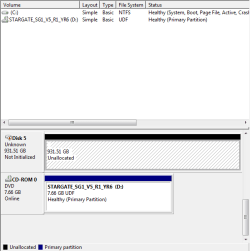
After a reboot my two external hard drives have vanished from my PC. I've had one of them going on five years and the other for only six months. I really can't believe they would just break after a simple restart. Especially two of them at once.
Folder Options are set to detect hidden files/drives so they aren't just hidden either. I tried uninstalling the drivers and letting them reinstall, but it didn't make a difference, when doing an error check and along the lines of "Windows can't detect this drive."
Folder Options are set to detect hidden files/drives so they aren't just hidden either. I tried uninstalling the drivers and letting them reinstall, but it didn't make a difference, when doing an error check and along the lines of "Windows can't detect this drive."
My Computer
- Computer Manufacturer/Model Number
- Cyberpower
- OS
- Windows 7 Home Premium 64-bit SP1
- CPU
- AMD Phenom II X4 955
- Motherboard
- ASUSTeK Computer INC. M4A78T-E
- Memory
- 8.00 GB Dual-Channel DDR3
- Graphics Card(s)
- ATI Radeon HD 4850 1GB
- Sound Card
- AMD High Definition Audio Device
- Hard Drives
- 488GB Hitachi Hitachi HDP725050GLA360 ATA Device (SATA)
- Case
- Coolermaster
- Cooling
- 3x Fans


 rb: in the search box type "Disk Management"