External HD NTFS -> Raw Mmmmmm

ZMan

New member
Member
VIP
Local time
3:27 AM
Messages
225
Hello all well I have a SeaGate 3TB HD. I turn off my computer for the night per usually stuff and nothing happen that was weird. Went to bed and than woke up and found out that the data for the HD is still there somewhat but is not there as well as the system think it a RAW stuff now. I went around and read other threads on the topic but think it best to open my own up as my issue is a little different.

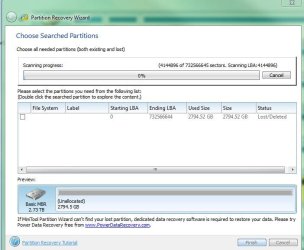
I have use MiniTools and also use Partition Recovery Wizard and it found my lost file system with a blank name for the type. I can see it but when I click the check box to restore it it won't do it.

So I have try so far chkdsk but can't do it b/c it's a RAW.

So I'm sort of mmmm what now stage.

Thoughts?
 

Attachments
  • 1.JPG
    1.JPG
    53 KB · Views: 1
  • 2.JPG
    2.JPG
    26.2 KB · Views: 2

My Computer My Computer

OS
windows 7 professional x32
Not to worry. All your data is there and barring unforeseen circumstances, you should be able to restore your hard drive.

From the PW screenshot you have put up, I guess that you have lost the NTFS Boot sector at sector 2048.( PW shows the the starting LBA as 0 whereas it should be 2048.)

First I would like to confirm that your 3TB drive is an MBR drive. Run PW again and post the screenshot showing your drives. ( The very first screen that appears when you launch PW) After you post the screenshot, close PW.

If it is indeed an MBR drive, in the next step, we shall use TestDisk to check whether the backup of that sector is ok and if it is, restore the corrupted NTFS boot sector with that backup.

Just download Test Disk for Windows and be ready. TestDisk Download - CGSecurity

You may then go to sleep. That gives me sometime :) to write a detailed instructions on how to go about it. ( Do not try TestDisk on your own.)


You may see my post in the morning and then proceed.
 

My Computer My Computer

OS
Windows 7 Home Premium 32 bit
Not to worry. All your data is there and barring unforeseen circumstances, you should be able to restore your hard drive.

From the PW screenshot you have put up, I guess that you have lost the NTFS Boot sector at sector 2048.( PW shows the the starting LBA as 0 whereas it should be 2048.)

First I would like to confirm that your 3TB drive is an MBR drive. Run PW again and post the screenshot showing your drives. ( The very first screen that appears when you launch PW) After you post the screenshot, close PW.

If it is indeed an MBR drive, in the next step, we shall use TestDisk to check whether the backup of that sector is ok and if it is, restore the corrupted NTFS boot sector with that backup.

Just download Test Disk for Windows and be ready. TestDisk Download - CGSecurity

You may then go to sleep. That gives me sometime :) to write a detailed instructions on how to go about it. ( Do not try TestDisk on your own.)
You may see my post in the morning and then proceed.

Thanks for your help jumanji, here is the pictures you request.
 

Attachments

  • Capture.JPG
    Capture.JPG
    19.3 KB · Views: 3
  • 1.JPG
    1.JPG
    28.4 KB · Views: 1

My Computer My Computer

OS
windows 7 professional x32
I don't want a truncated PW screenshot. Please post a full screenshot showing both the system drive and the Seagate external drive.
 

My Computer My Computer

OS
Windows 7 Home Premium 32 bit
Here the full picture. I'm off to bed now, hope this helps. :)
 

Attachments

  • Capture.JPG
    Capture.JPG
    166.6 KB · Views: 13

My Computer My Computer

OS
windows 7 professional x32
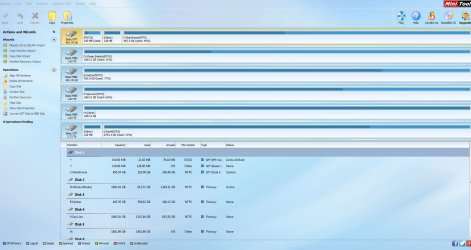
Your 3TB drive - the last one in the PW screenshot - appears to be a GPT drive and appears perfect in the screenshot. How do you say it had turned RAW?????? Clarify.

It now appears to me that your inability to access the drive/folder is due to some other cause.

Now do this to make things clear. We have to start ab-initio.

Safely remove all other external drives except the Seagate 3TB external drive which you say has turned RAW. ( I do not want to see any other drive/s except those inside your PC and the 3TB Seagate external drive.It will also ensure that you do not perform any recommended action on a wrong external drive.) Also please disconnect from the internet. (I do not want to see any networked drives intruding.)

Post an untruncated screenshot of Windows Disk Management. Please read this tutorial and adhere to the guidelines to post an untruncated screenshot with all the information seen.

http://www.sevenforums.com/tutorials/274797-disk-management-post-screen-capture-image.html

Also post a screenshot of PW showing only your internal drive/s and only the problem 3TB external drive.

After a wrong start, we have to start from ground zero again.

Only after seeing the above two screenshots, can we decide what needs to be done further.
 
Last edited:

My Computer My Computer

OS
Windows 7 Home Premium 32 bit
Your 3TB drive - the last one in the PW screenshot - appears to be a GPT drive and appears perfect in the screenshot. How do you say it had turned RAW?????? Clarify.

It now appears to me that your inability to access the drive/folder is due to some other cause.

Now do this to make things clear. We have to start ab-initio.

Safely remove all other external drives except the Seagate 3TB external drive which you say has turned RAW. ( I do not want to see any other drive/s except those inside your PC and the 3TB Seagate external drive.It will also ensure that you do not perform any recommended action on a wrong external drive.) Also please disconnect from the internet. (I do not want to see any networked drives intruding.)

Post an untruncated screenshot of Windows Disk Management. Please read this tutorial and adhere to the guidelines to post an untruncated screenshot with all the information seen.

http://www.sevenforums.com/tutorials/274797-disk-management-post-screen-capture-image.html

Also post a screenshot of PW showing only your internal drive/s and only the problem 3TB external drive.

After a wrong start, we have to start from ground zero again.

Only after seeing the above two screenshots, can we decide what needs to be done further.

I think were still on the right path but I need some time, before posting all the stuff I didn't know I had a pass scan going that was set to run upon the next reboot, but it was decline by the OS Cmd saying it was a RAW file, also PW said it was a "Bad Disk" with black lines. Fast forward to after posting the shots I notice that I had a scan going but didn't understand why the PW said it was a GPT when it was saying before it was "Bad Disk" current the scan below is going and I didn't want to stop it. As this is a 3TB HD I would think this will take some time. Do you want me to stop it and see what happens are make sure it keep going? As I didn't get this to work before and I'm a little shocked.
 

Attachments

  • 1.JPG
    1.JPG
    18.8 KB · Views: 45

My Computer My Computer

OS
windows 7 professional x32
Obviously some corrections have taken place/are taking place.

Let whatever runs - check disk - finish the job. No need to be in a hurry. We can go slowly and steadily.
 

My Computer My Computer

OS
Windows 7 Home Premium 32 bit
Obviously some corrections have taken place/are taking place.

Let whatever runs - check disk - finish the job. No need to be in a hurry. We can go slowly and steadily.

No problem, my thoughts is that it be finish by this weekend as 3TB is a lot of stuff to scan. I post again when it finish and the results.

Zak
 

My Computer My Computer

OS
windows 7 professional x32
Never mind. Let it take its own time. Do not abort check Disk for any reason. That can make matters worse. If it aborts by itself it is OK - we have no control over it - but note down any error message it throws out when aborting by itself and post.

I shall be peeping into Seven Forums atleast ten times during my day time, and I shall catch you whenever you post.
 

My Computer My Computer

OS
Windows 7 Home Premium 32 bit
Never mind. Let it take its own time. Do not abort check Disk for any reason. That can make matters worse. If it aborts by itself it is OK - we have no control over it - but note down any error message it throws out when aborting by itself and post.

I shall be peeping into Seven Forums atleast ten times during my day time, and I shall catch you whenever you post.

It finish with no error are display box. I was trying to get some files off it to make sure it alright but I'm having problems reading the data are copying stuff. At this point how would you like to move forward?
 

My Computer My Computer

OS
windows 7 professional x32
Try a live Linux CD. Those are not quite as fuzzy as Windows.
 

My Computer My Computer

Computer Manufacturer/Model Number
HP, Dell, Gateway, Toshiba - 4 laptops and 2 desktops
OS
Vista, Windows7, Mint Mate, Zorin, Windows 8
CPU
from 1.6GHz Duo to i7
Monitor(s) Displays
2x HP w2207
Hard Drives
5x HDD, 7x SSD, 12x Externals
Keyboard
with trackball - no mices
Mouse
Trackball mice
Internet Speed
DSL 6000
Try a live Linux CD. Those are not quite as fuzzy as Windows.

Sorry, can't assist in this issue. Windows Only.
 

My Computer My Computer

OS
windows 7 professional x32

My Computer My Computer

Computer Manufacturer/Model Number
HP, Dell, Gateway, Toshiba - 4 laptops and 2 desktops
OS
Vista, Windows7, Mint Mate, Zorin, Windows 8
CPU
from 1.6GHz Duo to i7
Monitor(s) Displays
2x HP w2207
Hard Drives
5x HDD, 7x SSD, 12x Externals
Keyboard
with trackball - no mices
Mouse
Trackball mice
Internet Speed
DSL 6000
Please post a screenshot of Windows Disk Management and Partition Wizard as requested in my post #6 for the record..

What exactly is the problem you face when trying to copy? Can you elaborate?

And yes, as whs proposed trying to copy with Live Linux is the next step.

He proposed his baby but I shall propose my baby. You have the choice to pick up the baby you like or think you will be comfortable with. :)

Download Lucid Puppy (Ubuntu Compatible Build) 5.2.8 ISO from Long-Term-Supported WaryPuppy (LTS)

Read this post http://www.sevenforums.com/hardware...ly-unrecognisable-hard-drive.html#post2936753 and create a Live Lucid Puppy pendrive. ( Back up all data in the pendrive beforehand for you will lose it all when Rufus formats the pendrive during the process of creating the Lucid Puppy pendrive.)

Boot from the Lucid Puppy pendrive and check whether you can recover the data.

[Go to the topic Recovering files from the non-bootable Internal Drive: in this thread Lucid Puppy way to recover files from a non-bootable computer on how-to. In your case it will be your external drive.]
 
Last edited:

My Computer My Computer

OS
Windows 7 Home Premium 32 bit
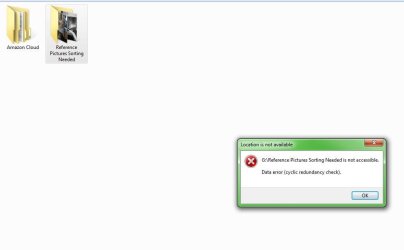
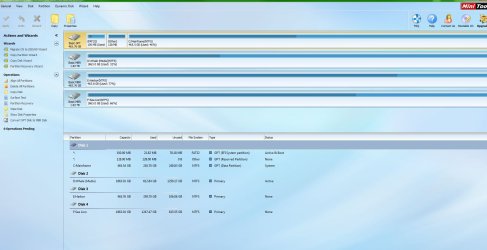
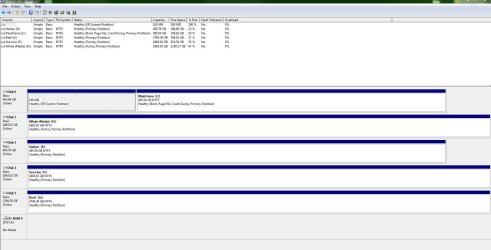
Alright got this posted. Problem is I can't access folders are data below the first folder level of the drive.
 

Attachments

  • 1.JPG
    1.JPG
    200.4 KB · Views: 7
  • 2.JPG
    2.JPG
    141.4 KB · Views: 4
  • 3.JPG
    3.JPG
    133.8 KB · Views: 7

My Computer My Computer

OS
windows 7 professional x32
1. How is it your 3TB external drive G: is not seen in Partition Wizard? That is very strange.( Earlier it was seen as a GPT drive)

2. Make sure that the 3TB external drive is plugged in, Run PW again and check. Report if it is not seen.( I haven't come across such a situation where the drive shows up in WDM but does not show in Partition Wizard.). If the drive is seen then post a screenshot.

( I may have to get into sector level and examine your drive but shall defer it for now.)

3. From what you have said, I understand that you can explore the drive, see two folders there but unable to open the folders. Is that right? In such a case, do you get any error message? If there is one post the error message verbatim.

All this is not going to stop our previous plan of trying to recover the drive with Live Linux. So go ahead with it as per my previous post #15 after answering the above questions.
 

My Computer My Computer

OS
Windows 7 Home Premium 32 bit
It is plug in as you see the window open in the screenshot above. No errors but I can get in to the folders like in the screenshot. Alright I try to get get Live Linux.
 

My Computer My Computer

OS
windows 7 professional x32
No Sir, I do not want you to open My Computer at all and select/click on Drive G:. Reboot your computer.

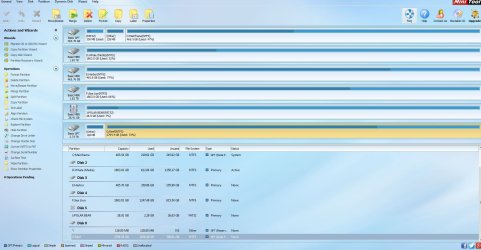
Just plug in your drive, straightaway launch PW (Start > All Programs > Partition Wizard )and post a screenshot. Let me see whether that makes a difference.

( Many a time, after seeing the drives in Windows Disk Management, when I open another program to look at the drive to perform an action, I get a message that the drive is already locked by another program (even though I had closed WDM before running that program). I have to reboot to release the drive and straightaway run the other program to access the drive.)
 
Last edited:

My Computer My Computer

OS
Windows 7 Home Premium 32 bit
It went back to GPT as you can see.
 

Attachments

  • Capture.JPG
    Capture.JPG
    186 KB · Views: 4

My Computer My Computer

OS
windows 7 professional x32
Back
Top