Solved External HD wants to format

Matosk

New member
Local time
10:20 PM
Messages
12
Hi,
I encountered an issue with my Western Digital 500 GB external hard drive which after plugging into USB in my laptop (tried 2 laptops) it says it need to be formatted. I use the hard-drive only in my laptop and plugged in TV as source to watch movies etc.. In the TV the HD still works without any issue.
I have searched many forums and tried 7-8 applications for data recovery but it was not working to at least copy the data to new hard-drive. Seems that some of the system files for windows are damaged.
When I tried recovery software scan, it started but after short while the disk disappeared from view and the scan stopped.

I want at least to copy the data, as I have almost full disk. Anyone that could advise? Many thanks
 

My Computer

Computer type
Laptop
Computer Manufacturer/Model Number
Lenovo
OS
Windows 7 Home Premium 32bit
Try to use EASEUS Data Recovery Wizard to copy your data...

:)
 

My Computer

Computer type
PC/Desktop
Computer Manufacturer/Model Number
My Build
OS
Windows 10 Build 9926
CPU
Core i7 4770k
Motherboard
Asus Z87 - Plus
Memory
32 GB DDR3 @ 1822 MHz
Graphics Card(s)
ATi 280X 3GB 384-Bit @ 1180/6840 MHz
Sound Card
Onboard 8 CH
Monitor(s) Displays
LCD 22" + CRT 17"
Screen Resolution
1920 x 1080 / 1600 x 1200
Hard Drives
SSD: 240 GB
HDD: 750GB (Media) + 2TB (Mass Storage)
PSU
1000W
Case
Self Modded
Cooling
Corsair H60 Triple Fan (Push-Push-Pull)
Keyboard
MS wireless
Mouse
MS wireless
Internet Speed
25M (down) 2M (up)
Antivirus
AVG Internet Security 2015
Browser
IE11 / FF / Chrome
Try to use EASEUS Data Recovery Wizard to copy your data...

:)

I have tried that program, but it couldn't copy. Perhaps it will help that when I performed chkdsk in command line: It's showing as RAW disk now...
 

My Computer

Computer type
Laptop
Computer Manufacturer/Model Number
Lenovo
OS
Windows 7 Home Premium 32bit

My Computer

Computer type
Laptop
Computer Manufacturer/Model Number
Lenovo
OS
Windows 7 Home Premium 32bit
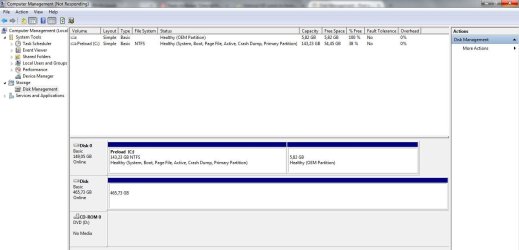
Quite strange. It doesn't even say Disk 1 just Disk.:rolleyes:

Please do the following and answer the queries:

1. At this point of time, are you still able to play from the drive on the TV? Yes/No ( Actually try it and post your answer and not what was happening earlier.:) )

2. In the Disk Map right click on where it says Disk. What menu items do you see? Click on "Offline" to take it offline and once the disk is offline, Right click again and bring it "online". Are there any changes on how the drive looks after this toggle?

3. Close Windows Disk Management, safely remove the external , plug it again and look it in Windows Disk Management again. Do you see any changes?

4. Model/ P/N of the Western Digital drive???. I am assuming that it is a portable external. Is it Elements, Passport or Passport Ultra? Have you installed any Drive Utilities that came with your external drive?

5. Download and install MiniTools Partition Wizard Free Edition version 9.0 Free download Magic Partition Manager Software, partition magic alternative, free partition magic, partition magic Windows 7 and server partition software - Partition Wizard Online. Run it with your external connected and post a screenshot.

Please post your answers point by point without skipping any query.
 

My Computer

OS
Windows 7 Home Premium 32 bit
Quite strange. It doesn't even say Disk 1 just Disk.:rolleyes:

Please do the following and answer the queries:

1. At this point of time, are you still able to play from the drive on the TV? Yes/No ( Actually try it and post your answer and not what was happening earlier.:) )

2. In the Disk Map right click on where it says Disk. What menu items do you see? Click on "Offline" to take it offline and once the disk is offline, Right click again and bring it "online". Are there any changes on how the drive looks after this toggle?

3. Close Windows Disk Management, safely remove the external , plug it again and look it in Windows Disk Management again. Do you see any changes?

4. Model/ P/N of the Western Digital drive???. I am assuming that it is a portable external. Is it Elements, Passport or Passport Ultra? Have you installed any Drive Utilities that came with your external drive?

5. Download and install MiniTools Partition Wizard Free Edition version 9.0 Free download Magic Partition Manager Software, partition magic alternative, free partition magic, partition magic Windows 7 and server partition software - Partition Wizard Online. Run it with your external connected and post a screenshot.

Please post your answers point by point without skipping any query.

Now I tried to do your list with my laptop in work (still Lenovo)

1. Yes, I still can play the drive on my TV.

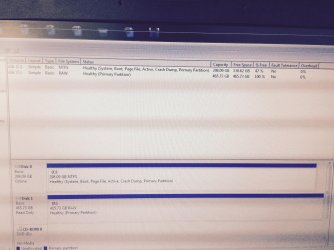
2. When I clicked offline, then my laptop froze, I waited for 10 mins and unplugged the USB cable but I was able to do a screenshot from my phone (sorry for the quality) as Windows was frozen couldn't apply any screenhunter tool.
hdd2.jpg

3. Cannot do that because when I tried to safely remove, then Windows gets frozen until I unplug the USB cable.

4. P/N WDBACY5000ABL-00 . Yes it's external portable - Passport version. No I haven't installed any utilities from the WD drive.

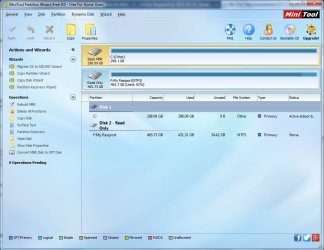
5. ScreenHunter_116.jpg
 

My Computer

Computer type
Laptop
Computer Manufacturer/Model Number
Lenovo
OS
Windows 7 Home Premium 32bit
It makes it difficult to analyse the situation if you change horses midway.:)

Now from the pictures you posted last, what all I can say is your data is still there and we should be able to get it.

Please go home and do it leisurely on the same laptop/PC from which you presented the WDM Screenshot in post#4.

Now do it in this order.

!. Post a screenshot of Windows Disk Management.(After you changed the horse we have to redo it with the old horse :D)

2. Post a screenshot of Partition Wizard.

(In many situations (but not all ) where Partition Wizard shows the drive as Read only toggling the drive offline/online in Windows usually sets it right. That is what I wanted you to try but trying it on a different PC you have made it meaningless.)
 

My Computer

OS
Windows 7 Home Premium 32 bit

My Computer

Computer type
PC/Desktop
Computer Manufacturer/Model Number
home built
OS
Multi-Boot W7_Pro_x64 W8.1_Pro_x64 W10_Pro_x64 +Linux_VMs +Chromium_VM
CPU
AMD Athlon II x4 620
Motherboard
Gigabyte GA-MA785G-UD3H
Memory
6GB GSkill DDR2 800
Graphics Card(s)
AMD 4670 GPU + AMD 4200 IGP
Sound Card
on board Realtek ALC889A
Monitor(s) Displays
RCA 40" LCD TV, Insignia 32" LCD TV, HP 15" LCD monitor
Screen Resolution
1680 x 1050
Hard Drives
OCZ Vertex 3 120GB,
Samsung F3 1TB (3),
Several others - WD, Seagate, Hitachi, ...
PSU
Corsair 500 W
Case
Rosewill mid tower
Cooling
CM 90mm rifle
Keyboard
Gyration wireless, Logitech wireless, Dell USB wired
Mouse
Gyration wireless, Logitech wireless, V7 USB wired
Internet Speed
Spectrum - 100Mbps D / 10Mbps U
Antivirus
Avast, MBAM3, EMET, WinPatrol
Browser
Pale Moon, Firefox, IE
Other Info
2 multi-boot PC's
Mainly HTPC/Office/Gen purpose (no gaming).
Trendnet USB KVM.
LG DVD burner/Blue Ray Player.
Tray system for removable SATA backup drives.

Not currently OCd, under-volted.
I use Hybrid sleep, rarely re-boot or shutdown.

Hauppauge HD-PVR, Avermedia PCIe TV Tuner, Hauppauge PCI TV Tuner.
Put on hold my instructions in post#8, grab MiniTools Power Data Recovery and try it.
 

My Computer

OS
Windows 7 Home Premium 32 bit
I have searched many forums and tried 7-8 applications for data recovery but it was not working to at least copy the data to new hard-drive.

Have you tried MiniTool Power Data Recovery Personal ?
Right now you can get the paid version for free from WindowsDeal:
MiniTool Power Data Recovery Personal (100% Discount)

No, I didn't. Many thanks for your post. I downloaded the free 'paid'version, but the problem is that if I plug the drive into USB and let the tool scan/refresh, it starts with 1%, but then stucks. Only after I remove the USB cable the system works again but the tool crashes :/

Jumanji: I tried to do the steps with 'old' horse but after I plug the drive into USB and in the disk management it starts to scan, it scans something like 5 minutes, then for half a second the drive appears and immediatelly dissapears from the disk drive list. So I cannot post any screenshot from that. How can I achieve that Windows doesn't (and program) freezes so I can perform some action?
 

My Computer

Computer type
Laptop
Computer Manufacturer/Model Number
Lenovo
OS
Windows 7 Home Premium 32bit
Some of these type of programs and options can take a LONG time to run.
How long did you wait ?
Maybe start it before you go to sleep, and see what it shows in the morning ?
 

My Computer

Computer type
PC/Desktop
Computer Manufacturer/Model Number
home built
OS
Multi-Boot W7_Pro_x64 W8.1_Pro_x64 W10_Pro_x64 +Linux_VMs +Chromium_VM
CPU
AMD Athlon II x4 620
Motherboard
Gigabyte GA-MA785G-UD3H
Memory
6GB GSkill DDR2 800
Graphics Card(s)
AMD 4670 GPU + AMD 4200 IGP
Sound Card
on board Realtek ALC889A
Monitor(s) Displays
RCA 40" LCD TV, Insignia 32" LCD TV, HP 15" LCD monitor
Screen Resolution
1680 x 1050
Hard Drives
OCZ Vertex 3 120GB,
Samsung F3 1TB (3),
Several others - WD, Seagate, Hitachi, ...
PSU
Corsair 500 W
Case
Rosewill mid tower
Cooling
CM 90mm rifle
Keyboard
Gyration wireless, Logitech wireless, Dell USB wired
Mouse
Gyration wireless, Logitech wireless, V7 USB wired
Internet Speed
Spectrum - 100Mbps D / 10Mbps U
Antivirus
Avast, MBAM3, EMET, WinPatrol
Browser
Pale Moon, Firefox, IE
Other Info
2 multi-boot PC's
Mainly HTPC/Office/Gen purpose (no gaming).
Trendnet USB KVM.
LG DVD burner/Blue Ray Player.
Tray system for removable SATA backup drives.

Not currently OCd, under-volted.
I use Hybrid sleep, rarely re-boot or shutdown.

Hauppauge HD-PVR, Avermedia PCIe TV Tuner, Hauppauge PCI TV Tuner.
You could also use Task Manager (TM), perhaps even TM Resource Monitor to see if there is any activity that shows it's doing "something".

I prefer and use Sysinternals Process Explorer as it has more info than TM.
In my example I have it sorted by "CPU Usage" and i can see what processes are using how much, and see the changes ...
ProcessExplorer_01.png
 

My Computer

Computer type
PC/Desktop
Computer Manufacturer/Model Number
home built
OS
Multi-Boot W7_Pro_x64 W8.1_Pro_x64 W10_Pro_x64 +Linux_VMs +Chromium_VM
CPU
AMD Athlon II x4 620
Motherboard
Gigabyte GA-MA785G-UD3H
Memory
6GB GSkill DDR2 800
Graphics Card(s)
AMD 4670 GPU + AMD 4200 IGP
Sound Card
on board Realtek ALC889A
Monitor(s) Displays
RCA 40" LCD TV, Insignia 32" LCD TV, HP 15" LCD monitor
Screen Resolution
1680 x 1050
Hard Drives
OCZ Vertex 3 120GB,
Samsung F3 1TB (3),
Several others - WD, Seagate, Hitachi, ...
PSU
Corsair 500 W
Case
Rosewill mid tower
Cooling
CM 90mm rifle
Keyboard
Gyration wireless, Logitech wireless, Dell USB wired
Mouse
Gyration wireless, Logitech wireless, V7 USB wired
Internet Speed
Spectrum - 100Mbps D / 10Mbps U
Antivirus
Avast, MBAM3, EMET, WinPatrol
Browser
Pale Moon, Firefox, IE
Other Info
2 multi-boot PC's
Mainly HTPC/Office/Gen purpose (no gaming).
Trendnet USB KVM.
LG DVD burner/Blue Ray Player.
Tray system for removable SATA backup drives.

Not currently OCd, under-volted.
I use Hybrid sleep, rarely re-boot or shutdown.

Hauppauge HD-PVR, Avermedia PCIe TV Tuner, Hauppauge PCI TV Tuner.
While you carry on with DavidE, post a screenshot of Partition Wizard if your drive shows up in it on your old horse.

If it sees the drive, you can then run Partition Recovery Wizard. But do it only on further instructions.
 

My Computer

OS
Windows 7 Home Premium 32 bit
DavidE : I wanted 2 hours, but only for refresh button in the tool in order to make the external drive visible. But that is always freezing the system and nothing is happening also in task manager.

WTM.jpg

In case I don't have the USB drive plugged, the refresh is immediate - below 1 second. After I unplug the USB cable (mentioned 2 hours) and Mini tool crashes down and I open it again it shows this screen- recovery result but when I want to see the results the tool says it can't open the results...
data recovery screen.jpg
 

My Computer

Computer type
Laptop
Computer Manufacturer/Model Number
Lenovo
OS
Windows 7 Home Premium 32bit
Last edited:

My Computer

Computer type
PC/Desktop
Computer Manufacturer/Model Number
home built
OS
Multi-Boot W7_Pro_x64 W8.1_Pro_x64 W10_Pro_x64 +Linux_VMs +Chromium_VM
CPU
AMD Athlon II x4 620
Motherboard
Gigabyte GA-MA785G-UD3H
Memory
6GB GSkill DDR2 800
Graphics Card(s)
AMD 4670 GPU + AMD 4200 IGP
Sound Card
on board Realtek ALC889A
Monitor(s) Displays
RCA 40" LCD TV, Insignia 32" LCD TV, HP 15" LCD monitor
Screen Resolution
1680 x 1050
Hard Drives
OCZ Vertex 3 120GB,
Samsung F3 1TB (3),
Several others - WD, Seagate, Hitachi, ...
PSU
Corsair 500 W
Case
Rosewill mid tower
Cooling
CM 90mm rifle
Keyboard
Gyration wireless, Logitech wireless, Dell USB wired
Mouse
Gyration wireless, Logitech wireless, V7 USB wired
Internet Speed
Spectrum - 100Mbps D / 10Mbps U
Antivirus
Avast, MBAM3, EMET, WinPatrol
Browser
Pale Moon, Firefox, IE
Other Info
2 multi-boot PC's
Mainly HTPC/Office/Gen purpose (no gaming).
Trendnet USB KVM.
LG DVD burner/Blue Ray Player.
Tray system for removable SATA backup drives.

Not currently OCd, under-volted.
I use Hybrid sleep, rarely re-boot or shutdown.

Hauppauge HD-PVR, Avermedia PCIe TV Tuner, Hauppauge PCI TV Tuner.
You're welcome and glad to hear that worked for you !
 

My Computer

Computer type
PC/Desktop
Computer Manufacturer/Model Number
home built
OS
Multi-Boot W7_Pro_x64 W8.1_Pro_x64 W10_Pro_x64 +Linux_VMs +Chromium_VM
CPU
AMD Athlon II x4 620
Motherboard
Gigabyte GA-MA785G-UD3H
Memory
6GB GSkill DDR2 800
Graphics Card(s)
AMD 4670 GPU + AMD 4200 IGP
Sound Card
on board Realtek ALC889A
Monitor(s) Displays
RCA 40" LCD TV, Insignia 32" LCD TV, HP 15" LCD monitor
Screen Resolution
1680 x 1050
Hard Drives
OCZ Vertex 3 120GB,
Samsung F3 1TB (3),
Several others - WD, Seagate, Hitachi, ...
PSU
Corsair 500 W
Case
Rosewill mid tower
Cooling
CM 90mm rifle
Keyboard
Gyration wireless, Logitech wireless, Dell USB wired
Mouse
Gyration wireless, Logitech wireless, V7 USB wired
Internet Speed
Spectrum - 100Mbps D / 10Mbps U
Antivirus
Avast, MBAM3, EMET, WinPatrol
Browser
Pale Moon, Firefox, IE
Other Info
2 multi-boot PC's
Mainly HTPC/Office/Gen purpose (no gaming).
Trendnet USB KVM.
LG DVD burner/Blue Ray Player.
Tray system for removable SATA backup drives.

Not currently OCd, under-volted.
I use Hybrid sleep, rarely re-boot or shutdown.

Hauppauge HD-PVR, Avermedia PCIe TV Tuner, Hauppauge PCI TV Tuner.
Wow david and jumanji you fixed his problem.

What is the difference between paragon rescue and the other recovery softwares like easeus.. etc?
 

My Computer

Computer type
PC/Desktop
Computer Manufacturer/Model Number
Custom Build (First built from scratch in 2010 by someone else.. then I rebuilt it in 2015).
OS
Windows 7 Home Premium 64bit
CPU
i7 4790k processor
Motherboard
Z97 Sabertooth Mark 1
Memory
Patriot 16gb
Graphics Card(s)
EVGA GeForce GTX 980 Ti FTW
Monitor(s) Displays
19" Monitor
Screen Resolution
1920 x 1080
Hard Drives
Samsung 850 Evo 120gb ssd
PSU
Corsair Cx600
Case
Haf 922
Cooling
Hydro Series H60 High Performance 120 mm
Keyboard
Microsoft
Mouse
Logitech
Browser
Firefox 37.0.4
Other Info
*Computer Manufacturer/Model Number: HP 15-d002tx Notebook* /

OS: Windows 7 Home Premium 64-bit / CPU: Intel Core i3-3110M / Memory: DDR3 4GB / Graphics Card: Intel HD Graphics 4000, GeForce 820M / Keyboard: Microsoft / Browser: Firefox 37.0
^ No, it was out and out DavidE. I had no part or rather parted/departed midway.:D

I shall leave your the other question to DavidE :geek:
 
Last edited:

My Computer

OS
Windows 7 Home Premium 32 bit
Back
Top