Solved External HD wants to format

I was able to copy the data to another hdd but when I'm trying to format my drive it doesn't let me. I looked at other topics in this forum but have not find a solution yet.
It shows me this when I try to format...
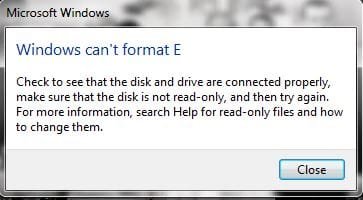
win cant format.JPG
 

My Computer My Computer

Computer type
Laptop
Computer Manufacturer/Model Number
Lenovo
OS
Windows 7 Home Premium 32bit
Check whether you can delete and then format the volume with MiniTool Partition Wizard.

If running on Windows it does not do it, then download the bootable CD version, burn it to CD ( or create a bootable pen drive) boot from it and try to do it. (The bootable CD version runs on Linux)

You can also try formatting it with HP USB Disk Storage Format tool v 2.2.3 HP USB Disk Storage Format Tool Download - Softpedia
(Right Click on HPUSBDisk.exe and run as administrator)
 

My Computer My Computer

OS
Windows 7 Home Premium 32 bit
What is the difference between paragon rescue and the other recovery softwares like easeus.. etc?

Paragon rescue free creates a bootable cd or usb flash drive, so Windows isn't running.
 

My Computer My Computer

Computer type
PC/Desktop
Computer Manufacturer/Model Number
home built
OS
Multi-Boot W7_Pro_x64 W8.1_Pro_x64 W10_Pro_x64 +Linux_VMs +Chromium_VM
CPU
AMD Athlon II x4 620
Motherboard
Gigabyte GA-MA785G-UD3H
Memory
6GB GSkill DDR2 800
Graphics Card(s)
AMD 4670 GPU + AMD 4200 IGP
Sound Card
on board Realtek ALC889A
Monitor(s) Displays
RCA 40" LCD TV, Insignia 32" LCD TV, HP 15" LCD monitor
Screen Resolution
1680 x 1050
Hard Drives
OCZ Vertex 3 120GB,
Samsung F3 1TB (3),
Several others - WD, Seagate, Hitachi, ...
PSU
Corsair 500 W
Case
Rosewill mid tower
Cooling
CM 90mm rifle
Keyboard
Gyration wireless, Logitech wireless, Dell USB wired
Mouse
Gyration wireless, Logitech wireless, V7 USB wired
Internet Speed
Spectrum - 100Mbps D / 10Mbps U
Antivirus
Avast, MBAM3, EMET, WinPatrol
Browser
Pale Moon, Firefox, IE
Other Info
2 multi-boot PC's
Mainly HTPC/Office/Gen purpose (no gaming).
Trendnet USB KVM.
LG DVD burner/Blue Ray Player.
Tray system for removable SATA backup drives.

Not currently OCd, under-volted.
I use Hybrid sleep, rarely re-boot or shutdown.

Hauppauge HD-PVR, Avermedia PCIe TV Tuner, Hauppauge PCI TV Tuner.
ok ty davide
 

My Computer My Computer

Computer type
PC/Desktop
Computer Manufacturer/Model Number
Custom Build (First built from scratch in 2010 by someone else.. then I rebuilt it in 2015).
OS
Windows 7 Home Premium 64bit
CPU
i7 4790k processor
Motherboard
Z97 Sabertooth Mark 1
Memory
Patriot 16gb
Graphics Card(s)
EVGA GeForce GTX 980 Ti FTW
Monitor(s) Displays
19" Monitor
Screen Resolution
1920 x 1080
Hard Drives
Samsung 850 Evo 120gb ssd
PSU
Corsair Cx600
Case
Haf 922
Cooling
Hydro Series H60 High Performance 120 mm
Keyboard
Microsoft
Mouse
Logitech
Browser
Firefox 37.0.4
Other Info
*Computer Manufacturer/Model Number: HP 15-d002tx Notebook* /

OS: Windows 7 Home Premium 64-bit / CPU: Intel Core i3-3110M / Memory: DDR3 4GB / Graphics Card: Intel HD Graphics 4000, GeForce 820M / Keyboard: Microsoft / Browser: Firefox 37.0
Check whether you can delete and then format the volume with MiniTool Partition Wizard.

If running on Windows it does not do it, then download the bootable CD version, burn it to CD ( or create a bootable pen drive) boot from it and try to do it. (The bootable CD version runs on Linux)

You can also try formatting it with HP USB Disk Storage Format tool v 2.2.3 HP USB Disk Storage Format Tool Download - Softpedia
(Right Click on HPUSBDisk.exe and run as administrator)

Jumanji: I was able to delete and format the drive through the bootable CD version but I'm not able to read the disk in Windows now. I tried to plug to TV and nothing is ongoing, the drive is running though.
I tried to go to Ubuntu linux and wonder... I can read the drive and also I could copy some files on the drive, so this means it's ok but why I cannot open it in Windows? It's formatted as NTFS....
Many thanks for support
 

My Computer My Computer

Computer type
Laptop
Computer Manufacturer/Model Number
Lenovo
OS
Windows 7 Home Premium 32bit

My Computer My Computer

Computer type
PC/Desktop
Computer Manufacturer/Model Number
home built
OS
Multi-Boot W7_Pro_x64 W8.1_Pro_x64 W10_Pro_x64 +Linux_VMs +Chromium_VM
CPU
AMD Athlon II x4 620
Motherboard
Gigabyte GA-MA785G-UD3H
Memory
6GB GSkill DDR2 800
Graphics Card(s)
AMD 4670 GPU + AMD 4200 IGP
Sound Card
on board Realtek ALC889A
Monitor(s) Displays
RCA 40" LCD TV, Insignia 32" LCD TV, HP 15" LCD monitor
Screen Resolution
1680 x 1050
Hard Drives
OCZ Vertex 3 120GB,
Samsung F3 1TB (3),
Several others - WD, Seagate, Hitachi, ...
PSU
Corsair 500 W
Case
Rosewill mid tower
Cooling
CM 90mm rifle
Keyboard
Gyration wireless, Logitech wireless, Dell USB wired
Mouse
Gyration wireless, Logitech wireless, V7 USB wired
Internet Speed
Spectrum - 100Mbps D / 10Mbps U
Antivirus
Avast, MBAM3, EMET, WinPatrol
Browser
Pale Moon, Firefox, IE
Other Info
2 multi-boot PC's
Mainly HTPC/Office/Gen purpose (no gaming).
Trendnet USB KVM.
LG DVD burner/Blue Ray Player.
Tray system for removable SATA backup drives.

Not currently OCd, under-volted.
I use Hybrid sleep, rarely re-boot or shutdown.

Hauppauge HD-PVR, Avermedia PCIe TV Tuner, Hauppauge PCI TV Tuner.
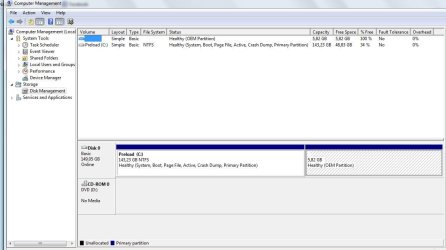
In both the system is not showing them: screenshot belowdisk v2.JPG
 

My Computer My Computer

Computer type
Laptop
Computer Manufacturer/Model Number
Lenovo
OS
Windows 7 Home Premium 32bit

My Computer My Computer

Computer type
PC/Desktop
Computer Manufacturer/Model Number
Custom assembled by me :}
OS
Win-7-Pro64bit 7-H-Prem-64bit
CPU
i7-5930K 2nd i9-9940x both water blocked VRM's too
Motherboard
ASUS SABERTOOTH X99 2nd ASUS x299 Apex
Memory
Trident-z 3200C14 2nd Trident-z 3600C16
Graphics Card(s)
EVGA 1080ti ftw3 2nd Titan Xp both water blocked
Sound Card
Built-in Realtek
Monitor(s) Displays
1-AOC G2460PG 24"G-Sync 144Hz/ 2nd 1-ASUS VG248QE 24" 144Hz
Screen Resolution
1920 x 1080 144Hz
Hard Drives
2-Samsung M.2 Evo & Evo Plus
2-Samsung 850 EVO 500GB SSD's/ 3-2.5 W.D. Black 1tb-&3-1tb/3-3.5 WD Black 1tb hdd's
PSU
EVGA SuperNOVA 1000-P2 2nd 1200-P2
Case
2-Corsair Obsidian Series 450D Black ATX Mid Tower
Cooling
Custom water loops
Keyboard
Logitech G710+/ 2nd Logitech G910
Mouse
2-RedDragon M901 Perdition 16400 dpi Gaming mouse = wired
Internet Speed
Comcast Ping 19ms 89.31mbps download speed 6.12mbps upload
Antivirus
Malwarebytes Pro/ Superantispyware Pro
Browser
FireFox & Pale moon
Other Info
2nd ASUS X299 Apex/Intel i9-9940x with Custom water loop/7H-Prem-x64/Corsair 450D case/Ram Trident-z 3600C16 4x8gb / Samsung970Evo plus 500gb SSD/Dual ssd EZ swap evo/PSU EVGA SuperNova 1200w-P2 80+Platinum/GPU Titan Xp /8-ML-140 on push-pull on 2-280GTX rads
Jumanji: I was able to delete and format the drive through the bootable CD version but I'm not able to read the disk in Windows now. I tried to plug to TV and nothing is ongoing, the drive is running though.
I tried to go to Ubuntu linux and wonder... I can read the drive and also I could copy some files on the drive, so this means it's ok but why I cannot open it in Windows? It's formatted as NTFS....
Many thanks for support

That is strange.

Please run Partition Wizard from the bootable CD or pen drive again, and post a screenshot with that external drive connected. (OK, you have to post a camera shot)
 

My Computer My Computer

OS
Windows 7 Home Premium 32 bit
Jumanji: Finally I was able to correct the disk and now it's working! :)

Let me explain how I did it: With the Boot CD of Partition Wizard I had to use the method of safe boot or compatible boot but not normal boot. With normal boot the tool couldn't even read and show the drive.

1. I used safe boot and then I wiped out all partitions with 0's. This could on the 500GB disk approx. 5 hours. 2. Then I formatted the disk with NTFS and default format.
3. I reloaded the MBR on the disk.

That's it, when I booted normal Win7, no more error messages and the drive showed in the menu. :)

Many thanks for your support in this tricky case.
 

My Computer My Computer

Computer type
Laptop
Computer Manufacturer/Model Number
Lenovo
OS
Windows 7 Home Premium 32bit
Glad you got it sorted out.

I was waiting for your screenshot and after seeing that I would have advised a complete zero wipe for that is the only thing we had left out.:) And for that I was contemplating using WD Datalifeguard Diagnostics for DOS for it would also check your drive and then write zeroes. Perhaps we should have done that in the first instance after you had successfully recovered the data instead of going to Partition Wizard to delete/ format it. We are also learning our lessons.

Now that it works in Windows use Datalifeguard Diagnostics for Windows and run Short Test and Long tests. If nothing else, it should boost your confidence that everything is fine and help use the HDD without any worries of the past.

Happy ending to an interesting thread and well done.

EDIT: You may mark this thread as solved if you have nothing else to continue.
 
Last edited:

My Computer My Computer

OS
Windows 7 Home Premium 32 bit
Back
Top