
External HD - Win8.1- can't access it OR assign letter to disk

aiven

New member
Local time
5:15 PM
Messages
2
Hello everyone.

I have made backups of my files on an external hard drive (WD MyBook 2TB).
I did the transfer from my previous iMac before selling it.

Now on my new PC running Windows 8.1 Pro 64bits, I plugged the HD, heard the sound that it was recognized but did not see it appearing in the "My Computer" HD list.

I can see it in the DiskManagement panel but when I try to assign a letter to the disc, everything is grey except "delete the volume".

I just would like to see my files and copy them on my internal HD.

Thank you in advance for your time and reply.
Kind regards.

Aiven
 

Attachments
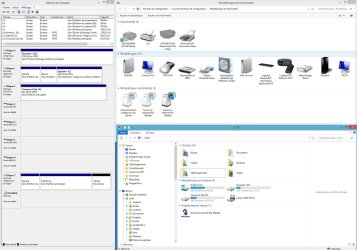
  • 0001.jpg
    0001.jpg
    221.5 KB · Views: 7

My Computer My Computer

At a glance

8.1 Pro 64bits
Computer type
PC/Desktop
OS
8.1 Pro 64bits
How was the external formatted before moving the files from the iMac?
 

My Computer My Computer

At a glance

Windows 10 Pro x64 ; Xubuntu x64Intel i7 860 @ 2.80 GHz O/C'ed to 4.0GHz16GB Corsair Vengance DDR3 @ 661 MHz Dual Cha...EVGA NVidia GTX 560 1024MB
Computer type
PC/Desktop
Computer Manufacturer/Model Number
Golden Mk. I.4
OS
Windows 10 Pro x64 ; Xubuntu x64
CPU
Intel i7 860 @ 2.80 GHz O/C'ed to 4.0GHz
Motherboard
Gigabyte P55A-UD3R Rev.1. Award BIOS F13
Memory
16GB Corsair Vengance DDR3 @ 661 MHz Dual Channel (9-9-9-24)
Graphics Card(s)
EVGA NVidia GTX 560 1024MB
Sound Card
Realtek Integrated
Monitor(s) Displays
Dual Samsung SyncMaster 2494HS
Screen Resolution
1920*1080 and 1920*1080
Hard Drives
1*Samsung 840 EVO 120GB SSD;
1*OCZ Vertex 2 60GB SSD;
2*Samsung F3 SpinPoint 1TB in RAID0;
1*Samsung F1 SpinPoint 1TB;
2*Western Digital 1TB External USB 3.0
1*Western Digital 500GB External USB 3.0
1*Seagate 500GB External USB 2.0
PSU
Thermaltake ToughPower QFan 750W
Case
Thermaltake Element S VK60001W2Z
Cooling
Corsair H60 Water Cooling, 2*230mm and 2*80mm case fans
Keyboard
Logitech G110
Mouse
Logitech MX518
I did not format it, just bought it and transfered my files. I cannot see in the DiskManager what format it is.

For the moment, it appears to me the solution would be to transfer all the files to a Mac, then format the HD, then re-copy the files? :sarc:
 

My Computer My Computer

At a glance

8.1 Pro 64bits
Computer type
PC/Desktop
OS
8.1 Pro 64bits

My Computer My Computer

At a glance

Windows 7
Computer type
PC/Desktop
OS
Windows 7
I did not format it, just bought it and transfered my files. I cannot see in the DiskManager what format it is.

For the moment, it appears to me the solution would be to transfer all the files to a Mac, then format the HD, then re-copy the files? :sarc:
Yes, try that. Format the disk as NTFS.
 

My Computer My Computer

At a glance

Windows 10 Pro x64 ; Xubuntu x64Intel i7 860 @ 2.80 GHz O/C'ed to 4.0GHz16GB Corsair Vengance DDR3 @ 661 MHz Dual Cha...EVGA NVidia GTX 560 1024MB
Computer type
PC/Desktop
Computer Manufacturer/Model Number
Golden Mk. I.4
OS
Windows 10 Pro x64 ; Xubuntu x64
CPU
Intel i7 860 @ 2.80 GHz O/C'ed to 4.0GHz
Motherboard
Gigabyte P55A-UD3R Rev.1. Award BIOS F13
Memory
16GB Corsair Vengance DDR3 @ 661 MHz Dual Channel (9-9-9-24)
Graphics Card(s)
EVGA NVidia GTX 560 1024MB
Sound Card
Realtek Integrated
Monitor(s) Displays
Dual Samsung SyncMaster 2494HS
Screen Resolution
1920*1080 and 1920*1080
Hard Drives
1*Samsung 840 EVO 120GB SSD;
1*OCZ Vertex 2 60GB SSD;
2*Samsung F3 SpinPoint 1TB in RAID0;
1*Samsung F1 SpinPoint 1TB;
2*Western Digital 1TB External USB 3.0
1*Western Digital 500GB External USB 3.0
1*Seagate 500GB External USB 2.0
PSU
Thermaltake ToughPower QFan 750W
Case
Thermaltake Element S VK60001W2Z
Cooling
Corsair H60 Water Cooling, 2*230mm and 2*80mm case fans
Keyboard
Logitech G110
Mouse
Logitech MX518
Back
Top