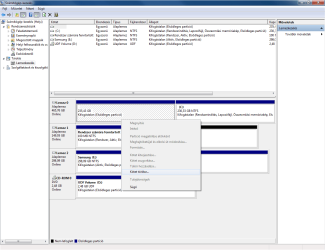
Looks like you have another drive that has either no letter or it is unallocated space.
The partition after the 100MB system Reserve partition.
I have seen this before with AHCI enabled. All the drives get mixed up for some reason.
That 100MB sys reserve partition that is on your drive 1 should also be on drive physical the OS is installed to. But your OS is installed to a partition on what is called drive 0 (zero). But that drive is not the first drive in the system (the drive connected to SATA port 1.
What you have here is a mess. Sys reserve in a partition on one physical drive, the OS in another partition on a completely different physical drive. The other part (partition) of the physical drive the OS is installed to doesn't have a drive letter and you can't assign one.
The other part (partition) of the physical drive that has the sys reserve partition looks to be unallocated space.
May be time to boot the system from a BOOT CD that has a file manager program on it and copy all your personal data over to a external drive. Format everything and start over.
If you go that route I suggest you only install one physical drive in the system until you reinstall the OS.
Good luck.
P.S.
If it was me I would of already wiped that system and started over.