
Solved External HDD 1TB not showing up please help (urgent)

sn1p3r

New member
Local time
5:26 AM
Messages
17
Good Evening guys,

My External HDD Toshiba 1TB doesn't show up at MY COMPUTER
..... 1st let me explain how this error occured ...

1. I used my external HDD to install KALI LINUX on it ( here my external HDD was converted to linux file system partition for its boot system)

2. After 1 day i thought to install that Kali linux on my internal Hard disk along with my win 7 side by side

3. I uninstall Kali linux by connecting USB flash drive & external HDD 1TB by help of "Linux Boot repair disc os uninstaller"

4. Kali os was uninstalled & i repair grub rescue too ... now am running back my win7 only

5. :eek: Now main problem is i can't see my Toshiba external HDD 1TB storage drive on MY COMPUTER

>>> Can anybody tell me how can i recover my that Toshiba external HDD & use for storage as before :huh:
 

My Computer My Computer

At a glance

win7 sp1 32-bit & Ubuntu 10.4 , kali Linux , ...2GBInternal
Computer type
Laptop
Computer Manufacturer/Model Number
Acer
OS
win7 sp1 32-bit & Ubuntu 10.4 , kali Linux , Back Track , Xp , Mac osX
Motherboard
Intel
Memory
2GB
Graphics Card(s)
Internal
Hard Drives
320 GB internal & 1 TB external
Internet Speed
10 MB/PS
Antivirus
Avast
Browser
firefox & crome , iceweasel , safari , UCweb
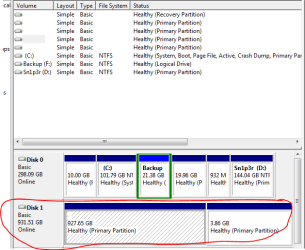
Actually i want to change this to my storage HDD . I explained all these on top
Capture.PNG
 

My Computer My Computer

At a glance

win7 sp1 32-bit & Ubuntu 10.4 , kali Linux , ...2GBInternal
Computer type
Laptop
Computer Manufacturer/Model Number
Acer
OS
win7 sp1 32-bit & Ubuntu 10.4 , kali Linux , Back Track , Xp , Mac osX
Motherboard
Intel
Memory
2GB
Graphics Card(s)
Internal
Hard Drives
320 GB internal & 1 TB external
Internet Speed
10 MB/PS
Antivirus
Avast
Browser
firefox & crome , iceweasel , safari , UCweb
Thank's for all for not Replying

Problem solved by Myself after some try

solution

- delete the partition ( wipes all datas stored by linux system ) & and again Mount it , enter the space value & drive name !
 

My Computer My Computer

At a glance

win7 sp1 32-bit & Ubuntu 10.4 , kali Linux , ...2GBInternal
Computer type
Laptop
Computer Manufacturer/Model Number
Acer
OS
win7 sp1 32-bit & Ubuntu 10.4 , kali Linux , Back Track , Xp , Mac osX
Motherboard
Intel
Memory
2GB
Graphics Card(s)
Internal
Hard Drives
320 GB internal & 1 TB external
Internet Speed
10 MB/PS
Antivirus
Avast
Browser
firefox & crome , iceweasel , safari , UCweb
You seem to forget that everyone here is a volunteer and we have a real life and other real jobs. Waiting 5 hours is hardly a long time.
 

My Computer My Computer

At a glance

Windows 10 Pro X64Intel Quad Core i7-4770 @ 3.4Ghz16.0GB PC3-12800 DDR3 SDRAM 1600 MHzIntel Integrated HD Graphics
Computer type
PC/Desktop
Computer Manufacturer/Model Number
Lenovo IdeaCenter 450
OS
Windows 10 Pro X64
CPU
Intel Quad Core i7-4770 @ 3.4Ghz
Memory
16.0GB PC3-12800 DDR3 SDRAM 1600 MHz
Graphics Card(s)
Intel Integrated HD Graphics
Sound Card
Realtek HD Audio
Monitor(s) Displays
HP 22" LCD
Screen Resolution
1680 x 1050
Hard Drives
250GB Samsung EVO SATA-3 SSD
2TB Seagate ST2000DM001 SATA-2
1.5TB Seagate ST3150041AS SATA
Keyboard
Dell USB
Mouse
Lenovo USB
Internet Speed
Cable via Road Runner 3MB Upload, 30MB Download
Antivirus
Windows Defender, MBAM Pro, MBAE
Browser
Seamonkey
Other Info
UEFI/GPT
PLDS DVD-RW DH16AERSH
Good that you figure out the problem yourself. In case you're interested to know, the reason why it's not detected is because the file system was changed when you installed linux which is different from what windows usually use. Hence, the outcome of it not being detected.

When you delete the partition, you delete the file system as well and it was formatted to the default file system.
 

My Computer My Computer

At a glance

Windows 10 Pro
Computer type
Laptop
Computer Manufacturer/Model Number
Lenovo E450
OS
Windows 10 Pro
Very well put Skyred5 ;)
 

My Computer My Computer

At a glance

Windows 10 Pro x64Intel Core i7 6700KGSkill TridentZ RGB 16GB 3600 16-16-16-36EVGA GTX 980 Ti SC x2
Computer type
PC/Desktop
Computer Manufacturer/Model Number
Skylake Special #666
OS
Windows 10 Pro x64
CPU
Intel Core i7 6700K
Motherboard
Asus Sabertooth Z170 Mark 1
Memory
GSkill TridentZ RGB 16GB 3600 16-16-16-36
Graphics Card(s)
EVGA GTX 980 Ti SC x2
Sound Card
Realtek High Definition
Monitor(s) Displays
AOC G2460PG
Screen Resolution
1920 x 1080 144Hz
Hard Drives
Samsung 860 Pro 256GB, Seagate Barracuda 4TB x2
PSU
EVGA 1000 P2, EVGA White Custom Braided Cables
Case
Corsair Vengeance C70 Gunmetal Black
Cooling
Corsair H100i v2, Corsair ML120 x2, Thermal Grizzly Kryonaut
Keyboard
Logitech G910 Orion Spectrum
Mouse
Logitech G700s
Internet Speed
Verizon Fios Quantum Gateway 75/75
Antivirus
Windows Defender, Malwarebytes Free 3.8.3
Browser
Chrome
Other Info
Corsair SP120 x4, LG Blu-ray Drive, Durabrand HT-395 100 Watt Dolby Digital Amp, Corsair H2100 Wireless 7.1 Headset
You also had no drive letters which need assignment via right click in Disk Mgmt before you can access the drive.

However after a Linux install I'd want to first wipe the drive with Diskpart Clean Command to clear boot code which may interfere otherwise, then repartition in Disk Mgmt.

A data drive is always best to partition Logically: Partition / Extended : Logical Drives - Windows 7 Forums because then boot files cannot be derailed onto it or it cannot interfere otherwise with boot.
 
You seem to forget that everyone here is a volunteer and we have a real life and other real jobs. Waiting 5 hours is hardly a long time.


Ztruker ;) : What exactly u mean to say waiting 5 hrs is hardly a long time ?
 

My Computer My Computer

At a glance

win7 sp1 32-bit & Ubuntu 10.4 , kali Linux , ...2GBInternal
Computer type
Laptop
Computer Manufacturer/Model Number
Acer
OS
win7 sp1 32-bit & Ubuntu 10.4 , kali Linux , Back Track , Xp , Mac osX
Motherboard
Intel
Memory
2GB
Graphics Card(s)
Internal
Hard Drives
320 GB internal & 1 TB external
Internet Speed
10 MB/PS
Antivirus
Avast
Browser
firefox & crome , iceweasel , safari , UCweb
Back
Top