
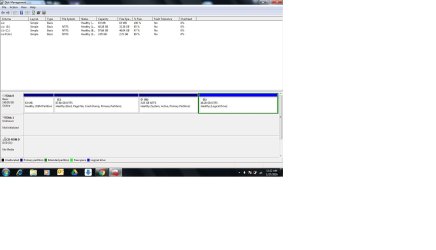
WD external HDD 1TB Showing unallocated not initialised

Yogesh12

New member
Local time
8:56 PM
Messages
4
Hello,

My WD external HDD 1TB is showing Disk 1 unallocated not initialised also space capacity is not shown in disk management. While connecting to the system some beep sound is coming from HDD and in system it is showing USB connected successfully but not showing on my computer. Please help it has my valuable data. I need to recover that. My HDD is not in warranty.
 

Attachments
  • WD_HDD_disk_mgmt.jpg
    WD_HDD_disk_mgmt.jpg
    77.2 KB · Views: 5
Last edited:

My Computer My Computer

At a glance

Windows 10 64bit
Computer type
Laptop
Computer Manufacturer/Model Number
Lenovo
OS
Windows 10 64bit
Hello Yogesh12!

This is a frustrating problem with the external! :/

It's too bad your drive is not in warranty any more, have you checked it through the WD Warranty check?

The problem you are describing sounds like the drive has damage and it's failing. The beeping sound is also not good. Is this a desktop or portable WD external, which model is it? You should try it with another USB cable in every port of the PC and also on another system. You could also boot to a Linux-based Live CD and check if you can access the drive then.

This SevenForums tutorial by Golden could help you:

http://www.sevenforums.com/tutorials/256518-peppermint-live-cd-dvd-usb-create-emergency-backup.html

If nothing works, you could try with a data recovery software at your own, but be careful as it could do more damage than help retrieve the data. My best advice would be to contact an official data recovery company for advice or services, WD has partners in the field.

Best of luck and post back!

CK_WD
 

My Computer My Computer

At a glance

Windows 7 Home Premium x64
Computer type
PC/Desktop
OS
Windows 7 Home Premium x64
Its an portable external HDD, I have used minitool in which nothing comes in scan i have done both quick and full scan. Also my hdd doesnt show its capacity. While plugging it says usb driver successfully installed but not showing in my computer. I searching for this issue and came across to photorec software will it work ??
Can i change its casing to connect by Sata connector ???
 

My Computer My Computer

At a glance

Windows 10 64bit
Computer type
Laptop
Computer Manufacturer/Model Number
Lenovo
OS
Windows 10 64bit
One more question. I need another USB drive by which i need to boot on linux and also my hdd needs to be connected with my system as data is present in it which i want to recover???
 

My Computer My Computer

At a glance

Windows 10 64bit
Computer type
Laptop
Computer Manufacturer/Model Number
Lenovo
OS
Windows 10 64bit
Unfortunately, no, you cannot connect the drive directly via SATA as it has a more different design internally with the aim to keep the form factor of the HDD small and it helps prevent issues that could happen with the bridge board. Moreover, the drive could have hardware encryption.

I cannot be certain about the software you are describing, I'm sorry. :/

The issues you are describing are pointing to a failing drive. Try the above mentioned options.

You need either another USB drive, or a thumb drive/USB stick or a CD. You make that media bootable with a Linux-based OS, boot to it, connect the external and observe if it shows up. Follow Golden's tutorial from my previous post. :)

Good luck!

CK_WD
 

My Computer My Computer

At a glance

Windows 7 Home Premium x64
Computer type
PC/Desktop
OS
Windows 7 Home Premium x64
I have tried linux but no luck....
 

My Computer My Computer

At a glance

Windows 10 64bit
Computer type
Laptop
Computer Manufacturer/Model Number
Lenovo
OS
Windows 10 64bit
Hi and welcome to SevenForums,
You show you're using win-10 ?
Are you dual booting also with win-7 ?
 

My Computer My Computer

At a glance

Win-7-Pro64bit 7-H-Prem-64biti7-5930K 2nd i9-9940x both water blocked VRM'...Trident-z 3200C14 2nd Trident-z 3600C16EVGA 1080ti ftw3 2nd Titan Xp both water blocked
Computer type
PC/Desktop
Computer Manufacturer/Model Number
Custom assembled by me :}
OS
Win-7-Pro64bit 7-H-Prem-64bit
CPU
i7-5930K 2nd i9-9940x both water blocked VRM's too
Motherboard
ASUS SABERTOOTH X99 2nd ASUS x299 Apex
Memory
Trident-z 3200C14 2nd Trident-z 3600C16
Graphics Card(s)
EVGA 1080ti ftw3 2nd Titan Xp both water blocked
Sound Card
Built-in Realtek
Monitor(s) Displays
1-AOC G2460PG 24"G-Sync 144Hz/ 2nd 1-ASUS VG248QE 24" 144Hz
Screen Resolution
1920 x 1080 144Hz
Hard Drives
2-Samsung M.2 Evo & Evo Plus
2-Samsung 850 EVO 500GB SSD's/ 3-2.5 W.D. Black 1tb-&3-1tb/3-3.5 WD Black 1tb hdd's
PSU
EVGA SuperNOVA 1000-P2 2nd 1200-P2
Case
2-Corsair Obsidian Series 450D Black ATX Mid Tower
Cooling
Custom water loops
Keyboard
Logitech G710+/ 2nd Logitech G910
Mouse
2-RedDragon M901 Perdition 16400 dpi Gaming mouse = wired
Internet Speed
Comcast Ping 19ms 89.31mbps download speed 6.12mbps upload
Antivirus
Malwarebytes Pro/ Superantispyware Pro
Browser
FireFox & Pale moon
Other Info
2nd ASUS X299 Apex/Intel i9-9940x with Custom water loop/7H-Prem-x64/Corsair 450D case/Ram Trident-z 3600C16 4x8gb / Samsung970Evo plus 500gb SSD/Dual ssd EZ swap evo/PSU EVGA SuperNova 1200w-P2 80+Platinum/GPU Titan Xp /8-ML-140 on push-pull on 2-280GTX rads
Have you tried the other options, changing the cable, trying on another system? Do those, as well, and if again nothing works, you could try a data recovery software on your own, or best – use professional data recovery services, as mentioned above, if your data is truly valuable. :/

Best of luck!

CK_WD
 

My Computer My Computer

At a glance

Windows 7 Home Premium x64
Computer type
PC/Desktop
OS
Windows 7 Home Premium x64
Back
Top