
External HDD says it need to be format

nums

New member
Member
Local time
4:49 AM
Messages
52
Hello. I have a 3TB External HDD, while in the middle of using it (was watching a video file) windows popped up saying that it needs to be format before it can be used.

Now whenever it's plugged in the same message pops up. It already has a lot of data on it and I don't want to lose it.

Anyone know whats happened or a way to fix or at least recover the data.
In the device manager it now shows under Other Devices and has the ! icon.
 

My Computer My Computer

Computer type
PC/Desktop
OS
Windows 7 Home 64bit
CPU
i5-4670 Quad Core @ 3.40GHz
Motherboard
Gigabyte H87-D3H
Memory
8 GB
Graphics Card(s)
GTX 780
Hard Drives
Samsung SSD 840 EVO 250GB | OZC-VERTEX2 120GB
PSU
SST-ST75F-P
Please post a screenshot of how the HDD presents itself in Windows Disk Manadement.

http://www.sevenforums.com/tutorials/274797-disk-management-post-screen-capture-image.html

And you may prepare yourself to recover the data with PhotoRec (and not TestDisk). Just go to the topic Recovery in this thread on using PhotoRec

http://www.sevenforums.com/software/193467-guide-using-photorec-recovery-software.html

On how to copy the data on to another external Copying files listed by TestDisk during Recovery here. (applies to PhotoRec too)

http://www.sevenforums.com/hardware...suddenly-became-unllocated-3.html#post2395385
 

My Computer My Computer

OS
Windows 7 Home Premium 32 bit
Thanks for the reply Jumanji

It seems to be random whether it wants to work or not. I was able to get it working for awhile then after a computer restart it stopped then now after having the drive off for awhile it's working again.

I did try restarting to see if that was causing it to stop working (it didn't) and previously keeping the drive off had not fixed it. I'll post a screenshot of the disk management next time it stops working.
 
Last edited:

My Computer My Computer

Computer type
PC/Desktop
OS
Windows 7 Home 64bit
CPU
i5-4670 Quad Core @ 3.40GHz
Motherboard
Gigabyte H87-D3H
Memory
8 GB
Graphics Card(s)
GTX 780
Hard Drives
Samsung SSD 840 EVO 250GB | OZC-VERTEX2 120GB
PSU
SST-ST75F-P
So It doesnt show up at all on the disk management screen when not working, though Windows still wants to format it.
 

My Computer My Computer

Computer type
PC/Desktop
OS
Windows 7 Home 64bit
CPU
i5-4670 Quad Core @ 3.40GHz
Motherboard
Gigabyte H87-D3H
Memory
8 GB
Graphics Card(s)
GTX 780
Hard Drives
Samsung SSD 840 EVO 250GB | OZC-VERTEX2 120GB
PSU
SST-ST75F-P
That is strange - HDD not showing in Disk Management but Windows wanting to format. I am now not sure such a thing could happen :D. Did you scroll down the Disk map and check? ( I know of atleast one user here who said so and then came back to tell, he scrolled and found it :).) You may also rescan and check. (Action > Rescan Disks)
If you have access to another working PC, connect this drive to it, check and report. If it shows up in Windows Disk management, post a screenshot.

I don't want to prescribe any laborious data recovery procedures unless I see how the disk presents itself in Windows.

Also Windows 7 may sometimes behave erratically when reading a FAT32 formatted drive. Is the drive FAT32 formatted? Is it a GPT drive? Did you format it anytime?
 

My Computer My Computer

OS
Windows 7 Home Premium 32 bit
The drive is NTFS.
It was not on the disk map, even after rescanning disks.

This is what it looks on the disk management when it decides to work: https://i.imgur.com/DV9QaWu.png

It will out of blue stop working (even when it's in use) and Windows will say it needs to be format. The last time it stopped working Windows also popped up saying the device was unrecognized or malfunctioned.

Maybe the drive is just on its way out?
 

My Computer My Computer

Computer type
PC/Desktop
OS
Windows 7 Home 64bit
CPU
i5-4670 Quad Core @ 3.40GHz
Motherboard
Gigabyte H87-D3H
Memory
8 GB
Graphics Card(s)
GTX 780
Hard Drives
Samsung SSD 840 EVO 250GB | OZC-VERTEX2 120GB
PSU
SST-ST75F-P
i too had an issue with a drive about 2 weeks ago, a Seagate 3TB desktop expansion drive, i was uploading a 4GB game file to my google drive, when i had finished i found that the perfectly working 3TB drive (which wasnt the source of the upload) had turned itself into a RAW drive, this drive had about 2.8TB of data on it.

i have since been able to recover 99% of the data safely to 2 other new 2TB drives running night and day recovering files.

my dilemma now is to try to format the 3TB to NTFS and then partition it, i had heard that drives greater than 2TB drive are prone to this RAW conversion so i want to format it and then partition it, but formatting is proving difficult.

message boxes pop up saying
'You need to format the disk in drive:E before you can use it'

so i click format and go through the boxes and after about 15 seconds a message box says
'Windows was unable to complete the format'

initially i tried to create the partitions, so now i have a primary partition of 2049.00GB RAW
and 746.52GB Unallocated. when i right click the unallocated area the New Simple Volume is greyed out and unusable and when i right click the larger partition the Extend Simple Volume is also greyed out and unusable.

cheers.
if you want screen grabs let me know.

Anthony Birch
 

My Computer My Computer

Computer type
PC/Desktop
Computer Manufacturer/Model Number
Computer Retailer
OS
Windows 7 Professional x64 (6.1, Build 7601)
CPU
Core i5-4460 3.2GHz
Motherboard
Gigabyte H97M-D3H
Memory
4 x 8GB 1333 DDR3
Graphics Card(s)
nVidia GeForce GTX760 4GB
Sound Card
on board
Monitor(s) Displays
Samsung 23" LCD & Acer 22" LCD
Hard Drives
250GB SSD
WD 1TB SATA
PSU
Thermaltake 850w
Case
Thermaltake Versa H22
Mouse
Logitech
Internet Speed
ADSL2+
Antivirus
Norton 360
Browser
Mozilla Firefox
hmm...

Your 3TB drive should be formatted as a GPT drive.

The first requirement for using a larger than 2 TB drive on a system is that the motherboard/BIOS should support larger than 2 TB drives.All new and recent motherboards do, but if you have an antique system :) you have to check and get it confirmed.

If you use a 3TB drive on such an antique system that does not support larger than 2TB drives, then after reaching the 2TB limit it will wrap around and start writing the data from the first sector destroying the MBR and GPT data in the first few sectors and you will lose access to that drive. This problem has been reported by many users using 3 TB drives on incompatible systems and interfaces like docks.

If you are sure that your system and any interface you are using can handle larger than 2 TB drives, then delete all volumes on the drive, initialize it as a GPT disk and then format it.

In stubborn cases where the HDD has "dirty sectors" which prevent formatting, you may have to do a low level formatting writing zeros to all sectors and then format it as a GPT drive.
 

My Computer My Computer

OS
Windows 7 Home Premium 32 bit
thanks for your reply jumanji, i followed your advise and the drive formatted perfectly, i then created the 2 partitions i wanted and windows sees everything spot on, i unplugged and plugged in the drive several times and windows didnt throw up the dialogue box asking to format the drive before i use it.........great result thanks again.

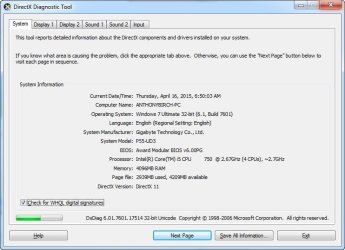
this is my motherboard version......
GIGABYTE - Motherboard - Socket 1156 - GA-P55A-UD3 (rev. 1.0)

and this is my system overview...
 

Attachments

  • 4-16-2015 6-50-19 AM.jpg
    4-16-2015 6-50-19 AM.jpg
    54.1 KB · Views: 1

My Computer My Computer

Computer type
PC/Desktop
Computer Manufacturer/Model Number
Computer Retailer
OS
Windows 7 Professional x64 (6.1, Build 7601)
CPU
Core i5-4460 3.2GHz
Motherboard
Gigabyte H97M-D3H
Memory
4 x 8GB 1333 DDR3
Graphics Card(s)
nVidia GeForce GTX760 4GB
Sound Card
on board
Monitor(s) Displays
Samsung 23" LCD & Acer 22" LCD
Hard Drives
250GB SSD
WD 1TB SATA
PSU
Thermaltake 850w
Case
Thermaltake Versa H22
Mouse
Logitech
Internet Speed
ADSL2+
Antivirus
Norton 360
Browser
Mozilla Firefox
Glad that your problem got resolved.:)
 

My Computer My Computer

OS
Windows 7 Home Premium 32 bit
:thumbsup:
 

My Computer My Computer

Computer type
PC/Desktop
Computer Manufacturer/Model Number
Computer Retailer
OS
Windows 7 Professional x64 (6.1, Build 7601)
CPU
Core i5-4460 3.2GHz
Motherboard
Gigabyte H97M-D3H
Memory
4 x 8GB 1333 DDR3
Graphics Card(s)
nVidia GeForce GTX760 4GB
Sound Card
on board
Monitor(s) Displays
Samsung 23" LCD & Acer 22" LCD
Hard Drives
250GB SSD
WD 1TB SATA
PSU
Thermaltake 850w
Case
Thermaltake Versa H22
Mouse
Logitech
Internet Speed
ADSL2+
Antivirus
Norton 360
Browser
Mozilla Firefox
Back
Top