Need help to recover 'WD MyPassport Ultra 1TB' external HDD! Please!

OLKD

New member
Local time
1:08 AM
Messages
3
Hi!
I have a huge problem right now. I have a work project I'm working on which includes a video for promotional purposes.
I have this external hard drive where I place every clip, movie, video, files for certain projects and/or photos. A few days ago, after recording the last scene, I moved all the clips over to my WD My Passport external HDD to keep everything in one place, and I was just sitting down to edit the clips I have been recording into this little video. I turned on my computer and couldn't find the icon for the external HDD anywhere. It's gone. I know that it is plugged in, and the computer knows that it's plugged in because it says ''The Installation was succesful'' or something like that.


The guys I have been filming are always busy, so recreating the scenes is next to impossible.

I need urgent help! The video needs to be ready by Wedensday, September, 10th 2014.

Here is what my controlpanel, computer management, partition recovery wizard and external HDD looks like:
k6qBpc0.png

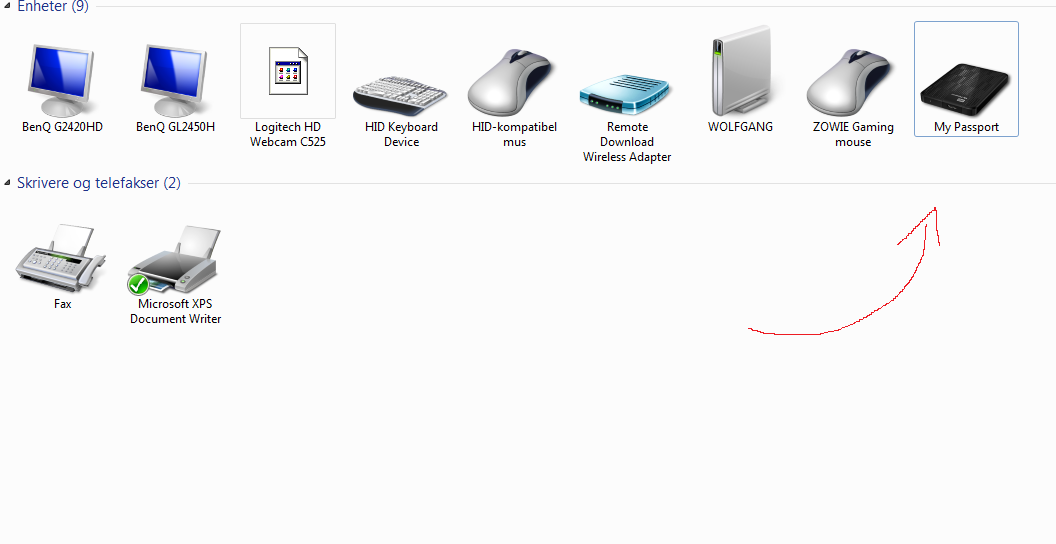
[1] This is the control panel. As you can see, the computer has detected the device. (Some text is in norwegian, sorry..)
2pAWPsb.png

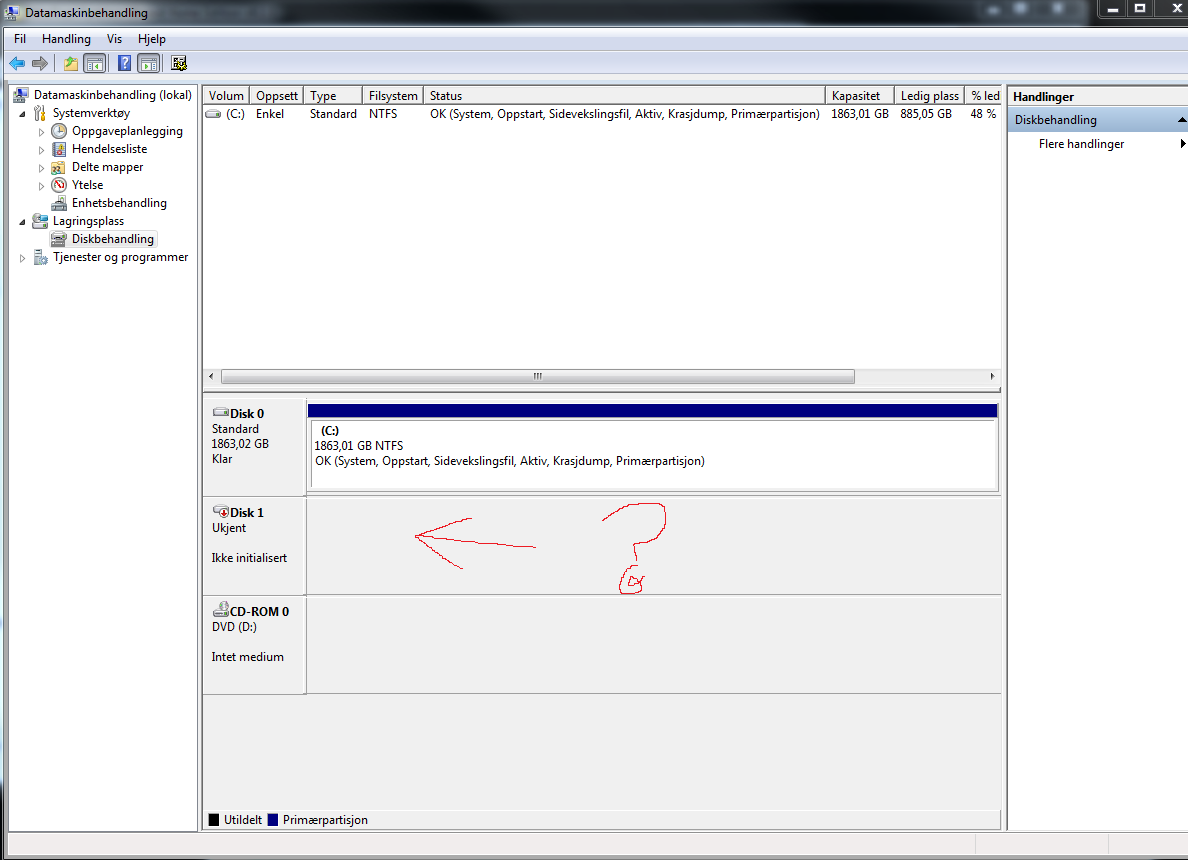
[2] This is the computer management page. Disc 1 should be the ''My Passport'', but it doesn't show as what it is. It says ''Unknown'' and ''Not Initialized'' in norwegian.
x0SbzrY.png

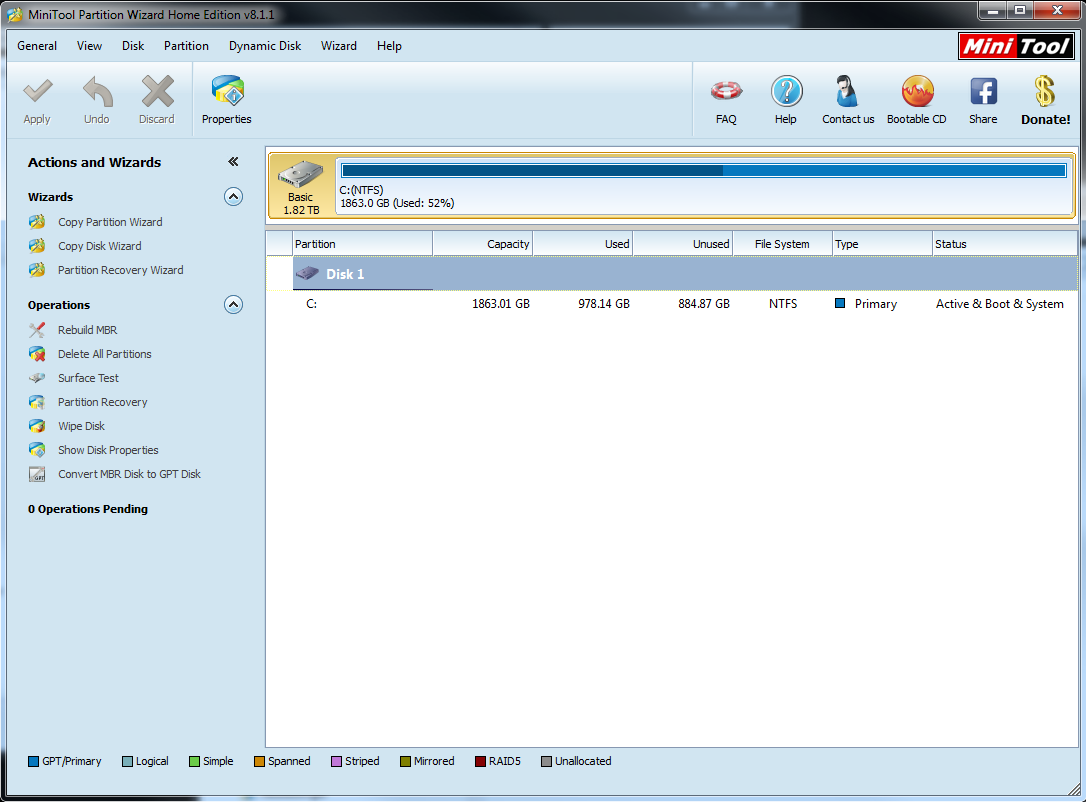
[3] This is what the Partition Wizard page looks like. It shows the information of the internal hard drive, but it doesn't want to show the external one.
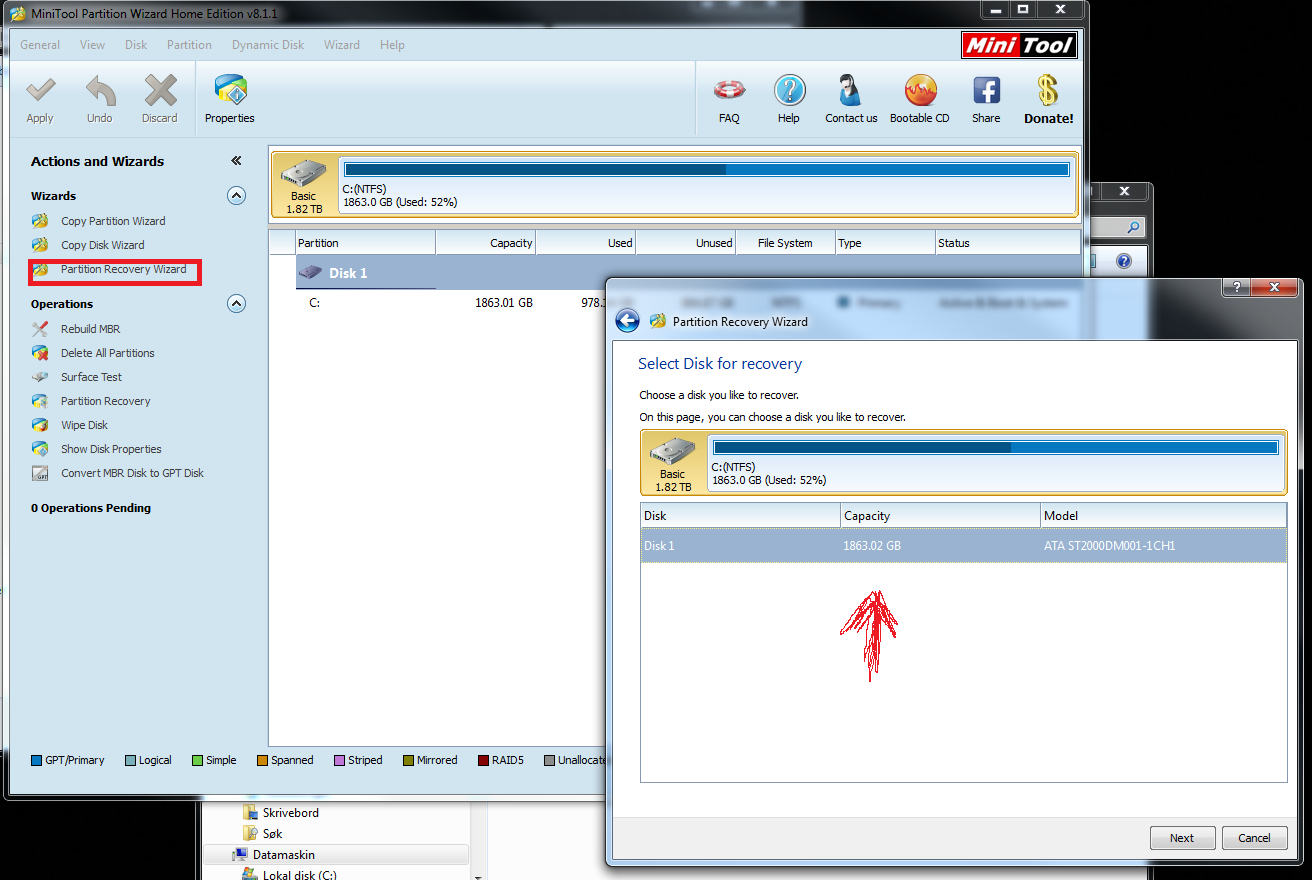
QwP7JtV.png

[4] This image show what happens when I try to recover the disc 1. It, somehow, automatically tries to recover the internal hard drive (C:), which I don't need recovered.

aPHX9L6.jpg

[5] And finally, this is what my external HDD looks like. If you have encountered the same kind of problem, please help me, I'm desperate.

If you need more information about my problem in order to help me, please just ask, and tell me if you notice if I've done anything wrong. I need help!

-OLKD
 

My Computer My Computer

At a glance

Windows 7 Home Premium 64 BitIntel i5-2500 @ 3.30GHz3 x Kingston DDR3 HyperX 4GB (12GB)Gainward GeForce GTX 570 1280MB PhysX
Computer type
PC/Desktop
Computer Manufacturer/Model Number
Home Buildt
OS
Windows 7 Home Premium 64 Bit
CPU
Intel i5-2500 @ 3.30GHz
Motherboard
MSI P67A-G45 B3
Memory
3 x Kingston DDR3 HyperX 4GB (12GB)
Graphics Card(s)
Gainward GeForce GTX 570 1280MB PhysX
Hard Drives
Western Digital Caviar® Blue 2TB
Antivirus
No
Try this :

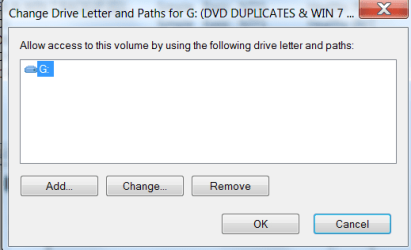
Right click on drive and click "drive letter" (in pic)

Click Add and OK.
 

Attachments

  • DISCMGMT PIC 9,4,14.png
    DISCMGMT PIC 9,4,14.png
    11.1 KB · Views: 15

My Computer My Computer

At a glance

Windows 7 Professional X64Core i7 (2nd gen) i7-2600K / 3.40GHzDDR3 2400MHz (OC) 16gbIntel(R) HD Graphics 3000, -1988 Mb
Computer type
PC/Desktop
Computer Manufacturer/Model Number
Self-Built
OS
Windows 7 Professional X64
CPU
Core i7 (2nd gen) i7-2600K / 3.40GHz
Motherboard
ASUS P8Z77-V Intel 7 Series Motherboard
Memory
DDR3 2400MHz (OC) 16gb
Graphics Card(s)
Intel(R) HD Graphics 3000, -1988 Mb
Sound Card
8 ChannelsAudio Chipset Realtek ALC892
Monitor(s) Displays
LG 29UM65 Black 29"
Screen Resolution
2560 x 1080
Hard Drives
840 EVO 250 GB SSD ;2tb (2);Seagate;1tb Seagate; 750 gb Seagate; wd ext (2) 750 gb,WD 2tb X 2;WD 3TB Black
PSU
750 watt
Case
Thermaltake RX -1
Cooling
2120mm Fans Included 1Other Fan Ports 5x 200mm Fan Ports
Keyboard
Microsoft Digital Media Pro
Mouse
Microsoft Wireless 6000
Internet Speed
U-verse 18 mbps
Antivirus
MSE
Browser
Firefox, Chrome and my favorite: Pale Moon
Other Info
HdHomerun Dual Tuner.
SRS Audio Lab,
Pioneer BDR 208-DBK
PS3-What a difference in my Surround Sound Receiver!
HP 4540s - My new Toy.
Epson R280 Printer- To personalize my Dvds.
Canon MP 560 - For scanning.
What picture are you refereing to?
 

My Computer My Computer

At a glance

Windows 7 Home Premium 64 BitIntel i5-2500 @ 3.30GHz3 x Kingston DDR3 HyperX 4GB (12GB)Gainward GeForce GTX 570 1280MB PhysX
Computer type
PC/Desktop
Computer Manufacturer/Model Number
Home Buildt
OS
Windows 7 Home Premium 64 Bit
CPU
Intel i5-2500 @ 3.30GHz
Motherboard
MSI P67A-G45 B3
Memory
3 x Kingston DDR3 HyperX 4GB (12GB)
Graphics Card(s)
Gainward GeForce GTX 570 1280MB PhysX
Hard Drives
Western Digital Caviar® Blue 2TB
Antivirus
No
The one in my post.

It shows the page that opens when you right click the drive in discmgmt and select drive letters and paths.
 

My Computer My Computer

At a glance

Windows 7 Professional X64Core i7 (2nd gen) i7-2600K / 3.40GHzDDR3 2400MHz (OC) 16gbIntel(R) HD Graphics 3000, -1988 Mb
Computer type
PC/Desktop
Computer Manufacturer/Model Number
Self-Built
OS
Windows 7 Professional X64
CPU
Core i7 (2nd gen) i7-2600K / 3.40GHz
Motherboard
ASUS P8Z77-V Intel 7 Series Motherboard
Memory
DDR3 2400MHz (OC) 16gb
Graphics Card(s)
Intel(R) HD Graphics 3000, -1988 Mb
Sound Card
8 ChannelsAudio Chipset Realtek ALC892
Monitor(s) Displays
LG 29UM65 Black 29"
Screen Resolution
2560 x 1080
Hard Drives
840 EVO 250 GB SSD ;2tb (2);Seagate;1tb Seagate; 750 gb Seagate; wd ext (2) 750 gb,WD 2tb X 2;WD 3TB Black
PSU
750 watt
Case
Thermaltake RX -1
Cooling
2120mm Fans Included 1Other Fan Ports 5x 200mm Fan Ports
Keyboard
Microsoft Digital Media Pro
Mouse
Microsoft Wireless 6000
Internet Speed
U-verse 18 mbps
Antivirus
MSE
Browser
Firefox, Chrome and my favorite: Pale Moon
Other Info
HdHomerun Dual Tuner.
SRS Audio Lab,
Pioneer BDR 208-DBK
PS3-What a difference in my Surround Sound Receiver!
HP 4540s - My new Toy.
Epson R280 Printer- To personalize my Dvds.
Canon MP 560 - For scanning.
Oh, right, well as you can see in picture 2, the disk wont show, so i can't right click it :(
 

My Computer My Computer

At a glance

Windows 7 Home Premium 64 BitIntel i5-2500 @ 3.30GHz3 x Kingston DDR3 HyperX 4GB (12GB)Gainward GeForce GTX 570 1280MB PhysX
Computer type
PC/Desktop
Computer Manufacturer/Model Number
Home Buildt
OS
Windows 7 Home Premium 64 Bit
CPU
Intel i5-2500 @ 3.30GHz
Motherboard
MSI P67A-G45 B3
Memory
3 x Kingston DDR3 HyperX 4GB (12GB)
Graphics Card(s)
Gainward GeForce GTX 570 1280MB PhysX
Hard Drives
Western Digital Caviar® Blue 2TB
Antivirus
No
Try another usb cable.
 

My Computer My Computer

At a glance

Windows 7 Professional X64Core i7 (2nd gen) i7-2600K / 3.40GHzDDR3 2400MHz (OC) 16gbIntel(R) HD Graphics 3000, -1988 Mb
Computer type
PC/Desktop
Computer Manufacturer/Model Number
Self-Built
OS
Windows 7 Professional X64
CPU
Core i7 (2nd gen) i7-2600K / 3.40GHz
Motherboard
ASUS P8Z77-V Intel 7 Series Motherboard
Memory
DDR3 2400MHz (OC) 16gb
Graphics Card(s)
Intel(R) HD Graphics 3000, -1988 Mb
Sound Card
8 ChannelsAudio Chipset Realtek ALC892
Monitor(s) Displays
LG 29UM65 Black 29"
Screen Resolution
2560 x 1080
Hard Drives
840 EVO 250 GB SSD ;2tb (2);Seagate;1tb Seagate; 750 gb Seagate; wd ext (2) 750 gb,WD 2tb X 2;WD 3TB Black
PSU
750 watt
Case
Thermaltake RX -1
Cooling
2120mm Fans Included 1Other Fan Ports 5x 200mm Fan Ports
Keyboard
Microsoft Digital Media Pro
Mouse
Microsoft Wireless 6000
Internet Speed
U-verse 18 mbps
Antivirus
MSE
Browser
Firefox, Chrome and my favorite: Pale Moon
Other Info
HdHomerun Dual Tuner.
SRS Audio Lab,
Pioneer BDR 208-DBK
PS3-What a difference in my Surround Sound Receiver!
HP 4540s - My new Toy.
Epson R280 Printer- To personalize my Dvds.
Canon MP 560 - For scanning.
Mac formatted?

I have a My Passport as well and was just curious as to when you copied the files over to this hard drive, was it connected to a Mac? Or did you copy them directly from a video camera? Where did your original video files come from? I am actually having major driver issues with a My Passport drive as we speak but those were completely my fault, haha, so I can sympathize.
 

My Computer My Computer

At a glance

Windows 7 Professional x64
Computer type
PC/Desktop
Computer Manufacturer/Model Number
Custom build
OS
Windows 7 Professional x64
Hi there

Might be a silly suggestion but sometimes even these devices need a bit more power than the USB port can provide.

Try plugging into what's known as a "Charging Port" on a laptop (those that have MORE power supplied to the port) or even into a powered USB2 Hub (OK the speed will be slower but you are trying to recover data which is the primary goal rather than speed).

This can sometimes fix "recalcitrant" drives -- not always but worth a shot.

Cheers
jimbo
 

My Computer My Computer

At a glance

Linux CENTOS 7 / various Windows OS'es and se...Intel i7 Intel i58GB, 16GBOn Motherboard
Computer type
PC/Desktop
Computer Manufacturer/Model Number
Custom built, several laptops HP/ASUS
OS
Linux CENTOS 7 / various Windows OS'es and servers
CPU
Intel i7 Intel i5
Memory
8GB, 16GB
Graphics Card(s)
On Motherboard
Sound Card
Realtek HD audio
Monitor(s) Displays
Apple Cinema display, Samsung LCD
Screen Resolution
1920 X 1080
Hard Drives
4 X 1TB SATA
Mouse
Toshiba wireless laser
Internet Speed
> 20MB up
Back
Top