External HDD showing full but it is impossible

OK, we are definitely better off than ever before.

To me it looks like there is no problem whatsoever with the Unlock software.

It also appears that the interface electronics inside is OK since your drive capacity is shown correctly. (if it is a 1TB drive)

(In your first post you said it is a 2TB drive "I have a WD 'My Passport' 2TB 2.5" drive which I purchased in September 2014". Would you confirm that it is only a 1TB drive?)

Anyway I would like CKWD to look into it and give his opinion. I shall chip in again after that. For the moment I would think Data Recovery should be possible. I shall delineate the route to be taken after CKWD clears your drive confirming that the software part of Unlocking is OK.

Over to CKWD.

( I took my quote from page 37 of the user manual. Didn't have the patience to look beyond it. :D I wouldn't have done even that had you not given the link. :))
 
Last edited:

My Computer My Computer

At a glance

Windows 7 Home Premium 32 bit
OS
Windows 7 Home Premium 32 bit
Thanks again Jumanji!

Yes, as I commented on the previous post, #40, it does seem the WD Unlocker software has nothing to do with the drive's problem, which rather has a file system/partition table damage that could be alongside a minor mechanical error, taking into account the lags that OP is experiencing.

I believe that if he needs his information back he should contact some of WD's Data recovery partners.

I'm glad to see we are on the same opinion. :)

CK_WD
 

My Computer My Computer

At a glance

Windows 7 Home Premium x64
Computer type
PC/Desktop
OS
Windows 7 Home Premium x64
Sshh, naked baby pictures! :o the whole package :D
 

My Computer My Computer

At a glance

Windows 7 Ultimate x64 SP1AMD Phenom 2 1090T2x8GB Kingston HyperX Fury Black 1600Mhz Unga...MSI GTX 970 Gaming 4G
Computer type
PC/Desktop
Computer Manufacturer/Model Number
Custom Build
OS
Windows 7 Ultimate x64 SP1
CPU
AMD Phenom 2 1090T
Motherboard
Gigabyte GA-890FXA-UD5
Memory
2x8GB Kingston HyperX Fury Black 1600Mhz Unganged
Graphics Card(s)
MSI GTX 970 Gaming 4G
Sound Card
Realtek On-Board HD 7.1 Audio / Logitech G35
Monitor(s) Displays
3xAcer GD245HQ
Screen Resolution
1920x1080
Hard Drives
Samsung 850 Pro 512GB SSD - OS /
WD Caviar Black SATA 3 - 1 TBx2 - Dynamic RAID 0 /
WD Caviar Green SATA 2 - 640GBx2 - Dynamic RAID 0 /
WD Caviar Green SATA 2 - 640GB - Internal Backup /
Seagate Barracude SATA 3 - 3TB - External Backup/ Sync
PSU
HighPower 1000W
Case
Cooler Master HAF 932
Cooling
Noctua NH-D14
Keyboard
Logitech G19
Mouse
Logitech G500
Internet Speed
100/4 Mbit Cable (100GB quota)
Antivirus
ZoneAlarm Extreme Security / MBAM Pro / MBAE Free / SAS Free
Browser
IE 11 - Firefox - Chrome
Other Info
Logitech F710/ G27/ G940/ Z5500 // TrackIR 5 // Nvidia 3D Surround Vision
Thanks again Jumanji!

Yes, as I commented on the previous post, #40, it does seem the WD Unlocker software has nothing to do with the drive's problem, which rather has a file system/partition table damage that could be alongside a minor mechanical error, taking into account the lags that OP is experiencing.....
CK_WD

Ok I missed your post#40 as I was composing my post and hit submit . Thank you CKWD.

On data recovery since the OP's drive shows with a drive letter, I would first check the file system with TestDisk and see what it finds and if it can correct.

@ 7leagueboot, install Testdisk (latest stable version 7.0) for Windows on the same machine but do not do anything with it. I shall take a break now and then come back with instructions on what you should do. Please wait till then. TestDisk - Partition Recovery and File Undelete
 

My Computer My Computer

At a glance

Windows 7 Home Premium 32 bit
OS
Windows 7 Home Premium 32 bit
In post #5 OP says he's made a mistake and the drive is indeed 1TB (fyi :D).

Also, OP states in the same post that PartitionWizard has frozen while trying to run on the damaged external. I have worries that because of the possible mechanical problem (alongside the file system/partition table damage) running another software on it may damage the drive further.

OP said he needed his/her information; I just have the feeling that more actions towards retrieving the drive's state back to normal, or getting back the data in home environment, would make these same drive and data done for. Thus, I would advise no more interventions with the drive at this state.

What do you think Jumanji?

CK_WD
 

My Computer My Computer

At a glance

Windows 7 Home Premium x64
Computer type
PC/Desktop
OS
Windows 7 Home Premium x64

My Computer My Computer

At a glance

Windows 7 Ultimate x64i7 Q8408 GB2 x ATI Radeon H5780
Computer Manufacturer/Model Number
Alienware M17x R2
OS
Windows 7 Ultimate x64
CPU
i7 Q840
Motherboard
M17x
Memory
8 GB
Graphics Card(s)
2 x ATI Radeon H5780
Sound Card
ATI HD Audio
Hard Drives
2 x 500 GB in RAID 0
@ 7leagueboot, install Testdisk (latest stable version 7.0) for Windows on the same machine but do not do anything with it. I shall take a break now and then come back with instructions on what you should do. Please wait till then. TestDisk - Partition Recovery and File Undelete

TestDisk x64 is loaded. I have executed it but done nothing more. Currently it is offering me the choice of Create, Append, or No log.
 

My Computer My Computer

At a glance

Windows 7 Ultimate x64i7 Q8408 GB2 x ATI Radeon H5780
Computer Manufacturer/Model Number
Alienware M17x R2
OS
Windows 7 Ultimate x64
CPU
i7 Q840
Motherboard
M17x
Memory
8 GB
Graphics Card(s)
2 x ATI Radeon H5780
Sound Card
ATI HD Audio
Hard Drives
2 x 500 GB in RAID 0
Just click on the X at top right and close Test Disk.

Have you read CKWD's post #45? More than what jumanji thinks of it, what you think is more important before we proceed any further.

What is your take on it?

The second point: If at all you want to try data recovery I can only suggest proven software. Free: Test Disk Paid: Getdataback simple.

As CKWD feels subjecting the disk to home data recovery may result in some more loss of data if your hDD is creating more and more bad sectors when run.. It may not also if your HDD had become RAW due to a glitch - like the frequent power interruptions you faced.

So decide and tell us.

You have lots of time to think about it and decide.I am retiring for the day and won't return for the next 10 hours.
 

My Computer My Computer

At a glance

Windows 7 Home Premium 32 bit
OS
Windows 7 Home Premium 32 bit
Yesterday, I phoned 2 of WD's data recovery partners, Recovery Labs and Datex.

Recovery Labs told me that as the drive was not making any noise it was unlikely to be caused by physical damage. Due to the placement of the drive, directly under my cooling pad, he felt it had become too hot which could lead to its conversion to RAW format. He also felt data recovery should not be difficult. With WD's 40% discount, the recovery would cost me 769 euros. They also guarantee that I pay nothing unless they recover my data.

Datex says no discounts are offered and sent me an estimate for well over 2000 euros. In addition, they want several other fees added to the bill. 2 that hit me hard were 180 euros for testing the drive and 360 euros for providing a list of recoverable data found however, it appears they may waive the 360 euros if I accept the 2000+ euros for physical recovery. I could go on and on about all the points why one would not want to use them but I believe the first offer says it all.

CKWD makes valid points but I can't help but feel his loyalty is to his company's partners. After all, his profile says he works for WD. You on the other hand jumanji, bear the label 'Seven Guru'. With over 5000 posts to your credit, I find it very difficult not to take you seriously.

When you asked me to get TestDisk, I did as you said. When you told me NOT to purchase OnTrack's Easy Data Recovery, I heard you. Now you are saying TestDisk is free while GetDataBack is paid so, if you believe the paid option is effective and easier to operate I'm willing to try it.

A word about the data itself...
My lifetime music collection which includes all my LP's converted to mp3's is on this drive. I do not have a backup list of it so it would be impossible for me to recreate.
All my software, including purchase receipts and activation info is also on there. If I lose that I may have trouble getting duplicates.
My image collection is on it. This includes textures and backgrounds for use in the Flash movies I create. Ditto all my sound bytes.
The sensitive data is all my passwords. This is just a backup so its loss would not be critical however, I would not want any of these to get into the wrong hands.

The bottom line is that I would go to 769 euros, if necessary, to recover ALL that data. If I could only recover a part of it then it would not be worth it. If the bill was over 1000 euros I would rather lose the lot and merely reformat the drive.

So now, allow me to throw the ball once again into your court. Should I make a final attempt to recover the data myself or just go with the offer from Recovery Labs?
 

My Computer My Computer

At a glance

Windows 7 Ultimate x64i7 Q8408 GB2 x ATI Radeon H5780
Computer Manufacturer/Model Number
Alienware M17x R2
OS
Windows 7 Ultimate x64
CPU
i7 Q840
Motherboard
M17x
Memory
8 GB
Graphics Card(s)
2 x ATI Radeon H5780
Sound Card
ATI HD Audio
Hard Drives
2 x 500 GB in RAID 0
Ok my dear friend, you couldn't have made your points more clearer.I appreciate it.

I also feel that the chances of a one year old drive developing bad sectors is rare - though it could happen in one in a million .

Further two more factors weigh in my mind.

1. You had mentioned that you experienced frequent power interruptions and that could have caused the drive becoming RAW. Possible.

2. You had run Datalifeguard Diagnostics. Initially I thought it had failed to scan - a communication problem :D. But later you confirmed that it run the Short Test taking 20 minutes and passed. If it had found bad sectors it would have failed. Confirm this again and then we will go with TestDisk. Test Disk has to be handled carefully and so I wouldn't allow you to handle it on your own. Not if you hadn't used it anytime before and familiar with it. .

Once you confirm wait for my instructions. It is going to be done online and you will not do even one click without my telling you.

I wait for your confirmation. Are you in Paris?

Note: Look under C:/Windows. If SysWOW64 is present, uninstall the Windows 64 version of TestDisk ( you have to simply delete that TestDisk folder). Install only the Windows version. TestDisk Download - CGSecurity

You should use the Windows 64 version of TestDisk only if SysWOW64 is not present.
 
Last edited:

My Computer My Computer

At a glance

Windows 7 Home Premium 32 bit
OS
Windows 7 Home Premium 32 bit
7leagueboot, I too thank you for your last detailed post, things are very much clear on what you think now!

You have some right, as a WD Representative I have certain obligations, but my loyalty lies not only with WD, but also the customers, clients and users, having a problem with a WD product or storage device. My intentions are to help at maximum, and so I tried to give my help and my last opinion, which was genuine concern. But Jumanji is right, what you think in this case is most important, also considering the fact that you understand the situation.

My opinion still stands, with the intention for you to recover your whole data. But Jumanji is more than capable to talk you through the other option so I trust you will do fine. ;)

Read his last post #50 (we've made some pages of posts here!.. :D) and confirm his point #2 and give out your opinion on what you want to do. :)

Best of luck!

CK_WD
 

My Computer My Computer

At a glance

Windows 7 Home Premium x64
Computer type
PC/Desktop
OS
Windows 7 Home Premium x64
2. You had run Datalifeguard Diagnostics. Initially I thought it had failed to scan - a communication problem :D. But later you confirmed that it run the Short Test taking 20 minutes and passed. If it had found bad sectors it would have failed. Confirm this again and then we will go with TestDisk. Test Disk has to be handled carefully and so I wouldn't allow you to handle it on your own. Not if you hadn't used it anytime before and familiar with it.

I confirm Data Lifeguard successfully scanned the drive and gave it a pass. I remind you that Drive Manager also displays the drive as being in a healthy state (French for 'healthy' is 'sain'). Where I think the confusion lies is that you also asked me to run a Quick Scan using Mini-Tool's Partition Recovery Wizard and after several days still running you said it was getting us nowhere and told me to abandon it. I also downloaded the trial version of OnTrack's Easy Data Recovery which I attempted to scan the drive with to see if it located any data but the program merely crashed. I left it for 24 hours to see if it would recover but it didn't so I logged off and restarted the machine.

Once you confirm wait for my instructions. It is going to be done online and you will not do even one click without my telling you.

I wait for your confirmation. Are you in Paris?

I'm fine with that but I must tell you that I run a company and today I have 2 appointments that require me to leave the office so please be patient as it may take me some time to reply. Probably the best thing to do to save time would be to give me 3 or 4 instructions at the same time so I can move things forward faster.

Note: Look under C:/Windows. If SysWOW64 is present, uninstall the Windows 64 version of TestDisk ( you have to simply delete that TestDisk folder). Install only the Windows version. TestDisk Download - CGSecurity

You should use the Windows 64 version of TestDisk only if SysWOW64 is not present.

SysWOW64 is present so I will use the standard version of TestDisk. It doesn't have an installer though. It appears to be in portable format so that you only need to execute testdisk_win.exe for it to run.
 

My Computer My Computer

At a glance

Windows 7 Ultimate x64i7 Q8408 GB2 x ATI Radeon H5780
Computer Manufacturer/Model Number
Alienware M17x R2
OS
Windows 7 Ultimate x64
CPU
i7 Q840
Motherboard
M17x
Memory
8 GB
Graphics Card(s)
2 x ATI Radeon H5780
Sound Card
ATI HD Audio
Hard Drives
2 x 500 GB in RAID 0
I will PM our data recovery expert, be patient and don't attempt anything if your data is important. :)

I agree with you. That's the best thing to do in order to get back the important data.
 

My Computer My Computer

At a glance

Windows 7 Home Premium 32bit
Computer type
PC/Desktop
Computer Manufacturer/Model Number
Dell
OS
Windows 7 Home Premium 32bit
Motherboard
China
as a WD Representative I have certain obligations, but my loyalty lies not only with WD, but also the customers, clients and users, having a problem with a WD product or storage device. My intentions are to help at maximum, and so I tried to give my help and my last opinion, which was genuine concern. But Jumanji is right, what you think in this case is most important, also considering the fact that you understand the situation.

CK, thank you for ALL your input. Believe it or not, I took on board everything you said very seriously. Proof of that is my phoning 2 of your partners to get a quote for the recovery. Please do not get the impression that my comments concerning your loyalty to WD's partners was a negative criticism. As an employer myself, I fully understand where you are coming from and appreciate the professional stance taken.

Let me just add that I intend making an image of the drive prior to attempting any data recovery. That way, if we fail in our attempts, at least the original drive will not have been damaged and Recovery Labs will still be able to do their thing. You see, I have taken on board everything I have been told here. ;)

Have a great day CK, and thanks again for coming to my aid!
 

My Computer My Computer

At a glance

Windows 7 Ultimate x64i7 Q8408 GB2 x ATI Radeon H5780
Computer Manufacturer/Model Number
Alienware M17x R2
OS
Windows 7 Ultimate x64
CPU
i7 Q840
Motherboard
M17x
Memory
8 GB
Graphics Card(s)
2 x ATI Radeon H5780
Sound Card
ATI HD Audio
Hard Drives
2 x 500 GB in RAID 0
I'm glad to hear that, 7leagueboot, thank you! :)

I'm happy if I was able to give insights helpful to you, and that you have decided to make the system image. It's best to be prepared with a spare copy of the drive to troubleshoot or send to recover from, if something happens to the first one.

I hope it doesn't come to that, and that you get your data back! :)

Just one last thing, if you decide to, and you actually can (depending on the warranty) here are some links to help you RMA the drive, if it's necessary.

WD Warranty check:
Support Answers

WD Warranty Policy:
Support Answers

Good luck! I'm leaving you in the safe hands of Jumanji. ;)

CK_WD
 

My Computer My Computer

At a glance

Windows 7 Home Premium x64
Computer type
PC/Desktop
OS
Windows 7 Home Premium x64
here are some links to help you RMA the drive, if it's necessary.

Whoops! That's an expression I have never heard of. What does "RMA the drive" mean please CK?
 

My Computer My Computer

At a glance

Windows 7 Ultimate x64i7 Q8408 GB2 x ATI Radeon H5780
Computer Manufacturer/Model Number
Alienware M17x R2
OS
Windows 7 Ultimate x64
CPU
i7 Q840
Motherboard
M17x
Memory
8 GB
Graphics Card(s)
2 x ATI Radeon H5780
Sound Card
ATI HD Audio
Hard Drives
2 x 500 GB in RAID 0
Hey, don't worry! :D

RMA means Return Merchandise Authorization. It is basically the procedure of returning a product not working properly to the manufacturer and receiving a recertified replacement. This can happen under certain conditions such as the product being still under warranty (first link) and the certain manufacturer's policy on the procedure (second link). :)

CK_WD
 

My Computer My Computer

At a glance

Windows 7 Home Premium x64
Computer type
PC/Desktop
OS
Windows 7 Home Premium x64
.......I'm fine with that but I must tell you that I run a company and today I have 2 appointments that require me to leave the office so please be patient as it may take me some time to reply. Probably the best thing to do to save time would be to give me 3 or 4 instructions at the same time so I can move things forward faster....

Before you hit on testdisk_win.exe (The generic Windows version and not the Windows 64bit version)
Reboot your PC. Plugin only your 1TB external drive to be recovered as also the formatted empty external drive to which you want to copy the data.

Unlock your 1TB external drive so that TestDisk can access it.

Now run testdisk_win.exe

First Screen -Highlight/Select (using the down arrow key) No log [ENTER]

Second Screen: You should see three disks. First one will be your System disk. Second and third will be your external disks. With down arrow key select your external disk to be recovered.( You should be able to identify it with the shown capacity) [ENTER]
Note: Select Disk and not the Drive

Third Screen: Select [Intel] Intel/PC partition (If not already highlighted.)[ENTER]

Fourth Screen: Select [Advanced] Filesystem Utils [ENTER]

Fifth Screen: should show the partition with [BOOT] highlighted [ENTER]

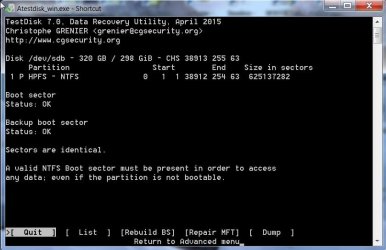
Post a screenshot of the sixth screen.

If I am not there online, to give further instructions press Q repeatedly till you get out of Test Disk. ( Every press of the Q Key will take you to the previous screen and finally out. You can also hit the X at top right to close the TestDisk Window in one click)

You can repeat the steps and proceed further on further instuctions.

Sample screenshot of the sixth screen:

17-07-2015 18-45-34.jpg

As you can see it will show the status of the NTFS Boot Sector. Our next action will depend upon the status.

Don't get tempted to try any other command therein like Rebuild BS, Repair MFT for the moment.

If you have any doubts while following these instructions, post a screenshot at that stage and Quit Test Disk.
 
Last edited:

My Computer My Computer

At a glance

Windows 7 Home Premium 32 bit
OS
Windows 7 Home Premium 32 bit
Hey, don't worry! :D

RMA means Return Merchandise Authorization. It is basically the procedure of returning a product not working properly to the manufacturer and receiving a recertified replacement. This can happen under certain conditions such as the product being still under warranty (first link) and the certain manufacturer's policy on the procedure (second link). :)

CK_WD

Got you! Well I spoke to the supplier and he said he could organize a replacement if it is genuinely defective however, he agrees that the first thing to do is recover the data and, as it doesn't appear to be a mechanical fault, then try reformatting to NTFS.
 

My Computer My Computer

At a glance

Windows 7 Ultimate x64i7 Q8408 GB2 x ATI Radeon H5780
Computer Manufacturer/Model Number
Alienware M17x R2
OS
Windows 7 Ultimate x64
CPU
i7 Q840
Motherboard
M17x
Memory
8 GB
Graphics Card(s)
2 x ATI Radeon H5780
Sound Card
ATI HD Audio
Hard Drives
2 x 500 GB in RAID 0
Hi jumanji,
I have been out all day so I will get around to this tomorrow.
Before I do, should I not first make an image of the WD drive?
I believe you and Nedly continually said that an image should be made prior to attempting anything, or is TestDisk 100% harmless?
 

My Computer My Computer

At a glance

Windows 7 Ultimate x64i7 Q8408 GB2 x ATI Radeon H5780
Computer Manufacturer/Model Number
Alienware M17x R2
OS
Windows 7 Ultimate x64
CPU
i7 Q840
Motherboard
M17x
Memory
8 GB
Graphics Card(s)
2 x ATI Radeon H5780
Sound Card
ATI HD Audio
Hard Drives
2 x 500 GB in RAID 0
Back
Top