Dear,
I have an external hard disk 4TB (Western Digital MyBook 25DA My Book Series - External Hard Drive | Western Digital (WD)) with bitlocker enabled (and i know the password).
I was working on it and everything was smooth.
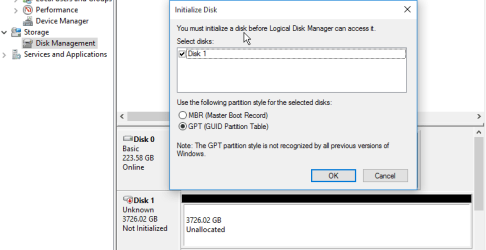
I restarted the PC , after it's booting and logging in to windows, I didnt found the HardDisk in "This PC", I goes to windows 10 64 bit' disk management console and a popup window appears asking me if I want to initialize it.
Any solution do you have for this?
Attachments
2016-09-29_20-43-49.png
12.1 KB
· Views: 0
My Computer
At a glance
Windows 10 Enterprize x64i7 9208GBnvidia GTS 2500
Computer type
PC/Desktop
Computer Manufacturer/Model Number
custom build
OS
Windows 10 Enterprize x64
CPU
i7 920
Motherboard
intel dx58so
Memory
8GB
Graphics Card(s)
nvidia GTS 2500
Hard Drives
2 SSDs Raid 0 Kingston
Western Digital MyBook 25DA
It's lost the partition table you need partition recovery software there are lots of free ones don't use file recovery as it's just partition that's lost
I'm sorry to hear about what happened with the drive and that you cannot access it, I know how unpleasant it can be. What why would suggest is to try to extract your data with Linux Live CD - just download/burn the ISO image to a CD or USB and change the boot order to the media you burned the Linux on. Once it loads, you could try and mount the drive (or if Linux can read it, it will mount by itself) and see if you can transfer the files from the external. You can take a look at this KB article if you want for additional information about the LiveCD:
If it doesn't help, then IMO it will be best to contact a data recovery company and see if your information can be retrieved from the drive, and keep in mind that the more you use the drive and try to repair it, the worse the damage and the extraction of files may become. Here's a link with the WD recovery partners you can take a look at:
On the face of it, it looks like the lost partitions issue.
Our first effort would and should be to recover the partitions. Download and install MiniTool Partition Wizard Free Edition 9.1 (30.49MB) from here https://www.partitionwizard.com/download.html
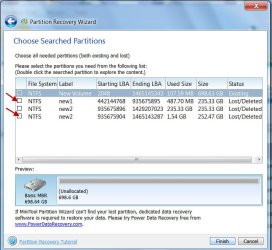
Launch PartitionWizard. Post a screenshot of how your 4TB WD drive looks like in it. I would like to know whether it is an MBR drive or GPT drive. On the left pane click on Partition Recovery Wizard > Next >Select your 4TB WD drive > Next > Full Disk > Next > QuickScan > Next. Allow the quickscan to complete. At the end of the quick scan you will get a window showing all the found partitions (like the one below). Post a screenshot of it. After you have taken the screenshot click on Cancel button on that Window and close PW. You can run it again after getting furtherinstructions from me.
Note: Select only that Window as above and take a snapshot. We do not need to see the Partition Wizard Main window or your Desktop on the background.
At this stage do not run any Data Recovery software. If you had run any, let us know what all you have done/tried after this problem arose but did not tell us before.