External HDD Unallocated 2047.35gb other Sol'n?

MrVenJhay

New member
Local time
2:42 AM
Messages
8
Hi and Hello :D

I have a 500gb HP External HDD then one day 2047.35gb showed up

-I tried disk part
-disk management,
-thumbscrew,
-Power data recovery(partition explorer does not show up),
-PhotoRec(Still None)
D:
-Regedit hoping to disable the write protection when using
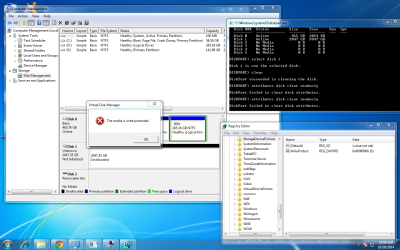
Disk management when promted user to initialize disk (disk 1) partition style MBR and GPT.
-I also tried the thread: disk 1 is unknown, not initialized, unallocated

I would like to ask how to bypass write protection and Format it I give up recovering my Files
(There is no On/Off switch in the External)

and advance Thank You
 

Attachments
  • A.png
    A.png
    126.7 KB · Views: 9

My Computer My Computer

At a glance

Windows Ultimate 32bit
Computer type
PC/Desktop
OS
Windows Ultimate 32bit
Hello and welcome Venjay mate run this so that we can see just what is in the machine because I don't quite get what you are trying to tell us.


Using HW Info general components

DownloadHW Info and pick the right bit version - HWiNFO, HWiNFO32/64 - Download - (copy andpaste this site into the search bar) If you do not need the running informationin the smaller right hand panel close it. In the left hand window click on the+ for the individual device groupings and they will open out to the variouscomponents.

Go onopening out further until you get to the device itself. click on it and it willhighlight. In the right hand window there will be a very detailed descriptionof that device as in brand, speeds model number etc etc These are very detailedand are just what is needed for searching for drivers etc.

See my picfor an example - in this I have opened out one my components and then highlighted one of the one you need andyou can see the detail.
See my pic I only have one drive in this machine you will have ore click on each one so it is highlighted and the very detailed report on that drive will show in the right hand panel.
 

Attachments

  • HW INFO SATA DRIVES.PNG
    HW INFO SATA DRIVES.PNG
    21.8 KB · Views: 3

My Computer My Computer

At a glance

Desk1 7 Home Prem / Desk2 10 Pro / Main lap A...Desk1 i5 3750K / Laptop i7 GTX 860M / Desk2 i...Desk1 8GB (1866) / Desk2 16GB (1333) / Laptop...Desk 1& 2NVidia GTX 650 & Laptops on board Intel
Computer type
PC/Desktop
Computer Manufacturer/Model Number
Own build (new) Desk1 / Asus ROG Win 7 / Desk2 1st build
OS
Desk1 7 Home Prem / Desk2 10 Pro / Main lap Asus ROG 10 Pro 2 laptop Toshiba 7 Pro Asus P2520 7 & 10
CPU
Desk1 i5 3750K / Laptop i7 GTX 860M / Desk2 i5 2500
Motherboard
Desk1 Asus P877-V / Desk2 Gigabyte H67 UD3H / Laptop ?
Memory
Desk1 8GB (1866) / Desk2 16GB (1333) / Laptop 8Gb DDR3
Graphics Card(s)
Desk 1& 2NVidia GTX 650 & Laptops on board Intel
Sound Card
Desk 1 & 2 -XONAR DG Realtek High Def audio Laptop
Monitor(s) Displays
Desk 1 Benq HD 2450 / Desk2 Philips 24" / Laptop 17.5"
Screen Resolution
1920x1080 D1 & D2 & Laptop 1
Hard Drives
Desk1 Samsung 120GB 830 SSD
Asus ROG 256GB 850 Pro SSD
Desk2 Samsung 840 256 SSD
Toshiba 120GB EVO
PSU
Desk 1 Corsair HX 1050/ Laptop ? / Desk 2 Corsair HX 650
Case
Desk 1 Cooler HAF XM ? Toshiba laptop / Desk2 Coolermaster
Cooling
Fans on all Desk1 -2 Desk2 - all Coolermasters 5 Laptop ?
Keyboard
Desk 1 MS Sidewinder X6 Desk 2 MS Sidewinder X 4
Mouse
Desk 1&2 - Gigabyte MS 900 gamer - laptop - Logitec wireless
Internet Speed
ADSL2+
Other Info
One other Desktop (tester) and spare Toshba laptop both with SSD's
Running Kaspersky 2016 ISS on all machines config'd identically
Logitec audio stereo systems on each machine (x3)
Canon MG5250MFC
Router/modem TP-Link running WPA2SK
Hi MrVenJhay!

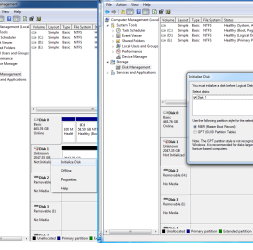
It's really unclear what you'd like help with. You say you have an external hard drive which is 500GB? On the images though the only one similar to this is Disk 0, which is 465,76GB, but it's the Boot drive (with your OS) so it can't be external? Unless the HP External one is Disk 2 which is Removable (H:).

The next question is how many hard drives do you have and which ones are internal and which external?

Next comes what is quite unclear to me: what does your HP external HDD 500GB have to do with the new Unallocated drive and what is your goal?

This Disk 1 which is Unknown is apparently a newly added hard drive with capacity of 2TB. It is Unallocated, meaning it's not Initialized, meaning it hasn't been Partitioned or Formatted yet. I don't think you need any third party software, you should be able to activate the hard drive by going in Disk Management and right clicking on it and selecting Initialize Disk. Then right click on the Unallocated space and select create a New Simple Volume. This way you create a new (one or more) partition(s) on the drive. Then you need to format them in NTFS (as you're using Windows). The Wizard will guide you through the process.

Is this what you needed? If I am mistaken somewhere, please correct me and provide more information to what you need help with!

Cheers! :)

CK_WD
 

My Computer My Computer

At a glance

Windows 7 Home Premium x64
Computer type
PC/Desktop
OS
Windows 7 Home Premium x64
Hmm CKWD mate that is why I asked for the HW Indo stuff because as I read it the 500GB has "turned" into a 2TB drive. Now you and I both know that is an impossibility and like you I am thinking there are more drives involved what I just said. We shall just have to wait for a reply.

Now formatting the external is also as you know very easy and I don't know why the OP has not been able to do that unless the drive has gone south.
 

My Computer My Computer

At a glance

Desk1 7 Home Prem / Desk2 10 Pro / Main lap A...Desk1 i5 3750K / Laptop i7 GTX 860M / Desk2 i...Desk1 8GB (1866) / Desk2 16GB (1333) / Laptop...Desk 1& 2NVidia GTX 650 & Laptops on board Intel
Computer type
PC/Desktop
Computer Manufacturer/Model Number
Own build (new) Desk1 / Asus ROG Win 7 / Desk2 1st build
OS
Desk1 7 Home Prem / Desk2 10 Pro / Main lap Asus ROG 10 Pro 2 laptop Toshiba 7 Pro Asus P2520 7 & 10
CPU
Desk1 i5 3750K / Laptop i7 GTX 860M / Desk2 i5 2500
Motherboard
Desk1 Asus P877-V / Desk2 Gigabyte H67 UD3H / Laptop ?
Memory
Desk1 8GB (1866) / Desk2 16GB (1333) / Laptop 8Gb DDR3
Graphics Card(s)
Desk 1& 2NVidia GTX 650 & Laptops on board Intel
Sound Card
Desk 1 & 2 -XONAR DG Realtek High Def audio Laptop
Monitor(s) Displays
Desk 1 Benq HD 2450 / Desk2 Philips 24" / Laptop 17.5"
Screen Resolution
1920x1080 D1 & D2 & Laptop 1
Hard Drives
Desk1 Samsung 120GB 830 SSD
Asus ROG 256GB 850 Pro SSD
Desk2 Samsung 840 256 SSD
Toshiba 120GB EVO
PSU
Desk 1 Corsair HX 1050/ Laptop ? / Desk 2 Corsair HX 650
Case
Desk 1 Cooler HAF XM ? Toshiba laptop / Desk2 Coolermaster
Cooling
Fans on all Desk1 -2 Desk2 - all Coolermasters 5 Laptop ?
Keyboard
Desk 1 MS Sidewinder X6 Desk 2 MS Sidewinder X 4
Mouse
Desk 1&2 - Gigabyte MS 900 gamer - laptop - Logitec wireless
Internet Speed
ADSL2+
Other Info
One other Desktop (tester) and spare Toshba laptop both with SSD's
Running Kaspersky 2016 ISS on all machines config'd identically
Logitec audio stereo systems on each machine (x3)
Canon MG5250MFC
Router/modem TP-Link running WPA2SK

My Computer My Computer

At a glance

Windows 10 Pro. 64/ version 1709 Windows 7 Pr...Intel i7-6800K @ 4.3Corsair Platinum 16 gig @2400EVGA GTX 1070 OC
Computer type
PC/Desktop
Computer Manufacturer/Model Number
Home made Desktop
OS
Windows 10 Pro. 64/ version 1709 Windows 7 Pro/64
CPU
Intel i7-6800K @ 4.3
Motherboard
ASUS X-99 Deluxe II
Memory
Corsair Platinum 16 gig @2400
Graphics Card(s)
EVGA GTX 1070 OC
Monitor(s) Displays
Asus 27" LED LCD/VE278Q
Screen Resolution
1920-1080 or 1280-720 HDMI
Hard Drives
INTEL SSD 730-240 Gb Sata 3.0/
PSU
EVGA Platium 1200W
Case
Phanteks Luxe Tempered Glass 8 fans/ one radiator
Cooling
XSPC/ Water Cooled CPU
Keyboard
Das 4 Professional
Mouse
Logitech M705/MX Anywhere 2-S
Internet Speed
100 mbits
Antivirus
Microsoft Security Essentials/ Malwarebytes Premium 3.0/ SAS
Browser
I.E. 11 default/Firefox/ ISP Time Warner Cable/Spectrum
Other Info
LG BluRay Burner/
Sound system-KLipsch-THX/
Icy Dock ssd Hot Swap bays.
Hey Icit2lol!

When I read OP's post I thought of exactly what apparantly you have though of. Then I saw your answer. I wanted to clarify the overall idea you (and I) had and add something to it.
In my understanding, OP seems a bit confused on what has happened and can't explain it quite well. I decided that it would help better if I explain in more detail and ask the questions further in order to Jhay to be helped the most. I had no intention of shadowing your words, so if it has seemed like that, I apologize. My intention is to only clarify the best and provide maximum troubleshooting and solutions. :)
Now, it is possible that a drive has gone bad, the question is which one (if this is the case), so yes, we just have to wait for an answer and see what the HW Info screenshot would show. :)

Also, @LaybackBear, that is an option too. :)

Cheers!

CK_WD
 

My Computer My Computer

At a glance

Windows 7 Home Premium x64
Computer type
PC/Desktop
OS
Windows 7 Home Premium x64
Hi again, Sorry for making you wait..
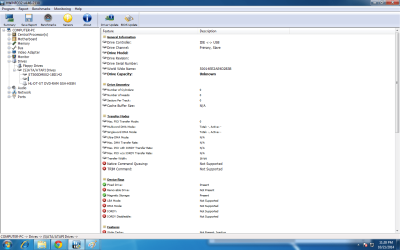
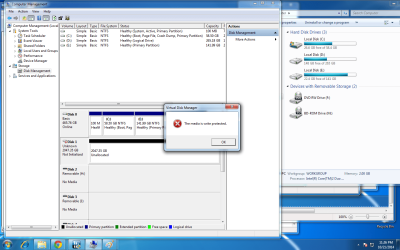
1st pic is the HwInfo an the 2nd and 3rd is trying to initialize
 

Attachments

  • Ab.png
    Ab.png
    53.6 KB · Views: 6
  • C.png
    C.png
    32.3 KB · Views: 2
  • D.png
    D.png
    103.2 KB · Views: 3

My Computer My Computer

At a glance

Windows Ultimate 32bit
Computer type
PC/Desktop
OS
Windows Ultimate 32bit
Is it limited to post pictures? Because I am not good in expressing my thoughts in words and does not know what terms to use, i just follow instructions and problem is it must be detailed to understand.
I hope people can still help me.
 
Last edited:

My Computer My Computer

At a glance

Windows Ultimate 32bit
Computer type
PC/Desktop
OS
Windows Ultimate 32bit
I think i can be up for 45min because i have classes but I can still check in the early morning.
and I am very grateful for helping me
 

My Computer My Computer

At a glance

Windows Ultimate 32bit
Computer type
PC/Desktop
OS
Windows Ultimate 32bit
Ok CKWD and Layback at least it is a bit clearer as to what is hooked up where to go next is something else. I am wondering if that larger drive and I am just a simple thinker and maybe that unallocated drive needs just formatting unless I am being a tad oversimplified?
 

My Computer My Computer

At a glance

Desk1 7 Home Prem / Desk2 10 Pro / Main lap A...Desk1 i5 3750K / Laptop i7 GTX 860M / Desk2 i...Desk1 8GB (1866) / Desk2 16GB (1333) / Laptop...Desk 1& 2NVidia GTX 650 & Laptops on board Intel
Computer type
PC/Desktop
Computer Manufacturer/Model Number
Own build (new) Desk1 / Asus ROG Win 7 / Desk2 1st build
OS
Desk1 7 Home Prem / Desk2 10 Pro / Main lap Asus ROG 10 Pro 2 laptop Toshiba 7 Pro Asus P2520 7 & 10
CPU
Desk1 i5 3750K / Laptop i7 GTX 860M / Desk2 i5 2500
Motherboard
Desk1 Asus P877-V / Desk2 Gigabyte H67 UD3H / Laptop ?
Memory
Desk1 8GB (1866) / Desk2 16GB (1333) / Laptop 8Gb DDR3
Graphics Card(s)
Desk 1& 2NVidia GTX 650 & Laptops on board Intel
Sound Card
Desk 1 & 2 -XONAR DG Realtek High Def audio Laptop
Monitor(s) Displays
Desk 1 Benq HD 2450 / Desk2 Philips 24" / Laptop 17.5"
Screen Resolution
1920x1080 D1 & D2 & Laptop 1
Hard Drives
Desk1 Samsung 120GB 830 SSD
Asus ROG 256GB 850 Pro SSD
Desk2 Samsung 840 256 SSD
Toshiba 120GB EVO
PSU
Desk 1 Corsair HX 1050/ Laptop ? / Desk 2 Corsair HX 650
Case
Desk 1 Cooler HAF XM ? Toshiba laptop / Desk2 Coolermaster
Cooling
Fans on all Desk1 -2 Desk2 - all Coolermasters 5 Laptop ?
Keyboard
Desk 1 MS Sidewinder X6 Desk 2 MS Sidewinder X 4
Mouse
Desk 1&2 - Gigabyte MS 900 gamer - laptop - Logitec wireless
Internet Speed
ADSL2+
Other Info
One other Desktop (tester) and spare Toshba laptop both with SSD's
Running Kaspersky 2016 ISS on all machines config'd identically
Logitec audio stereo systems on each machine (x3)
Canon MG5250MFC
Router/modem TP-Link running WPA2SK
Yes, I suppose we know a bit more now.
I have the same idea, Icit2lol, I think the question asked here is how he can initialize his hard drive?
Here's where the confusion came from; MrVenJhay said the 500GB drive was external, when in reality it's internal and it's the boot drive. Below it, above the DVD-RAM, there's another hard drive that can't be listed correctly as it's model can't be detected at this point.
That makes two internal hard drives at this point, the second one, the Unknown, being around 2TB. @ MrVenJhay, can you tell us the model of the second hard drive? Is it new, or do you have information on it? If you have information on it and you don't want to lose it, tell us up front and don't do what's written below!
The drive has to be initialized, but it says it's write protected, so before all, he has to first remove the write protection from the device.
This could happen so:
1. Open Command prompt: click Start, type command, click Command Prompt
2. Type "diskpart" and press Enter
3. Type "list volume" and press Enter
4. Type select volume #, where # is the number of the drive that's giving you the "write-protected" error
5. Type "attributes disk clear readonly" and press Enter
6. Type "exit" and press Enter
These steps should make the drive read and write enabled. Then it can be Initialized, Partitioned and Formatted, like already explained. :)

Icit2lol, do you see anything else?

Cheers!

CK_WD
 

My Computer My Computer

At a glance

Windows 7 Home Premium x64
Computer type
PC/Desktop
OS
Windows 7 Home Premium x64
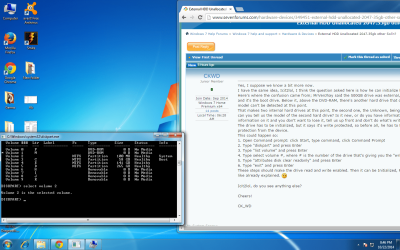
I don't know what volume will I choose..
 

My Computer My Computer

At a glance

Windows Ultimate 32bit
Computer type
PC/Desktop
OS
Windows Ultimate 32bit
Here's a Pic
 

Attachments

  • E.png
    E.png
    172.9 KB · Views: 5

My Computer My Computer

At a glance

Windows Ultimate 32bit
Computer type
PC/Desktop
OS
Windows Ultimate 32bit
Ok am with you CKWD Mr. VenJhay mate another option is the Partition Wizard too Free Partition Manager for Window PC | MiniTool Partition Wizard Free Edition see the small Youtube video and see if that is going to be easier to follow though what CKWD has suggested is the usual method but if you are like me then watching it in action I tend to follow and go back over when I want to.


There is probably a YouTube video for the diskpart method too and the Partition Wizard is a very handy tool to keep for all sorts of jobs.
 

My Computer My Computer

At a glance

Desk1 7 Home Prem / Desk2 10 Pro / Main lap A...Desk1 i5 3750K / Laptop i7 GTX 860M / Desk2 i...Desk1 8GB (1866) / Desk2 16GB (1333) / Laptop...Desk 1& 2NVidia GTX 650 & Laptops on board Intel
Computer type
PC/Desktop
Computer Manufacturer/Model Number
Own build (new) Desk1 / Asus ROG Win 7 / Desk2 1st build
OS
Desk1 7 Home Prem / Desk2 10 Pro / Main lap Asus ROG 10 Pro 2 laptop Toshiba 7 Pro Asus P2520 7 & 10
CPU
Desk1 i5 3750K / Laptop i7 GTX 860M / Desk2 i5 2500
Motherboard
Desk1 Asus P877-V / Desk2 Gigabyte H67 UD3H / Laptop ?
Memory
Desk1 8GB (1866) / Desk2 16GB (1333) / Laptop 8Gb DDR3
Graphics Card(s)
Desk 1& 2NVidia GTX 650 & Laptops on board Intel
Sound Card
Desk 1 & 2 -XONAR DG Realtek High Def audio Laptop
Monitor(s) Displays
Desk 1 Benq HD 2450 / Desk2 Philips 24" / Laptop 17.5"
Screen Resolution
1920x1080 D1 & D2 & Laptop 1
Hard Drives
Desk1 Samsung 120GB 830 SSD
Asus ROG 256GB 850 Pro SSD
Desk2 Samsung 840 256 SSD
Toshiba 120GB EVO
PSU
Desk 1 Corsair HX 1050/ Laptop ? / Desk 2 Corsair HX 650
Case
Desk 1 Cooler HAF XM ? Toshiba laptop / Desk2 Coolermaster
Cooling
Fans on all Desk1 -2 Desk2 - all Coolermasters 5 Laptop ?
Keyboard
Desk 1 MS Sidewinder X6 Desk 2 MS Sidewinder X 4
Mouse
Desk 1&2 - Gigabyte MS 900 gamer - laptop - Logitec wireless
Internet Speed
ADSL2+
Other Info
One other Desktop (tester) and spare Toshba laptop both with SSD's
Running Kaspersky 2016 ISS on all machines config'd identically
Logitec audio stereo systems on each machine (x3)
Canon MG5250MFC
Router/modem TP-Link running WPA2SK
This is a bit confusing, I have to admit. Without seeing all of your partitions clearly I can't tell you which volume you need to type in. You should consider it according to what the system is giving you as information.
But ICit2lol's suggestion is useful too. It's even easier, basically I've explained what's needed to be done theoretically and if the traditional way is difficult for you, then the software Icit2lol gave you would do the same but in a much easier way. I totally agree. :)
So after you manage to remove the write protection initialize your drive and everything should be fine! :)

Cheers!

CK_WD
 

My Computer My Computer

At a glance

Windows 7 Home Premium x64
Computer type
PC/Desktop
OS
Windows 7 Home Premium x64
Look I have to agree again with CKWD it is very difficult without seeing the whole process as you go through it - a small snip of that diskpart window is not easy to see where you are up to.

That write protection I reckon could be dealt with if it isn't the boot drive (disk 0) by just clean all with the diskpart command line or the wipe disk feature with Partition Wizard - both take about the same time to complete and if it is 2TB then a very long time.
Now I take it as I see the pics as disk 0 being the boot drive and disk 1 as the problem drive and from what CK has found it is installed in the machine.

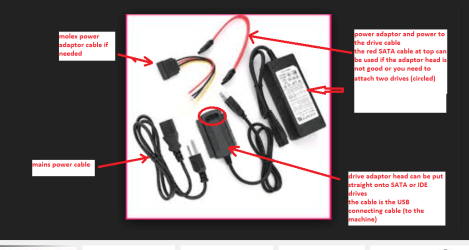
What you could do is install that drive in another machine or attach it with a USB to SATA adaptor and do the process that way see pic for the adaptor. The adaptors are quite cheap to buy.
 

Attachments

  • USB SATA GADGET.PNG
    USB SATA GADGET.PNG
    70.6 KB · Views: 0

My Computer My Computer

At a glance

Desk1 7 Home Prem / Desk2 10 Pro / Main lap A...Desk1 i5 3750K / Laptop i7 GTX 860M / Desk2 i...Desk1 8GB (1866) / Desk2 16GB (1333) / Laptop...Desk 1& 2NVidia GTX 650 & Laptops on board Intel
Computer type
PC/Desktop
Computer Manufacturer/Model Number
Own build (new) Desk1 / Asus ROG Win 7 / Desk2 1st build
OS
Desk1 7 Home Prem / Desk2 10 Pro / Main lap Asus ROG 10 Pro 2 laptop Toshiba 7 Pro Asus P2520 7 & 10
CPU
Desk1 i5 3750K / Laptop i7 GTX 860M / Desk2 i5 2500
Motherboard
Desk1 Asus P877-V / Desk2 Gigabyte H67 UD3H / Laptop ?
Memory
Desk1 8GB (1866) / Desk2 16GB (1333) / Laptop 8Gb DDR3
Graphics Card(s)
Desk 1& 2NVidia GTX 650 & Laptops on board Intel
Sound Card
Desk 1 & 2 -XONAR DG Realtek High Def audio Laptop
Monitor(s) Displays
Desk 1 Benq HD 2450 / Desk2 Philips 24" / Laptop 17.5"
Screen Resolution
1920x1080 D1 & D2 & Laptop 1
Hard Drives
Desk1 Samsung 120GB 830 SSD
Asus ROG 256GB 850 Pro SSD
Desk2 Samsung 840 256 SSD
Toshiba 120GB EVO
PSU
Desk 1 Corsair HX 1050/ Laptop ? / Desk 2 Corsair HX 650
Case
Desk 1 Cooler HAF XM ? Toshiba laptop / Desk2 Coolermaster
Cooling
Fans on all Desk1 -2 Desk2 - all Coolermasters 5 Laptop ?
Keyboard
Desk 1 MS Sidewinder X6 Desk 2 MS Sidewinder X 4
Mouse
Desk 1&2 - Gigabyte MS 900 gamer - laptop - Logitec wireless
Internet Speed
ADSL2+
Other Info
One other Desktop (tester) and spare Toshba laptop both with SSD's
Running Kaspersky 2016 ISS on all machines config'd identically
Logitec audio stereo systems on each machine (x3)
Canon MG5250MFC
Router/modem TP-Link running WPA2SK
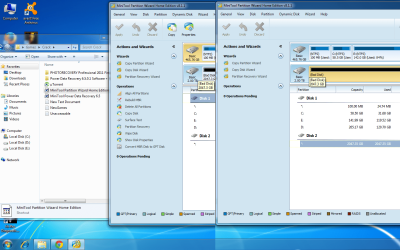
I already tried minitool, however it does not show searched partitions it returns empty, I even tried it 2 times it took me 48hrs to finish (Lol).. Also in the pic below comparing the Disk 1 and Disk 2(which is the external that shows 2tb) disk 2 shows as bad disk and does not show other operations the only thing i can use is the wizard which is the Partition Rec, Wizard that does not return any results.
 

Attachments

  • CDDE.png
    CDDE.png
    117.1 KB · Views: 2

My Computer My Computer

At a glance

Windows Ultimate 32bit
Computer type
PC/Desktop
OS
Windows Ultimate 32bit
BTW.. before I was referred to this site, I used diskpart and used the clean command it was successful but still, cant use the attributes clear disk readonly, it only shows failure.. So i think there is nothing to retrieve but i will still try
 

My Computer My Computer

At a glance

Windows Ultimate 32bit
Computer type
PC/Desktop
OS
Windows Ultimate 32bit
Well for what it is worth the drive is showing as bad I would be ditching the thing. Now just so I have it right the 2TB is an external?? if so is it worth this grief as I mentioned above?
 

My Computer My Computer

At a glance

Desk1 7 Home Prem / Desk2 10 Pro / Main lap A...Desk1 i5 3750K / Laptop i7 GTX 860M / Desk2 i...Desk1 8GB (1866) / Desk2 16GB (1333) / Laptop...Desk 1& 2NVidia GTX 650 & Laptops on board Intel
Computer type
PC/Desktop
Computer Manufacturer/Model Number
Own build (new) Desk1 / Asus ROG Win 7 / Desk2 1st build
OS
Desk1 7 Home Prem / Desk2 10 Pro / Main lap Asus ROG 10 Pro 2 laptop Toshiba 7 Pro Asus P2520 7 & 10
CPU
Desk1 i5 3750K / Laptop i7 GTX 860M / Desk2 i5 2500
Motherboard
Desk1 Asus P877-V / Desk2 Gigabyte H67 UD3H / Laptop ?
Memory
Desk1 8GB (1866) / Desk2 16GB (1333) / Laptop 8Gb DDR3
Graphics Card(s)
Desk 1& 2NVidia GTX 650 & Laptops on board Intel
Sound Card
Desk 1 & 2 -XONAR DG Realtek High Def audio Laptop
Monitor(s) Displays
Desk 1 Benq HD 2450 / Desk2 Philips 24" / Laptop 17.5"
Screen Resolution
1920x1080 D1 & D2 & Laptop 1
Hard Drives
Desk1 Samsung 120GB 830 SSD
Asus ROG 256GB 850 Pro SSD
Desk2 Samsung 840 256 SSD
Toshiba 120GB EVO
PSU
Desk 1 Corsair HX 1050/ Laptop ? / Desk 2 Corsair HX 650
Case
Desk 1 Cooler HAF XM ? Toshiba laptop / Desk2 Coolermaster
Cooling
Fans on all Desk1 -2 Desk2 - all Coolermasters 5 Laptop ?
Keyboard
Desk 1 MS Sidewinder X6 Desk 2 MS Sidewinder X 4
Mouse
Desk 1&2 - Gigabyte MS 900 gamer - laptop - Logitec wireless
Internet Speed
ADSL2+
Other Info
One other Desktop (tester) and spare Toshba laptop both with SSD's
Running Kaspersky 2016 ISS on all machines config'd identically
Logitec audio stereo systems on each machine (x3)
Canon MG5250MFC
Router/modem TP-Link running WPA2SK
maybe an idea.. download a live version of ubuntu, unplug all your hard drives inside the computer, boot the live cd and see if you can initialize and format the external drive with GParted.
 

My Computer My Computer

At a glance

Windows 7 Ultimate x64i7 2600kCMZ16GX3M4A1600C9Gainward GeForce GTX 580 1536MB Phantom
Computer type
PC/Desktop
Computer Manufacturer/Model Number
custom build
OS
Windows 7 Ultimate x64
CPU
i7 2600k
Motherboard
GA Z68X-UD4-B3
Memory
CMZ16GX3M4A1600C9
Graphics Card(s)
Gainward GeForce GTX 580 1536MB Phantom
Hard Drives
OCZ Agility 3 120GB
Western Digital Caviar Green 2 TB WD20EARS
Antivirus
Norton AV
Browser
Firefox
Back
Top