
External HDD Unallocated 2047.35gb other Sol'n?

Probably a good idea Pimple Haze and if Mr VenJay wants to do that I have a little ditty to show how


BOOTABLE UBUNTU

Make a bootable Ubuntu disk http://www.ubuntu.com/download

Set the BIOSto boot from the optical when the machine boots it will show you a screen with TRY or INSTALL >select TRY.You can of course remove the hard driveand any other drives when doing this as if the optical alone is the only driveleft in the machine then the BIOS willonly find the optical to boot from.

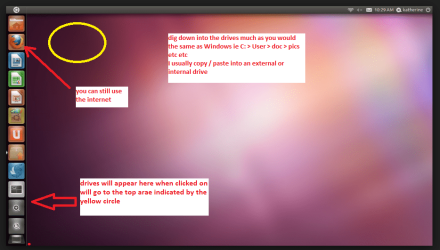
When it isfinished - it takes very little time you will get a screen like in the pic .

Open thedrive you want > User and dig down until you get to the data / settings you may be able to copy / paste the materialyou want to an external source or other installed drive doing this.

I am notsure if it will but I have recovered tons of data etc using this method both on"dead" or just plain drives that you cannot get data from using Windows.
 

Attachments
  • UBUTUX.PNG
    UBUTUX.PNG
    128.9 KB · Views: 0

My Computer My Computer

At a glance

Desk1 7 Home Prem / Desk2 10 Pro / Main lap A...Desk1 i5 3750K / Laptop i7 GTX 860M / Desk2 i...Desk1 8GB (1866) / Desk2 16GB (1333) / Laptop...Desk 1& 2NVidia GTX 650 & Laptops on board Intel
Computer type
PC/Desktop
Computer Manufacturer/Model Number
Own build (new) Desk1 / Asus ROG Win 7 / Desk2 1st build
OS
Desk1 7 Home Prem / Desk2 10 Pro / Main lap Asus ROG 10 Pro 2 laptop Toshiba 7 Pro Asus P2520 7 & 10
CPU
Desk1 i5 3750K / Laptop i7 GTX 860M / Desk2 i5 2500
Motherboard
Desk1 Asus P877-V / Desk2 Gigabyte H67 UD3H / Laptop ?
Memory
Desk1 8GB (1866) / Desk2 16GB (1333) / Laptop 8Gb DDR3
Graphics Card(s)
Desk 1& 2NVidia GTX 650 & Laptops on board Intel
Sound Card
Desk 1 & 2 -XONAR DG Realtek High Def audio Laptop
Monitor(s) Displays
Desk 1 Benq HD 2450 / Desk2 Philips 24" / Laptop 17.5"
Screen Resolution
1920x1080 D1 & D2 & Laptop 1
Hard Drives
Desk1 Samsung 120GB 830 SSD
Asus ROG 256GB 850 Pro SSD
Desk2 Samsung 840 256 SSD
Toshiba 120GB EVO
PSU
Desk 1 Corsair HX 1050/ Laptop ? / Desk 2 Corsair HX 650
Case
Desk 1 Cooler HAF XM ? Toshiba laptop / Desk2 Coolermaster
Cooling
Fans on all Desk1 -2 Desk2 - all Coolermasters 5 Laptop ?
Keyboard
Desk 1 MS Sidewinder X6 Desk 2 MS Sidewinder X 4
Mouse
Desk 1&2 - Gigabyte MS 900 gamer - laptop - Logitec wireless
Internet Speed
ADSL2+
Other Info
One other Desktop (tester) and spare Toshba laptop both with SSD's
Running Kaspersky 2016 ISS on all machines config'd identically
Logitec audio stereo systems on each machine (x3)
Canon MG5250MFC
Router/modem TP-Link running WPA2SK
Hi again everyone!

I'm sorry for the delay here, I have missed I few new posts and as I can see I haven't quite understood everything right?
So the 2TB hard drive is an external one, not internal! That does change things a bit! Though, I don't understand why it would make it so hard to initialize?
@MrVenJhay, so the disk has shown failure? But you haven't checked it thoroughly? If you can, I would suggest scan it fully, you could use the WD Data Lifeguard Tool for that:
http://support.wdc.com/product/download.asp?groupid=810&lang=en

Afterwards, look at the results, post them here, to see if it's even worth it to deal with this external hard drive. Looks like a bad one, it happens so sometime, or if it's not brand new, then it could've been damaged somehow.

What brand and model is the hard drive? If you don't know can you send a picture? Depending on the disk and how old (new) it is, you could try and RMA it.

But I couldn't understand if it has any information on it that you would need?

@PimpleMaze, the Ubuntu idea is great! @Icit2lol, great guide! But I have a bit of doubt in this particular case. If the 2TB disk is write protected that probably means that it's hardware encrypted. I am not sure if loading it in Ubuntu would be able to initialize it? I may be wrong, if so, please correct me! Otherwise, it's worth to try.

Last case scenario, I would still suggest RMA-ing the disk as this one just seems bad.

Best of luck! :)

CK_WD
 

My Computer My Computer

At a glance

Windows 7 Home Premium x64
Computer type
PC/Desktop
OS
Windows 7 Home Premium x64
Facts in this case:

1. 500GB external HDD reads as a 2047.35 GB drive, unknown, Not initialised, Unallocated. ( It is not a 2TB drive. The OP has clearly stated this in his first post. Moreover a 2TB drive will never read as 2047GB.)

2. Trying to initialise it throws out the error message of it being writeprotected.

Read together and there is no doubt whatsoever that the drive is a goner.

Yes, if your drive is still under warranty, RMA it.

If not, you can work as follows to determine whether it is the SATA/PATA to USB bridge interface inside the enclosure or the physical HDD inside that has given up. ( Yep somewhere in the HWInfo I saw it as
IDE <->USB, Primary-Slave)

Take out the HDD and connect it as an internal drive on your desktop and see how it behaves. Check it in Windows Disk Management. If it is a PATA drive, you have to connect it with a PATA cable and configure it as a Master if you don't have any other PATA drive.

If the drive proves to be good you can use it. If it proves to be bad , just throw it away.
 

My Computer My Computer

At a glance

Windows 7 Home Premium 32 bit
OS
Windows 7 Home Premium 32 bit
Probably right, Jumanji.
Try another usb cable.
try another usb port,
try another computer, if possible.
If nothing works, and the external drive's under warranty, RMA!
otherwise take it out of the enclosure and connect it as internal drive.
If that doesn't help try updating the firmware, if available,
try running the tools that are available from the manufacturer's website
But don't toss it away before you tried it on linux too.
 

My Computer My Computer

At a glance

Windows 7 Ultimate x64i7 2600kCMZ16GX3M4A1600C9Gainward GeForce GTX 580 1536MB Phantom
Computer type
PC/Desktop
Computer Manufacturer/Model Number
custom build
OS
Windows 7 Ultimate x64
CPU
i7 2600k
Motherboard
GA Z68X-UD4-B3
Memory
CMZ16GX3M4A1600C9
Graphics Card(s)
Gainward GeForce GTX 580 1536MB Phantom
Hard Drives
OCZ Agility 3 120GB
Western Digital Caviar Green 2 TB WD20EARS
Antivirus
Norton AV
Browser
Firefox
Ok well I did suggest that the drive was hooked up to another machine back in post #16 and as far as I could tell from the very beginning the drive was an external and was showing a very odd capacity and I should have suggested a chkdsk on that drive back then.

However there seems to be a fair bit of confusion throughout the thread and I think the Ubuntu run would have probably shown that drive up for what it actually is, and as in the HW Info readout the drive was seen to be a 500GB drive and in fact I suggested ditching this drive quite a ways back. I suppose I should have been a bit more explicit and say to return it under warranty if that was possible the reference to ditching I agree sounds a bit too a blanket cover way of getting the thing changed.

There are also other signs that flag a problem for me I that the drive testing with Partition Wizard took so long and again I should have suggested something like a Seagate test or similar. So apart for my idea of a chkdsk on that drive I really have nothing more to add.
 

My Computer My Computer

At a glance

Desk1 7 Home Prem / Desk2 10 Pro / Main lap A...Desk1 i5 3750K / Laptop i7 GTX 860M / Desk2 i...Desk1 8GB (1866) / Desk2 16GB (1333) / Laptop...Desk 1& 2NVidia GTX 650 & Laptops on board Intel
Computer type
PC/Desktop
Computer Manufacturer/Model Number
Own build (new) Desk1 / Asus ROG Win 7 / Desk2 1st build
OS
Desk1 7 Home Prem / Desk2 10 Pro / Main lap Asus ROG 10 Pro 2 laptop Toshiba 7 Pro Asus P2520 7 & 10
CPU
Desk1 i5 3750K / Laptop i7 GTX 860M / Desk2 i5 2500
Motherboard
Desk1 Asus P877-V / Desk2 Gigabyte H67 UD3H / Laptop ?
Memory
Desk1 8GB (1866) / Desk2 16GB (1333) / Laptop 8Gb DDR3
Graphics Card(s)
Desk 1& 2NVidia GTX 650 & Laptops on board Intel
Sound Card
Desk 1 & 2 -XONAR DG Realtek High Def audio Laptop
Monitor(s) Displays
Desk 1 Benq HD 2450 / Desk2 Philips 24" / Laptop 17.5"
Screen Resolution
1920x1080 D1 & D2 & Laptop 1
Hard Drives
Desk1 Samsung 120GB 830 SSD
Asus ROG 256GB 850 Pro SSD
Desk2 Samsung 840 256 SSD
Toshiba 120GB EVO
PSU
Desk 1 Corsair HX 1050/ Laptop ? / Desk 2 Corsair HX 650
Case
Desk 1 Cooler HAF XM ? Toshiba laptop / Desk2 Coolermaster
Cooling
Fans on all Desk1 -2 Desk2 - all Coolermasters 5 Laptop ?
Keyboard
Desk 1 MS Sidewinder X6 Desk 2 MS Sidewinder X 4
Mouse
Desk 1&2 - Gigabyte MS 900 gamer - laptop - Logitec wireless
Internet Speed
ADSL2+
Other Info
One other Desktop (tester) and spare Toshba laptop both with SSD's
Running Kaspersky 2016 ISS on all machines config'd identically
Logitec audio stereo systems on each machine (x3)
Canon MG5250MFC
Router/modem TP-Link running WPA2SK
I ask back in post #5 for a clean shot of Disk Management.


Disk Management - Post a Screen Capture Image

All we get is a bunch of pictures covering pictures, covering pictures. It makes it very difficult to impossible to see the information needed.

Have a nice day.
 

My Computer My Computer

At a glance

Windows 10 Pro. 64/ version 1709 Windows 7 Pr...Intel i7-6800K @ 4.3Corsair Platinum 16 gig @2400EVGA GTX 1070 OC
Computer type
PC/Desktop
Computer Manufacturer/Model Number
Home made Desktop
OS
Windows 10 Pro. 64/ version 1709 Windows 7 Pro/64
CPU
Intel i7-6800K @ 4.3
Motherboard
ASUS X-99 Deluxe II
Memory
Corsair Platinum 16 gig @2400
Graphics Card(s)
EVGA GTX 1070 OC
Monitor(s) Displays
Asus 27" LED LCD/VE278Q
Screen Resolution
1920-1080 or 1280-720 HDMI
Hard Drives
INTEL SSD 730-240 Gb Sata 3.0/
PSU
EVGA Platium 1200W
Case
Phanteks Luxe Tempered Glass 8 fans/ one radiator
Cooling
XSPC/ Water Cooled CPU
Keyboard
Das 4 Professional
Mouse
Logitech M705/MX Anywhere 2-S
Internet Speed
100 mbits
Antivirus
Microsoft Security Essentials/ Malwarebytes Premium 3.0/ SAS
Browser
I.E. 11 default/Firefox/ ISP Time Warner Cable/Spectrum
Other Info
LG BluRay Burner/
Sound system-KLipsch-THX/
Icy Dock ssd Hot Swap bays.
I suppose the confusion on this thread prevented us from understanding the issue better. The clean screenshots could've also been useful.
So @MrVenJhay, @jumanji and @PimpleMaze have given the most promissing troubleshooting. In the end, if nothing has worked, again, check on your manufacturer's website if your drive is still in warranty and RMA it.
I apologize for any confusion and hope you get back yourself a nicely working hard drive! :)

Best of luck!

CK_WD
 

My Computer My Computer

At a glance

Windows 7 Home Premium x64
Computer type
PC/Desktop
OS
Windows 7 Home Premium x64
Yes CK suppose that is why it is good there are more than one pair of eyes viewing a thread at any one time.:)
 

My Computer My Computer

At a glance

Desk1 7 Home Prem / Desk2 10 Pro / Main lap A...Desk1 i5 3750K / Laptop i7 GTX 860M / Desk2 i...Desk1 8GB (1866) / Desk2 16GB (1333) / Laptop...Desk 1& 2NVidia GTX 650 & Laptops on board Intel
Computer type
PC/Desktop
Computer Manufacturer/Model Number
Own build (new) Desk1 / Asus ROG Win 7 / Desk2 1st build
OS
Desk1 7 Home Prem / Desk2 10 Pro / Main lap Asus ROG 10 Pro 2 laptop Toshiba 7 Pro Asus P2520 7 & 10
CPU
Desk1 i5 3750K / Laptop i7 GTX 860M / Desk2 i5 2500
Motherboard
Desk1 Asus P877-V / Desk2 Gigabyte H67 UD3H / Laptop ?
Memory
Desk1 8GB (1866) / Desk2 16GB (1333) / Laptop 8Gb DDR3
Graphics Card(s)
Desk 1& 2NVidia GTX 650 & Laptops on board Intel
Sound Card
Desk 1 & 2 -XONAR DG Realtek High Def audio Laptop
Monitor(s) Displays
Desk 1 Benq HD 2450 / Desk2 Philips 24" / Laptop 17.5"
Screen Resolution
1920x1080 D1 & D2 & Laptop 1
Hard Drives
Desk1 Samsung 120GB 830 SSD
Asus ROG 256GB 850 Pro SSD
Desk2 Samsung 840 256 SSD
Toshiba 120GB EVO
PSU
Desk 1 Corsair HX 1050/ Laptop ? / Desk 2 Corsair HX 650
Case
Desk 1 Cooler HAF XM ? Toshiba laptop / Desk2 Coolermaster
Cooling
Fans on all Desk1 -2 Desk2 - all Coolermasters 5 Laptop ?
Keyboard
Desk 1 MS Sidewinder X6 Desk 2 MS Sidewinder X 4
Mouse
Desk 1&2 - Gigabyte MS 900 gamer - laptop - Logitec wireless
Internet Speed
ADSL2+
Other Info
One other Desktop (tester) and spare Toshba laptop both with SSD's
Running Kaspersky 2016 ISS on all machines config'd identically
Logitec audio stereo systems on each machine (x3)
Canon MG5250MFC
Router/modem TP-Link running WPA2SK
Of course, Icit2lol! Also, I am happy to see all cooperative attitude here without any unnecessary rudeness or unprofessional behaviour!

Cheers! :)

CK_WD
 

My Computer My Computer

At a glance

Windows 7 Home Premium x64
Computer type
PC/Desktop
OS
Windows 7 Home Premium x64
Back
Top