
External pocket USB3 HD - Access denied

bawldiggle

GrayGhost2 ret.
Pro User
VIP
Local time
11:10 PM
Messages
895
Location
Australia
I cannot save files to my (pocket) external NTSF "Imation" USB3 harddrive.
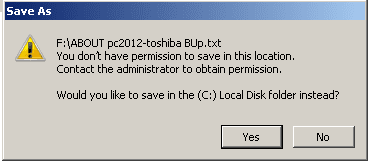
SaveAs_Denied.png

I can create new folders on the disc
BUT cannot save files onto either the drive nor a folder on the drive.
In the past I have copied folders onto the drive (it is a backup drive)

There are two hidden folders on the drive
"$RECYCLE.BIN"
"System Volume Information" (SVI)
I understand "$RECYCLE.BIN"
I suspect SVI is the problem, but all I get is "Access denied"

Can I reformat the drive (NTSF) -- I know I will loose all data -- and will that solve the problem ?
 

My Computer My Computer

Computer type
PC/Desktop
Computer Manufacturer/Model Number
Toshiba, Lenovo (laptops) + 4 rigs
OS
XP Pro (x86) | 7 HP (x86) & (x64) | 7 Pro (x64)
Hiyya Gray well mate you could go further and wipe the thing and then format it if you are not concerned with the stuff on it.

I prefer to use Partition Wizard to do both operations but you can use DISKPART if you want.

Best Free Partition Manager Freeware and free partition magic for Windows 7, Windows 8, Windows Vista and Windows XP 32 bit & 64 bit. MiniTool Free Partition Manager Software Home Edition. VERY useful tool to keep


http://www.sevenforums.com/tutorials/52129-disk-clean-clean-all-diskpart-command.html

Myself I do object to the manufacturers putting their crap on the sticks but hey beggars can't be chooser eh? :)
 

My Computer My Computer

Computer type
PC/Desktop
Computer Manufacturer/Model Number
Own build (new) Desk1 / Asus ROG Win 7 / Desk2 1st build
OS
Desk1 7 Home Prem / Desk2 10 Pro / Main lap Asus ROG 10 Pro 2 laptop Toshiba 7 Pro Asus P2520 7 & 10
CPU
Desk1 i5 3750K / Laptop i7 GTX 860M / Desk2 i5 2500
Motherboard
Desk1 Asus P877-V / Desk2 Gigabyte H67 UD3H / Laptop ?
Memory
Desk1 8GB (1866) / Desk2 16GB (1333) / Laptop 8Gb DDR3
Graphics Card(s)
Desk 1& 2NVidia GTX 650 & Laptops on board Intel
Sound Card
Desk 1 & 2 -XONAR DG Realtek High Def audio Laptop
Monitor(s) Displays
Desk 1 Benq HD 2450 / Desk2 Philips 24" / Laptop 17.5"
Screen Resolution
1920x1080 D1 & D2 & Laptop 1
Hard Drives
Desk1 Samsung 120GB 830 SSD
Asus ROG 256GB 850 Pro SSD
Desk2 Samsung 840 256 SSD
Toshiba 120GB EVO
PSU
Desk 1 Corsair HX 1050/ Laptop ? / Desk 2 Corsair HX 650
Case
Desk 1 Cooler HAF XM ? Toshiba laptop / Desk2 Coolermaster
Cooling
Fans on all Desk1 -2 Desk2 - all Coolermasters 5 Laptop ?
Keyboard
Desk 1 MS Sidewinder X6 Desk 2 MS Sidewinder X 4
Mouse
Desk 1&2 - Gigabyte MS 900 gamer - laptop - Logitec wireless
Internet Speed
ADSL2+
Other Info
One other Desktop (tester) and spare Toshba laptop both with SSD's
Running Kaspersky 2016 ISS on all machines config'd identically
Logitec audio stereo systems on each machine (x3)
Canon MG5250MFC
Router/modem TP-Link running WPA2SK
Hi "ICit2lol", thank you for your response. :)

Previously this pocket HDD accepted changes but suddenly "access is denied" ?
I suspected the crap-wear but I don't have a lot of experience around systems.
Worst I could do is blow up a thumb-drive ... all for $8??
. . . I wonder if the thought police are reading this?

Occasionally I get problem drives but I think they are mostly older drives (5 yrs+)
. . . New policy is to chuck thumb-drives after two years + toss pocket HDD after 5 years.
--------
What are your thoughts on an external pocket drive as the permanent data drive.
I have just helped a senior-cit to setup her $200 govt subsidized PC for seniors.
At 85GB HDD (yes 85GB !) it is already half full with OS, Av and a few apps. (its an ex govt Dell, they (govt dept) obviously server based.) There are no OS discs nor a re-install partions, so slipping in a new HD is not an option considering the cost of M$ Windows.
. . . most of my time is spent in coaching on how to use the PC etc. web, word-processing, email.
-----
Glad you mentioned "partitioning" -- don't know if I should start another "fred",
... but seeing how you are also in OZ ...? I could do with some help on partitioning. :confused:

Regards
 
Last edited:

My Computer My Computer

Computer type
PC/Desktop
Computer Manufacturer/Model Number
Toshiba, Lenovo (laptops) + 4 rigs
OS
XP Pro (x86) | 7 HP (x86) & (x64) | 7 Pro (x64)
Hmm Gray take a look at some of these tutorials you will find a lot of different aspects of partitioning
Tutorial search - Windows 7 Help Forums

Myself I use the Partition Wizard it is useful for a heap of things from partition extending to making new ones to deleting them and wiping drives to surface tests etc etc
Very useful tool to keep on the taskbar I find anyway. Best Free Partition Manager Freeware and free partition magic for Windows 7, Windows 8, Windows Vista and Windows XP 32 bit & 64 bit. MiniTool Free Partition Manager Software Home Edition.

Another handy tool is this Macrium Reflect FREE Edition - Information and download see this on how to use it
http://www.sevenforums.com/tutorials/73828-imaging-free-macrium.html

That drive mate could you not just clone that small one to a larger one? It is easy with the Macrium I think the only thing is that you can clone from small to large drives but not large to small ones. Plus you will not need a new OS:) and if the new drive evr fails you have the original drive that you cloned from.

Having said that you can clean install as long as you have the original activation number on the Microsoft sticker see http://www.sevenforums.com/tutorials/1649-clean-install-windows-7-a.html onto new drive and still keep the original drive. The only setback is the updates ad nauseum :rolleyes:
 

My Computer My Computer

Computer type
PC/Desktop
Computer Manufacturer/Model Number
Own build (new) Desk1 / Asus ROG Win 7 / Desk2 1st build
OS
Desk1 7 Home Prem / Desk2 10 Pro / Main lap Asus ROG 10 Pro 2 laptop Toshiba 7 Pro Asus P2520 7 & 10
CPU
Desk1 i5 3750K / Laptop i7 GTX 860M / Desk2 i5 2500
Motherboard
Desk1 Asus P877-V / Desk2 Gigabyte H67 UD3H / Laptop ?
Memory
Desk1 8GB (1866) / Desk2 16GB (1333) / Laptop 8Gb DDR3
Graphics Card(s)
Desk 1& 2NVidia GTX 650 & Laptops on board Intel
Sound Card
Desk 1 & 2 -XONAR DG Realtek High Def audio Laptop
Monitor(s) Displays
Desk 1 Benq HD 2450 / Desk2 Philips 24" / Laptop 17.5"
Screen Resolution
1920x1080 D1 & D2 & Laptop 1
Hard Drives
Desk1 Samsung 120GB 830 SSD
Asus ROG 256GB 850 Pro SSD
Desk2 Samsung 840 256 SSD
Toshiba 120GB EVO
PSU
Desk 1 Corsair HX 1050/ Laptop ? / Desk 2 Corsair HX 650
Case
Desk 1 Cooler HAF XM ? Toshiba laptop / Desk2 Coolermaster
Cooling
Fans on all Desk1 -2 Desk2 - all Coolermasters 5 Laptop ?
Keyboard
Desk 1 MS Sidewinder X6 Desk 2 MS Sidewinder X 4
Mouse
Desk 1&2 - Gigabyte MS 900 gamer - laptop - Logitec wireless
Internet Speed
ADSL2+
Other Info
One other Desktop (tester) and spare Toshba laptop both with SSD's
Running Kaspersky 2016 ISS on all machines config'd identically
Logitec audio stereo systems on each machine (x3)
Canon MG5250MFC
Router/modem TP-Link running WPA2SK
Just plugged in the problem drive. Now it is not locked ? :confused:

ASSUMPTION:-

When the drive was first misbehaving I had changed the drive "Name" several times, and when I tried to add files to the drive -- "access denied".

I wonder if when changing an external drive-name I should have safely-removed and then attached it again ?

I have decided to reformat the drive (NTSF) to remove the inherited manufacturers files.
 

My Computer My Computer

Computer type
PC/Desktop
Computer Manufacturer/Model Number
Toshiba, Lenovo (laptops) + 4 rigs
OS
XP Pro (x86) | 7 HP (x86) & (x64) | 7 Pro (x64)
Thanks "ICit2lol" :)

After formatting, safely removed drive ... then reconnected.

Opened Drive properties
General (tab)
Of the 298GB capacity
there is already 99.0MB used
297 free
There is now a new folder "$RECYCLE.BIN" and I assume that is the 99MB ?

Security (tab)
has 4 accounts
   Note
1. Authenticated Users
2. SYSTEM
3 Administrators (Owner-PC\Administrators)
4. Users (Owner-PC\Users)

Surely I don't need all these accounts for this lone external 300GB pocket drive.
That's assuming these accounts are specific to the target drive (or ext HDD)
PC only has WiFi connection to printer + internet router + a Sonos Router
Do these accounts refer to the drive or the device?

I am the only user, no gold bars under the bed, nor any sensitive material.
My guess is I should retain System, and Users.
Which accounts can I delete and which should stay ?


My Computer My Computer

Computer type
PC/Desktop
Computer Manufacturer/Model Number
Toshiba, Lenovo (laptops) + 4 rigs
OS
XP Pro (x86) | 7 HP (x86) & (x64) | 7 Pro (x64)
Turn off System Restore for the USB drive.
 

My Computer My Computer

Computer type
PC/Desktop
Computer Manufacturer/Model Number
Dell Inspiron 660
OS
Windows 7 Home Premium 64bit
CPU
Intel Core i3-3240
Motherboard
Dell 084J0R
Memory
8GB DDR3 SDRAM
Graphics Card(s)
EVGA GeForce GT 620
Sound Card
Intel Panther Point PCH High Definition Audio
Monitor(s) Displays
Acer G205HV
Screen Resolution
1600 x 900
Hard Drives
Sandisk SSD 64GB SDSSDP064G
Seagate HDD 1TB ST1000DM003-1CH162
PSU
Dell 300W
Case
Dell Inspiron
Keyboard
Logitech Wireless K320/B350
Mouse
Microsoft
Internet Speed
25Mbps/4Mbps
Antivirus
Avast
Browser
Mozilla Firefox
Comp Cmndo said:
Turn off System Restore for the USB drive.

Which of the current accounts is "System Restore for the USB drive" ?
... OR is there something else I should know (something in SysRestore config/settings) ??
I have only recently started creating Restore Points ... so far thankfully, not needed.


Thank you for your help :)
 

My Computer My Computer

Computer type
PC/Desktop
Computer Manufacturer/Model Number
Toshiba, Lenovo (laptops) + 4 rigs
OS
XP Pro (x86) | 7 HP (x86) & (x64) | 7 Pro (x64)
Back
Top