
External USB Hard Drive Backup not being found

dave60707

New member
Local time
10:34 AM
Messages
7
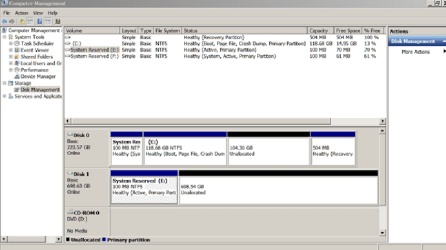
The “E” drive became missing. I added the drive letter in Disc Management but backup still can’t find it.
Please see attached screen shot. I’m guessing it has to do with Systems Reserve but can’t figure out how to fix that partition which I never saw before. I used Windows Image to backup and then recently tried to save a clone with Macrium Reflect but it failed with a message error 13 broken pipe.
Help please,
Dave
 

Attachments
  • Disc Management Image.png
    Disc Management Image.png
    37.4 KB · Views: 6

My Computer My Computer

Computer type
Laptop
Computer Manufacturer/Model Number
Lenovo T510
OS
Microsoft Windows 7 Professional 64-bit
CPU
Intel(R) Core(TM) i5 CPU M 540 @ 2.53GHz
Motherboard
Lenovo 43493HU
Memory
6GB usable
Graphics Card(s)
NVIDIA NVS 3100M
Sound Card
(1) NVIDIA High Definition Audio (2) NVIDIA High Definitio
Hard Drives
SAMSUNG MMCRE28G8MXP-0VB
Mouse
touchpad
Internet Speed
uverse
Antivirus
Malwarebytes
Browser
Google Chrome Version 42.0.2311.152 m
Have you simply tried setting the drive to a different letter other than E?
 

My Computer My Computer

Computer type
Laptop
Computer Manufacturer/Model Number
Dell Latitude E6540 Laptop
OS
Windows 7 Professional 64bit
CPU
Intel Core i7 4600M @ 2.90GHz
Motherboard
Dell Inc. 0CYT5F (SOCKET 0)
Memory
16.0GB Dual-Channel DDR3 @ 797MHz (11-11-11-28)
Graphics Card(s)
Intel HD Graphics 4600 (Dell) 2048MB ATI AMD Radeon HD 8790M
Sound Card
Realtek High Definition Audio
Monitor(s) Displays
HP ZR30w (2560x1600@60Hz)
Hard Drives
256GB LITEONIT LMT-256M6M-41 mm SATA (SSD)
1TB Samsung SSD 860 EVO mSATA SATA (SSD)
2TB USB 3.0 USB Device
115GB SanDisk Ultra Fit USB
Other Info
Multiple Dell E-Port Plus II Port Replicator/Docking Stations 0Y72NH USB 3.0 + 130W AC Adapters
Hi maxseven,
Thanks for your reply. I have just tried your suggestion of renaming it with an unused letter but to no avail. Could the Macrium Reflect cloning software have created the System Reserve partition (it that's what it is)? Should I just reformat the external hard drive?
Dave
 

My Computer My Computer

Computer type
Laptop
Computer Manufacturer/Model Number
Lenovo T510
OS
Microsoft Windows 7 Professional 64-bit
CPU
Intel(R) Core(TM) i5 CPU M 540 @ 2.53GHz
Motherboard
Lenovo 43493HU
Memory
6GB usable
Graphics Card(s)
NVIDIA NVS 3100M
Sound Card
(1) NVIDIA High Definition Audio (2) NVIDIA High Definitio
Hard Drives
SAMSUNG MMCRE28G8MXP-0VB
Mouse
touchpad
Internet Speed
uverse
Antivirus
Malwarebytes
Browser
Google Chrome Version 42.0.2311.152 m
The E partition is a tiny little partition. What do you want to do with it. The space behind it is very big and could be used for backup. But you have to first define a partition in that space.
 

My Computer My Computer

Computer Manufacturer/Model Number
HP, Dell, Gateway, Toshiba - 4 laptops and 2 desktops
OS
Vista, Windows7, Mint Mate, Zorin, Windows 8
CPU
from 1.6GHz Duo to i7
Monitor(s) Displays
2x HP w2207
Hard Drives
5x HDD, 7x SSD, 12x Externals
Keyboard
with trackball - no mices
Mouse
Trackball mice
Internet Speed
DSL 6000
The E partition is a tiny little partition.
Yes, it appears to me OP that you did perhaps err in some way asking Macrium to back-up your primary hard drive, and thus all it did was create that 100MB System Reserved partition and left the rest of the drive alone. I don't use Macrium so can't imagine how this might happen--must be the result of the "broken pipe" error.

But to guess: you tried to make a "clone" with Macrium and what you really want to do is create a Backup Image of that drive, which BTW can hold many multiple backups of your original (and why does your original have such a large unused space?).

I'd try running Macrium again and don't select Clone this time. Again, dunno Macrium but if it doesn't like your unformatted drive you may have to format it first as whs suggests.
 

My Computer My Computer

Computer type
Laptop
Computer Manufacturer/Model Number
Dell Latitude E6540 Laptop
OS
Windows 7 Professional 64bit
CPU
Intel Core i7 4600M @ 2.90GHz
Motherboard
Dell Inc. 0CYT5F (SOCKET 0)
Memory
16.0GB Dual-Channel DDR3 @ 797MHz (11-11-11-28)
Graphics Card(s)
Intel HD Graphics 4600 (Dell) 2048MB ATI AMD Radeon HD 8790M
Sound Card
Realtek High Definition Audio
Monitor(s) Displays
HP ZR30w (2560x1600@60Hz)
Hard Drives
256GB LITEONIT LMT-256M6M-41 mm SATA (SSD)
1TB Samsung SSD 860 EVO mSATA SATA (SSD)
2TB USB 3.0 USB Device
115GB SanDisk Ultra Fit USB
Other Info
Multiple Dell E-Port Plus II Port Replicator/Docking Stations 0Y72NH USB 3.0 + 130W AC Adapters
Hi Maxseven,
Yes Macrium created that small E partition and was probably going to save the clone in the large partition but for some reason crashed. I renamed and formatted the large partition and it failed again.
So I then reformatted the drive in windows and just successfully completed a window image backup.
I really appreciate your help.
Thank you very much,
Dave
 

My Computer My Computer

Computer type
Laptop
Computer Manufacturer/Model Number
Lenovo T510
OS
Microsoft Windows 7 Professional 64-bit
CPU
Intel(R) Core(TM) i5 CPU M 540 @ 2.53GHz
Motherboard
Lenovo 43493HU
Memory
6GB usable
Graphics Card(s)
NVIDIA NVS 3100M
Sound Card
(1) NVIDIA High Definition Audio (2) NVIDIA High Definitio
Hard Drives
SAMSUNG MMCRE28G8MXP-0VB
Mouse
touchpad
Internet Speed
uverse
Antivirus
Malwarebytes
Browser
Google Chrome Version 42.0.2311.152 m
Hi Maxseven,
Yes Macrium created that small E partition and was probably going to save the clone in the large partition but for some reason crashed. I renamed and formatted the large partition and it failed again.
So I then reformatted the drive in windows and just successfully completed a window image backup.
I really appreciate your help.
Thank you very much,
Dave
You're welcome. Maybe your Macrium installation is corrupt--people here swear by it.
 

My Computer My Computer

Computer type
Laptop
Computer Manufacturer/Model Number
Dell Latitude E6540 Laptop
OS
Windows 7 Professional 64bit
CPU
Intel Core i7 4600M @ 2.90GHz
Motherboard
Dell Inc. 0CYT5F (SOCKET 0)
Memory
16.0GB Dual-Channel DDR3 @ 797MHz (11-11-11-28)
Graphics Card(s)
Intel HD Graphics 4600 (Dell) 2048MB ATI AMD Radeon HD 8790M
Sound Card
Realtek High Definition Audio
Monitor(s) Displays
HP ZR30w (2560x1600@60Hz)
Hard Drives
256GB LITEONIT LMT-256M6M-41 mm SATA (SSD)
1TB Samsung SSD 860 EVO mSATA SATA (SSD)
2TB USB 3.0 USB Device
115GB SanDisk Ultra Fit USB
Other Info
Multiple Dell E-Port Plus II Port Replicator/Docking Stations 0Y72NH USB 3.0 + 130W AC Adapters
Problem Solved

I discovered that the problem was with many errors on the hard drive that I was trying to clone. I used Seagate's SeaTools for DOS to test the drive. I had to run it 5 times before all the errors were repaired but it did a commendable job fixing every single one. Thank you Seagate, and you very helpful folks at SevenForums.
Dave
 

My Computer My Computer

Computer type
Laptop
Computer Manufacturer/Model Number
Lenovo T510
OS
Microsoft Windows 7 Professional 64-bit
CPU
Intel(R) Core(TM) i5 CPU M 540 @ 2.53GHz
Motherboard
Lenovo 43493HU
Memory
6GB usable
Graphics Card(s)
NVIDIA NVS 3100M
Sound Card
(1) NVIDIA High Definition Audio (2) NVIDIA High Definitio
Hard Drives
SAMSUNG MMCRE28G8MXP-0VB
Mouse
touchpad
Internet Speed
uverse
Antivirus
Malwarebytes
Browser
Google Chrome Version 42.0.2311.152 m
Back
Top