
Solved Both "System reserved" and "C" partition cloned to external HDD: boot?

firmos

New member
Local time
7:42 AM
Messages
16
Both "System reserved" and "C" partition cloned to external HDD: boot?

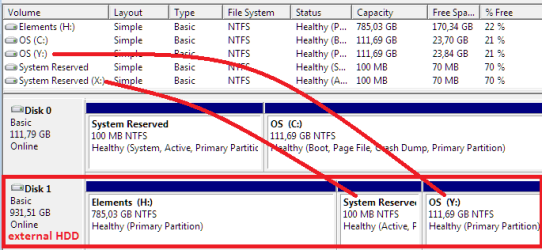
With EaseUS Backup Tool, I've cloned these two partitions ("System Reserved" and "C") to same-sized partitions on a external HDD ("X" and "Y"). Picture tells it concisely:
Capture.PNG

How to make drives "X" and "Y" boot-able?

In "Disk Management", I've noticed these partition labels missing:
  • "X" (or "System Reserved") is missing System label,
  • "Y" (or "OS") is missing Boot, Page File and Crash Dump labels

Thank you!
 
Last edited:

My Computer My Computer

At a glance

Windows 7 Professional
OS
Windows 7 Professional
You cannot boot Win7 on external HD, unless it is connected via eSATA.
 
Is it technically/ultimately infeasible ... or would it be just too tedious?

I'm just temporarily parking Windows 7 aside (to put UNIX on) and would like to return to it later ... so, I'd just like to verify that cloning went well?

What other options do users have in such circumstances? Would, say, creating a system image (with built-in tool) on the external HDD enable the user to resume Windows 7 exactly as it was?

gregrocker, thank you for the reply ... was afraid that I'd get ignored. :o
 

My Computer My Computer

At a glance

Windows 7 Professional
OS
Windows 7 Professional
detach original hdd temporary, enable boot from external hdd and perform a startup repair. This links the boot menu to the new os-partition. that's all.

now attach old hdd again. mark old "system reserved" as inactive so it doesn't boot from there. Drive C with old OS still needed?

booting form external hdd works only using esata. USB won't work!! usb-drivers are not loaded at boot time
 

My Computer My Computer

At a glance

Microsoft Windows 7 Home Premium 64-bits 7601...Intel(R) Core(TM) i3 CPU M 370 @ 2.40GHz4,00 GBATI Mobility Radeon HD 5400 Series
Computer type
Laptop
Computer Manufacturer/Model Number
ACER ASPIRE 5742G
OS
Microsoft Windows 7 Home Premium 64-bits 7601 Multiprocessor Free Service Pack 1
CPU
Intel(R) Core(TM) i3 CPU M 370 @ 2.40GHz
Motherboard
Acer Aspire 5742G
Memory
4,00 GB
Graphics Card(s)
ATI Mobility Radeon HD 5400 Series
Sound Card
(1) AMD High Definition Audio Device (2) Realtek High Defi
Screen Resolution
1366 x 768 x 32 bits (4294967296 colors) @ 60 Hz
Hard Drives
WDC WD5000BEVT-22ZAT0
It will only say "system" if it the current system partition - (contains the live bcd hive )

It will only say "boot" if it is the os you are currently booted into.

Windows system image will not make it any easier.

Booting from usb is tricky with win7 - probably not worth the effort for you - best use esata.
 

My Computers My Computers

  • At a glance

    7 X64i5 84002x8gb 3200mhz
    Computer type
    PC/Desktop
    OS
    7 X64
    CPU
    i5 8400
    Motherboard
    gigabyte b365m ds3h
    Memory
    2x8gb 3200mhz
    Hard Drives
    various
    PSU
    pure power 11 400w cm
    Case
    Coolermaster
    Cooling
    cryorig m9i
  • At a glance

    7x64g54008gb ddr4 2400
    Computer type
    PC/Desktop
    OS
    7x64
    CPU
    g5400
    Motherboard
    ga b365m ds3h
    Memory
    8gb ddr4 2400
    PSU
    xfx pro 450w
Is it technically/ultimately infeasible ... or would it be just too tedious?

I'm just temporarily parking Windows 7 aside (to put UNIX on) and would like to return to it later ... so, I'd just like to verify that cloning went well?

What other options do users have in such circumstances? Would, say, creating a system image (with built-in tool) on the external HDD enable the user to resume Windows 7 exactly as it was?

gregrocker, thank you for the reply ... was afraid that I'd get ignored. :o
why parking win7 aside? You can make it dual boot (win7 and linux)

system image is the best thing to do. But actually you can also clone partitions
 

My Computer My Computer

At a glance

Microsoft Windows 7 Home Premium 64-bits 7601...Intel(R) Core(TM) i3 CPU M 370 @ 2.40GHz4,00 GBATI Mobility Radeon HD 5400 Series
Computer type
Laptop
Computer Manufacturer/Model Number
ACER ASPIRE 5742G
OS
Microsoft Windows 7 Home Premium 64-bits 7601 Multiprocessor Free Service Pack 1
CPU
Intel(R) Core(TM) i3 CPU M 370 @ 2.40GHz
Motherboard
Acer Aspire 5742G
Memory
4,00 GB
Graphics Card(s)
ATI Mobility Radeon HD 5400 Series
Sound Card
(1) AMD High Definition Audio Device (2) Realtek High Defi
Screen Resolution
1366 x 768 x 32 bits (4294967296 colors) @ 60 Hz
Hard Drives
WDC WD5000BEVT-22ZAT0
why parking win7 aside? You can make it dual boot (win7 and linux)
Too little (ie. 23 GB) free space on a 120 GB drive.

system image is the best thing to do. But actually you can also clone partitions
Is there a difference between the two (system image via built-in tool and cloning)?
 

My Computer My Computer

At a glance

Windows 7 Professional
OS
Windows 7 Professional
Yes, the solution is to back up to external a Win7 backup image, or for more flexibility use Macrium .

Acronis also has an excellent premium imaging/cloning program which comes free with any WD or Seagate HD in the mix.

Cloning is a direct transfer between HD's, while imaging stores an archive which is a backup solution at the same time.

Backup Complete Computer - Create an Image Backup
 
gregrocker, but whichever tool one uses to backup/image/clone on a USB drive ... one cannot verify/boot it ... is this correct?

So, does Windows' built-in "Create a system image" tool make all 3rd party cloning/imaging tools unnecessary (at least with regards to cloning Windows itself)?
 

My Computer My Computer

At a glance

Windows 7 Professional
OS
Windows 7 Professional
No - windows system image is very basic and lacks flexibility.

If you already cloned - which you have - the only way to check is to boot it up - either via esata, or put the hd inside the machine as a regular internal drive.

Note - you might find that windows has changed the disk signature - you can fix that by running startup repair from win7 repair cd , or install dvd.
 

My Computers My Computers

  • At a glance

    7 X64i5 84002x8gb 3200mhz
    Computer type
    PC/Desktop
    OS
    7 X64
    CPU
    i5 8400
    Motherboard
    gigabyte b365m ds3h
    Memory
    2x8gb 3200mhz
    Hard Drives
    various
    PSU
    pure power 11 400w cm
    Case
    Coolermaster
    Cooling
    cryorig m9i
  • At a glance

    7x64g54008gb ddr4 2400
    Computer type
    PC/Desktop
    OS
    7x64
    CPU
    g5400
    Motherboard
    ga b365m ds3h
    Memory
    8gb ddr4 2400
    PSU
    xfx pro 450w
Yes, built in Win7 will save and restore an image. But it lacks the flexibility of others like Macrium, Acronis, Paragon. In your case it might want more partitions saved than you chose there, and if it reimages them will want to put them in the same offset (position).

It is frequently required to run Startup Repair on a newly imaged or cloned HD, making sure Win7 or it's 100mb boot partition (preferred if you have it) are marked Active first. Partition - Mark as Active (Method Two)
 
SIW2 and Gregrocker, you both say that Windows' "System Image" lacks flexibility ... but does it do its job (enabling exact restore)?

Or is the very first sentence in How to Do a System Image Recovery in Windows 7
This will show you how to restore your Windows 7 hard disk back to exactly how it was when you created a system image backup.
misleading? :shock:

In short, can user clone disk with built-in "Create system image" tool or not? (I'm confused.)


If the buillt-in tool really isn't meant for this, then I'll try your other advice.
(1) pry open the case of the external HDD ...
(2) ... then run the Startup Repair.
 

My Computer My Computer

At a glance

Windows 7 Professional
OS
Windows 7 Professional
Just forget the external HD except to store an image. Trying to boot WIn7 on an external HD is going nowhere without eSATA. No need to pry it open and risk ruining it.
 
You're right ... and I have no need to boot (ie. verify) the System Image ... I do trust Microsoft's programmers. But, does the System-Image-restore allow user to resume at the exact state (from when the System Image was created)? (Or are there, say, drivers to be re-installed? I just need to be sure.)
 

My Computer My Computer

At a glance

Windows 7 Professional
OS
Windows 7 Professional
You're right ... and I have no need to boot (ie. verify) the System Image ... I do trust Microsoft's programmers. But, does the System-Image-restore allow user to resume at the exact state (from when the System Image was created)? (Or are there, say, drivers to be re-installed? I just need to be sure.)
yes it's exactly the same!! Accept the pagefile and hibernation file are not backupped (and probably more useless files). also (as far I can remember) it doesn't backup restore points as well. But drivers, users, settings... you don't loose anything!

But... it tries to restore in exact same location. If the original partition(s) changed, so changed in size, start location, or deleted .... the whole disk will be cleaned and then the system image restore starts and recreates the partitions on exact place and size as they were at time of backup.
 

My Computer My Computer

At a glance

Microsoft Windows 7 Home Premium 64-bits 7601...Intel(R) Core(TM) i3 CPU M 370 @ 2.40GHz4,00 GBATI Mobility Radeon HD 5400 Series
Computer type
Laptop
Computer Manufacturer/Model Number
ACER ASPIRE 5742G
OS
Microsoft Windows 7 Home Premium 64-bits 7601 Multiprocessor Free Service Pack 1
CPU
Intel(R) Core(TM) i3 CPU M 370 @ 2.40GHz
Motherboard
Acer Aspire 5742G
Memory
4,00 GB
Graphics Card(s)
ATI Mobility Radeon HD 5400 Series
Sound Card
(1) AMD High Definition Audio Device (2) Realtek High Defi
Screen Resolution
1366 x 768 x 32 bits (4294967296 colors) @ 60 Hz
Hard Drives
WDC WD5000BEVT-22ZAT0
As stated I believe if you were to choose those two partitions shown in your screenshot that Win7 backup imaging would reimage them to the exact same spot on HD. You'd need Macrium or one of the others to be able to choose more flexibly where you want the backup image placed.

Of course you can always use free Partition Wizard bootable CD to Resize, dragging both partitions to the left side of HD, then resizing C to desired size. However this lack of flexibility causes many to choose another freeware, or even a premium app like Acronis.
 
Thank you both, that settles it ... finally reassured. I'll just manually backup personal files ... and then have faith in Microsoft to do its job.

Extremely helpful community you are. Thumbs up.
 

My Computer My Computer

At a glance

Windows 7 Professional
OS
Windows 7 Professional
You're right ... and I have no need to boot (ie. verify) the System Image ... I do trust Microsoft's programmers. But, does the System-Image-restore allow user to resume at the exact state (from when the System Image was created)? (Or are there, say, drivers to be re-installed? I just need to be sure.)
yes it's exactly the same!! Accept the pagefile and hibernation file are not backupped (and probably more useless files). also (as far I can remember) it doesn't backup restore points as well. But drivers, users, settings... you don't loose anything!

But... it tries to restore in exact same location. If the original partition(s) changed, so changed in size, start location, or deleted .... the whole disk will be cleaned and then the system image restore starts and recreates the partitions on exact place and size as they were at time of backup.
Registry key HKEY_LOCAL_MACHINE\SYSTEM\CurrentControlSet\Control\BackupRestore has info about what to NOT backup and what to NOT restore
 

My Computer My Computer

At a glance

Microsoft Windows 7 Home Premium 64-bits 7601...Intel(R) Core(TM) i3 CPU M 370 @ 2.40GHz4,00 GBATI Mobility Radeon HD 5400 Series
Computer type
Laptop
Computer Manufacturer/Model Number
ACER ASPIRE 5742G
OS
Microsoft Windows 7 Home Premium 64-bits 7601 Multiprocessor Free Service Pack 1
CPU
Intel(R) Core(TM) i3 CPU M 370 @ 2.40GHz
Motherboard
Acer Aspire 5742G
Memory
4,00 GB
Graphics Card(s)
ATI Mobility Radeon HD 5400 Series
Sound Card
(1) AMD High Definition Audio Device (2) Realtek High Defi
Screen Resolution
1366 x 768 x 32 bits (4294967296 colors) @ 60 Hz
Hard Drives
WDC WD5000BEVT-22ZAT0
Just took a look ... neatly and clearly written out what wouldn't be included.
 

My Computer My Computer

At a glance

Windows 7 Professional
OS
Windows 7 Professional
< some swear words >, I can't create a "System Image"! :(

First tried with built-in tool, now with Macrium ... I get this error:

Failed to create Volume snapshot

And I have already tried these suggestions from Macrium themselves.

Ahh, I'll just stick with the EaseUS partition clone I started this thread with. Again, really appreciate all the help you've given ... great site.
 
Last edited:

My Computer My Computer

At a glance

Windows 7 Professional
OS
Windows 7 Professional
Back
Top