
External USB (not) giving errors [after gpt to mbr conversion]

IMAyNeed

New member
Power User
Local time
1:34 PM
Messages
501
External USB giving errors [after gpt to mbr conversion]

I have an External USB.
It was a GPT Disk.
I turned it to an mbr disk and created a NTFS Primary Partition and problems started.
Ok, it is there, then in the middle of the copy, it is not.
Or it is there, but the copy process gets stucked.
Sometimes format is possible , sometimes not.
Before this conversion from GPT to MBR; the drive was 90% full.
So, if I have a drive like this having problems with;
how can make it work healthy again, that is if I can?
Do I write it with zeros? Do i format it with external software?
Do I format with from command prompt?
Do I format it to fat32 and ntfs?
What ways can return my drive to the healthy way of working before I converted it?
By the way, I checked and changed the plug and USB Cable and tried different ports.

When I connect the drive, I see the warning of "This drive can work faster if you connect it to a USB 3.0 port". I can see the drive in the "Safely Remove Drive Section" with its name,
But I can't see the drive in Windows Explorer or in Disk Management!
What the heck?
Thanks!
 

My Computer My Computer

At a glance

Windows 7 Ultimate 64-bitIntel® Core™2 Duo mobile processor P8700 2.53...6GB DDRIINVIDIA GeForce GTX 260M
Computer Manufacturer/Model Number
ASUS G72 Notebook
OS
Windows 7 Ultimate 64-bit
CPU
Intel® Core™2 Duo mobile processor P8700 2.53 GHz
Memory
6GB DDRII
Graphics Card(s)
NVIDIA GeForce GTX 260M
Sound Card
EAX Advanced HD 4.0 + Logitech Wireless Headset G930
Monitor(s) Displays
17.3" LED-backlit LCD high-definition plus widescreen
Screen Resolution
1600 x 900
Hard Drives
2 x Seagate Momentus 500 GB 5400.6 SATA 3Gb/s
Cooling
Targus
Mouse
Logitech Wireless Trackball M570
Internet Speed
3 to 6 Mbps Download / .5 to 1 Mbps Upload
Other Info
Clear Modem with Wi-fi*
Comodo Internet Security Premium
In linux, dmesg | tail result is

Code:
dmesg | tail
[   79.655616] sd 6:0:0:0: [sdc] 3906963456 512-byte logical blocks: (2.00 TB/1.81 TiB)
[   79.656111] sd 6:0:0:0: [sdc] Write Protect is off
[   79.656113] sd 6:0:0:0: [sdc] Mode Sense: 47 00 10 08
[   79.656115] sd 6:0:0:0: [sdc] Assuming drive cache: write through
[   79.657359] sd 6:0:0:0: [sdc] Assuming drive cache: write through
[   79.657362]  sdc: sdc1
[   79.679245] sd 6:0:0:0: [sdc] Assuming drive cache: write through
[   79.679249] sd 6:0:0:0: [sdc] Attached SCSI disk
[   79.737267] ses 6:0:0:1: Attached Enclosure device
[  404.122944] usb 2-1.3: reset high speed USB device using ehci_hcd and address 11
 

My Computer My Computer

At a glance

Windows 7 Ultimate 64-bitIntel® Core™2 Duo mobile processor P8700 2.53...6GB DDRIINVIDIA GeForce GTX 260M
Computer Manufacturer/Model Number
ASUS G72 Notebook
OS
Windows 7 Ultimate 64-bit
CPU
Intel® Core™2 Duo mobile processor P8700 2.53 GHz
Memory
6GB DDRII
Graphics Card(s)
NVIDIA GeForce GTX 260M
Sound Card
EAX Advanced HD 4.0 + Logitech Wireless Headset G930
Monitor(s) Displays
17.3" LED-backlit LCD high-definition plus widescreen
Screen Resolution
1600 x 900
Hard Drives
2 x Seagate Momentus 500 GB 5400.6 SATA 3Gb/s
Cooling
Targus
Mouse
Logitech Wireless Trackball M570
Internet Speed
3 to 6 Mbps Download / .5 to 1 Mbps Upload
Other Info
Clear Modem with Wi-fi*
Comodo Internet Security Premium
"Clean all" command (in diskpart.exe) should erase all information on USB.
Then create partition primary (for MBR disk).
You can format the new partition as NTFS or FAT32 (maybe format without the quick option)
I think FAT32 is the recommended format for USB flash drives as there are fewer write operations.
 

My Computer My Computer

At a glance

Win 8 RP, Win 7, XPIntel
Computer Manufacturer/Model Number
Acer Notebook
OS
Win 8 RP, Win 7, XP
CPU
Intel
Oops! I guess I forgot to mention that this is not Flash.
It is a 2 TB External Desktop with its own power (with plug) I mean.

So,

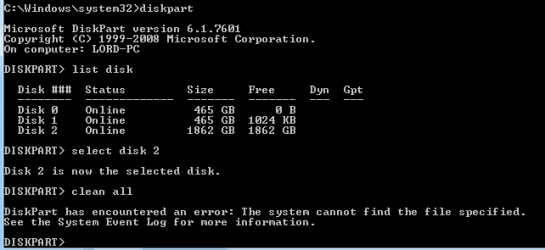
select disc X
clean all
? (how do I create mbr disk or it is already there?)
create partition primary
format fs=ntfs

Last time, like twelve hours ago; I got stuck when I pressed 'clean'. I will try it again I guess and this time wait.
That is if it sees it!
 

My Computer My Computer

At a glance

Windows 7 Ultimate 64-bitIntel® Core™2 Duo mobile processor P8700 2.53...6GB DDRIINVIDIA GeForce GTX 260M
Computer Manufacturer/Model Number
ASUS G72 Notebook
OS
Windows 7 Ultimate 64-bit
CPU
Intel® Core™2 Duo mobile processor P8700 2.53 GHz
Memory
6GB DDRII
Graphics Card(s)
NVIDIA GeForce GTX 260M
Sound Card
EAX Advanced HD 4.0 + Logitech Wireless Headset G930
Monitor(s) Displays
17.3" LED-backlit LCD high-definition plus widescreen
Screen Resolution
1600 x 900
Hard Drives
2 x Seagate Momentus 500 GB 5400.6 SATA 3Gb/s
Cooling
Targus
Mouse
Logitech Wireless Trackball M570
Internet Speed
3 to 6 Mbps Download / .5 to 1 Mbps Upload
Other Info
Clear Modem with Wi-fi*
Comodo Internet Security Premium
Error!

After the error, it shows up in the disk management as not initialized, and when I try to initialize it; it says, the system cannot find the path specified.
 

Attachments

  • Capture.PNG
    Capture.PNG
    3.9 KB · Views: 19

My Computer My Computer

At a glance

Windows 7 Ultimate 64-bitIntel® Core™2 Duo mobile processor P8700 2.53...6GB DDRIINVIDIA GeForce GTX 260M
Computer Manufacturer/Model Number
ASUS G72 Notebook
OS
Windows 7 Ultimate 64-bit
CPU
Intel® Core™2 Duo mobile processor P8700 2.53 GHz
Memory
6GB DDRII
Graphics Card(s)
NVIDIA GeForce GTX 260M
Sound Card
EAX Advanced HD 4.0 + Logitech Wireless Headset G930
Monitor(s) Displays
17.3" LED-backlit LCD high-definition plus widescreen
Screen Resolution
1600 x 900
Hard Drives
2 x Seagate Momentus 500 GB 5400.6 SATA 3Gb/s
Cooling
Targus
Mouse
Logitech Wireless Trackball M570
Internet Speed
3 to 6 Mbps Download / .5 to 1 Mbps Upload
Other Info
Clear Modem with Wi-fi*
Comodo Internet Security Premium
I was able to initialize it and make a quick format after safely removing and connecting it again.
But I am sure that when I start to copy, it will give errors.
I will inform.
 

My Computer My Computer

At a glance

Windows 7 Ultimate 64-bitIntel® Core™2 Duo mobile processor P8700 2.53...6GB DDRIINVIDIA GeForce GTX 260M
Computer Manufacturer/Model Number
ASUS G72 Notebook
OS
Windows 7 Ultimate 64-bit
CPU
Intel® Core™2 Duo mobile processor P8700 2.53 GHz
Memory
6GB DDRII
Graphics Card(s)
NVIDIA GeForce GTX 260M
Sound Card
EAX Advanced HD 4.0 + Logitech Wireless Headset G930
Monitor(s) Displays
17.3" LED-backlit LCD high-definition plus widescreen
Screen Resolution
1600 x 900
Hard Drives
2 x Seagate Momentus 500 GB 5400.6 SATA 3Gb/s
Cooling
Targus
Mouse
Logitech Wireless Trackball M570
Internet Speed
3 to 6 Mbps Download / .5 to 1 Mbps Upload
Other Info
Clear Modem with Wi-fi*
Comodo Internet Security Premium
select disc X
clean all
? (how do I create mbr disk or it is already there?)
create partition primary
format fs=ntfs

An empty disk is initialized when creating first partition.
If it is a primary or extended partition -> MBR
If you create a basic, system, MS reserved partition -> GPT

I am not 100% sure but on a GPT disk the first partition should be the "system" partition.

The clean command (without "all" option) is clearing all partition info so the disk should be decoded as uninitialized (data in areas outside partition tables is still on disk and can be viewed if you scan sector by sector)
 

My Computer My Computer

At a glance

Win 8 RP, Win 7, XPIntel
Computer Manufacturer/Model Number
Acer Notebook
OS
Win 8 RP, Win 7, XP
CPU
Intel
I wrote around 50GB and it said, it is not located there anymore. I open the drive see the folder in there, but it shows empty, it shouldn't be like this. There is something wrong here, but what?

And it says 1.77 free out of 1.81 TB, but the folder seems empty.
 

My Computer My Computer

At a glance

Windows 7 Ultimate 64-bitIntel® Core™2 Duo mobile processor P8700 2.53...6GB DDRIINVIDIA GeForce GTX 260M
Computer Manufacturer/Model Number
ASUS G72 Notebook
OS
Windows 7 Ultimate 64-bit
CPU
Intel® Core™2 Duo mobile processor P8700 2.53 GHz
Memory
6GB DDRII
Graphics Card(s)
NVIDIA GeForce GTX 260M
Sound Card
EAX Advanced HD 4.0 + Logitech Wireless Headset G930
Monitor(s) Displays
17.3" LED-backlit LCD high-definition plus widescreen
Screen Resolution
1600 x 900
Hard Drives
2 x Seagate Momentus 500 GB 5400.6 SATA 3Gb/s
Cooling
Targus
Mouse
Logitech Wireless Trackball M570
Internet Speed
3 to 6 Mbps Download / .5 to 1 Mbps Upload
Other Info
Clear Modem with Wi-fi*
Comodo Internet Security Premium
Maybe chkdsk /r can fix this disk.
 

My Computer My Computer

At a glance

Win 8 RP, Win 7, XPIntel
Computer Manufacturer/Model Number
Acer Notebook
OS
Win 8 RP, Win 7, XP
CPU
Intel
Where do I run it from?
C:\windows\system32 or K:\?
If I run it from C:\windows\system32, do I write chkdsk /r K:\?
 

My Computer My Computer

At a glance

Windows 7 Ultimate 64-bitIntel® Core™2 Duo mobile processor P8700 2.53...6GB DDRIINVIDIA GeForce GTX 260M
Computer Manufacturer/Model Number
ASUS G72 Notebook
OS
Windows 7 Ultimate 64-bit
CPU
Intel® Core™2 Duo mobile processor P8700 2.53 GHz
Memory
6GB DDRII
Graphics Card(s)
NVIDIA GeForce GTX 260M
Sound Card
EAX Advanced HD 4.0 + Logitech Wireless Headset G930
Monitor(s) Displays
17.3" LED-backlit LCD high-definition plus widescreen
Screen Resolution
1600 x 900
Hard Drives
2 x Seagate Momentus 500 GB 5400.6 SATA 3Gb/s
Cooling
Targus
Mouse
Logitech Wireless Trackball M570
Internet Speed
3 to 6 Mbps Download / .5 to 1 Mbps Upload
Other Info
Clear Modem with Wi-fi*
Comodo Internet Security Premium
chkdsk K: /R
(according to help syntax from "chkdsk /?")
 

My Computer My Computer

At a glance

Win 8 RP, Win 7, XPIntel
Computer Manufacturer/Model Number
Acer Notebook
OS
Win 8 RP, Win 7, XP
CPU
Intel
Thanks. This is the latest info ( I haven't done chkdsk yet).

scrur.png
 

My Computer My Computer

At a glance

Windows 7 Ultimate 64-bitIntel® Core™2 Duo mobile processor P8700 2.53...6GB DDRIINVIDIA GeForce GTX 260M
Computer Manufacturer/Model Number
ASUS G72 Notebook
OS
Windows 7 Ultimate 64-bit
CPU
Intel® Core™2 Duo mobile processor P8700 2.53 GHz
Memory
6GB DDRII
Graphics Card(s)
NVIDIA GeForce GTX 260M
Sound Card
EAX Advanced HD 4.0 + Logitech Wireless Headset G930
Monitor(s) Displays
17.3" LED-backlit LCD high-definition plus widescreen
Screen Resolution
1600 x 900
Hard Drives
2 x Seagate Momentus 500 GB 5400.6 SATA 3Gb/s
Cooling
Targus
Mouse
Logitech Wireless Trackball M570
Internet Speed
3 to 6 Mbps Download / .5 to 1 Mbps Upload
Other Info
Clear Modem with Wi-fi*
Comodo Internet Security Premium
Update:

Used Firmware Updater from WD again.
Updated the firmware (It was the same one).
Now, running chkdsk k: /r.
It is at 14%.
Wish me luck.
Thanks again!
 

My Computer My Computer

At a glance

Windows 7 Ultimate 64-bitIntel® Core™2 Duo mobile processor P8700 2.53...6GB DDRIINVIDIA GeForce GTX 260M
Computer Manufacturer/Model Number
ASUS G72 Notebook
OS
Windows 7 Ultimate 64-bit
CPU
Intel® Core™2 Duo mobile processor P8700 2.53 GHz
Memory
6GB DDRII
Graphics Card(s)
NVIDIA GeForce GTX 260M
Sound Card
EAX Advanced HD 4.0 + Logitech Wireless Headset G930
Monitor(s) Displays
17.3" LED-backlit LCD high-definition plus widescreen
Screen Resolution
1600 x 900
Hard Drives
2 x Seagate Momentus 500 GB 5400.6 SATA 3Gb/s
Cooling
Targus
Mouse
Logitech Wireless Trackball M570
Internet Speed
3 to 6 Mbps Download / .5 to 1 Mbps Upload
Other Info
Clear Modem with Wi-fi*
Comodo Internet Security Premium
It just finished.

2 bad clusters.
8kb in bad sectors.
488369919 total allocation units on disk.
488333004 allocation units available on disk.

The whole point, all these hours, the drive didn't eject itself and it is still there.
Now, to check the copying process.
 

My Computer My Computer

At a glance

Windows 7 Ultimate 64-bitIntel® Core™2 Duo mobile processor P8700 2.53...6GB DDRIINVIDIA GeForce GTX 260M
Computer Manufacturer/Model Number
ASUS G72 Notebook
OS
Windows 7 Ultimate 64-bit
CPU
Intel® Core™2 Duo mobile processor P8700 2.53 GHz
Memory
6GB DDRII
Graphics Card(s)
NVIDIA GeForce GTX 260M
Sound Card
EAX Advanced HD 4.0 + Logitech Wireless Headset G930
Monitor(s) Displays
17.3" LED-backlit LCD high-definition plus widescreen
Screen Resolution
1600 x 900
Hard Drives
2 x Seagate Momentus 500 GB 5400.6 SATA 3Gb/s
Cooling
Targus
Mouse
Logitech Wireless Trackball M570
Internet Speed
3 to 6 Mbps Download / .5 to 1 Mbps Upload
Other Info
Clear Modem with Wi-fi*
Comodo Internet Security Premium
Back
Top