OS can no longer start after MBR-to-GPT conversion

gptokyo

New member
Local time
11:36 PM
Messages
7
I posted earlier but didn't explain myself very well, so let me try again.

I am a PC novice using Windows 7. I had a problem with my old Lenovo x200 and asked a PC repair shop to install the SSD into another Lenovo x200. That was successful, and the PC was working fine.

The problem occurred when I asked them to make a copy of the SSD onto a hard drive. During conversion from MBR to GPT, a blue screen appeared and the PC experienced forced termination, making it impossible to boot the OS. We can see see files such as user folders by connecting to another PC. Since the data is still there, the shop suspects that the file system was damaged. They then created a clone HDD. While cloning, the file system was converted by the cloning software. After converting from GPT to MBR, the clone was created, but the OS cannot be started. The shop pointed out that while the file system can normally be converted using the standard Windows functions, that is premised on the SSD and HDD formats.

In my previous posts, respondents seemed to be proposing a clean installation of the OS after converting and formatting the SSD to MBR. However, if the recovery media required for a clean OS installation is Windows 7, which is no longer available from the manufacturer, the OS can’t be booted even if the SSD file system is converted.

GPT has already been converted back to MBR, i.e., the SSD is currently MBR format. The shop says it has no choice but to perform a clean OS installation, but recovery is impossible since there is no recovery media. Is there any way to accomplish this while leaving currently installed OS data bootable as is?

I would appreciate any help.
 

My Computers My Computers

  • At a glance

    Windows 10 pro 21H1 x64
    Computer type
    PC/Desktop
    OS
    Windows 10 pro 21H1 x64
  • Computer type
    PC/Desktop
While cloning, the file system was converted by the cloning software.

:confused:

mbr and gpt are partition styles.

ntfs and fat32 are filesystems. I have never heard of cloning software doing filesystem conversion.

Filesystems can get damaged , the usual way to try and fix is with the chkdsk command.
how to run Disk Check (chkdsk)

If you want to do a fresh install:

1. you need installation media ( it is not hard to find the standard ms win7 installation media )

What is the language, edition ( e.g. home preimum or Professional) and bit version ( x64 -64 bit or x86-32 bit ) you want ?

2. You probably need some drivers for your particular machine . They can usually be found without much difficulty.
Download Lenovo ThinkPad X200 laptop drivers for Windows 7 x64 | DriverPack

Download Lenovo ThinkPad X200 laptop drivers for Windows 7 x86 | DriverPack

3. You will need to be able to activate the freshly installed win7. You could use the key from the coa sticker ( often in the battery compartment of the laptop ). Or by using slp activation if your laptop has the lenovo slic table, which it will have if it came with win7 pre installed.


Before you try a fresh install:

If you can post a screenshot of disk management window showing the affected disk, we may be able to suggest ways to get the ssd running.

- - - Updated - - -

Are you asleep ?
 
Last edited:

My Computers My Computers

  • At a glance

    7 X64i5 84002x8gb 3200mhz
    Computer type
    PC/Desktop
    OS
    7 X64
    CPU
    i5 8400
    Motherboard
    gigabyte b365m ds3h
    Memory
    2x8gb 3200mhz
    Hard Drives
    various
    PSU
    pure power 11 400w cm
    Case
    Coolermaster
    Cooling
    cryorig m9i
  • At a glance

    7x64g54008gb ddr4 2400
    Computer type
    PC/Desktop
    OS
    7x64
    CPU
    g5400
    Motherboard
    ga b365m ds3h
    Memory
    8gb ddr4 2400
    PSU
    xfx pro 450w
Is there are a reason you wanted to convert from MBR to GPT?

A more important question is does the Lenovo x200 even support GPT? If you are not sure then stick with MBR.

If the drive is 2TB or smaller the you can stick with MBR. GPT is only necessary if the drive is larger than 2TB.

In any case, conversion from MBR to GPT should only be done after a backup of the drive is made. If the shop did not do that then they were at fault.
 

My Computers My Computers

  • At a glance

    Windows 7 Professional 64bit / Windows 10 Hom...AMD FX-8350GSKILL Ripjaw-X PC3 12800 12GB (2x4GB, 2x2GB)ASUS ENGTX560 DCII OC/2DI/1GD5 1GB
    Computer type
    PC/Desktop
    Computer Manufacturer/Model Number
    Custom build
    OS
    Windows 7 Professional 64bit / Windows 10 Home 64bit
    CPU
    AMD FX-8350
    Motherboard
    Gigabyte GA-990FXA-UD3 (AM3+) Rev. 4.0
    Memory
    GSKILL Ripjaw-X PC3 12800 12GB (2x4GB, 2x2GB)
    Graphics Card(s)
    ASUS ENGTX560 DCII OC/2DI/1GD5 1GB
    Sound Card
    Integrated
    Monitor(s) Displays
    Asus VE228H (21.5-in)
    Screen Resolution
    1920x1080 60Hz
    Hard Drives
    SAMSUNG 870 EVO 1TB (2.5" SATA SSD)
    SAMSUNG 870 EVO 500GB (2.5" SATA SSD)
    PSU
    Antec TruePower (new) TP-650 (650 watts)
    Case
    Antec Three Hundred
    Cooling
    AMD stock (plan to upgrade to Cooler Master Hyper 212 EVO)
    Keyboard
    Logitech K540 (wireless)
    Mouse
    Logitech M310 (wireless)
    Internet Speed
    Comcast Gigabit X2 Internet (2100Mbps down / 300Mbps up)
    Browser
    Firefox, Edge, Chrome
    Other Info
    Optical drive: ASUS DRW-24B3ST/BLK/G (Black) (24X)
    External hard drives: 2TB & 6TB
    Internet Gateway: Comcast XB8
  • Computer type
    PC/Desktop
As you have 2 identical models, I'd be inclined to check your BIOS settings... whats different
 

My Computer My Computer

At a glance

W7 home premium 32bit/W7HP 64bit/w10 tp insid...E5300 dual core3gbNvidia Geforce 7100 Nforce 630i
Computer type
PC/Desktop
Computer Manufacturer/Model Number
medionl/Aspire 6930G/acer x55a
OS
W7 home premium 32bit/W7HP 64bit/w10 tp insider ring
CPU
E5300 dual core
Motherboard
medion MS7366
Memory
3gb
Graphics Card(s)
Nvidia Geforce 7100 Nforce 630i
Monitor(s) Displays
avixc
Internet Speed
n (isp resticted to 72)
Antivirus
mse/pands
Browser
palemoon
Other Info
Belkin Fd7050 n USB using Railink RT2870 drivers, more upto date
torchwood

I think I would try and get it fixed first.

GPT has already been converted back to MBR, i.e., the SSD is currently MBR format.

Run chkdsk on all partitions.

Rewrite the mbr and vbr/pbr code using bootsect or bootice

Mark one of the primaries active ( probably the os partition)

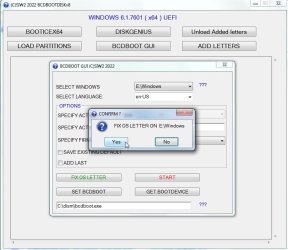
Fix the os drive letter . This is is needed if the os has been moved to a differnt partition, or style has been converted gpt to mbr or vice versa or both in this case , or any change to the disk id or start sector.

Use bcdboot to create the boot files on the active partition.

Cross fingers and see if it boots up ok.

If that doesn't work then a fresh install is not difficult, though it can be a bit time consuming. Drivers are available, slp activation easy enough, updates might take a while but easy to do.

Can fish out any needed files from the old non working installation and can probably get the office key as well using nir sofers produkey ( i think he posted he has office 2003 )

- - - Updated - - -

I have made a thing to facilitate these sort of jobs


bcdbootdisk-v91.jpg

You can have a play with it if you like:

I have included bootice in the zip so it will show up as a button on the interface.

The bcbootdisk.wcs file is not needed if you are running the .exe.

If your pe includes pecmd.exe you can use the script (the.wcs file ) instead of the .exe because it is written in pecmd scripting language.

View attachment bcdbootdisk-v9.zip
 
Last edited:

My Computers My Computers

  • At a glance

    7 X64i5 84002x8gb 3200mhz
    Computer type
    PC/Desktop
    OS
    7 X64
    CPU
    i5 8400
    Motherboard
    gigabyte b365m ds3h
    Memory
    2x8gb 3200mhz
    Hard Drives
    various
    PSU
    pure power 11 400w cm
    Case
    Coolermaster
    Cooling
    cryorig m9i
  • At a glance

    7x64g54008gb ddr4 2400
    Computer type
    PC/Desktop
    OS
    7x64
    CPU
    g5400
    Motherboard
    ga b365m ds3h
    Memory
    8gb ddr4 2400
    PSU
    xfx pro 450w
Thank for you all the helpful comments. These are great. I'll take these to the PC shop that's helping me. Hoping for the best. Much appreciated.
 

My Computers My Computers

  • At a glance

    Windows 10 pro 21H1 x64
    Computer type
    PC/Desktop
    OS
    Windows 10 pro 21H1 x64
  • Computer type
    PC/Desktop
Back
Top