External USB wont show up on desktop

draptak

New member
Member
Local time
10:44 PM
Messages
52
Have a 2.5" External HDD which doesnt appear on my desktop PC anymore, its not listed in device manager & computer management, etc. 'Device not reconziged' doesnt pop up. I've tried all USB ports. Already uninstalled and updated the USB ports. Still nothing. There is a blue light on the external HDD when connected to the usb port though

Although it perfectly works on my laptop

I have tested my PC with a 16GB flash drive, it works perfectly, but the external drive doesn't.
I'm guessing my USB port has insufficent power?
 

My Computer My Computer

At a glance

Windows 7 Ultimate 64-BitIntel(R) Core(TM)2 Quad CPU Q9400 @ 2.66GHz6.00 GB RAMNVIDIA GeForce GTX 770
Computer type
PC/Desktop
Computer Manufacturer/Model Number
ASUS
OS
Windows 7 Ultimate 64-Bit
CPU
Intel(R) Core(TM)2 Quad CPU Q9400 @ 2.66GHz
Motherboard
ASUSTeK Computer INC. P5QL/EPU
Memory
6.00 GB RAM
Graphics Card(s)
NVIDIA GeForce GTX 770
Sound Card
(1) NVIDIA Virtual Audio Device (WDM) (2)HD Audio Device
Monitor(s) Displays
Samsung SyncMaster 22"
Screen Resolution
1650x1050 Max Resolution
Hard Drives
1TB Sata
PSU
Corsair CX750M
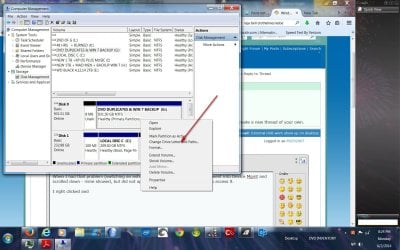
When I had that problem (switching an external hdd between pc and laptop), I went into Device Mgmt and scrolled down - mine showed, but did not appear in My Computer - so no way to access it.

I right clicked and assigned a drive letter.

I would think yours would show up at bottom, especially since it works in another computer.
 

Attachments

  • comp mgmt pic 6,2,14.jpg
    comp mgmt pic 6,2,14.jpg
    201.4 KB · Views: 2

My Computer My Computer

At a glance

Windows 7 Professional X64Core i7 (2nd gen) i7-2600K / 3.40GHzDDR3 2400MHz (OC) 16gbIntel(R) HD Graphics 3000, -1988 Mb
Computer type
PC/Desktop
Computer Manufacturer/Model Number
Self-Built
OS
Windows 7 Professional X64
CPU
Core i7 (2nd gen) i7-2600K / 3.40GHz
Motherboard
ASUS P8Z77-V Intel 7 Series Motherboard
Memory
DDR3 2400MHz (OC) 16gb
Graphics Card(s)
Intel(R) HD Graphics 3000, -1988 Mb
Sound Card
8 ChannelsAudio Chipset Realtek ALC892
Monitor(s) Displays
LG 29UM65 Black 29"
Screen Resolution
2560 x 1080
Hard Drives
840 EVO 250 GB SSD ;2tb (2);Seagate;1tb Seagate; 750 gb Seagate; wd ext (2) 750 gb,WD 2tb X 2;WD 3TB Black
PSU
750 watt
Case
Thermaltake RX -1
Cooling
2120mm Fans Included 1Other Fan Ports 5x 200mm Fan Ports
Keyboard
Microsoft Digital Media Pro
Mouse
Microsoft Wireless 6000
Internet Speed
U-verse 18 mbps
Antivirus
MSE
Browser
Firefox, Chrome and my favorite: Pale Moon
Other Info
HdHomerun Dual Tuner.
SRS Audio Lab,
Pioneer BDR 208-DBK
PS3-What a difference in my Surround Sound Receiver!
HP 4540s - My new Toy.
Epson R280 Printer- To personalize my Dvds.
Canon MP 560 - For scanning.
When I had that problem (switching an external hdd between pc and laptop), I went into Device Mgmt and scrolled down - mine showed, but did not appear in My Computer - so no way to access it.

I right clicked and assigned a drive letter.

I would think yours would show up at bottom, especially since it works in another computer.

Thanks PSCO2007, Lucky that worked for you, but there's nothing appearing on my Disk management except my C: HDD.

Funny thing I turned off my PC with the External HDD still plugged in, when the PC shutdown, the External HDD started to power up 100%. It's strange, turned my PC back on, it powered down, but with the blue lights still on.
 

My Computer My Computer

At a glance

Windows 7 Ultimate 64-BitIntel(R) Core(TM)2 Quad CPU Q9400 @ 2.66GHz6.00 GB RAMNVIDIA GeForce GTX 770
Computer type
PC/Desktop
Computer Manufacturer/Model Number
ASUS
OS
Windows 7 Ultimate 64-Bit
CPU
Intel(R) Core(TM)2 Quad CPU Q9400 @ 2.66GHz
Motherboard
ASUSTeK Computer INC. P5QL/EPU
Memory
6.00 GB RAM
Graphics Card(s)
NVIDIA GeForce GTX 770
Sound Card
(1) NVIDIA Virtual Audio Device (WDM) (2)HD Audio Device
Monitor(s) Displays
Samsung SyncMaster 22"
Screen Resolution
1650x1050 Max Resolution
Hard Drives
1TB Sata
PSU
Corsair CX750M
Sometimes Windows will turn off the USB ports to save power, maybe that is kicking in too soon.
 

My Computer My Computer

At a glance

Windows 7 Ultimate 64-bit, Windows 8.1 64-bit...
Computer type
PC/Desktop
Computer Manufacturer/Model Number
Customs, Dell, Gateway, HP, Toshiba, Acer, ASUS
OS
Windows 7 Ultimate 64-bit, Windows 8.1 64-bit, Mac OS X 10.10, Linux Mint 17, Windows 10 Pro TP
Keyboard
Microsoft
Mouse
Microsoft
Back
Top