Solved My laptop hard drive doesn't show up on desktop pc

The2nd

New member
Member
Local time
8:00 PM
Messages
57
Hello,

I wanted to recover data that was on a now broken laptop because,
not long ago my W7 laptop died on me, I tried to get someone to fix it for me but apparently the motherboard is dead so no fixing for me lol. I bought a HardDrive enclosure, put in the HardDrive, plug it into my desktop computer, makes the sound that it's in, after installing I couldn't find the hard drive on "My computer" therefore I went into "Disk management" and I see it says "disk 5 unknown, not initialized" I tried to use "photorec_win/testdisk" but my hard drive doesn't show up in the command box.

How can I recover my stuff please, I'm hopeless
 

My Computer My Computer

At a glance

Windows 7 Ultimate 32bitIntel(R) Pentium(R) Dual CPU E2140 @ 1.60GHz2,00 GBATI Radeon HD 2350
Computer type
PC/Desktop
Computer Manufacturer/Model Number
HP Presario SR5302FR
OS
Windows 7 Ultimate 32bit
CPU
Intel(R) Pentium(R) Dual CPU E2140 @ 1.60GHz
Motherboard
ECS
Memory
2,00 GB
Graphics Card(s)
ATI Radeon HD 2350
Sound Card
Realtek High Definition Audio

My Computers My Computers

  • At a glance

    Windows 7 HP 64i5 6600K - 800MHz to 4200MHz4+4G GSkill DDR4 3000IG - Intel 530
    Computer type
    PC/Desktop
    Computer Manufacturer/Model Number
    custom build
    OS
    Windows 7 HP 64
    CPU
    i5 6600K - 800MHz to 4200MHz
    Motherboard
    GA-Z170-HD3P
    Memory
    4+4G GSkill DDR4 3000
    Graphics Card(s)
    IG - Intel 530
    Monitor(s) Displays
    Samsung 226BW
    Screen Resolution
    1680x1050
    Hard Drives
    (1) -1 SM951 – 128GB M.2 AHCI PCIe SSD drive for Windows 7 and Lubuntu
    (2) -1 WD SATA 3 - 1T for Data
    (3) -1 WD SATA 3 - 1T for backup
    PSU
    Thermaltake 450W TR2 gold
    Keyboard
    Old and good Chicony mechanical keyboard
    Mouse
    Logitech mX performance - 9 buttons (had to disable some)
    Internet Speed
    500Mb/s
    Browser
    Firefox 64
    Other Info
    TinyWall firewall
  • At a glance

    Windows 7 Proi7-4500U 800MHz to 3.0GHz(4+4)G DDR3 1600IG intel 4400 + NVIDIA GeForce GT 745M
    Computer type
    Laptop
    System Manufacturer/Model Number
    Asus Q550LF
    OS
    Windows 7 Pro
    CPU
    i7-4500U 800MHz to 3.0GHz
    Motherboard
    Asus Q550LF
    Memory
    (4+4)G DDR3 1600
    Graphics Card(s)
    IG intel 4400 + NVIDIA GeForce GT 745M
    Sound Card
    Realtek
    Monitor(s) Displays
    LG Display LP156WF4-SPH1
    Screen Resolution
    1920 x 1080
    Hard Drives
    BX500 120G SSD for Windows and programs +
    1T HDD for data
    Internet Speed
    500 Mb/s
    Browser
    Firefox
    Other Info
    TinyWall firewall

My Computer My Computer

At a glance

Windows 7 Ultimate 32bitIntel(R) Pentium(R) Dual CPU E2140 @ 1.60GHz2,00 GBATI Radeon HD 2350
Computer type
PC/Desktop
Computer Manufacturer/Model Number
HP Presario SR5302FR
OS
Windows 7 Ultimate 32bit
CPU
Intel(R) Pentium(R) Dual CPU E2140 @ 1.60GHz
Motherboard
ECS
Memory
2,00 GB
Graphics Card(s)
ATI Radeon HD 2350
Sound Card
Realtek High Definition Audio
Check your drive in question with the drive manufacturer's diagnostic/repair Utility. If it does not recognise the drive or the tests fail, it confirms your drive is dead. No DIY data recovery is possible in such cases.
 

My Computer My Computer

At a glance

Windows 7 Home Premium 32 bit
OS
Windows 7 Home Premium 32 bit

My Computer My Computer

At a glance

Windows 7 Ultimate 32bitIntel(R) Pentium(R) Dual CPU E2140 @ 1.60GHz2,00 GBATI Radeon HD 2350
Computer type
PC/Desktop
Computer Manufacturer/Model Number
HP Presario SR5302FR
OS
Windows 7 Ultimate 32bit
CPU
Intel(R) Pentium(R) Dual CPU E2140 @ 1.60GHz
Motherboard
ECS
Memory
2,00 GB
Graphics Card(s)
ATI Radeon HD 2350
Sound Card
Realtek High Definition Audio
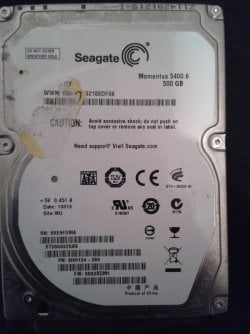
LOL! Does not look like a Seagate drive.

Please specify Manufacturer ? Model Name ? Model No ? and capacity ? of your laptop HDD.

Please remove all other storage devices from the USB ports except your lappy drive in the enclosure

1. Post a screenshot of Windows Disk Management.

2. Please install MiniTool Partition Wizard Free Edition 9.1 (30.49MB) . Free download Magic Partition Manager Software, partition magic alternative, free partition magic, partition magic Windows 7 and server partition software - Partition Wizard Online
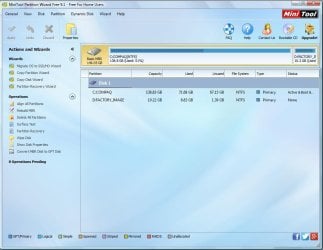
Launch it, and post the screenshot - the very first screen that appears as soon as you launch PW.

Please upload the screenshots to Seven Forum servers.

Follow the guidelines here to post an untruncataed screenshot with all the information clearly visible. Disk Management - Post a Screen Capture Image
Snipping Tool How to Use the Snipping Tool in Vista
Upload to Seven Forums: Screenshots and Files - Upload and Post in Seven F
 

My Computer My Computer

At a glance

Windows 7 Home Premium 32 bit
OS
Windows 7 Home Premium 32 bit
lol! Does not look like a seagate drive.

Please specify manufacturer ? Model name ? Model no ? And capacity ? Of your laptop hdd.

Please remove all other storage devices from the usb ports except your lappy drive in the enclosure

1. Post a screenshot of windows disk management.

2. Please install minitool partition wizard free edition 9.1 (30.49mb) . free download magic partition manager software, partition magic alternative, free partition magic, partition magic windows 7 and server partition software - partition wizard online
launch it, and post the screenshot - the very first screen that appears as soon as you launch pw.

please upload the screenshots to seven forum servers.

Follow the guidelines here to post an untruncataed screenshot with all the information clearly visible. disk management - post a screen capture image
snipping tool how to use the snipping tool in vista
upload to seven forums: screenshots and files - upload and post in seven f
IMG_20161210_150342.jpg
Disk.jpg
Mini.jpg
 

My Computer My Computer

At a glance

Windows 7 Ultimate 32bitIntel(R) Pentium(R) Dual CPU E2140 @ 1.60GHz2,00 GBATI Radeon HD 2350
Computer type
PC/Desktop
Computer Manufacturer/Model Number
HP Presario SR5302FR
OS
Windows 7 Ultimate 32bit
CPU
Intel(R) Pentium(R) Dual CPU E2140 @ 1.60GHz
Motherboard
ECS
Memory
2,00 GB
Graphics Card(s)
ATI Radeon HD 2350
Sound Card
Realtek High Definition Audio
OK, Seagate Momentus 500GB.

Not showing up in Partition Wizard (scratching my head). And you said it is not visible in TestDisk also. Now I have to believe you and may be you wrongly believed in me believing somebody :D.

You haven't read the tutorial on how to take the screenshot of the Windows Disk Management. I can't see your laptop drive in it. Please read and redo it. You have to hide the Console Tree and also Action Pane, pull up the separator above the disk map so that Disk 5 is clearly visible.

Since I do not see it and you do not see it in any other application ( and as long as we do not see it in any other application, no DIY data recovery is possible), please connect the laptop HDD directly to the motherboard as an internal drive on a desktop removing the unnecessary enclosure from the scene..

Then run Seatools for Windows.( It should show up as a Seagate drive and not as an innou or innova.) Post the screenshots of WDM and Partition Wizard. Let me hope we can see the drive in Partition Wizard.
 

My Computer My Computer

At a glance

Windows 7 Home Premium 32 bit
OS
Windows 7 Home Premium 32 bit
ok, seagate momentus 500gb.

Not showing up in partition wizard (scratching my head). And you said it is not visible in testdisk also. Now i have to believe you and may be you wrongly believed in me believing somebody :d.

You haven't read the tutorial on how to take the screenshot of the windows disk management. I can't see your laptop drive in it. Please read and redo it. You have to hide the console tree and also action pane, pull up the separator above the disk map so that disk 5 is clearly visible.

Since i do not see it and you do not see it in any other application ( and as long as we do not see it in any other application, no diy data recovery is possible), please connect the laptop hdd directly to the motherboard as an internal drive on a desktop removing the unnecessary enclosure from the scene..

Then run seatools for windows.( it should show up as a seagate drive and not as an innou or innova.) post the screenshots of wdm and partition wizard. Let me hope we can see the drive in partition wizard.
disk2.jpg
 

My Computer My Computer

At a glance

Windows 7 Ultimate 32bitIntel(R) Pentium(R) Dual CPU E2140 @ 1.60GHz2,00 GBATI Radeon HD 2350
Computer type
PC/Desktop
Computer Manufacturer/Model Number
HP Presario SR5302FR
OS
Windows 7 Ultimate 32bit
CPU
Intel(R) Pentium(R) Dual CPU E2140 @ 1.60GHz
Motherboard
ECS
Memory
2,00 GB
Graphics Card(s)
ATI Radeon HD 2350
Sound Card
Realtek High Definition Audio
OK, now I know Inconnu means Unknown. Je ne parle pas francaise :). Seagate Seatools for windows did not recognise it as a seagate drive. It only said unknown. It could have tested the platters and given a pass. But that does not take us anywhere.
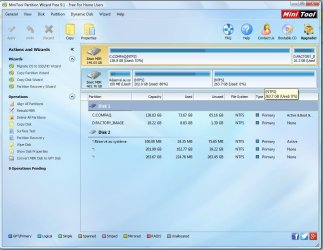
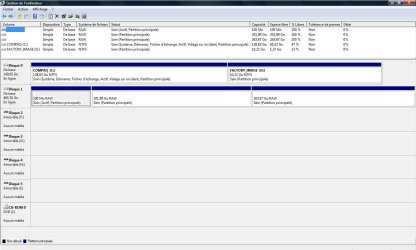
When Seagate introduced Momentus drives, I did want to buy one since it is a hybrid drive with part solid state memory and rest platter. The MBR/Boot/partition table resides in the solid state memory. I have a nasty feeling that the solid state memory inside your HDD has failed. In such a case, I would think your HDD may not be accessible to any data recovery software.

Now go ahead, takeout the laptop drive from the enclosure, connect it directly to a motherboard SATA port on a desktop. Run Seatools for windows and check whether it recognises it as a Seagate drive. Do the short and long Tests.Long Test should take a longtime. If it finishes off in a jiffy then it is not a valid result. Post screenshots of WDM and PW.

In case nothing shows up in Partition Wizard, you may have to seek Seagate support or Seagate Data recovery partners, who may be able to replace the solid state memory in the drive and try to bring the drive alive.

Now just curious to know what exactly was the problem in your laptop.Did it run the BIOS but won't boot from the HDD?
 
Last edited:

My Computer My Computer

At a glance

Windows 7 Home Premium 32 bit
OS
Windows 7 Home Premium 32 bit
OK, now I know Inconnu means Unknown. Je ne parle pas francaise :). Seagate Seatools for windows did not recognise it as a seagate drive. It only said unknown. It could have tested the platters and given a pass. But that does not take us anywhere.
When Seagate introduced Momentus drives, I did want to buy one since it is a hybrid drive with part solid state memory and rest platter. The MBR/Boot/partition table resides in the solid state memory. I have a nasty feeling that the solid state memory inside your HDD has failed. In such a case, I would think your HDD may not be accessible to any data recovery software.

Now go ahead, takeout the laptop drive from the enclosure, connect it directly to a motherboard SATA port on a desktop. Run Seatools for windows and check whether it recognises it as a Seagate drive. Do the short and long Tests.Long Test should take a longtime. If it finishes off in a jiffy then it is not a valid result. Post screenshots of WDM and PW.

In case nothing shows up in Partition Wizard, you may have to seek Seagate support or Seagate Data recovery partners, who may be able to replace the solid state memory in the drive and try to bring the drive alive.

Now just curious to know what exactly was the problem in your laptop.Did it run the BIOS but won't boot from the HDD?
I'll try doing the "connect it directly to a motherboard SATA port on a desktop" tomorrow.

A 7 year old laptop that got damaged over the years and barely worked. One day I turned in one and the screen didn't even light up black but the power button was on and I could hear the fan. After having someone take a look a it he told me it had something to do with the ports and the mother board or graphics card, something like that but basically RIP.

If it's really dead can I like format it and turn it into a portable hard drive?
 

My Computer My Computer

At a glance

Windows 7 Ultimate 32bitIntel(R) Pentium(R) Dual CPU E2140 @ 1.60GHz2,00 GBATI Radeon HD 2350
Computer type
PC/Desktop
Computer Manufacturer/Model Number
HP Presario SR5302FR
OS
Windows 7 Ultimate 32bit
CPU
Intel(R) Pentium(R) Dual CPU E2140 @ 1.60GHz
Motherboard
ECS
Memory
2,00 GB
Graphics Card(s)
ATI Radeon HD 2350
Sound Card
Realtek High Definition Audio
If after the direct connection also it is established that the HDD cannot be accessed, then you can try to initialise it and see what happens. In all probability it will fail to initialise, and that will be the end of the story for the user. Over to Seagate.
 

My Computer My Computer

At a glance

Windows 7 Home Premium 32 bit
OS
Windows 7 Home Premium 32 bit
if after the direct connection also it is established that the hdd cannot be accessed, then you can try to initialise it and see what happens. In all probability it will fail to initialise, and that will be the end of the story for the user. Over to seagate.

DSKHDD.jpg
wdm.jpg
short test passed
long test finished in a jiffy therefore failed
 
Last edited:

My Computer My Computer

At a glance

Windows 7 Ultimate 32bitIntel(R) Pentium(R) Dual CPU E2140 @ 1.60GHz2,00 GBATI Radeon HD 2350
Computer type
PC/Desktop
Computer Manufacturer/Model Number
HP Presario SR5302FR
OS
Windows 7 Ultimate 32bit
CPU
Intel(R) Pentium(R) Dual CPU E2140 @ 1.60GHz
Motherboard
ECS
Memory
2,00 GB
Graphics Card(s)
ATI Radeon HD 2350
Sound Card
Realtek High Definition Audio
We seem to have some light at the end of the tunnel.

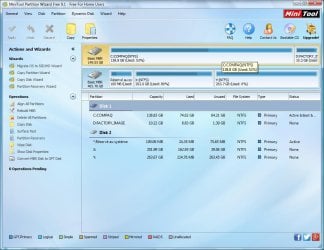
Partition Wizard now shows your drive. Right click on the 202GB and 263GB partitions and try to give a drive letter ( Change Letter). Also click on "Explore" and check whether it shows your files.

Report the results.
 
Last edited:

My Computer My Computer

At a glance

Windows 7 Home Premium 32 bit
OS
Windows 7 Home Premium 32 bit
We seem to have some light at the end of the tunnel.

Partition Wizard now shows your drive. Right click on the 202GB and 263GB partitions and try to give a drive letter ( Change Letter). Also click on "Explore" and check whether it shows your files.

Report the results.
Thank you so muchhhhh
You just made my week

Can I put the hard drive back in the enclosure or just keep it in the computer?
 

My Computer My Computer

At a glance

Windows 7 Ultimate 32bitIntel(R) Pentium(R) Dual CPU E2140 @ 1.60GHz2,00 GBATI Radeon HD 2350
Computer type
PC/Desktop
Computer Manufacturer/Model Number
HP Presario SR5302FR
OS
Windows 7 Ultimate 32bit
CPU
Intel(R) Pentium(R) Dual CPU E2140 @ 1.60GHz
Motherboard
ECS
Memory
2,00 GB
Graphics Card(s)
ATI Radeon HD 2350
Sound Card
Realtek High Definition Audio
What?

I wanted you to give a drive letter. Did it take the drive letter?

I wanted you to explore and see whether you can see your files and report. Could you see the files?

Please report what happened.

Post a screenshot of how your drive appears in Partition Wizard after you did the above operations.
 

My Computer My Computer

At a glance

Windows 7 Home Premium 32 bit
OS
Windows 7 Home Premium 32 bit
What?

I wanted you to give a drive letter. Did it take the drive letter?

I wanted you to explore and see whether you can see your files and report. Could you see the files?

Please report what happened.

Post a screenshot of how your drive appears in Partition Wizard after you did the above operations.
Yes I gave it a number and it took it
Clicked on explore, it showed me what the HD contained then clicked on my user folder
a window showed up telling I didn't have access and asked whether I wanted to continue anyways I clicked yes and it took like 5 minutes to load and voila
Report.jpg
 

My Computer My Computer

At a glance

Windows 7 Ultimate 32bitIntel(R) Pentium(R) Dual CPU E2140 @ 1.60GHz2,00 GBATI Radeon HD 2350
Computer type
PC/Desktop
Computer Manufacturer/Model Number
HP Presario SR5302FR
OS
Windows 7 Ultimate 32bit
CPU
Intel(R) Pentium(R) Dual CPU E2140 @ 1.60GHz
Motherboard
ECS
Memory
2,00 GB
Graphics Card(s)
ATI Radeon HD 2350
Sound Card
Realtek High Definition Audio
After giving a drive letter, did you click on APPLY?

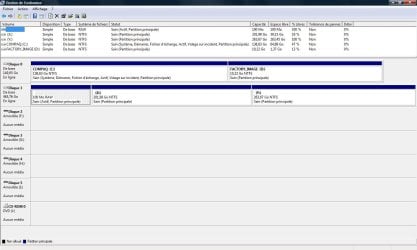
Is your drive now accessible in your computer? Just to complete the record, post a screenshot of Windows Disk Management. ( I just can't believe. Actually I knew from the PW screenshot, data is recoverable and was preparing to run TestDisk for recovering the data. Surprised that there is no need for it :))

You may not put it into the external enclosure. It may be defective. Please get it checked.

If your problem is resolved mark the thread as solved.

I am going out for a walk.
 

My Computer My Computer

At a glance

Windows 7 Home Premium 32 bit
OS
Windows 7 Home Premium 32 bit
After giving a drive letter, did you click on APPLY?

Is your drive now accessible in your computer? Just to complete the record, post a screenshot of Windows Disk Management. ( I just can't believe. Actually I knew from the PW screenshot, data is recoverable and was preparing to run TestDisk for recovering the data. Surprised that there is no need for it :))

You may not put it into the external enclosure. It may be defective. Please get it checked.

If your problem is resolved mark the thread as solved.

I am going out for a walk.
Yeah It's like I had my laptop back since everything is right where I left them.
So I gotta go get a new external enclosure?
WDM2.jpg
Thanks for you help and have a nice walk :D
 

My Computer My Computer

At a glance

Windows 7 Ultimate 32bitIntel(R) Pentium(R) Dual CPU E2140 @ 1.60GHz2,00 GBATI Radeon HD 2350
Computer type
PC/Desktop
Computer Manufacturer/Model Number
HP Presario SR5302FR
OS
Windows 7 Ultimate 32bit
CPU
Intel(R) Pentium(R) Dual CPU E2140 @ 1.60GHz
Motherboard
ECS
Memory
2,00 GB
Graphics Card(s)
ATI Radeon HD 2350
Sound Card
Realtek High Definition Audio
You do need a working external drive and you do need to backup all your important data to it.

As I said, get your present enclosure checked by a computer professional who can put a working internal drive into it and determine whether it is OK.

Some people prefer to buy a branded external drive while some others prefer to buy a good reputed brand enclosure and a brand internal HDD. Which way you want to go, you have to decide. ( I have ceased to buy any computer hardware)

Do backup all data on your present laptop drive to another external drive. Then delete all partitions in it and do a full format. If it works fine, you may decide to use it as an internal drive or external drive in an enclosure as you please, but keep monitoring its health. 14 Free Hard Drive Testing Tools (December 2016)
 
Last edited:

My Computer My Computer

At a glance

Windows 7 Home Premium 32 bit
OS
Windows 7 Home Premium 32 bit
Back
Top