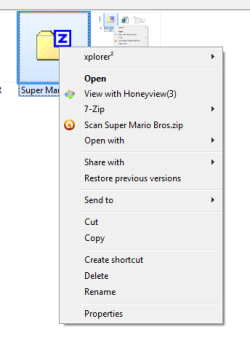
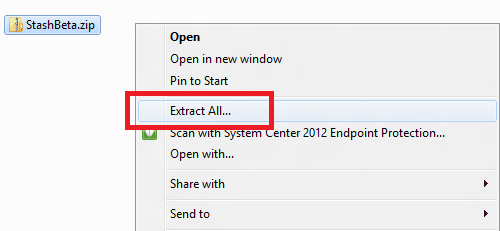
So I've kinda ran into a big mess. I noticed that the Extract All option was missing from the right-click menu (i have 7zip installed). I'm trying to extract 3-part .rar files.. tricky thing to do. I keep getting extraction errors with 7-zip, and wanted to see what Windows could do with the extraction instead, using Extract All.
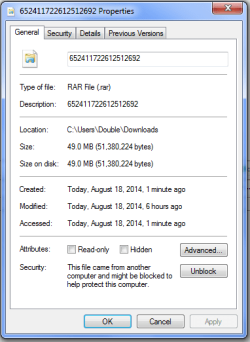
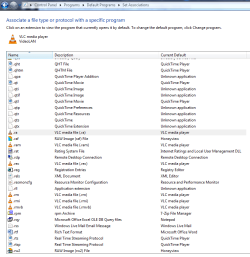
Well I changed the Properties of the .rar files to open with Windows Explorer (C:\Windows\explorer.exe) instead of 7zip. I then realized that Windows may not extract .rars, only zips. Now, I cannot seem to change the Properties of this file back to 7-Zip, the change button is missing. I've uninstalled and reinstalled 7zip to see if the rar extension would stick back, but it did not.. ugh
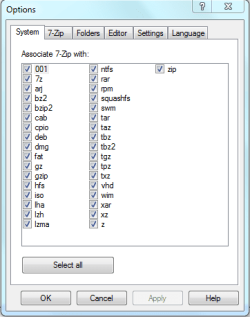
Hi Brink, i tried running 7zip as administrator and did as you said, but everything appeared ok? rar was already selected by 7zip, but I'm not seeing the effects in my file-explorer:
explorer.exe also crashes (the taskbar restarts).. still not sure what action triggers it
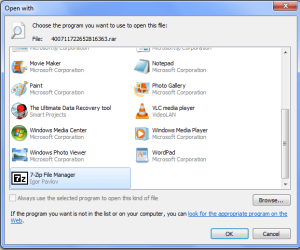
In that case, right click on a .rar file, click on Open with, select Choose default program, select 7-Zip ("C:\Program Files\7-Zip\7zFM.exe") with the Always use the selected program to open this kind of file box checked.
Ok. I have 7-Zip installed, so if you like, download and merge the .reg file below to set the default association of .rar files to open with 7-Zip. Afterwards, restart the computer to full apply.
Attachments
7-Zip_RAR.reg
1.6 KB
· Views: 10
My Computer
Computer type
PC/Desktop
Computer Manufacturer/Model Number
Self built custom
OS
64-bit Windows 11 Pro for Workstations
CPU
Intel i7-8700K OC'd to 5 GHz
Motherboard
ASUS ROG Maximus XI Formula Z390
Memory
64 GB (4x16GB) G.SKILL TridentZ RGB DDR4 3600 MHz
Graphics Card(s)
ASUS ROG-STRIX-GTX1080TI-O11G-GAMING
Sound Card
Integrated
Monitor(s) Displays
2 x Samsung Odyssey G7 27"
Screen Resolution
2560x1440
Hard Drives
1TB Samsung 990 PRO M.2,
4TB Samsung 990 PRO PRO M.2,
TerraMaster F8 SSD Plus NAS
PSU
Seasonic Prime Titanium 850W
Case
Thermaltake Core P3
Cooling
Corsair Hydro H115i
Keyboard
Logitech wireless K800
Mouse
Logitech MX Master 4
Internet Speed
2 Gb/s Download and 100 Mb/s Upload
Antivirus
Malwarebyte Anti-Malware Premium
Browser
Google Chrome
Other Info
Logitech Z625 speaker system,
Logitech BRIO 4K Pro webcam,
HP Color LaserJet Pro MFP M477fdn,
APC SMART-UPS RT 1000 XL - SURT1000XLI,
Galaxy S23 Plus phone
ZIP files do not have "Extract All" in the context menu unless the default Windows Explorer is set as the default program instead of 7-Zip. Otherwise you'll have the options like above instead.
If you like to restore the default associations for ZIP files, then you could download and merge the .reg file for the listed .zip option in the tutorial below to do so.
So.. there is no way to have 7-Zip options and the 'Extract All' options in the same menu? I was hoping to have an additional tool to extract from incase 7-zip couldn't do the job. Does 'Extract All' also work on rar files? I've been using 7zip so much i cannot remember..?
Sure, if you have ZIP set to open with the default (not 7-Zip) using the .reg file from above, and check all context menu boxes in 7-Zip options, you'll have all of them for .zip files like below.
RAR files are not handled by Windows by default, so there isn't an "Extract All" option for it. However, the 7-Zip "Extract files" and "Extract Here" context menus are basically the same.
My Computer
Computer type
PC/Desktop
Computer Manufacturer/Model Number
Self built custom
OS
64-bit Windows 11 Pro for Workstations
CPU
Intel i7-8700K OC'd to 5 GHz
Motherboard
ASUS ROG Maximus XI Formula Z390
Memory
64 GB (4x16GB) G.SKILL TridentZ RGB DDR4 3600 MHz
Graphics Card(s)
ASUS ROG-STRIX-GTX1080TI-O11G-GAMING
Sound Card
Integrated
Monitor(s) Displays
2 x Samsung Odyssey G7 27"
Screen Resolution
2560x1440
Hard Drives
1TB Samsung 990 PRO M.2,
4TB Samsung 990 PRO PRO M.2,
TerraMaster F8 SSD Plus NAS
PSU
Seasonic Prime Titanium 850W
Case
Thermaltake Core P3
Cooling
Corsair Hydro H115i
Keyboard
Logitech wireless K800
Mouse
Logitech MX Master 4
Internet Speed
2 Gb/s Download and 100 Mb/s Upload
Antivirus
Malwarebyte Anti-Malware Premium
Browser
Google Chrome
Other Info
Logitech Z625 speaker system,
Logitech BRIO 4K Pro webcam,
HP Color LaserJet Pro MFP M477fdn,
APC SMART-UPS RT 1000 XL - SURT1000XLI,
Galaxy S23 Plus phone
I remember a couple occasions when an extract with 7zip returned errors, i used Extract All instead, which gave none. Even though i use 7zip as my main, i still think Extract All is very useful.
The link you mention leads to Eight forums, are those instructions still relevant to Windows 7?
Thanks for all your help and advice, i really appreciate it. I'm bookmarking this page for future reference