Extracting RAR archives results in different extracted file sizes

cgh98

New member
Local time
8:54 AM
Messages
7
I have been extracting several RAR archives that have been stored on an external HD for a while. I do not know what the exact contents of the archives were before they were archived so there is no way for me to know if any content is actually missing. I started extracting two copies of each archive as a redundancy factor and I noticed something very strange. After the archive is fully extracted I extract the same archive again and once the same archive is fully extracted I view the Properties of both and the size, size on disk, and file/folder count are different. They are not massively different from each other but I question why they would be different at all as they should be identical since they are being extracted from the one and the same original RAR archive.

The RAR archives are stored on one external HD and I am extracting them to another external HD (Untitled). Both HDs are formatted as ExFAT. They are being extracted by WinRAR v5.40 64-bit on a Windows 7 Ultimate x64 Dell laptop. And this has happened with multiple archives. I have made sure in the process that nothing has gotten disconnected, the computer has stayed on the entire time, no power failures.

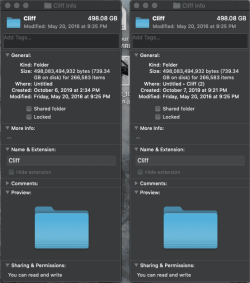
The part I have found to be even stranger is that when I disconnect the external HD that I have extracted the files to and connect it to my Mac and compare the Properties of the two RAR archives; they are identical in size, size on disk, and item count. Also strange to me is that the file sizes on the Mac are quite a bit different compared to the identical file on the same drive on the Windows 7 computer.

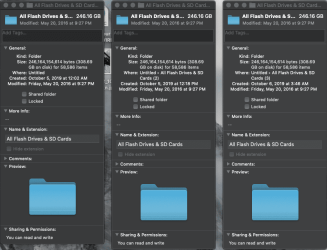
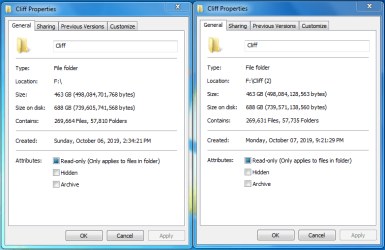
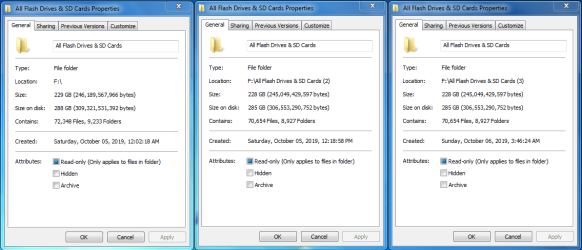
I've attached a couple screenshots of three copies of one archive extracted and two copies of another archive extracted with the Properties displayed on the Windows PC and the Mac. I just can't understand why the files when extracted are different sizes. My main purpose for this post is first to see if anyone might can tell me why the files may be different in size and second to see if anyone thinks I have a reason to be concerned about missing files. Thanks to anyone in advance!!
 

Attachments
  • Screenshot 1.png
    Screenshot 1.png
    27.4 KB · Views: 4
  • Screen Shot 2019-10-09 at 1.01.51 AM.png
    Screen Shot 2019-10-09 at 1.01.51 AM.png
    54 KB · Views: 1
  • Screenshot 2.png
    Screenshot 2.png
    21.5 KB · Views: 2
  • Screen Shot 2019-10-09 at 1.02.41 AM.png
    Screen Shot 2019-10-09 at 1.02.41 AM.png
    30 KB · Views: 19

My Computer My Computer

At a glance

Windows 7 Ultimate x64
Computer type
Laptop
OS
Windows 7 Ultimate x64
I use WinRar all the time. My AutoSURT64 is bases upon a Self-Extracting WinRar executable.
Does this happen every time you extract contents they are different size?
If not, you probably didn't extract everything on the smaller one.
Bill

run sha1 hash match.

Bill
 

My Computer My Computer

At a glance

Win 10 x64, Linux Lite, Win 7 x64, BlackArch,...
Computer type
PC/Desktop
Computer Manufacturer/Model Number
HP Desktop & Compaq Laptop
OS
Win 10 x64, Linux Lite, Win 7 x64, BlackArch, & Kali
Hard Drives
Samsung 850 Pro 256Gb,
Hitachi HDD 1Tb,
Crucial MX SSD 250Gb
Segate 3Tb USB 3.0 Ext. Backup HDD
Internet Speed
150Mbps dn, 20Mbps up
Antivirus
Avast Free, Malwarebytes Anti-Exploit & Anti-Ransomware
Browser
Firefox, Chrome, Opera, & VPN
Does this happen every time you extract contents they are different size?
If not, you probably didn't extract everything on the smaller one.

The "Cliff" archive I have only extracted twice and the second extraction was different in size compared to the first one, on Windows. Yet they are identical in size when looking at the same two folders on Mac.

The other archive "All Flash Drives & SD Cards" I have extracted three times. The last two times, each folder is identical in size but the first extraction was different in size, on Windows. Yet they are all three identical when looking at the same three folders on Mac.

One other thing I noticed is that on my Mac, the file size and size on disk of both sets of folders are larger than when looking at them on Windows. However the number of total items on Mac is lesser in both sets of folders compared to the number of total files & folders on Windows. Why would the two OSes be wielding such different results when viewing the same exact folders? Every extraction was completed without interruption so I don't see how everything couldn't have been extracted. Why would Windows have two different sizes for two copies of an extraction of the same archive?

run sha1 hash match.

How could I check the hash for folders?

THANKS for your reply!
 

My Computer My Computer

At a glance

Windows 7 Ultimate x64
Computer type
Laptop
OS
Windows 7 Ultimate x64
It could be due to the hard drive format of ExFAT. Not sure. Can you extract to a NTFS hard drive? Also, try 7Zip to extract the folder.
 

My Computer My Computer

At a glance

Windows 7 Ultimate x64
Computer type
PC/Desktop
OS
Windows 7 Ultimate x64
MAC compression different from Windows compression? Regarding different archived sizes.
 

My Computer My Computer

At a glance

Windows 7 Professional 64-bitDesktop i5; Acers i5 & i7desktop 16GB; 1 Acer 8GB & 1 Acer 16GB
Computer type
PC/Desktop
Computer Manufacturer/Model Number
Antec desktop; Acer Aspire laptops
OS
Windows 7 Professional 64-bit
CPU
Desktop i5; Acers i5 & i7
Memory
desktop 16GB; 1 Acer 8GB & 1 Acer 16GB
Hard Drives
1TB split into 2 equal partitions [OS and data] usable by RJS
Internet Speed
AT&T DSL
Browser
FF, GChrome, msIE
Other Info
Windows 7 Firewall, Emsisoft AM/AV, MSE [scan-only], SpywareBlaster, Ruiware/BillP combine

My Computer My Computer

At a glance

Win 10 x64, Linux Lite, Win 7 x64, BlackArch,...
Computer type
PC/Desktop
Computer Manufacturer/Model Number
HP Desktop & Compaq Laptop
OS
Win 10 x64, Linux Lite, Win 7 x64, BlackArch, & Kali
Hard Drives
Samsung 850 Pro 256Gb,
Hitachi HDD 1Tb,
Crucial MX SSD 250Gb
Segate 3Tb USB 3.0 Ext. Backup HDD
Internet Speed
150Mbps dn, 20Mbps up
Antivirus
Avast Free, Malwarebytes Anti-Exploit & Anti-Ransomware
Browser
Firefox, Chrome, Opera, & VPN
MAC compression different from Windows compression? Regarding different archived sizes.


I don't think that's it all because there are file and size discrepancies in Windows 7 not on the Mac.
 

My Computer My Computer

At a glance

Windows 7 Ultimate x64
Computer type
PC/Desktop
OS
Windows 7 Ultimate x64
MAC compression different from Windows compression? Regarding different archived sizes.

Well when I've looked at the actual RAR archives before there is a different in size there as well on the Mac but both of those could just be the different ways the OSes read the data? I've done a little experimenting and this is the same case with smaller files from the desktop; showing slightly different sizes when viewing the folder on Mac vs Windows. But ultimately that's not even my main issue. The problem is, why would extracting the same RAR archive two times on the same computer to the same drive result in different extracted file sizes? And this is before ever touching the contents of extracted folders. Just can't get my head around it.

It could be due to the hard drive format of ExFAT. Not sure. Can you extract to a NTFS hard drive? Also, try 7Zip to extract the folder.

I don't think extracting to an NTFS drive would work because the original files were saved on an ExFAT drive already and the file paths I already know are too long to copy to an NTFS drive. I've already experienced this when trying to copy some files from this extracted archive to the desktop it won't work saying due to a file name/file path too long error.

I'm going to try extracting the archives with 7Zip and Bandzip to see if I get the same results.
 

My Computer My Computer

At a glance

Windows 7 Ultimate x64
Computer type
Laptop
OS
Windows 7 Ultimate x64
Yeah, please let us know if 7Zip yields the same result.
 

My Computer My Computer

At a glance

Windows 7 Ultimate x64
Computer type
PC/Desktop
OS
Windows 7 Ultimate x64
Windows, you can't exceed MAX_PATH value (259 characters for files, 248 for folders)
 

My Computer My Computer

At a glance

Win 10 x64, Linux Lite, Win 7 x64, BlackArch,...
Computer type
PC/Desktop
Computer Manufacturer/Model Number
HP Desktop & Compaq Laptop
OS
Win 10 x64, Linux Lite, Win 7 x64, BlackArch, & Kali
Hard Drives
Samsung 850 Pro 256Gb,
Hitachi HDD 1Tb,
Crucial MX SSD 250Gb
Segate 3Tb USB 3.0 Ext. Backup HDD
Internet Speed
150Mbps dn, 20Mbps up
Antivirus
Avast Free, Malwarebytes Anti-Exploit & Anti-Ransomware
Browser
Firefox, Chrome, Opera, & VPN
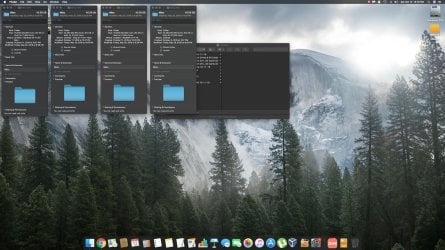
Okay so I tested this using a different archive (because it's the smallest one and took a lot less time to extract) from the same drive with the other archives stored and extracted them to the other drive I'm using. I've attached screenshots showing the sizes of each extracted folder from both my Windows laptop and Mac. It's bizarre to me to see but I extracted the same archive using the 3 different programs (Bandizip, 7Zip, WinRAR) and got different results from each. What does anyone make of this? The 4th properties/info pane is of the same archive that I extracted a few days ago with WinRAR and as you can see it even shows a different size than the WinRAR extraction I did last night.

Also as you can see the size of each is the same when viewing info pane on Mac but like before each folder shows a different size and file/folder count when viewing properties on Windows.
 

Attachments

  • Untitled1.png
    Untitled1.png
    142.4 KB · Views: 4
  • Screen Shot 2019-10-12 at 12.15.34 PM.jpg
    Screen Shot 2019-10-12 at 12.15.34 PM.jpg
    398.9 KB · Views: 3

My Computer My Computer

At a glance

Windows 7 Ultimate x64
Computer type
Laptop
OS
Windows 7 Ultimate x64
I am curious, once extracted, do the (contents) function properly?
 
Last edited:

My Computer My Computer

At a glance

Windows 7 Home Premium bitamd?4 gig
Computer type
Laptop
Computer Manufacturer/Model Number
toshiba 505
OS
Windows 7 Home Premium bit
CPU
amd?
Motherboard
?
Memory
4 gig
Monitor(s) Displays
Samsung S27D360 &S24D300 - Acer K222HQL - Eizo 21" (4x3)
Screen Resolution
1280 x 720 -1600x900 - (eizo 1024x768
Hard Drives
240 ssd
PSU
amd (?)
Mouse
logitech tackball
Antivirus
360 total security
Browser
firefox portable 29.0.1

My Computer My Computer

At a glance

Win 10 x64, Linux Lite, Win 7 x64, BlackArch,...
Computer type
PC/Desktop
Computer Manufacturer/Model Number
HP Desktop & Compaq Laptop
OS
Win 10 x64, Linux Lite, Win 7 x64, BlackArch, & Kali
Hard Drives
Samsung 850 Pro 256Gb,
Hitachi HDD 1Tb,
Crucial MX SSD 250Gb
Segate 3Tb USB 3.0 Ext. Backup HDD
Internet Speed
150Mbps dn, 20Mbps up
Antivirus
Avast Free, Malwarebytes Anti-Exploit & Anti-Ransomware
Browser
Firefox, Chrome, Opera, & VPN
I am curious, onve extracted, do the (contents) function properly?

Yes, everything so far seems to view and function properly that is within the folders.

You are comparing to files on two different Operating Systems, if you check the files on the same system, open with the same program, they should be the same, the hashes should be identical
What Are MD5, SHA-1, and SHA-256 Hashes, and How Do I ...


Yes that's my issue...take macOS out of the equation. When comparing the folders extracted they are different file sizes in Windows. This has occurred when extracting the same archive twice with WinRAR and they are different sizes. Also when I extracted the same archive via 3 different unarchivers as you can see in the last post, they are all three different sizes.
 

My Computer My Computer

At a glance

Windows 7 Ultimate x64
Computer type
Laptop
OS
Windows 7 Ultimate x64
cgh98,
You are playing games with the compression algorithms.
Any time you compress data, you are utilizing a compression algorithm. 7zip, WinRar, WinZip, PeaZip, etc., they all utilize their own proprietary algorithm.
How File Compression Works

Why is this so important?
 

My Computer My Computer

At a glance

Win 10 x64, Linux Lite, Win 7 x64, BlackArch,...
Computer type
PC/Desktop
Computer Manufacturer/Model Number
HP Desktop & Compaq Laptop
OS
Win 10 x64, Linux Lite, Win 7 x64, BlackArch, & Kali
Hard Drives
Samsung 850 Pro 256Gb,
Hitachi HDD 1Tb,
Crucial MX SSD 250Gb
Segate 3Tb USB 3.0 Ext. Backup HDD
Internet Speed
150Mbps dn, 20Mbps up
Antivirus
Avast Free, Malwarebytes Anti-Exploit & Anti-Ransomware
Browser
Firefox, Chrome, Opera, & VPN
cgh98,
You are playing games with the compression algorithms.
Any time you compress data, you are utilizing a compression algorithm. 7zip, WinRar, WinZip, PeaZip, etc., they all utilize their own proprietary algorithm.
How File Compression Works

Why is this so important?

I mean honestly I'm just concerned that all the files that were originally archived aren't going to be there. Still no reason I can find as to why extracting the same archive using the same program (WinRAR) and extracting it to the same drive; produces different results/different sizes.
 

My Computer My Computer

At a glance

Windows 7 Ultimate x64
Computer type
Laptop
OS
Windows 7 Ultimate x64
The same zipped archive
you extract it to say the desktop?
then you extract it to the desktop again?
and compare them right?
and they are different right?
how are you comparing them?
both there extracted, at the same time? right?
 

My Computer My Computer

At a glance

Win 10 x64, Linux Lite, Win 7 x64, BlackArch,...
Computer type
PC/Desktop
Computer Manufacturer/Model Number
HP Desktop & Compaq Laptop
OS
Win 10 x64, Linux Lite, Win 7 x64, BlackArch, & Kali
Hard Drives
Samsung 850 Pro 256Gb,
Hitachi HDD 1Tb,
Crucial MX SSD 250Gb
Segate 3Tb USB 3.0 Ext. Backup HDD
Internet Speed
150Mbps dn, 20Mbps up
Antivirus
Avast Free, Malwarebytes Anti-Exploit & Anti-Ransomware
Browser
Firefox, Chrome, Opera, & VPN
The same zipped archive
you extract it to say the desktop?
then you extract it to the desktop again?
and compare them right?
and they are different right?
how are you comparing them?
both there extracted, at the same time? right?

Yes that's exactly how I'm comparing them. In some of the folders extracted they have both been the same file size but then some folders extracted have been different. When having extracted them like you said, using the same program to the same location.

Like in the first screenshot I posted showing 3 properties windows of the folder all 3 called "All Flash Drives & SD Cards" I extracted all 3 from the same original archive and the second and third ones ended up being the same size but they are different from when I extracted it the first time.
 

My Computer My Computer

At a glance

Windows 7 Ultimate x64
Computer type
Laptop
OS
Windows 7 Ultimate x64
Back
Top