Extremely slow boot speed

Tominko

New member
Local time
11:15 PM
Messages
7
The speed used to be optimal, but in the past weeks it increased up to 4 minutes which is insane.
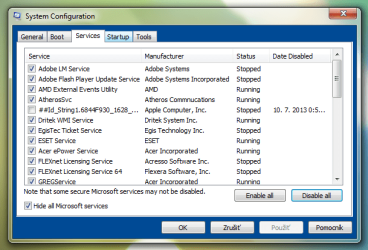
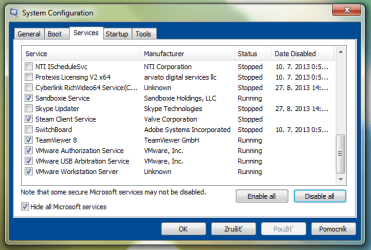
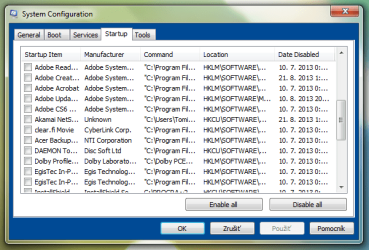
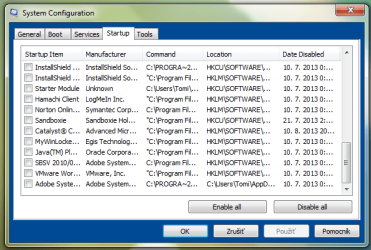
I disabled most of non microsoft services and startup programs but it does not decrease at all. If you need any further logs/info feel free to ask.

Thank you

- Tom
 

My Computer

Computer Manufacturer/Model Number
Acer Aspire 5560G
OS
Windows 7 Home Premium x64
CPU
AMD A6-3400M (Quad-Core)
Memory
6,0GB
Graphics Card(s)
AMD Radeon HD 6520G & AMD Radeon 6400M Series Dual Graphics
Screen Resolution
1366x768
Did you use msconfig or simply Task manager ?
I wouldn't guess unchecking ms services would be a good thing to do ?
Post a couple of screen shots.
 

My Computer

Computer type
PC/Desktop
Computer Manufacturer/Model Number
Custom assembled by me :}
OS
Win-7-Pro64bit 7-H-Prem-64bit
CPU
i7-5930K 2nd i9-9940x both water blocked VRM's too
Motherboard
ASUS SABERTOOTH X99 2nd ASUS x299 Apex
Memory
Trident-z 3200C14 2nd Trident-z 3600C16
Graphics Card(s)
EVGA 1080ti ftw3 2nd Titan Xp both water blocked
Sound Card
Built-in Realtek
Monitor(s) Displays
1-AOC G2460PG 24"G-Sync 144Hz/ 2nd 1-ASUS VG248QE 24" 144Hz
Screen Resolution
1920 x 1080 144Hz
Hard Drives
2-Samsung M.2 Evo & Evo Plus
2-Samsung 850 EVO 500GB SSD's/ 3-2.5 W.D. Black 1tb-&3-1tb/3-3.5 WD Black 1tb hdd's
PSU
EVGA SuperNOVA 1000-P2 2nd 1200-P2
Case
2-Corsair Obsidian Series 450D Black ATX Mid Tower
Cooling
Custom water loops
Keyboard
Logitech G710+/ 2nd Logitech G910
Mouse
2-RedDragon M901 Perdition 16400 dpi Gaming mouse = wired
Internet Speed
Comcast Ping 19ms 89.31mbps download speed 6.12mbps upload
Antivirus
Malwarebytes Pro/ Superantispyware Pro
Browser
FireFox & Pale moon
Other Info
2nd ASUS X299 Apex/Intel i9-9940x with Custom water loop/7H-Prem-x64/Corsair 450D case/Ram Trident-z 3600C16 4x8gb / Samsung970Evo plus 500gb SSD/Dual ssd EZ swap evo/PSU EVGA SuperNova 1200w-P2 80+Platinum/GPU Titan Xp /8-ML-140 on push-pull on 2-280GTX rads
Did you use msconfig or simply Task manager ?
I wouldn't guess unchecking ms services would be a good thing to do ?
Post a couple of screen shots.

I said i unchecked most of the non ms services.
I put the screenshots in the attachments.
 

Attachments

  • services1.png
    services1.png
    25.6 KB · Views: 26
  • services2.png
    services2.png
    23.8 KB · Views: 22
  • services3.png
    services3.png
    22.8 KB · Views: 21
  • startup1.png
    startup1.png
    21.6 KB · Views: 25
  • startup2.png
    startup2.png
    22 KB · Views: 24
  • startup3.png
    startup3.png
    21.2 KB · Views: 21

My Computer

Computer Manufacturer/Model Number
Acer Aspire 5560G
OS
Windows 7 Home Premium x64
CPU
AMD A6-3400M (Quad-Core)
Memory
6,0GB
Graphics Card(s)
AMD Radeon HD 6520G & AMD Radeon 6400M Series Dual Graphics
Screen Resolution
1366x768
When did this happen or did it just happen gradually?
 

My Computer

Computer type
PC/Desktop
OS
windows 7 home premium 64bit
CPU
Amd phenom ii 560 3.30ghz
Motherboard
Asus m4a785td-v evo
Memory
Corsair TwinX 8GB (4x2)
Graphics Card(s)
AMD radeon HD 5670 1GB
Sound Card
None
Monitor(s) Displays
Hp
Hard Drives
WD Black Caviar 1TB 7200rpm
PSU
Corsair 500W
Case
CM Enforcer
Cooling
Stock HS, 200mm Front fan + 120mm Exhaust
Keyboard
Cyborg v7
Mouse
Laser Microsoft 6000
Internet Speed
5mb/s
Antivirus
Norton
Browser
Chrome

My Computer

Computer type
PC/Desktop
Computer Manufacturer/Model Number
Custom assembled by me :}
OS
Win-7-Pro64bit 7-H-Prem-64bit
CPU
i7-5930K 2nd i9-9940x both water blocked VRM's too
Motherboard
ASUS SABERTOOTH X99 2nd ASUS x299 Apex
Memory
Trident-z 3200C14 2nd Trident-z 3600C16
Graphics Card(s)
EVGA 1080ti ftw3 2nd Titan Xp both water blocked
Sound Card
Built-in Realtek
Monitor(s) Displays
1-AOC G2460PG 24"G-Sync 144Hz/ 2nd 1-ASUS VG248QE 24" 144Hz
Screen Resolution
1920 x 1080 144Hz
Hard Drives
2-Samsung M.2 Evo & Evo Plus
2-Samsung 850 EVO 500GB SSD's/ 3-2.5 W.D. Black 1tb-&3-1tb/3-3.5 WD Black 1tb hdd's
PSU
EVGA SuperNOVA 1000-P2 2nd 1200-P2
Case
2-Corsair Obsidian Series 450D Black ATX Mid Tower
Cooling
Custom water loops
Keyboard
Logitech G710+/ 2nd Logitech G910
Mouse
2-RedDragon M901 Perdition 16400 dpi Gaming mouse = wired
Internet Speed
Comcast Ping 19ms 89.31mbps download speed 6.12mbps upload
Antivirus
Malwarebytes Pro/ Superantispyware Pro
Browser
FireFox & Pale moon
Other Info
2nd ASUS X299 Apex/Intel i9-9940x with Custom water loop/7H-Prem-x64/Corsair 450D case/Ram Trident-z 3600C16 4x8gb / Samsung970Evo plus 500gb SSD/Dual ssd EZ swap evo/PSU EVGA SuperNova 1200w-P2 80+Platinum/GPU Titan Xp /8-ML-140 on push-pull on 2-280GTX rads
in your startup, there's a programs called Starter module that's coming from your user account, what's the path to that file?
 

My Computer

Computer type
PC/Desktop
OS
.

My Computer

Computer Manufacturer/Model Number
Acer Aspire 5560G
OS
Windows 7 Home Premium x64
CPU
AMD A6-3400M (Quad-Core)
Memory
6,0GB
Graphics Card(s)
AMD Radeon HD 6520G & AMD Radeon 6400M Series Dual Graphics
Screen Resolution
1366x768

My Computer

Computer Manufacturer/Model Number
Acer Aspire 5560G
OS
Windows 7 Home Premium x64
CPU
AMD A6-3400M (Quad-Core)
Memory
6,0GB
Graphics Card(s)
AMD Radeon HD 6520G & AMD Radeon 6400M Series Dual Graphics
Screen Resolution
1366x768
in your startup, there's a programs called Starter module that's coming from your user account, what's the path to that file?

Oh thats lightshot a screen capture app, it does not slow down as it's very small and executes instantly. And like i said even if i do a clean startup, it is still being slow
 

My Computer

Computer Manufacturer/Model Number
Acer Aspire 5560G
OS
Windows 7 Home Premium x64
CPU
AMD A6-3400M (Quad-Core)
Memory
6,0GB
Graphics Card(s)
AMD Radeon HD 6520G & AMD Radeon 6400M Series Dual Graphics
Screen Resolution
1366x768
well, sorry i didn't catch this thread, it MAY be malware related, so I'd suggest the following...
run VipreRescue scanner, save it as a folder called VIPRE on your Desktop.
VIPRE Rescue - VIPRE Computer Recovery Solution

run ADWCleaner from here:
AdwCleaner Download

and dowload and install the FREE version of MalwareBytes Anti-Malware(MBAM) from below and run a FULL scan:
Malwarebytes : Malwarebytes Anti-Malware removes malware including viruses, spyware, worms and trojans, plus it protects your computer

do a scan with Kasperskys TDSSKiller from here:
TDSSKiller Rootkit Removal Utility Free Download | Kaspersky Lab US

and finally, a scan with MalwareBytes Anti-Rootkit (MBAR)

NOTE:
make sure you run the above tools with Administrator permissions by right clicking and selecting run as Administrator

hope everythig works out :)
 

My Computer

Computer type
PC/Desktop
OS
.
Sometimes too, just having them in the msconfig startup list and not checked can slow things down. Especially with a large list of stuff.
CCleaner (in my sig) can actually delete the entries that are there that are already disabled in the tools section.

I have found that this usually solves slow boot problems.
 

My Computer

Computer type
PC/Desktop
Computer Manufacturer/Model Number
Custom Built
OS
Windows 10 Pro
CPU
AMD Ryzen 5 2400G Processor with Radeon RX Vega 11 Graphics
Motherboard
ASRock X470 Master SLI/AC AM4 AMD Promontory X470 SATA 6Gb/s
Memory
G.SKILL Ripjaws V Series 16GB (2 x 8GB) 288-Pin DDR4 SDRAM D
Graphics Card(s)
2047MB NVIDIA GeForce GTX 1060 6GB (EVGA)
Sound Card
Motherboard Built in
Monitor(s) Displays
Acer R240HY bidx 23.8-Inch IPS HDMI DVI VGA (1920 x 1080) Wi
Screen Resolution
1920 x 1080
Hard Drives
1TB Sandisk SSD PLUS (Main drive)
500 GB Seagate 7200 RPM (Games)
500 GB Western Digital 7200 RPM (Virtual Machines)
PSU
CORSAIR TX Series TX650M 650W 80+ Gold Modular Power Supply
Case
CORSAIR CARBIDE SPEC-02 Mid-Tower Gaming Case, Red LED Fan
Cooling
220mm, two 120mm, and four 60mm fans
Keyboard
Wired Dell keyboard
Mouse
Wireless Logitech mouse
Internet Speed
250mb down, 30mb up
Antivirus
Panda Cloud Antivirus
Browser
Chrome-ish x64
Other Info
Your awesome for reading this.
You have more freeloaders starting with Win7 than I've ever seen before. None of them are needed except your AV, any sync, gadgets or stickies you use which actually need to start with WIn7.

With such a dirty install you really need to do a perfect Clean Reinstall - Factory OEM Windows 7
to enjoy for the first time native Win7 performance without all of that crap interfering with the OS.

At the minimum I'd Clean Up Factory Bloatware.
 
Back
Top