Extremely slow internet on fresh install

jlawes20389

New member
Local time
4:02 AM
Messages
18
Hi guys.

I am having a problem with my internet connect on 3 laptops for the last couple of days that I cannot seem to get my head around.

Ill start with the specs. 2 of the laptops are Acer Aspire One netbooks with the following:

Intel Atom 1.6ghz
1GB ram
120GB HDD
Atheros AR5007EG

One of these is an XP install which has been running since new and the other is a windows 7 Home Premium that I put on when i first got it over a year ago. The Windows 7 one has also been formatted and reinstalled a couple of hours ago

The other is a Compaq CQ70 with the following:

Intel T3200
2GB ram
160GB HDD
Atheros AR5700

This laptop has cleanly installed Vista Home premium on it. I have also tried 7 Home Premium with no difference.

The router is a Netgear DGN1000, I have updated to the newest firmware with no luck and have since rolled back to the previous version.

All 3 machines have been running perfectly for quite some time until a couple of days ago, nothing that I know of has changed the setup etc of any of the machines. As i was having problems, 2 out of the 3 laptops were formatted and reinstalled and the router was also reset to factory settings and then setup again.

The problem I am having with these laptops is that they are all extremely slow online and are also only downloading at approximately 150 bps! I have tried updated drivers, changing the router from N to B/G only and nothing seems to be making a difference.

I do have 2 main PC's which are currently working fine, a little bit on the slow side but they are fine in terms of downloading compared to the laptops.

I have tried the laptops connected through Ethernet to the router and they are perfect. I have also tried my WNA3100 adapter out of my PC and again works perfectly.

Any ideas as to what I could try would be greatly appreciated!
 

My Computer My Computer

OS
Windows 7 Home Premium X86
CPU
Intel Dual Core E2140
Motherboard
Asrock 4CoreDual-Sata2
Memory
2 x 1GB Corsair XMS DDR2
Graphics Card(s)
Sapphire Radeon 5570
Hi jlawes20389,

You've mentioned this 'reset to factory settings and then setup again.' Did you by any chance restore the router's previous settings? It's actually advisable to reconfigure the router settings.

Also, please check this out on how to improve your wireless connection speed.

From your wireless computer pls. install and run Xirrus Wi-Fi Inspector.
http://www.xirrus.com/library/wifitools.php.

Click on the 'Show Networks' to display all wireless networks on the xirrus icon on your desktop of if you have one running in a corner. Tap the Printscreen key on your keyboard, open up Paint then choose Edit from the Menu and select Paste, then SAVE it. Upload and attached it here.
 
Last edited:

My Computer My Computer

Computer Manufacturer/Model Number
Lenovo Desktop/Samsung Laptop
OS
Win7 & Win8 64bit
CPU
Intel i5
Internet Speed
Charter-20 Mbps
Antivirus
Avast
Browser
FF, IE9 and Chrome
Hi, thanks for your reply

I setup the router as if it was a new one, not restore to previous settings

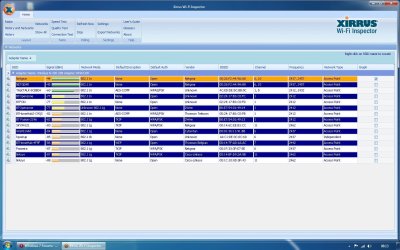
Heres the picture of Xirrus, my network is the Netgear one. Not sure why its showing twice though
 

Attachments

  • network.jpg
    network.jpg
    159.6 KB · Views: 83

My Computer My Computer

OS
Windows 7 Home Premium X86
CPU
Intel Dual Core E2140
Motherboard
Asrock 4CoreDual-Sata2
Memory
2 x 1GB Corsair XMS DDR2
Graphics Card(s)
Sapphire Radeon 5570
Thanks for the Xirrus snap shot. Currently your network is not secured, perhaps others are using your Wi-Fi for Free and using your bandwidth. Your wireless channel selection is excellent, let's leave it as is for now.

Please secure your network with WPA2 so that no one can tap in to your network.
Securing Your Wireless Network: WPA/WPA2 (Recommended))

Please let us know.
 

My Computer My Computer

Computer Manufacturer/Model Number
Lenovo Desktop/Samsung Laptop
OS
Win7 & Win8 64bit
CPU
Intel i5
Internet Speed
Charter-20 Mbps
Antivirus
Avast
Browser
FF, IE9 and Chrome
Hi,

The only reason it was unsecured was because I had reset it again about half hour before I took the Xirrus screenshot and hadn't got round to adding any security.

I have enabled WPA-2 again now but there is no difference
 

My Computer My Computer

OS
Windows 7 Home Premium X86
CPU
Intel Dual Core E2140
Motherboard
Asrock 4CoreDual-Sata2
Memory
2 x 1GB Corsair XMS DDR2
Graphics Card(s)
Sapphire Radeon 5570
Have you tried doing the same thing to the Wireless Adapters of all your computers that are affected?
changing the router from N to B/G only and nothing seems to be making a difference.
 

My Computer My Computer

Computer Manufacturer/Model Number
Lenovo Desktop/Samsung Laptop
OS
Win7 & Win8 64bit
CPU
Intel i5
Internet Speed
Charter-20 Mbps
Antivirus
Avast
Browser
FF, IE9 and Chrome
I did try looking to see if I could change that for wireless adapters but couldnt find anything under device manager for it. I will check again

Strangely, I haven't changed anything again yet but over night the laptops have decided to start working and downloading at the usual speed. I have not changed anything in order for this to happen though! Odd....

Still not perfect, some websites wont load 100% but it is now loads better.
 

My Computer My Computer

OS
Windows 7 Home Premium X86
CPU
Intel Dual Core E2140
Motherboard
Asrock 4CoreDual-Sata2
Memory
2 x 1GB Corsair XMS DDR2
Graphics Card(s)
Sapphire Radeon 5570
I noticed that you are showing the use of two channels and also that your Network is showing up twice on the list, once with caps NETGEAR and the other with small case netgear.

When two channels show up it means you have channel bonding turned on which relates the the 20-40Mhz setting in your routers control panel. Channel bonding can sometimes cause problems so you might want to turn it off by changing to 20Mhz only frequency.

I also can't help but to think that your SSID showing up twice is another problem. I would reset the router and start from scratch making sure that channel bonding is turned off and that your SSID is correct.

Also I noticed that quite a few of your neighbors are using channel 6 so best to use a single channel that isn't being used by anyone and even better to use a channel that is 4 numbers away from anyone else.
 

My Computer My Computer

Computer type
PC/Desktop
Computer Manufacturer/Model Number
Home built
OS
Windows 7 Ult, Windows 8.1 Pro,
CPU
Q9650-4.275GHz, E8600 4.5GHz, E6750-3.8GHz
Motherboard
Evga 780i FTW
Memory
G.Skill PC2 9600 1200Mhz 5 5 5 15 2T
Graphics Card(s)
GTX480
Sound Card
Asus Xonar D2
Monitor(s) Displays
HannsG
Screen Resolution
1680X1050
Hard Drives
GSkill Phoenix Pro 120GB SSD
PSU
ThermalTake Toughpower 1000Watt modular
Case
ThermalTake XaserV
Cooling
Xigmatek S1283
Keyboard
Logitech G15
Mouse
Logitech G9
Internet Speed
T1
I ran Xirrus again and the network was only showing up once this time. To be on the safeside I have started the router from scratch again and selected channel 9 this time.

I have been through every page of the router settings looking for anything about channel bonding or broadcasting on 2 different channels but cannot find anything relating to this, any ideas what it could be under? Cant find anything on google about it and my router either
 

My Computer My Computer

OS
Windows 7 Home Premium X86
CPU
Intel Dual Core E2140
Motherboard
Asrock 4CoreDual-Sata2
Memory
2 x 1GB Corsair XMS DDR2
Graphics Card(s)
Sapphire Radeon 5570
I am amazed how many of those connections are open - don't these people do any research about security?
 

My Computer My Computer

OS
Windows 7 Home Premium 64bit
CPU
Intel Core 2 Quad Q8400 2.66Ghz
Motherboard
Gigabyte GA-P35-S3
Memory
4.Gb 240pin DDR2 PC667Mhz PC5300
Graphics Card(s)
ATI EAH4850 512mb DDR3
Sound Card
Audigy 4
PSU
Corsair 650w
half of those open connections are public hotspots but yeah I know what you mean otherwise! Security is nearly always the first thing I do each time I set up a new router.

Download speeds are now much better on the machines that were having problems but I am still having some difficulty getting it to run perfectly.

Some sites and downloads will just hang as they nearly finish loading and will take forever to load up, some will not load at all. One example is paypal, have bought something on ebay but cannot get onto paypal to pay for it! Downloading the opera browser just hangs at 99% completed download. This is the same on every machine in the house. I have tried switching channels etc again but no different so have gone back to channel 9.

If I access the same websites on my mobile phone using 3G I can load fine, as soon as i connect back to the wireless some sites have problems. Not really sure where to go with this one now!
 

My Computer My Computer

OS
Windows 7 Home Premium X86
CPU
Intel Dual Core E2140
Motherboard
Asrock 4CoreDual-Sata2
Memory
2 x 1GB Corsair XMS DDR2
Graphics Card(s)
Sapphire Radeon 5570
Right.... I have tried install Ubuntu on my netbook out of curiosity and I get the same problems as I did before on Windows so I am now wondering if this is more of a router issue than windows? Any ideas on what I could try changing on the router? I still havent been able to stop it broadcasting on 2 channels yet either
 

My Computer My Computer

OS
Windows 7 Home Premium X86
CPU
Intel Dual Core E2140
Motherboard
Asrock 4CoreDual-Sata2
Memory
2 x 1GB Corsair XMS DDR2
Graphics Card(s)
Sapphire Radeon 5570
After reading through this odd issue you seem to be having, I noticed replacing or using another wireless router is the only thing that hasn't been tried yet.

Oh and for the record, when setting wireless channels, the only channels that do not overlap are 1, 6, 11... 2, 3, 4, and 5 overlap each other by 25% and 7, 8, 9, and 10 overlap each other by 25%. (that's just for G, I don't know about N)

What you want to be looking for is "channel bonding" somewhere in the broadcast settings (the area that includes your channel, ssid, etc)
 

My Computer My Computer

OS
Windows 7 Ultimate 64-bit
CPU
AMD Phenom II X6 1090T 3.2GHZ
Motherboard
MSI 890FXA-GD70
Memory
G.SKILL RipJaw 3x2GB DDR3-1066
Graphics Card(s)
2x HIS Radeon HD 6850 1 GB
Sound Card
VIA 8-channel
Monitor(s) Displays
2x 20 inch Acer LCDs, 1x 32" Sony LCD TV
Screen Resolution
4480x900
Hard Drives
1x Crucial 64GB SSD
3x 1TB HDDs (WD, Seagate, Hitatchi)
1x 500GB Seagate External
PSU
Kingwin 1000W Modular
Case
Coolermaster HAF 932
Cooling
1x 120mm, 3x 200mm, CoolerMaster Hyper 212+
Keyboard
Microsoft Wireless Keyboard 1000
Mouse
Microsoft Wiresless Mouse 5000
Internet Speed
20mbps
Other Info
Samsung BD-ROM/DVD-RW
I think I have found the dual channel part in my router. It was under the broadcast mode, it was set to upto 150mbps and changing that it is now showing just one channel. But as I thought still no different.

At the moment I do not have another router to try but its looking like I am going to need to try a different one as I am running out of ideas!
 

My Computer My Computer

OS
Windows 7 Home Premium X86
CPU
Intel Dual Core E2140
Motherboard
Asrock 4CoreDual-Sata2
Memory
2 x 1GB Corsair XMS DDR2
Graphics Card(s)
Sapphire Radeon 5570
Well seems like it was the router that was the problem, took it back to the store as it was only 6 months old, swapped it for a Linksys WAG160 and as far as i can tell everything is working perfectly
 

My Computer My Computer

OS
Windows 7 Home Premium X86
CPU
Intel Dual Core E2140
Motherboard
Asrock 4CoreDual-Sata2
Memory
2 x 1GB Corsair XMS DDR2
Graphics Card(s)
Sapphire Radeon 5570
Well seems like it was the router that was the problem, took it back to the store as it was only 6 months old, swapped it for a Linksys WAG160 and as far as i can tell everything is working perfectly

Glad to hear it jlawes, I hope you tried to use the reset button on the router before you returned it. I'm glad you got it working.

Anyway, the channel bonding relates to the 20-40Mhz or the 20Mhz setting on your router. It usually won't say a thing about channel bonding, it only shows the 20-40Mhz or 20Mhz settings, the first is using channel bonding the second is not. It works better with the 5GHz band because the channels do not overlap nearly as much with the 5Ghz band.
 

My Computer My Computer

Computer type
PC/Desktop
Computer Manufacturer/Model Number
Home built
OS
Windows 7 Ult, Windows 8.1 Pro,
CPU
Q9650-4.275GHz, E8600 4.5GHz, E6750-3.8GHz
Motherboard
Evga 780i FTW
Memory
G.Skill PC2 9600 1200Mhz 5 5 5 15 2T
Graphics Card(s)
GTX480
Sound Card
Asus Xonar D2
Monitor(s) Displays
HannsG
Screen Resolution
1680X1050
Hard Drives
GSkill Phoenix Pro 120GB SSD
PSU
ThermalTake Toughpower 1000Watt modular
Case
ThermalTake XaserV
Cooling
Xigmatek S1283
Keyboard
Logitech G15
Mouse
Logitech G9
Internet Speed
T1
Awesome! Good to hear things are returning to normal!
 

My Computer My Computer

OS
Windows 7 Ultimate 64-bit
CPU
AMD Phenom II X6 1090T 3.2GHZ
Motherboard
MSI 890FXA-GD70
Memory
G.SKILL RipJaw 3x2GB DDR3-1066
Graphics Card(s)
2x HIS Radeon HD 6850 1 GB
Sound Card
VIA 8-channel
Monitor(s) Displays
2x 20 inch Acer LCDs, 1x 32" Sony LCD TV
Screen Resolution
4480x900
Hard Drives
1x Crucial 64GB SSD
3x 1TB HDDs (WD, Seagate, Hitatchi)
1x 500GB Seagate External
PSU
Kingwin 1000W Modular
Case
Coolermaster HAF 932
Cooling
1x 120mm, 3x 200mm, CoolerMaster Hyper 212+
Keyboard
Microsoft Wireless Keyboard 1000
Mouse
Microsoft Wiresless Mouse 5000
Internet Speed
20mbps
Other Info
Samsung BD-ROM/DVD-RW
Back
Top