Extremely slow Win7 x64 while medium HDD usage

Nick2

New member
Member
Local time
9:43 AM
Messages
38
Hi,

I have a very annoying problem with my PC.
Most of the time the PC responds very very slow, windows are maximizing in 5-10secs, ApexDC++ takes ages to maximize, typed characters don't appear in real-time in Yahoo Messenger, Explorer is also very slow and shows that waiting cursor every time I change the folders( this is the most annoying aspect), etc.
At the same time I was running an XP in VMware, for a test, and it's Explorer was very snappy.

The PC reacts like it is overwhelmed. Things like these happened when I had a Duron 900Mhz +256MB RAM.
The actual PC is a quad core Q8300, 8GB RAM DDR2, ATI x550(an old video card, but not important because I don't play games) and a Samsung HE642JJ HDD on AHCI mode.


The things that work in the baground are a few emule instances, an ApexDC++ instance and uTorrent.
All of these don't use more than 2048kbps up or down. The only thing is that those 2048kbps are divided in small streams depending on the files that are being uploaded or downloaded.

The CPU usage varies from 20 to 90%, the RAM usage is up to 75%.
I have stopped the indexing, but superfetching is activated. The HDD seems fine in HD Tune, no errors, normal speed graph, SMART is OK.
I've turned off NOD32 AV but saw no difference.
I use the Comodo Firewall, and ofc, the Windows Firewall is turned off.
(I see now that Windows Defender is still on.)
I have no viruses, never had a crash, nor a reset, from the last time I reinstalled the OS.

I had an E6550, 4GB, 500GB HDD in IDE mode, running WinXP SP2 in similar load conditions and things were waaaay smoother. No lags, no nothing, everything was very fluent.

What could be the cause?
AHCI? Win7 x64?
 

My Computer

OS
Windows 7 Professional x64

My Computer

Computer type
PC/Desktop
Computer Manufacturer/Model Number
Dell XPS 420
OS
Windows 10, Home Clean Install
CPU
Intel Core2 processsor Q8200(2.33Ghz 1333FSB) Quad Core Tech
Motherboard
Dell
Memory
6 gb
Graphics Card(s)
ATI Radeon 256MB HD3650
Sound Card
Intergrated 7.1 Channel Audio
Monitor(s) Displays
Dell SP2009W 20"
Hard Drives
640 GB Serial ATA Hard drive
Cooling
Fan
Keyboard
Dell USB Keyboard
Mouse
Dell Premium Optical USB
Internet Speed
DSL 2.85
Intel Q8300
MSI P43T-C51 mainboard
2x2GB A-DATA Extreme Vitesta 800+ + 2x2GB Kingston (don't know the exact model)
ATI Radeon x550(RV370) 256MB PCI-E
Samsung HE642JJ HDD
Optiarc IDE DVD-RW
Floppy

and that'a about it.

Memtest86+ returned no errors.
No infections in MBAM.
 

My Computer

OS
Windows 7 Professional x64
My guess is that you've disabled indexing before you allowed Windows to index the drive, and at the same time you're running 4 file sharing applications (writing to the drive). Upstream and downstream are irrelevant to the issue.

Slowing things down even more, you've got Nod32 and Windows Defender running. What's ofc?
 

My Computer

OS
7 Ultimate x64
CPU
i5-2500k
Motherboard
Asus P8P67 Pro
Memory
8GB G.Skill Ripjaws X F3-12800CL7D-8GBXH 1866MHz 8-9-8-24
Graphics Card(s)
EVGA GTX 570 SC
Sound Card
X-Fi Titanium Fatality
Monitor(s) Displays
Samsung S27A550H 27" LED
Screen Resolution
1920x1080
Hard Drives
OCZ Vertex 3 120GB.
1TB Samsung F3.
2TB Samsung F4.
PSU
PC Power & Cooling Silencer 760
Case
Lian Li Lancool K62
Cooling
Thermalright Venomous X Black/Scythe S-Flex/Shin-Etsu X23
Keyboard
MS Natural Elite 4000 Ergonomic
Mouse
Logitech G500
Internet Speed
6MB/768
Other Info
Logitech Z-5500 505 watts.
D-Link DGL-4500.
Tripp-Lite Smart Pro 1500.
I thought that indexing is used only for searching. Why do I need indexing?
Anyway new files are coming, others are being deleted, so if it was to index the HDD, this service would have to be turned on all the time.
Upstream and downstream are very relevant because they reflect the maximum stress that these apps put on the HDD. 2048kbps isn't that much.
"ofc" is of course.

As I said, I had another PC, an E6550 with 4GB RAM, and a Samsung 500GB HDD.
The OS was winXP SP2 32bit(that limits the amount of RAM to 3.25GB), also the 500GB was slower than the 640GB since it had 2x250GB platters instead of 320GB platters. Despite all these facts, the overall experience was waaaaay smoother under the same working conditions.

I am assuming that it's either AHCI mode, the Win7 x64 kernel, a Win7 service, or some software incompatibility.
 

My Computer

OS
Windows 7 Professional x64
Did you check what's using the CPU up to 90% (with Task Manager or Process Explorer). The disk activity (from Reliability and Performance Monitor) would also be of interest.
 

My Computer

Computer Manufacturer/Model Number
HP, Dell, Gateway, Toshiba - 4 laptops and 2 desktops
OS
Vista, Windows7, Mint Mate, Zorin, Windows 8
CPU
from 1.6GHz Duo to i7
Monitor(s) Displays
2x HP w2207
Hard Drives
5x HDD, 7x SSD, 12x Externals
Keyboard
with trackball - no mices
Mouse
Trackball mice
Internet Speed
DSL 6000
The CPU usage varies from 20% up to 90%(rare cases)...averaging at around 50%.
ApexDC++ uses 15-40%(don't know why does it use so many resources, especially that it doesn't download at more than 128KB/s).

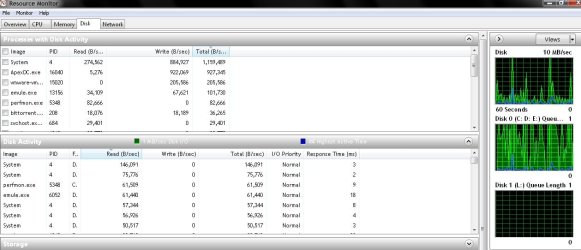
I've attached the disk activity.
 

Attachments

  • Untitled.jpg
    Untitled.jpg
    85.2 KB · Views: 33

My Computer

OS
Windows 7 Professional x64
Hmm, apart from the ApexDC, things look quite normal. How is the performance when you stop the ApexDC?
 

My Computer

Computer Manufacturer/Model Number
HP, Dell, Gateway, Toshiba - 4 laptops and 2 desktops
OS
Vista, Windows7, Mint Mate, Zorin, Windows 8
CPU
from 1.6GHz Duo to i7
Monitor(s) Displays
2x HP w2207
Hard Drives
5x HDD, 7x SSD, 12x Externals
Keyboard
with trackball - no mices
Mouse
Trackball mice
Internet Speed
DSL 6000
I thought that indexing is used only for searching. Why do I need indexing?
Anyway new files are coming, others are being deleted, so if it was to index the HDD, this service would have to be turned on all the time.
Upstream and downstream are very relevant because they reflect the maximum stress that these apps put on the HDD. 2048kbps isn't that much.
"ofc" is of course.

As I said, I had another PC, an E6550 with 4GB RAM, and a Samsung 500GB HDD.
The OS was winXP SP2 32bit...
It doesn't matter how much you're writing to the drive, only that you are. When you ask it to open other files, you're asking the actuator arm to move from its current position to the position of the file(s) you want to open. This is probably why opening folders takes so long for you? If you were to use that older 500GB drive as storage for all your file sharing dl's, and allow 7 to index, I think you'll see a marked improvement.

A lot of people who freshly install 7 bag on indexing, but it really only thrashes the hdd for a day or two until it indexes and figures out commonly used files/folders. After that, you don't notice it at all, no matter how much you create/delete files.

I think they've made big improvements to indexing with 7? I recall a speed up Vista tutorial that said to disable indexing for better performance; however, that suggestion is missing from the speed up 7 tutorial: http://www.sevenforums.com/tutorials/11728-optimize-windows-7-a.html?filter[2]=Performance%20Maintenance

Apart from that, yeah, Apex seems like it's hogging a lot of cpu cycles.
 

My Computer

OS
7 Ultimate x64
CPU
i5-2500k
Motherboard
Asus P8P67 Pro
Memory
8GB G.Skill Ripjaws X F3-12800CL7D-8GBXH 1866MHz 8-9-8-24
Graphics Card(s)
EVGA GTX 570 SC
Sound Card
X-Fi Titanium Fatality
Monitor(s) Displays
Samsung S27A550H 27" LED
Screen Resolution
1920x1080
Hard Drives
OCZ Vertex 3 120GB.
1TB Samsung F3.
2TB Samsung F4.
PSU
PC Power & Cooling Silencer 760
Case
Lian Li Lancool K62
Cooling
Thermalright Venomous X Black/Scythe S-Flex/Shin-Etsu X23
Keyboard
MS Natural Elite 4000 Ergonomic
Mouse
Logitech G500
Internet Speed
6MB/768
Other Info
Logitech Z-5500 505 watts.
D-Link DGL-4500.
Tripp-Lite Smart Pro 1500.
I've done some tests and I think that this slowness is caused by IE8. I use to browse with multiple IE instances and multiple tabs open, but nothing fancy, simple pages(forums, IMDB, etc).
IE8 was not eating CPU at all after all of those pages were opened, so there's no reason to think that it was a frozen script or something like that that could cause this type of behaviour.

There were around 15-30 tabs left open, in 3-4 IE8 instances, doing nothing, eating no CPU at all, plenty of spare RAM(~2GB left free, out of 8GB).
It seems that under these conditions Explorer is slow, very slow.


Has anyone had this issue before?
 

My Computer

OS
Windows 7 Professional x64
Back
Top