testing enterprise hdd/connecting through usb case

rocketman122

New member
Member
VIP
Local time
9:07 AM
Messages
106
so a friend gave me a drive from his work they didnt need. he says they were used for around 3 years in very good cooled condition. what program can I use to check its condition and run a few tests on it?

Ill use this as an archive drive for pictures. so just add pictures over and over, fill it, then put it on the side. he said hell give me more later so I may make a double. 10tb drives.

not much erasing. it will only be connected \every 2 months for around an hour, then disconnected and put on the side. I realize its better to have it working all the time but I have no need for it to be running all the time.

some tips? I never owned a server drive. the other issue is can this be connected through a 3.5" case? he explained theres some power issue and the first 3 pins on the hdd should be covered or carefully removed. but after that will it work ok in a usb case?

thanks in advance
 

My Computers

System One System Two

  • Computer type
    PC/Desktop
    Computer Manufacturer/Model Number
    custom
    OS
    win 7 pro 64
    CPU
    8320fx
    Memory
    8gb
    Graphics Card(s)
    gtx 660
    Hard Drives
    ssd hdd
    Antivirus
    none
  • Computer type
    PC/Desktop
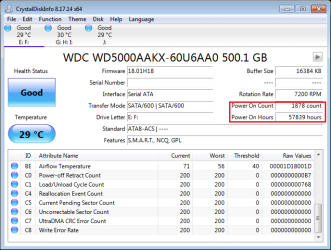
you can run CrystalDiskInfo to know the disk info.

typically, server disk has low "Power on Count" number, as low as 3 digits ( i.e. < 1000), while, high number on "Power on Hours". If this number is over 50,000 hrs, it's suggested NOT in use any more. or use it in a NOT important place.

A case with 300 watts PSU should be ok, in my experience. if only 10 TB disk. 180 watts would be no go.
(in your case, three yrs running, over 26000 hrs, that's about half of 50,000 hrs. it's reasonable your friend let them "retired")

USB enclosure should be fine for the disks. I have USB enclosure many years.

image.png
 

My Computers

System One System Two

  • Computer type
    PC/Desktop
    Computer Manufacturer/Model Number
    HP Elite 800 G5
    OS
    Windows 7 Pro 64-bit
    CPU
    I7-9700
    Memory
    32 GB
  • Computer type
    Laptop
    System Manufacturer/Model Number
    ASUS UX305C
    OS
    Windows 7 Pro 64-bit
you can run CrystalDiskInfo to know the disk info.

thanks very much for the help. so no test? just run chkdsk is enough?

typically, server disk has low "Power on Count" number, as low as 3 digits ( i.e. < 1000), while, high number on "Power on Hours". If this number is over 50,000 hrs, it's suggested NOT in use any more. or use it in a NOT important place.

what do you mean, power on...like how many times it can be turned on/off? why is it a low thing? basically theyre supposed to be turned on once and run till dead for 5 years? so turning it on and off once every few months will ruin the drive? I have no experience with enterprise drives.

A case with 300 watts PSU should be ok, in my experience. if only 10 TB disk. 180 watts would be no go.

my psu are 600w and 750w. whos using a pc with 300watts ? or maybe youre referring to some server pc? I dont know. ive never had a server drive.

(in your case, three yrs running, over 26000 hrs, that's about half of 50,000 hrs. it's reasonable your friend let them "retired")

I will hardly add any hours to mine. basically filling it with images till its full then set aside for archive I may need a few years later. is it a good idea to put them in vacuum bags in between use? or just leave them in cool area low humidity?

USB enclosure should be fine for the disks. I have USB enclosure many years.

but I need to remove those 3 pins to use it in the usb case?
 

My Computers

System One System Two

  • Computer type
    PC/Desktop
    Computer Manufacturer/Model Number
    custom
    OS
    win 7 pro 64
    CPU
    8320fx
    Memory
    8gb
    Graphics Card(s)
    gtx 660
    Hard Drives
    ssd hdd
    Antivirus
    none
  • Computer type
    PC/Desktop
CrystalDiskInfo is a free-tool (developed by an MIT guy), you can google and download it.

I don't know the thing of 3-pins, could be specific.

some server was modified from old/used PC, whose PSU can be 180 - 300 watts. looks you are using a serve PC, then no worry at all.

in past, I left my storage disks in esd bags then on bookshelf. didn't find any thing bad so far. I am gradually moving to SSD and disposing these spinning disk drives. mechanical disks need more care when in use.
 

My Computers

System One System Two

  • Computer type
    PC/Desktop
    Computer Manufacturer/Model Number
    HP Elite 800 G5
    OS
    Windows 7 Pro 64-bit
    CPU
    I7-9700
    Memory
    32 GB
  • Computer type
    Laptop
    System Manufacturer/Model Number
    ASUS UX305C
    OS
    Windows 7 Pro 64-bit
Back
Top