Solved F3 search sucks

whs

New member
Guru
Gold Member
VIP
Local time
12:25 AM
Messages
26,200
Location
Florida in winter, Black Forest/Germany
When I search via the F3 search window, the system does not find the item. When I use Start/Search, it finds it. And it was something simple, a picture from the Public Pictures folder.

Anybody have an explanation for that.
 

My Computer

Computer Manufacturer/Model Number
HP, Dell, Gateway, Toshiba - 4 laptops and 2 desktops
OS
Vista, Windows7, Mint Mate, Zorin, Windows 8
CPU
from 1.6GHz Duo to i7
Monitor(s) Displays
2x HP w2207
Hard Drives
5x HDD, 7x SSD, 12x Externals
Keyboard
with trackball - no mices
Mouse
Trackball mice
Internet Speed
DSL 6000
When you search from start it searches everywhere, when you serch from F3 (or top right explorer) it searches only within the currently viewed location (Library by default) if you have the navigation pane enabled on the left, select the area you want to search there.

Although I just tested it and found it working for a picture in the public library.
 

My Computer

Computer type
PC/Desktop
Computer Manufacturer/Model Number
Self Build
OS
Windows 7 Ultimate x64
CPU
Intel Core2 Quad Q8300 2.5Ghz
Motherboard
Asus P5QD Turbo
Memory
Kingston HyperX 4x1GB DDR2 1066Mhz
Graphics Card(s)
Asus/Nvidia 9500GT 1GB
Sound Card
On-Board HD
Monitor(s) Displays
22" Widescreen TFT
Screen Resolution
1920x1080
Hard Drives
2x 320Gb Seagate SATAII RAID 0
2x 80Gb Seagate SATAII RAID 0
1x 1tb hybrid (8gb ssd)
PSU
650w
Case
ATX
Cooling
140mm front, 120mm Rear, 80mm Chipset + stock CPU and GPU
Keyboard
Plastic one
Mouse
Plastic one
Internet Speed
4Mbps
Other Info
Laptop: HP Elitebook 2560p
i5 @2.7Ghz 4GB DDR3
No, I did not search from an Explorer window. I searched from here:
 

Attachments

  • 2011-12-14_1640.png
    2011-12-14_1640.png
    82.1 KB · Views: 14

My Computer

Computer Manufacturer/Model Number
HP, Dell, Gateway, Toshiba - 4 laptops and 2 desktops
OS
Vista, Windows7, Mint Mate, Zorin, Windows 8
CPU
from 1.6GHz Duo to i7
Monitor(s) Displays
2x HP w2207
Hard Drives
5x HDD, 7x SSD, 12x Externals
Keyboard
with trackball - no mices
Mouse
Trackball mice
Internet Speed
DSL 6000
Ah, F3 from desktop not F3 from explorer, using this I can only find items saved on the desktop.

I suppose when you F3 from the desktop the search window opens with a "Start in: %Desktop%" shortcut switch.

I don't know how to modify that switch to another location.
 

My Computer

Computer type
PC/Desktop
Computer Manufacturer/Model Number
Self Build
OS
Windows 7 Ultimate x64
CPU
Intel Core2 Quad Q8300 2.5Ghz
Motherboard
Asus P5QD Turbo
Memory
Kingston HyperX 4x1GB DDR2 1066Mhz
Graphics Card(s)
Asus/Nvidia 9500GT 1GB
Sound Card
On-Board HD
Monitor(s) Displays
22" Widescreen TFT
Screen Resolution
1920x1080
Hard Drives
2x 320Gb Seagate SATAII RAID 0
2x 80Gb Seagate SATAII RAID 0
1x 1tb hybrid (8gb ssd)
PSU
650w
Case
ATX
Cooling
140mm front, 120mm Rear, 80mm Chipset + stock CPU and GPU
Keyboard
Plastic one
Mouse
Plastic one
Internet Speed
4Mbps
Other Info
Laptop: HP Elitebook 2560p
i5 @2.7Ghz 4GB DDR3
I guess you are right. The thing is useless for a general system wide search.
 

My Computer

Computer Manufacturer/Model Number
HP, Dell, Gateway, Toshiba - 4 laptops and 2 desktops
OS
Vista, Windows7, Mint Mate, Zorin, Windows 8
CPU
from 1.6GHz Duo to i7
Monitor(s) Displays
2x HP w2207
Hard Drives
5x HDD, 7x SSD, 12x Externals
Keyboard
with trackball - no mices
Mouse
Trackball mice
Internet Speed
DSL 6000
I always believed that F3 was to search within the current active window, be it Browser, Document, Explorer.

e.g. pressing F3 in FireFox gives the search box at the bottom of the browser
 

My Computer

Computer Manufacturer/Model Number
Compaq Desktop
OS
Windows 7 Ultimate x64
CPU
AMD Sempron Dual Core
Memory
3GB
Graphics Card(s)
NVIDIA GeForce 6150SE nForce 430
Screen Resolution
1024x768
Hard Drives
150GB Sata
Yes, using F3 in application will (if available) allow you to search for anything within that window, Regedit springs to mind for this one!
 

My Computer

Computer type
PC/Desktop
Computer Manufacturer/Model Number
Self Build
OS
Windows 7 Ultimate x64
CPU
Intel Core2 Quad Q8300 2.5Ghz
Motherboard
Asus P5QD Turbo
Memory
Kingston HyperX 4x1GB DDR2 1066Mhz
Graphics Card(s)
Asus/Nvidia 9500GT 1GB
Sound Card
On-Board HD
Monitor(s) Displays
22" Widescreen TFT
Screen Resolution
1920x1080
Hard Drives
2x 320Gb Seagate SATAII RAID 0
2x 80Gb Seagate SATAII RAID 0
1x 1tb hybrid (8gb ssd)
PSU
650w
Case
ATX
Cooling
140mm front, 120mm Rear, 80mm Chipset + stock CPU and GPU
Keyboard
Plastic one
Mouse
Plastic one
Internet Speed
4Mbps
Other Info
Laptop: HP Elitebook 2560p
i5 @2.7Ghz 4GB DDR3
Hello Wolfgang,

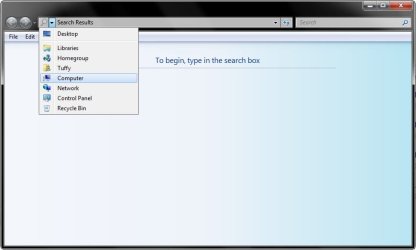
Unfortunately, you will still need to select where you would like to search in the address bar. For a system wide search, you would need to select Computer in the address bar. :)
 

My Computer

Computer type
PC/Desktop
Computer Manufacturer/Model Number
Self built custom
OS
64-bit Windows 11 Pro for Workstations
CPU
Intel i7-8700K OC'd to 5 GHz
Motherboard
ASUS ROG Maximus XI Formula Z390
Memory
64 GB (4x16GB) G.SKILL TridentZ RGB DDR4 3600 MHz
Graphics Card(s)
ASUS ROG-STRIX-GTX1080TI-O11G-GAMING
Sound Card
Integrated
Monitor(s) Displays
2 x Samsung Odyssey G7 27"
Screen Resolution
2560x1440
Hard Drives
1TB Samsung 990 PRO M.2,
4TB Samsung 990 PRO PRO M.2,
TerraMaster F8 SSD Plus NAS
PSU
Seasonic Prime Titanium 850W
Case
Thermaltake Core P3
Cooling
Corsair Hydro H115i
Keyboard
Logitech wireless K800
Mouse
Logitech MX Master 4
Internet Speed
2 Gb/s Download and 100 Mb/s Upload
Antivirus
Malwarebyte Anti-Malware Premium
Browser
Google Chrome
Other Info
Logitech Z625 speaker system,
Logitech BRIO 4K Pro webcam,
HP Color LaserJet Pro MFP M477fdn,
APC SMART-UPS RT 1000 XL - SURT1000XLI,
Galaxy S23 Plus phone
Thanks Shawn, I will try that.

Update, that worked. It found more stuff than I was looking for, LOL.
 

My Computer

Computer Manufacturer/Model Number
HP, Dell, Gateway, Toshiba - 4 laptops and 2 desktops
OS
Vista, Windows7, Mint Mate, Zorin, Windows 8
CPU
from 1.6GHz Duo to i7
Monitor(s) Displays
2x HP w2207
Hard Drives
5x HDD, 7x SSD, 12x Externals
Keyboard
with trackball - no mices
Mouse
Trackball mice
Internet Speed
DSL 6000
You're most welcome.

LOL, I hear that. :)
 

My Computer

Computer type
PC/Desktop
Computer Manufacturer/Model Number
Self built custom
OS
64-bit Windows 11 Pro for Workstations
CPU
Intel i7-8700K OC'd to 5 GHz
Motherboard
ASUS ROG Maximus XI Formula Z390
Memory
64 GB (4x16GB) G.SKILL TridentZ RGB DDR4 3600 MHz
Graphics Card(s)
ASUS ROG-STRIX-GTX1080TI-O11G-GAMING
Sound Card
Integrated
Monitor(s) Displays
2 x Samsung Odyssey G7 27"
Screen Resolution
2560x1440
Hard Drives
1TB Samsung 990 PRO M.2,
4TB Samsung 990 PRO PRO M.2,
TerraMaster F8 SSD Plus NAS
PSU
Seasonic Prime Titanium 850W
Case
Thermaltake Core P3
Cooling
Corsair Hydro H115i
Keyboard
Logitech wireless K800
Mouse
Logitech MX Master 4
Internet Speed
2 Gb/s Download and 100 Mb/s Upload
Antivirus
Malwarebyte Anti-Malware Premium
Browser
Google Chrome
Other Info
Logitech Z625 speaker system,
Logitech BRIO 4K Pro webcam,
HP Color LaserJet Pro MFP M477fdn,
APC SMART-UPS RT 1000 XL - SURT1000XLI,
Galaxy S23 Plus phone
Win 7 Search

According to MS, [WIN + F3] with Explorer closed searches the entire computer.

I searched for WinApp2.ini with WIN + F3 with Expl closed, and in a split second, it said no results found. That's five drives.

I then searched from the upper right-hand box with Explorer open to C:, and it took 10 seconds (searching only one relatively small drive) to tell me no results found.

Any explanations why it takes Search sooooo much longer to search only ONE drive...?

I find all MS forums (including MS's "Answers") have lots of users complaining about the same thing and trying to help each other by guessing at solutions, but no bona fide answers from MS. Is there any place where one can get an answer from MS?????
 

My Computer

Computer Manufacturer/Model Number
Custom
OS
Windows 7 Home Premium 64bit
CPU
Intel Core i7-870 2.93 8M 1333
Motherboard
(LGA 1156) Intel WHITESBURG DP55 WB
Memory
8GB DDR3 1333MHz
Graphics Card(s)
Gainward GTS 450 1024mb DVI HDMI DDR5
Sound Card
On motherboard
Monitor(s) Displays
ViewSonic p97f+
Hard Drives
WD WD1002FAEX 1T/7200/64MB SATA-II
Case
ATX Compucase 6AR6
Hello Janet,

The same F3 or WIN+F window is an explorer window, so explorer will not be closed with it open.

You will still need to select where you would like to search in the address bar, or it will search nowhere. That's why the search is so fast if you do not select a location to search in the address bar.


Hope this helps,
Shawn
 
Last edited:

My Computer

Computer type
PC/Desktop
Computer Manufacturer/Model Number
Self built custom
OS
64-bit Windows 11 Pro for Workstations
CPU
Intel i7-8700K OC'd to 5 GHz
Motherboard
ASUS ROG Maximus XI Formula Z390
Memory
64 GB (4x16GB) G.SKILL TridentZ RGB DDR4 3600 MHz
Graphics Card(s)
ASUS ROG-STRIX-GTX1080TI-O11G-GAMING
Sound Card
Integrated
Monitor(s) Displays
2 x Samsung Odyssey G7 27"
Screen Resolution
2560x1440
Hard Drives
1TB Samsung 990 PRO M.2,
4TB Samsung 990 PRO PRO M.2,
TerraMaster F8 SSD Plus NAS
PSU
Seasonic Prime Titanium 850W
Case
Thermaltake Core P3
Cooling
Corsair Hydro H115i
Keyboard
Logitech wireless K800
Mouse
Logitech MX Master 4
Internet Speed
2 Gb/s Download and 100 Mb/s Upload
Antivirus
Malwarebyte Anti-Malware Premium
Browser
Google Chrome
Other Info
Logitech Z625 speaker system,
Logitech BRIO 4K Pro webcam,
HP Color LaserJet Pro MFP M477fdn,
APC SMART-UPS RT 1000 XL - SURT1000XLI,
Galaxy S23 Plus phone
correction and clarification

1. CORRECTION: In my original post, replace [WIN + F3] with [WIN + F]. Everything else in the original post stands as is.


2. SHAWN: Obviously Explorer will not be closed after opening an Explorer window with WIN + F.....:-)....! The point is to type in WIN + F when Explorer is closed. If Explorer is open, it will only search the disk/folder to which it is open. If Explorer is closed, and then you type in Win + 3, it opens a search which does not have the navigation pane and is supposed to search the entire computer.
 

My Computer

Computer Manufacturer/Model Number
Custom
OS
Windows 7 Home Premium 64bit
CPU
Intel Core i7-870 2.93 8M 1333
Motherboard
(LGA 1156) Intel WHITESBURG DP55 WB
Memory
8GB DDR3 1333MHz
Graphics Card(s)
Gainward GTS 450 1024mb DVI HDMI DDR5
Sound Card
On motherboard
Monitor(s) Displays
ViewSonic p97f+
Hard Drives
WD WD1002FAEX 1T/7200/64MB SATA-II
Case
ATX Compucase 6AR6
For every Windows 7 computer I used, it has never searched the entire computer by just pressing Win+F and doing a search with just the default "Search Results" in the address bar.

My only point is that you must select where you want to search in the address bar first, then you could select another more specific location in the navigation pane if you like. If you search with only the default "Search results" in the address bar, then it will only search the desktop.

Give it a play and see if you get the same.

That's all. :)


search.jpg
 
Last edited:

My Computer

Computer type
PC/Desktop
Computer Manufacturer/Model Number
Self built custom
OS
64-bit Windows 11 Pro for Workstations
CPU
Intel i7-8700K OC'd to 5 GHz
Motherboard
ASUS ROG Maximus XI Formula Z390
Memory
64 GB (4x16GB) G.SKILL TridentZ RGB DDR4 3600 MHz
Graphics Card(s)
ASUS ROG-STRIX-GTX1080TI-O11G-GAMING
Sound Card
Integrated
Monitor(s) Displays
2 x Samsung Odyssey G7 27"
Screen Resolution
2560x1440
Hard Drives
1TB Samsung 990 PRO M.2,
4TB Samsung 990 PRO PRO M.2,
TerraMaster F8 SSD Plus NAS
PSU
Seasonic Prime Titanium 850W
Case
Thermaltake Core P3
Cooling
Corsair Hydro H115i
Keyboard
Logitech wireless K800
Mouse
Logitech MX Master 4
Internet Speed
2 Gb/s Download and 100 Mb/s Upload
Antivirus
Malwarebyte Anti-Malware Premium
Browser
Google Chrome
Other Info
Logitech Z625 speaker system,
Logitech BRIO 4K Pro webcam,
HP Color LaserJet Pro MFP M477fdn,
APC SMART-UPS RT 1000 XL - SURT1000XLI,
Galaxy S23 Plus phone
For every Windows 7 computer I used, it has never searched the entire computer by just pressing Win+F and doing a search with just the default "Search Results" in the address bar.

My only point is that you must select where you want to search in the address bar first, then you could select another more specific location in the navigation pane if you like. If you search with only the default "Search results" in the address bar, then it will only search the desktop.

Give it a play and see if you get the same.
View attachment 188410


Hmmm...mine always produces full-computer search results...:)....This 'hint' (Win + F) surfaces regularly in forums. I use it regularly because 1) I usually want to search the Computer, and 2) WIN + F is the only way I know of that you are offered a larger number of filters for your search ---you can just click on them, as opposed to having to know what they are as well as the proper form to type them in. Many people have complained that if you search from the upper right hand corner search box in WExplorer (as most people usually do), your only offered filters are 'Date Modified' and 'Size'. But if you use WIN + F, you get Kind, Type, etc. I have found all the above points to be true as regards my Win7 Search function (although for some reason, I have stopped getting the 'Kind' filter lately....). I always do full-computer searches this way.....
 
Last edited by a moderator:

My Computer

Computer Manufacturer/Model Number
Custom
OS
Windows 7 Home Premium 64bit
CPU
Intel Core i7-870 2.93 8M 1333
Motherboard
(LGA 1156) Intel WHITESBURG DP55 WB
Memory
8GB DDR3 1333MHz
Graphics Card(s)
Gainward GTS 450 1024mb DVI HDMI DDR5
Sound Card
On motherboard
Monitor(s) Displays
ViewSonic p97f+
Hard Drives
WD WD1002FAEX 1T/7200/64MB SATA-II
Case
ATX Compucase 6AR6
Win+F with "search results" listed as the location returned results from my desktop only.

Subsequent attempts appear to include results from my whole Library (still with search results selected) I wondered if this was a recall of a previous search so I closed search, Searched X: from an Explorer window. Re-tried and only got results from my library so I can rule that theory out.
 

My Computer

Computer type
PC/Desktop
Computer Manufacturer/Model Number
Self Build
OS
Windows 7 Ultimate x64
CPU
Intel Core2 Quad Q8300 2.5Ghz
Motherboard
Asus P5QD Turbo
Memory
Kingston HyperX 4x1GB DDR2 1066Mhz
Graphics Card(s)
Asus/Nvidia 9500GT 1GB
Sound Card
On-Board HD
Monitor(s) Displays
22" Widescreen TFT
Screen Resolution
1920x1080
Hard Drives
2x 320Gb Seagate SATAII RAID 0
2x 80Gb Seagate SATAII RAID 0
1x 1tb hybrid (8gb ssd)
PSU
650w
Case
ATX
Cooling
140mm front, 120mm Rear, 80mm Chipset + stock CPU and GPU
Keyboard
Plastic one
Mouse
Plastic one
Internet Speed
4Mbps
Other Info
Laptop: HP Elitebook 2560p
i5 @2.7Ghz 4GB DDR3
Back
Top