Factory Reset Without Disk?

ArlisT

New member
Local time
6:58 PM
Messages
33
Location
Indiana
I bought a refurbed Dell Optiplex with Win 7 Pro 64 bit a while back and I'd like to do a factory reset and start over with the computer. Not having problems with the machine, I just want to start fresh. Searching 'Factory Reset' I get a lot of results saying to do this through the Recovery control panel, under Advanced Recovery Methods. but I see no 'Factory Reset' option there. There's a 'Reinstall Windows' option, but it says I need an installation disk to do this. There's also an option to restore everything from a system image, including the system, all my software, and files, but I've never made a system image, and anyway, I'm looking for a clean slate.

This computer is all legit - System Control Panel reports genuine MS Windows and Intel i5-3470. It came with a 2 year full replacement warranty, which is pretty unheard of for a refurb, but it came with Windows preinstalled - no disk. (Does anyone even provide disks anymore?) Anyway, I'm thinking reinstall is something different from factory reset. So can somebody tell me how to factory reset my computer without a disk?

Dell Optiplex 7010, Intel Core i5-3470, 2TB HD, 16GB RAM, Win7 Pro 64-bit

Thanks,

Arlis
 

My Computer

Computer type
PC/Desktop
Computer Manufacturer/Model Number
Dell Optiplex 7010
OS
Windows 7 Pro x64
CPU
Intel i5 - 3470
Motherboard
Dell Inc. 0WR7PY
Memory
16 GB
Graphics Card(s)
Intel(R) HD Graphics
Sound Card
Realtek High Definition Audio
Monitor(s) Displays
Insignia 50" Flat Screen TV
Screen Resolution
1080p
Hard Drives
1863 GB HITACHI HUA723020ALA640 ATA Device (SATA)
Keyboard
Logitech K800
Mouse
Logitech M325
Internet Speed
25 Mbps down 5 Mbps up
Antivirus
MalwareBytes Premium
Browser
Firefox
Other Info
I am the rightful King of France
I dont think they come with a recovery partition. You can download the recovery iso file instead. It is very big because it is multi language.
987TR_5JJH2A00_W7SP1PRO64_EM(DL).iso

ISO Download Tool
 

My Computers

System One System Two

  • Computer type
    PC/Desktop
    OS
    7 X64
    CPU
    i5 8400
    Motherboard
    gigabyte b365m ds3h
    Memory
    2x8gb 3200mhz
    Hard Drives
    various
    PSU
    pure power 11 400w cm
    Case
    Coolermaster
    Cooling
    cryorig m9i
  • Computer type
    PC/Desktop
    OS
    7x64
    CPU
    g5400
    Motherboard
    ga b365m ds3h
    Memory
    8gb ddr4 2400
    PSU
    xfx pro 450w
Check in disk manager is there a recovery parition

Have you got this on your pc https://www.dell.com/support/kbdoc/...l-factory-image-with-dell-backup-and-recovery

I don't have Dell Backup and Recovery, but I clicked on 'Computer' and there is a recovery partition with a little over 7 GB on it. Can I use this with just the Recovery control panel? In there, under 'Advanced Recovery Methods' there is an option that says 'Use a system image you created earlier to restore your computer'. How would I do that?

Thanks
 

My Computer

Computer type
PC/Desktop
Computer Manufacturer/Model Number
Dell Optiplex 7010
OS
Windows 7 Pro x64
CPU
Intel i5 - 3470
Motherboard
Dell Inc. 0WR7PY
Memory
16 GB
Graphics Card(s)
Intel(R) HD Graphics
Sound Card
Realtek High Definition Audio
Monitor(s) Displays
Insignia 50" Flat Screen TV
Screen Resolution
1080p
Hard Drives
1863 GB HITACHI HUA723020ALA640 ATA Device (SATA)
Keyboard
Logitech K800
Mouse
Logitech M325
Internet Speed
25 Mbps down 5 Mbps up
Antivirus
MalwareBytes Premium
Browser
Firefox
Other Info
I am the rightful King of France
'Use a system image you created earlier to restore your computer'. How would I do that?

you cant unless you previously created a windows system image. That is a windows function and nothing to do with dell.
The windows system image function comes with win7. If you made one of those it is completely separate from the dell supplied recovery mechanism.

I clicked on 'Computer' and there is a recovery partition with a little over 7 GB on it

sounds like whoever you bought it from reinstalled win7 at some point, without the dell recovery program. However, if the recovery partition is still there and intact, you should be able to boot into it to do the restore to factory .

You would need to add a boot menu entry to do it.

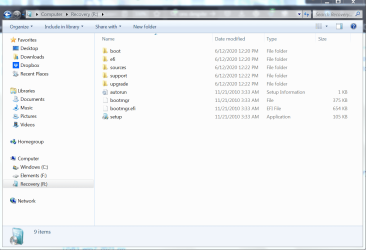
Can you post a screenshot of the contents of that recovery partition?

- - - Updated - - -

In any case, you would be advised to download the dell recovery iso as posted earlier.

That is because you might want to install again in future, or get access to the system recovery otpions from the dell iso, or something might go wrong when attempting to use the recovery partition.
 

My Computers

System One System Two

  • Computer type
    PC/Desktop
    OS
    7 X64
    CPU
    i5 8400
    Motherboard
    gigabyte b365m ds3h
    Memory
    2x8gb 3200mhz
    Hard Drives
    various
    PSU
    pure power 11 400w cm
    Case
    Coolermaster
    Cooling
    cryorig m9i
  • Computer type
    PC/Desktop
    OS
    7x64
    CPU
    g5400
    Motherboard
    ga b365m ds3h
    Memory
    8gb ddr4 2400
    PSU
    xfx pro 450w
sounds like whoever you bought it from reinstalled win7 at some point, without the dell recovery program. However, if the recovery partition is still there and intact, you should be able to boot into it to do the restore to factory .
You would need to add a boot menu entry to do it.
Can you post a screenshot of the contents of that recovery partition?

Recovery Partition Contents.PNG

Here it is. I bought the computer refurbed from an eBay seller, TechLeaf. You give them a menu of your requirements: Computer brand, how much RAM, HD (both brand new), OS version, and then they build the computer accordingly - so I guess that would be the fresh install of the OS. 2 year total replacement warranty also included, but I never had to resort to that. A little over a year in, they handheld me through several weeks trying to track down a recurring BSOD problem, then finally offered to just replace the machine, but within a couple days I resolved the issue. No probs since then.

So how do I boot into this partition and do the factory reset?

Do you still think I need to dl the iso? This was a fresh install of the OS.

Thanks.
 

My Computer

Computer type
PC/Desktop
Computer Manufacturer/Model Number
Dell Optiplex 7010
OS
Windows 7 Pro x64
CPU
Intel i5 - 3470
Motherboard
Dell Inc. 0WR7PY
Memory
16 GB
Graphics Card(s)
Intel(R) HD Graphics
Sound Card
Realtek High Definition Audio
Monitor(s) Displays
Insignia 50" Flat Screen TV
Screen Resolution
1080p
Hard Drives
1863 GB HITACHI HUA723020ALA640 ATA Device (SATA)
Keyboard
Logitech K800
Mouse
Logitech M325
Internet Speed
25 Mbps down 5 Mbps up
Antivirus
MalwareBytes Premium
Browser
Firefox
Other Info
I am the rightful King of France
Do you still think I need to dl the iso?

I have already said it twice.

If that is an mbr disk, marking the recovery partition active should allow you to boot into it..
 

My Computers

System One System Two

  • Computer type
    PC/Desktop
    OS
    7 X64
    CPU
    i5 8400
    Motherboard
    gigabyte b365m ds3h
    Memory
    2x8gb 3200mhz
    Hard Drives
    various
    PSU
    pure power 11 400w cm
    Case
    Coolermaster
    Cooling
    cryorig m9i
  • Computer type
    PC/Desktop
    OS
    7x64
    CPU
    g5400
    Motherboard
    ga b365m ds3h
    Memory
    8gb ddr4 2400
    PSU
    xfx pro 450w
Thanks. Did some searching and figured out how to mark the partition active. Now, boot into it and then do what to factory reset my computer?
 

My Computer

Computer type
PC/Desktop
Computer Manufacturer/Model Number
Dell Optiplex 7010
OS
Windows 7 Pro x64
CPU
Intel i5 - 3470
Motherboard
Dell Inc. 0WR7PY
Memory
16 GB
Graphics Card(s)
Intel(R) HD Graphics
Sound Card
Realtek High Definition Audio
Monitor(s) Displays
Insignia 50" Flat Screen TV
Screen Resolution
1080p
Hard Drives
1863 GB HITACHI HUA723020ALA640 ATA Device (SATA)
Keyboard
Logitech K800
Mouse
Logitech M325
Internet Speed
25 Mbps down 5 Mbps up
Antivirus
MalwareBytes Premium
Browser
Firefox
Other Info
I am the rightful King of France
If its windows then best option is a clean install ie wipe all paritions and let winodws create new ones
 

My Computer

Computer type
PC/Desktop
OS
win 8 32 bit
Check if your Dell has a recovery partition. When you start up your computer, press F8 repeatedly until the Advanced Boot Options menu appears. If there's an option for Repair Your Computer, select it and see if it guides you through a factory reset process.
 

My Computers

System One System Two

  • OS
    macos
  • Computer type
    PC/Desktop
Not sure if the OP is still watching this thread. I recently bought a refurbished HP Elite 3100, which came with Windows 7 Pro. I decided to keep it, upgrading with Simplix and activating with a W7 Pro Key I have from my i7 music computer (which unexpectedly worked). I also put LMDE (Linux Mint, Debian Edition) on a separate SSD (W7 is on a HDD).

To each their own, but why bother reinstalling? you're going to end up with the same thing, after uninstalling programs you don't want, installing ones you do, etc. I'm thinking of upgrading it to W7 Ultimate, after seeing a thread here on that.
 

My Computer

Computer type
PC/Desktop
Computer Manufacturer/Model Number
Gateway GT5656
OS
Windows 7 x64 SP1
CPU
AMD Athlon 64 X2 6000+ / 3.0 GHz
Motherboard
NVIDIA GeForce 6150 SE
Memory
6 GB
Monitor(s) Displays
Lenovo LED
Screen Resolution
1920 X 1080
Hard Drives
Windows on 500 GB spinner; Ubuntu 16 on Sandisk 250GB SSD; Bodhi5 on Samsung 250GB SSD; another old spinner for fooling around.
PSU
Original that came with computer
Keyboard
Logitech wireless
Mouse
Logitech wireless
Antivirus
Microsoft Sec Essentials
Browser
Vivaldi
3100 ?
 

My Computers

System One System Two

  • Computer type
    PC/Desktop
    OS
    7 X64
    CPU
    i5 8400
    Motherboard
    gigabyte b365m ds3h
    Memory
    2x8gb 3200mhz
    Hard Drives
    various
    PSU
    pure power 11 400w cm
    Case
    Coolermaster
    Cooling
    cryorig m9i
  • Computer type
    PC/Desktop
    OS
    7x64
    CPU
    g5400
    Motherboard
    ga b365m ds3h
    Memory
    8gb ddr4 2400
    PSU
    xfx pro 450w

Woops, that's 8300. Not sure where I got that one...:o

Addendum: I have an old Netgear N3100 wireless adapter. That must be the source of the misnomer . Or is it misnumber?
 
Last edited:

My Computer

Computer type
PC/Desktop
Computer Manufacturer/Model Number
Gateway GT5656
OS
Windows 7 x64 SP1
CPU
AMD Athlon 64 X2 6000+ / 3.0 GHz
Motherboard
NVIDIA GeForce 6150 SE
Memory
6 GB
Monitor(s) Displays
Lenovo LED
Screen Resolution
1920 X 1080
Hard Drives
Windows on 500 GB spinner; Ubuntu 16 on Sandisk 250GB SSD; Bodhi5 on Samsung 250GB SSD; another old spinner for fooling around.
PSU
Original that came with computer
Keyboard
Logitech wireless
Mouse
Logitech wireless
Antivirus
Microsoft Sec Essentials
Browser
Vivaldi
Last edited:

My Computers

System One System Two

  • Computer type
    PC/Desktop
    OS
    7 X64
    CPU
    i5 8400
    Motherboard
    gigabyte b365m ds3h
    Memory
    2x8gb 3200mhz
    Hard Drives
    various
    PSU
    pure power 11 400w cm
    Case
    Coolermaster
    Cooling
    cryorig m9i
  • Computer type
    PC/Desktop
    OS
    7x64
    CPU
    g5400
    Motherboard
    ga b365m ds3h
    Memory
    8gb ddr4 2400
    PSU
    xfx pro 450w
I have an 8300 sff. Noisy and windy little thing. Not sure if it is worth replacing the fans

Phil is doing an 8200 which is very simlar

https://www.youtube.com/watch?v=OouB84X37Zo
I got mine because my old Gateway GT5656 from 2009 was acting strange. I love it, it's just for basic web surfing, which I mainly do on Mint. W7 and Mint are my two favorite systems of all time. both intuitive, reliable and beautiful. I was doing my music composition on Mint for about a year, but migrated back to Windows 7 because I had to keep some of my virtual instrument licenses on the cloud, due to Linux not being able to deal with dongles. Meaning, no internet, no work. So now I use Mint for the web, and W7 for my music. I'm in operating system heaven.

Interesting video. The only upgrade I did was to add a SSD, to put Mint on. I taped it to the DVD unit. not a lot of room in there.
 

My Computer

Computer type
PC/Desktop
Computer Manufacturer/Model Number
Gateway GT5656
OS
Windows 7 x64 SP1
CPU
AMD Athlon 64 X2 6000+ / 3.0 GHz
Motherboard
NVIDIA GeForce 6150 SE
Memory
6 GB
Monitor(s) Displays
Lenovo LED
Screen Resolution
1920 X 1080
Hard Drives
Windows on 500 GB spinner; Ubuntu 16 on Sandisk 250GB SSD; Bodhi5 on Samsung 250GB SSD; another old spinner for fooling around.
PSU
Original that came with computer
Keyboard
Logitech wireless
Mouse
Logitech wireless
Antivirus
Microsoft Sec Essentials
Browser
Vivaldi
Last edited:

My Computers

System One System Two

  • Computer type
    PC/Desktop
    OS
    7 X64
    CPU
    i5 8400
    Motherboard
    gigabyte b365m ds3h
    Memory
    2x8gb 3200mhz
    Hard Drives
    various
    PSU
    pure power 11 400w cm
    Case
    Coolermaster
    Cooling
    cryorig m9i
  • Computer type
    PC/Desktop
    OS
    7x64
    CPU
    g5400
    Motherboard
    ga b365m ds3h
    Memory
    8gb ddr4 2400
    PSU
    xfx pro 450w
I did something like that on my barebone custom-built i7, which does not have an nvme slot. I also used the Evo 970, and a pci adapter card to put it on. I use it to store some of my virtual instrument libraries. Makes for fast loading.

The Gigabyte mobo on that machine also has an M-sata slot. I considered buying on of those drives, but wasn't sure it would be as fast as the nvme. I guess they weren't around for very long. but it would be a neat way to add another drive, no adapter needed, if I decide I need one down the road.
 

My Computer

Computer type
PC/Desktop
Computer Manufacturer/Model Number
Gateway GT5656
OS
Windows 7 x64 SP1
CPU
AMD Athlon 64 X2 6000+ / 3.0 GHz
Motherboard
NVIDIA GeForce 6150 SE
Memory
6 GB
Monitor(s) Displays
Lenovo LED
Screen Resolution
1920 X 1080
Hard Drives
Windows on 500 GB spinner; Ubuntu 16 on Sandisk 250GB SSD; Bodhi5 on Samsung 250GB SSD; another old spinner for fooling around.
PSU
Original that came with computer
Keyboard
Logitech wireless
Mouse
Logitech wireless
Antivirus
Microsoft Sec Essentials
Browser
Vivaldi
Check if your Dell has a recovery partition. When you start up your computer, press F8 repeatedly until the Advanced Boot Options menu appears. If there's an option for Repair Your Computer, select it and see if it guides you through a factory reset process.

If that doesn't work, you might have to use the Reinstall Windows option. You can create a bootable USB drive with the Windows 7 ISO from Microsoft's site. You'll need your product key, which should be on a sticker somewhere on your PC.
For future reference, if you ever switch to Windows 11, here's a handy guide: How to Factory Reset PC Windows 11 - Operating Systems
 

My Computers

System One System Two

  • OS
    macos
  • Computer type
    PC/Desktop
Back
Top