Solved Factory restore on Dell Inspiron N5050

c4cyro

Cy
Local time
7:29 AM
Messages
40
Location
Delhi
hey folks...i need sum help!
u must be knwing tat dell has a restore s/w calld "dell data safe local backup" thru wich u can restore ur system to factory settings.
once i made a fresh windows installation so tat data safe backup s/w is gone...if i try 2 restore by pressing f8 at the boot...dell data safe option duznt cum only.
so im unable 2 restore 2 factore.
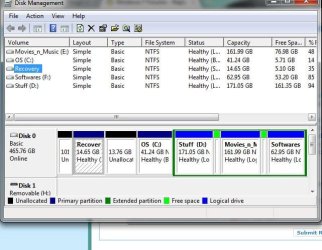
ive chekd tat d "recovery" partition still xists on my system(5.09GB free of 14.65GB), but its nt accessible i.e no files r shown in it.
is thr ny possible method to retore my sys to factore?
ive resinstalld the "datasafe local backup" s/w but its unable 2 detect the recovery partion.
please help me!!
 

My Computer My Computer

At a glance

Windows 7 Ultimate 64bit4GB
Computer Manufacturer/Model Number
Dell Inspiron N5050
OS
Windows 7 Ultimate 64bit
Motherboard
Intel 2nd generation core i5
Memory
4GB
Screen Resolution
1366x768
Hard Drives
500GB
.......once i made a fresh windows installation so tat data safe backup s/w is gone....

More info is required. How did you make that fresh Windows installation? Was it from the Recovery Disks or recovery partition or a clean install from any other Windows Installation media ?

Assuming that you still have the factory installation, you may download and install Dell Datasafe Local Backup http://dslbdownload.datasafelocalbackup.com/dsldownload-en.html and then try Factory Image Restore.

The program will install only if there is a valid Win Recovery Environment and a valid Factory Image meaning a non-corrupt and accessible recovery partition and a valid factory install.

If it fails to install, you may contact DELL tech. support and request for an OEM Reinstall disk - do not ask for Recovery Disks - with which you can make a clean install doing away with the OEM partition and Recovery partition. With OEM reinstall disk no need for any fresh activation. Make sure that you download all the drivers from the Dell website and keep them ready. (The OEM Reinstall media is just the regular Windows install media with OEM activation data builtin so that you need not activate after the clean install)

For a clean install, even if you have the OEM disk, you may prefer to download your version with SP1 integrated from here . This will avoid downloading pre-sp1 updates.
 
Last edited by a moderator:

My Computer My Computer

At a glance

Windows 7 Home Premium 32 bit
OS
Windows 7 Home Premium 32 bit
   Information
We always assume you have made your Recovery Disks using the OEM manufacturer's Recovery Media Creator app the first day you had your new PC.
& made the Startup Repair CD.
startup repair disc-create


Did you make the OEM manufacturer's Recovery Disks?


How to use Dell Recovery Partition,make Recovery Disks & how to order Recovery Disks.
Dell - Support
 

My Computer My Computer

At a glance

ME/XP/Vista/Win7
OS
ME/XP/Vista/Win7
.......once i made a fresh windows installation so tat data safe backup s/w is gone....

More info is required. How did you make that fresh Windows installation? Was it from the Recovery Disks or recovery partition or a clean install from any other Windows Installation media ?

Assuming that you still have the factory installation, you may download and install Dell Datasafe Local Backup http://dslbdownload.datasafelocalbackup.com/dsldownload-en.html and then try Factory Image Restore.

The program will install only if there is a valid Win Recovery Environment and a valid Factory Image meaning a non-corrupt and accessible recovery partition and a valid factory install.

If it fails to install, you may contact DELL tech. support and request for an OEM Reinstall disk - do not ask for Recovery Disks - with which you can make a clean install doing away with the OEM partition and Recovery partition. With OEM reinstall disk no need for any fresh activation. Make sure that you download all the drivers from the Dell website and keep them ready. (The OEM Reinstall media is just the regular Windows install media with OEM activation data builtin so that you need not activate after the clean install)

For a clean install, even if you have the OEM disk, you may prefer to download your version with SP1 integrated from here . This will avoid downloading pre-sp1 updates.


sir i did a clean install frm d windows cd wich dell gave me alongwith my laptop.
activating windows is not my problem.
after tat d dell datasafe thng was found nowhere.. so i dwnloded it and installed.. tat s/w is nt able 2 access the recovery partition.
but the recovery partition is thr on my sys(screenshot)
i hope ive given all details nw...pls revert!!
 

Attachments

  • partition.JPG
    partition.JPG
    62.4 KB · Views: 288
Last edited by a moderator:

My Computer My Computer

At a glance

Windows 7 Ultimate 64bit4GB
Computer Manufacturer/Model Number
Dell Inspiron N5050
OS
Windows 7 Ultimate 64bit
Motherboard
Intel 2nd generation core i5
Memory
4GB
Screen Resolution
1366x768
Hard Drives
500GB
I presume that once you do a clean install either with the Dell supplied OEM Reinstall Disk (which requires no activation) or the regular Windows Installation media of the same version (which requires COA key + Phone activation or OEM activation restore with ABR or Advanced Token Manager) the recovery partition becomes redundant and may be non-functional.

With a clean install, I had wiped off the recovery partition and regained the 15 GB space :) and use only the third party backup software to create and restore the backups. You may use the built-in Windows backup or any other free backup software.


Why do you require the recovery partition now? And forget about the DELL datasafe local backup.

If your DELL has a Seagate HDD {most probable) you may download the Disk Wizard (which is the same as Acronis backup software) and use it for backups and restore. http://www.seagate.com/ww/v/index.j...toid=d9fd4a3cdde5c010VgnVCM100000dd04090aRCRD
 

My Computer My Computer

At a glance

Windows 7 Home Premium 32 bit
OS
Windows 7 Home Premium 32 bit
Dell Recovery Partition - restoring F8 link
Dell Restoring Your Computer´s Software to the Factory Settings

If you cannot restore the hotlink to run Factory Recovery then I would boot into free Partition Wizard bootable CD, rightclick on Recovery to Delete, OK. Then rightclick on C to Resize, slide left grey border all the way to the left to take up all Unallocated Space.

As you desperately need more space on C anyway, I would myself delete Factory Recovery to reclaim its space and the existing Unallocated space into C.

If you should then need to run Factory Recovery to restore all the bloatware you can use the disks you should have made when you set up your computer, or order then from Dell. A better Recovery method is using a Win7 backup image stored externally in case of HD failure: Backup Complete Computer - Create an Image Backup

Reinstalling Windows 7
Clean up factory bloatware
 
ok nw lemme be vry frank abt d thng "y i want to restore my sys to factore"
the dell ppl,they gave me mcafee wit 15months subscription....so if i restore it to d factore...the mcafee is installd automatically,..i jus need 2 register it n get 15months subscription again ..so i can do tat and use mcafee for free always ryt?
tis is main reasun!!
 

My Computer My Computer

At a glance

Windows 7 Ultimate 64bit4GB
Computer Manufacturer/Model Number
Dell Inspiron N5050
OS
Windows 7 Ultimate 64bit
Motherboard
Intel 2nd generation core i5
Memory
4GB
Screen Resolution
1366x768
Hard Drives
500GB
MucAfee is the worst possible AV, the cause of performance problems we see here regularly. The only way it works well is uninstalled.

Use free Microsoft Security Essentials or Avast 6 with the Win7 firewall for best performance. If you get chronically infected, then buy Malwarebytes real time protection, or at least run the scan monthly which is the very best scan out there.

If you write in txt spk here you will be ignored by most everyone. We use full sentences to communicate fully.
 
ok thanx and i will keep that in mind from now...hope this one is correct :P
 

My Computer My Computer

At a glance

Windows 7 Ultimate 64bit4GB
Computer Manufacturer/Model Number
Dell Inspiron N5050
OS
Windows 7 Ultimate 64bit
Motherboard
Intel 2nd generation core i5
Memory
4GB
Screen Resolution
1366x768
Hard Drives
500GB
Yep, I wouldn't touch McAfee even with a barge pole. The first thing I did when I got my Dell Lappie was to scrub it clean.

Be happy with your clean install and do away with the OEM Partition(if any) and recovery partition.
 
Last edited by a moderator:

My Computer My Computer

At a glance

Windows 7 Home Premium 32 bit
OS
Windows 7 Home Premium 32 bit
Yep, I wouldn't touch McAfee even with a barge pole. The first thing I did when I got my Dell Lappie was to scrub it clean.

Be happy with your clean install and do away with the OEM Partition(if any) and recovery partition.


and i have windows cd which came with my laptop...it does nt ask for any activation key..it gets self activated whenever i install windows from it.
now do i still need to all that ABR and OEM stuff??
 
Last edited by a moderator:

My Computer My Computer

At a glance

Windows 7 Ultimate 64bit4GB
Computer Manufacturer/Model Number
Dell Inspiron N5050
OS
Windows 7 Ultimate 64bit
Motherboard
Intel 2nd generation core i5
Memory
4GB
Screen Resolution
1366x768
Hard Drives
500GB
My new Dell dasktop came with a 15 month free McAfee. That was the first thing I uninstalled before I even connected to the web (and I did not bother to keep the key) and installed NIS2012 instead. No way would I tolerate McAfee on any of my systems. Just make sure you run the MPCR.exe after you did the normal windows uninstall. Else you might get problems with the next AV program.

McAfee has a good scanner though. They are good at finding rootkits. But that you can find for free on the web.
 

My Computer My Computer

At a glance

Vista, Windows7, Mint Mate, Zorin, Windows 8from 1.6GHz Duo to i7
Computer Manufacturer/Model Number
HP, Dell, Gateway, Toshiba - 4 laptops and 2 desktops
OS
Vista, Windows7, Mint Mate, Zorin, Windows 8
CPU
from 1.6GHz Duo to i7
Monitor(s) Displays
2x HP w2207
Hard Drives
5x HDD, 7x SSD, 12x Externals
Keyboard
with trackball - no mices
Mouse
Trackball mice
Internet Speed
DSL 6000
Don't worry about activation. The Win7 Reinstallation DVD which came with your Dell has the factory mass activation file included so that it reactivates itself using the factory OEM-SLP method.

If you reinstall with a Win7 retail DVD as is possible you'd instead use the Product Key on the COA sticker which changes activation method to OEM-COA which is managed directly in MS Activation servers and often requires a telephone robocall to MS during activation to record your hardware ID.
 
yep, Greg has already explained.

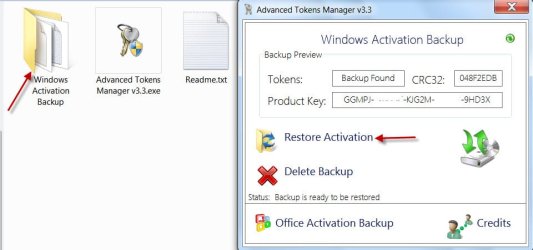
Both ABR and Advanced Tokens Manager facilitate activation of any future installs without going through the hassles of reactivating through the internet or calling Microsoft. The screenshots below show the stored activation info for my Dell laptop and my custom-built Desktop.

Dell Laptop: (ABR)

ABR.jpg

Custom-built desktop: (Advanced Tokens Manager)

ATmanager.jpg

I can now reinstall any number of times and simply restore the activation in just a click. Hope this clarifies your query.
 

My Computer My Computer

At a glance

Windows 7 Home Premium 32 bit
OS
Windows 7 Home Premium 32 bit
yes it did. thanks to all of you.
 

My Computer My Computer

At a glance

Windows 7 Ultimate 64bit4GB
Computer Manufacturer/Model Number
Dell Inspiron N5050
OS
Windows 7 Ultimate 64bit
Motherboard
Intel 2nd generation core i5
Memory
4GB
Screen Resolution
1366x768
Hard Drives
500GB
I have forgot to take a back up of factory setting and dell has changed my hard drive, even the executive who has come to replacement did not inform me. I am using inspiron N5050, can any one help me for getting my factory restore setting?
 

My Computer My Computer

At a glance

windows 7
Computer type
Laptop
Computer Manufacturer/Model Number
dell N5050
OS
windows 7
Follow these steps to get a perfect Clean Reinstall - Factory OEM Windows 7.

Everything needed is in the blue link including the installer which is the same as the Dell REinstallation DVD except that you will need to activate it from the Product Key on COA sticker and it will lack a Dell Logo on Computer>Properties page. But you will likely have a more recent installer provided in tutorial.

Put the wireless driver for your tag number into your backup in case you need it to get online to run all rounds of Important and Optional Updates which should deliver most of the rest of your drivers. If not import any other drivers needed from the Dell Support Downloads webpage for your tag number.
 
Back
Top