Factory restore on Toshiba L675D..Not picking up wireless

msechols24

New member
Local time
5:56 PM
Messages
3
I have been on forum for a while today. I did a factory restore on my Toshiba L675 laptop because after I did a system restore to an earlier date it still was not working like before nor could it pick up any wireless signal. But I could and still can connect through ethernet cord. How do I get my laptop to pick up any wireless signal?

Side note: I have unplugged my modem and router for several minutes. Maybe like 15 min or so. Also turned off my laptop then plugged in modem, then router then turned on laptop....nothing still.

I have tried a few other things suggested on here but still nothing.

*I remember seeing on a screen that wireless was not enabled* I did try the "FN+F8" nothing. :cry:

Sorry for this post but after searching for a while and reading through other post I could not get it to work.

Thank you to whomever can help me.
 

My Computer My Computer

At a glance

Windows 7 Home Premium 64bit4.00 GB
Computer type
Laptop
Computer Manufacturer/Model Number
Toshiba L675D
OS
Windows 7 Home Premium 64bit
Memory
4.00 GB
So you already had this problem? You did a factory restore... same problem..correct?

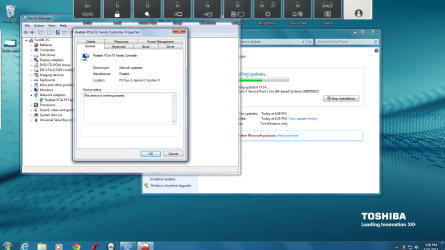
Open Device Manager... no exclamation marks? Device Manager->expand network adapters. Is wireless lan listed there without exclamation marks?
 

My Computer My Computer

At a glance

Microsoft Windows 7 Home Premium 64-bits 7601...Intel(R) Core(TM) i3 CPU M 370 @ 2.40GHz4,00 GBATI Mobility Radeon HD 5400 Series
Computer type
Laptop
Computer Manufacturer/Model Number
ACER ASPIRE 5742G
OS
Microsoft Windows 7 Home Premium 64-bits 7601 Multiprocessor Free Service Pack 1
CPU
Intel(R) Core(TM) i3 CPU M 370 @ 2.40GHz
Motherboard
Acer Aspire 5742G
Memory
4,00 GB
Graphics Card(s)
ATI Mobility Radeon HD 5400 Series
Sound Card
(1) AMD High Definition Audio Device (2) Realtek High Defi
Screen Resolution
1366 x 768 x 32 bits (4294967296 colors) @ 60 Hz
Hard Drives
WDC WD5000BEVT-22ZAT0
network centre->change adapter settings. Is wlan adapter in the list? If so, is the status "not connected"? disabled? rightclick ->enable
 

My Computer My Computer

At a glance

Microsoft Windows 7 Home Premium 64-bits 7601...Intel(R) Core(TM) i3 CPU M 370 @ 2.40GHz4,00 GBATI Mobility Radeon HD 5400 Series
Computer type
Laptop
Computer Manufacturer/Model Number
ACER ASPIRE 5742G
OS
Microsoft Windows 7 Home Premium 64-bits 7601 Multiprocessor Free Service Pack 1
CPU
Intel(R) Core(TM) i3 CPU M 370 @ 2.40GHz
Motherboard
Acer Aspire 5742G
Memory
4,00 GB
Graphics Card(s)
ATI Mobility Radeon HD 5400 Series
Sound Card
(1) AMD High Definition Audio Device (2) Realtek High Defi
Screen Resolution
1366 x 768 x 32 bits (4294967296 colors) @ 60 Hz
Hard Drives
WDC WD5000BEVT-22ZAT0
device man2.png

device man.png

I took screen shots of what I think you are talking about....My apologies i am not that tech savvy.
 

My Computer My Computer

At a glance

Windows 7 Home Premium 64bit4.00 GB
Computer type
Laptop
Computer Manufacturer/Model Number
Toshiba L675D
OS
Windows 7 Home Premium 64bit
Memory
4.00 GB
No wireless driver in device manager. No missing drivers and other problems as well in device manager. It's just not needed now. Wireless adapter has hardware errors or you did disable it.

I see F6,F7,F9 etc on top of screenshot. Where is F8???
Try pressing FN+F8

Press FN+F6 a few times. Screen becomes darker? Press FN+F7 to make it brighter. Does that work?
 

My Computer My Computer

At a glance

Microsoft Windows 7 Home Premium 64-bits 7601...Intel(R) Core(TM) i3 CPU M 370 @ 2.40GHz4,00 GBATI Mobility Radeon HD 5400 Series
Computer type
Laptop
Computer Manufacturer/Model Number
ACER ASPIRE 5742G
OS
Microsoft Windows 7 Home Premium 64-bits 7601 Multiprocessor Free Service Pack 1
CPU
Intel(R) Core(TM) i3 CPU M 370 @ 2.40GHz
Motherboard
Acer Aspire 5742G
Memory
4,00 GB
Graphics Card(s)
ATI Mobility Radeon HD 5400 Series
Sound Card
(1) AMD High Definition Audio Device (2) Realtek High Defi
Screen Resolution
1366 x 768 x 32 bits (4294967296 colors) @ 60 Hz
Hard Drives
WDC WD5000BEVT-22ZAT0
Yes when I press "FN+F6/FN" it goes dark and light. But when I press "FN+F8" it does nothing and as you can see it doesn't come up. I was told it could be the wireless in my laptop could be bad. OR just get a USB wireless adapter.
 

My Computer My Computer

At a glance

Windows 7 Home Premium 64bit4.00 GB
Computer type
Laptop
Computer Manufacturer/Model Number
Toshiba L675D
OS
Windows 7 Home Premium 64bit
Memory
4.00 GB
The adaptor isn't showing up in Device Manager, maybe try shutting down completely and removing the power and push the power button to bring the adaptor back up. It may have just gone bad hard to say for sure but others with your same laptop are reporting similar problems.

Since you recovered from the hard drive which no doubt installed lots of bloatware, try using Decrapifier to remove all traces of preinstalled bloatware, maybe this will make your wireless NIC reappear as it should.

Satellite L675D-S7106 WiFi not accessible!! - TOSHIBA FORUMS
 

My Computer My Computer

At a glance

Windows 7 Ult, Windows 8.1 Pro,Q9650-4.275GHz, E8600 4.5GHz, E6750-3.8GHzG.Skill PC2 9600 1200Mhz 5 5 5 15 2TGTX480
Computer type
PC/Desktop
Computer Manufacturer/Model Number
Home built
OS
Windows 7 Ult, Windows 8.1 Pro,
CPU
Q9650-4.275GHz, E8600 4.5GHz, E6750-3.8GHz
Motherboard
Evga 780i FTW
Memory
G.Skill PC2 9600 1200Mhz 5 5 5 15 2T
Graphics Card(s)
GTX480
Sound Card
Asus Xonar D2
Monitor(s) Displays
HannsG
Screen Resolution
1680X1050
Hard Drives
GSkill Phoenix Pro 120GB SSD
PSU
ThermalTake Toughpower 1000Watt modular
Case
ThermalTake XaserV
Cooling
Xigmatek S1283
Keyboard
Logitech G15
Mouse
Logitech G9
Internet Speed
T1
The adaptor isn't showing up in Device Manager, maybe try shutting down completely and removing the power and push the power button to bring the adaptor back up. It may have just gone bad hard to say for sure but others with your same laptop are reporting similar problems.

Since you recovered from the hard drive which no doubt installed lots of bloatware, try using Decrapifier to remove all traces of preinstalled bloatware, maybe this will make your wireless NIC reappear as it should.

Satellite L675D-S7106 WiFi not accessible!! - TOSHIBA FORUMS
With "removing the power" you mean remove laptopbattery as well, I assume?
 

My Computer My Computer

At a glance

Microsoft Windows 7 Home Premium 64-bits 7601...Intel(R) Core(TM) i3 CPU M 370 @ 2.40GHz4,00 GBATI Mobility Radeon HD 5400 Series
Computer type
Laptop
Computer Manufacturer/Model Number
ACER ASPIRE 5742G
OS
Microsoft Windows 7 Home Premium 64-bits 7601 Multiprocessor Free Service Pack 1
CPU
Intel(R) Core(TM) i3 CPU M 370 @ 2.40GHz
Motherboard
Acer Aspire 5742G
Memory
4,00 GB
Graphics Card(s)
ATI Mobility Radeon HD 5400 Series
Sound Card
(1) AMD High Definition Audio Device (2) Realtek High Defi
Screen Resolution
1366 x 768 x 32 bits (4294967296 colors) @ 60 Hz
Hard Drives
WDC WD5000BEVT-22ZAT0
Back
Top