
Failed Cum Security Update IE11 Home Prem SP1 x64; Error 80073712

pof27

New member
Local time
9:33 PM
Messages
4
Failed Cumulative Security Update IE11 Win7 Home Prem SP1 x64; Error 80073712
I've been getting this failed update since the Sept 2015 Cumulative Security Update for Internet Explorer 11, but I use Chrome instead since I can't install the security update. I tried to uninstall IE11, using two methods but that didn't work. The IE11 security update failures began with KB3087038 in Sept 2015 and have continued through KB3104002 released in Dec 2015 . Other Windows 7 updates that come up have been successful, except for the update to Windows 10 which also failed, starting in July 2015. I have run the system update readiness tool (took about 20 minutes) and sfc /scannow tool (took about 15 minutes) - it found some unrepairable components which I am uploading here; and also found a list of 9 CSI Manifest Failed Catalog Check items in the CheckSUR file. Eventually I want to update to Windows 10 but am guessing that I may have to fix these files before the upgrade will work. I have pasted the CheckSur file here for quick reference in case this may help. My CBS log zip file after compression is over 1GB so I am not sure what I should do.
If anyone can help me fix this, I would be very grateful!
Thanks.
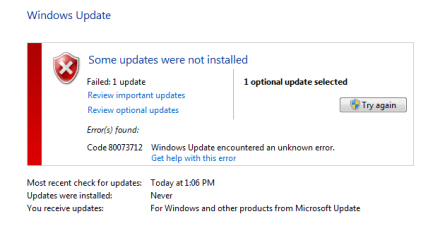
Error Message for IE Cumulative Security Update.PNG

View attachment sfcdetails.txt

View attachment CheckSUR.log
 

My Computer My Computer

At a glance

Windows 7 Home Premium 64bitAMD phenom II X6 1065T 2.9Ghz8 GB DDR3ATI Radeon HD 5770
Computer type
PC/Desktop
Computer Manufacturer/Model Number
HP: HPE 519c
OS
Windows 7 Home Premium 64bit
CPU
AMD phenom II X6 1065T 2.9Ghz
Motherboard
Mfg: Foxconn H-RS880-uATX chipset AMD 785G
Memory
8 GB DDR3
Graphics Card(s)
ATI Radeon HD 5770
Hard Drives
Samsung 1TB SCSI Disk Device
Antivirus
Norton Internet Security v22.5.4.24
Browser
Google Chrome
Hopefully the problem is easy to solve. The next time that you get the update, right click on it. Then click on hide. You should not be bothered again.
(If the right click does not work try a left click)
 

My Computer My Computer

At a glance

Windows 10, Home Clean InstallIntel Core2 processsor Q8200(2.33Ghz 1333FSB)...6 gbATI Radeon 256MB HD3650
Computer type
PC/Desktop
Computer Manufacturer/Model Number
Dell XPS 420
OS
Windows 10, Home Clean Install
CPU
Intel Core2 processsor Q8200(2.33Ghz 1333FSB) Quad Core Tech
Motherboard
Dell
Memory
6 gb
Graphics Card(s)
ATI Radeon 256MB HD3650
Sound Card
Intergrated 7.1 Channel Audio
Monitor(s) Displays
Dell SP2009W 20"
Hard Drives
640 GB Serial ATA Hard drive
Cooling
Fan
Keyboard
Dell USB Keyboard
Mouse
Dell Premium Optical USB
Internet Speed
DSL 2.85
I would prefer to fix it rather than hide the update; if it is possible to fix, thanks.
 

My Computer My Computer

At a glance

Windows 7 Home Premium 64bitAMD phenom II X6 1065T 2.9Ghz8 GB DDR3ATI Radeon HD 5770
Computer type
PC/Desktop
Computer Manufacturer/Model Number
HP: HPE 519c
OS
Windows 7 Home Premium 64bit
CPU
AMD phenom II X6 1065T 2.9Ghz
Motherboard
Mfg: Foxconn H-RS880-uATX chipset AMD 785G
Memory
8 GB DDR3
Graphics Card(s)
ATI Radeon HD 5770
Hard Drives
Samsung 1TB SCSI Disk Device
Antivirus
Norton Internet Security v22.5.4.24
Browser
Google Chrome

My Computer My Computer

At a glance

Windows 10, Home Clean InstallIntel Core2 processsor Q8200(2.33Ghz 1333FSB)...6 gbATI Radeon 256MB HD3650
Computer type
PC/Desktop
Computer Manufacturer/Model Number
Dell XPS 420
OS
Windows 10, Home Clean Install
CPU
Intel Core2 processsor Q8200(2.33Ghz 1333FSB) Quad Core Tech
Motherboard
Dell
Memory
6 gb
Graphics Card(s)
ATI Radeon 256MB HD3650
Sound Card
Intergrated 7.1 Channel Audio
Monitor(s) Displays
Dell SP2009W 20"
Hard Drives
640 GB Serial ATA Hard drive
Cooling
Fan
Keyboard
Dell USB Keyboard
Mouse
Dell Premium Optical USB
Internet Speed
DSL 2.85
Thanks I will turn off IE 11 in Windows Features, that was something I had considered as well. I decided to write this today as I had another problem, which I think I solved, a failed update to MS Silverlight that came through in Dec 2015. I decided to uninstall Silverlight since I rarely use it; and had a problem uninstalling. Then I used the MS Fixit tool for installing and uninstalling to fix the Windows Installer Service; Fixit successfully repaired some items which allowed me to uninstall Silverlight; I rebooted, reran updates, and that eliminated the Silverlight update. So I guess turning off IE 11 accomplishes the same thing. I was worried that I may have more problems, as there were some failed manifest catalog entries in my CheckSur log that looked unrelated to Internet Explorer. Also I was never able to get Windows 10 to download (the download never completed). Should I be concerned with all of the SFC errors?
 

My Computer My Computer

At a glance

Windows 7 Home Premium 64bitAMD phenom II X6 1065T 2.9Ghz8 GB DDR3ATI Radeon HD 5770
Computer type
PC/Desktop
Computer Manufacturer/Model Number
HP: HPE 519c
OS
Windows 7 Home Premium 64bit
CPU
AMD phenom II X6 1065T 2.9Ghz
Motherboard
Mfg: Foxconn H-RS880-uATX chipset AMD 785G
Memory
8 GB DDR3
Graphics Card(s)
ATI Radeon HD 5770
Hard Drives
Samsung 1TB SCSI Disk Device
Antivirus
Norton Internet Security v22.5.4.24
Browser
Google Chrome
You do have quite a bit of SFC errors. If they can be corrected it would be wise to do so. The suggested procedure is to run SFC 3 times. If the errors cannot be corrected, the next step is a repair install.
http://www.sevenforums.com/tutorials/3413-repair-install.html?ltr=R
The tut mentions some downloads from the MS site, I do not think that the downloads are still available. You may not need them, however, depending on what you already have available.
If you cannot do the repair install, the next step would be to reinstall. I do not think that I would go that far, unless you are prepared to reset all of your settings, download all of the software and to make any other necessary changes.
For the future, I would suggest downloading the free Macrium Reflect, make images once a week, or so, to an external hard drive. If you have any future problems, you can use the last good image that you have to reinstall, without the need to reset or download anything.
 

My Computer My Computer

At a glance

Windows 10, Home Clean InstallIntel Core2 processsor Q8200(2.33Ghz 1333FSB)...6 gbATI Radeon 256MB HD3650
Computer type
PC/Desktop
Computer Manufacturer/Model Number
Dell XPS 420
OS
Windows 10, Home Clean Install
CPU
Intel Core2 processsor Q8200(2.33Ghz 1333FSB) Quad Core Tech
Motherboard
Dell
Memory
6 gb
Graphics Card(s)
ATI Radeon 256MB HD3650
Sound Card
Intergrated 7.1 Channel Audio
Monitor(s) Displays
Dell SP2009W 20"
Hard Drives
640 GB Serial ATA Hard drive
Cooling
Fan
Keyboard
Dell USB Keyboard
Mouse
Dell Premium Optical USB
Internet Speed
DSL 2.85
Thank you for your suggestions. I have run sfc /scannow 3 times, rebooting, but get the same errors. Unfortunately I do not have a Window 7 disk to do repairs because I have an OEM version.
I do backups and system images to external hard drives and also have the reinstall disks from HP. But I think due to space requirements some of my system images got replaced and may only have system images similar to what I have now.
I am not sure if or how I can go about replacing the scannow and checksur errors from my backups/system images or whether the process is even worth going through to find the files etc. I had seen other replies in this forum where the appropriate repair files were given with instructions, so I guess that is what I was hoping for.
I agree about not doing a reinstall, my pc works fine except for -- cannot download Windows 10, cannot update Internet Explorer 11 and the errors from scannow/checksur.
 

My Computer My Computer

At a glance

Windows 7 Home Premium 64bitAMD phenom II X6 1065T 2.9Ghz8 GB DDR3ATI Radeon HD 5770
Computer type
PC/Desktop
Computer Manufacturer/Model Number
HP: HPE 519c
OS
Windows 7 Home Premium 64bit
CPU
AMD phenom II X6 1065T 2.9Ghz
Motherboard
Mfg: Foxconn H-RS880-uATX chipset AMD 785G
Memory
8 GB DDR3
Graphics Card(s)
ATI Radeon HD 5770
Hard Drives
Samsung 1TB SCSI Disk Device
Antivirus
Norton Internet Security v22.5.4.24
Browser
Google Chrome
Back
Top