Solved KB3170106 (July 2016 IE11 Security Update) Fails with Error 80073712

BobT36

New member
Local time
12:18 PM
Messages
23
The Problem:
The July 2016 Cumulative Security Update for IE11 (KB3170106) Update Fails to Install, giving Error code 80073712. All other updates installed successfully.

AFAIK no malware or other suspicious symptoms, besides a random CHKDSK on boot up a few days / week ago, where it had to repair a tonne of file indexes etc. Could be related, otherwise all seems fine.

Operating System:
Windows 7 Ultimate x64 SP1.

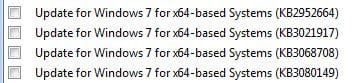
Fully updated besides KB3170106 (This update. Fails) and KBs 2952664, 3021917, 3068708 and 3080149, which I have hidden (Just telemetry crap I believe?).

What I've Tried:
• CHKDSK (Now comes back clean). - Log Attached.

• SFC /Scannow (Detects errors, unable to repair). Also tried this from Safe Mode, and the Repair Mode Command Prompt on my Windows Boot disk, same result. - Log Attached.

• System Update Readiness Tool - (Detects errors, unable to repair) - Log Attached.

• Downloading 2 of the updates that errored in SURT, placed them in Windows\CheckSur\packages directory, which fixed two of the error lines, but still many errors left, as well as errors with the .mum and .cat files of those are updates still present. (This one is strange as one of the updates is KB2952664 which I had hidden and NOT installed..). The log I have attached is from a re-run after this one.

• Downloading the KB3170106 update manually - Still errors. (Said successful once, but obv wasn't).

Resources Available:
• Full Admin access to the problem PC
• A separate Windows 7 Professional x64 SP1 Machine
• Original Windows Install / Boot Disk


From looking at other threads it seems that portions of my Windows Installations have become corrupted, and it will take several runs of the SURT, while adding files to be replaced?

Either ways any assistance is appreciated.
 

My Computer My Computer

At a glance

Windows 7 Ultimate x64Intel Core I7 3960X Hex Core 4ghz16 GB Corsair VengeanceGeforce GTX 590 3GB
OS
Windows 7 Ultimate x64
CPU
Intel Core I7 3960X Hex Core 4ghz
Motherboard
Gigabyte X79-UD3
Memory
16 GB Corsair Vengeance
Graphics Card(s)
Geforce GTX 590 3GB
Cooling
Corsair H80
Hello,
I can confirm the problem on Windows 7 Professional x64. We currently have 2 machines on the network with the same error.
With all the common ways (prev post) i was not able to fix it.
Greez
 

My Computer My Computer

At a glance

Win 7 Prof x64
Computer type
PC/Desktop
OS
Win 7 Prof x64
Yeah I think this particular update uses a lot more windows files than normal or something, as I keep seeing issues with past versions of this particular one.

I think the resolution is likely copying the files from a working version of windows, and letting the SURT or SFC tools replace the dodgy ones. However some of these in my logs have complex file name so I'm not exactly sure which ones are the problem. Need a bit of assistance just to make sure I get the right ones.
 

My Computer My Computer

At a glance

Windows 7 Ultimate x64Intel Core I7 3960X Hex Core 4ghz16 GB Corsair VengeanceGeforce GTX 590 3GB
OS
Windows 7 Ultimate x64
CPU
Intel Core I7 3960X Hex Core 4ghz
Motherboard
Gigabyte X79-UD3
Memory
16 GB Corsair Vengeance
Graphics Card(s)
Geforce GTX 590 3GB
Cooling
Corsair H80
Hello Bob,
Looks like KB2952664 is causing part of the corruption., (1 of the W10 nags) did you use a w10 "stopper" program or make any changes in the registry, certainly some strange symbols there.

Can you try and remove that KB, copy/paste the following using an Admin command mode.

wusa /uninstall /kb:2952664

did it report as successfull, if so it might clear the other errors.

Roy
 

My Computer My Computer

At a glance

W7 home premium 32bit/W7HP 64bit/w10 tp insid...E5300 dual core3gbNvidia Geforce 7100 Nforce 630i
Computer type
PC/Desktop
Computer Manufacturer/Model Number
medionl/Aspire 6930G/acer x55a
OS
W7 home premium 32bit/W7HP 64bit/w10 tp insider ring
CPU
E5300 dual core
Motherboard
medion MS7366
Memory
3gb
Graphics Card(s)
Nvidia Geforce 7100 Nforce 630i
Monitor(s) Displays
avixc
Internet Speed
n (isp resticted to 72)
Antivirus
mse/pands
Browser
palemoon
Other Info
Belkin Fd7050 n USB using Railink RT2870 drivers, more upto date
Absolutely not, I simply either didn't install it in the first place, or manually removed it from add/remove programs > Windows Updates, once I read about the telemetry shite. Either way it was one of the 4 I had uninstalled & hidden. :S

With the Windows 10 stuff, I just manually didn't install any of it.

Just tried that command in an Administrator Command Prompt, and got: "Installer Encountered an Error: 0x800f0900". (It gave me that after a box popped up saying "Searching for Windows Updates").
 

My Computer My Computer

At a glance

Windows 7 Ultimate x64Intel Core I7 3960X Hex Core 4ghz16 GB Corsair VengeanceGeforce GTX 590 3GB
OS
Windows 7 Ultimate x64
CPU
Intel Core I7 3960X Hex Core 4ghz
Motherboard
Gigabyte X79-UD3
Memory
16 GB Corsair Vengeance
Graphics Card(s)
Geforce GTX 590 3GB
Cooling
Corsair H80

My Computer My Computer

At a glance

W7 home premium 32bit/W7HP 64bit/w10 tp insid...E5300 dual core3gbNvidia Geforce 7100 Nforce 630i
Computer type
PC/Desktop
Computer Manufacturer/Model Number
medionl/Aspire 6930G/acer x55a
OS
W7 home premium 32bit/W7HP 64bit/w10 tp insider ring
CPU
E5300 dual core
Motherboard
medion MS7366
Memory
3gb
Graphics Card(s)
Nvidia Geforce 7100 Nforce 630i
Monitor(s) Displays
avixc
Internet Speed
n (isp resticted to 72)
Antivirus
mse/pands
Browser
palemoon
Other Info
Belkin Fd7050 n USB using Railink RT2870 drivers, more upto date
Yeah I remember routinely hiding it. It's likely that I installed it the very first time, then removed it (from add/remove programs), and hid it thereafter. It must have not fully uninstalled correctly, grr.

I ran that tool, and it seemed to run successfully, however as it prompted me, after rebooting I ran the dism line to check for existing packages, and it found one for KB2952664, so I ran the following command for the one it found:
Code:
dism /online /remove-package 
/PackageName:Package_for_KB2952664~31bf3856ad364e35~amd64~~6.1.15.2

Unfortunately that failed with this error:
Code:
An error occurred - Package_for_KB2952664 Error: 0x800f0900
 
Error: 0x800f0900
 
DISM failed. No operation was performed.

Here's what I believe is the relevant section from the attached DISM.log:
Code:
2016-08-05 13:52:41, Info                  DISM   DISM Package Manager: PID=6868 Package Package_for_KB2952664~31bf3856ad364e35~amd64~~6.1.15.2 with CBS state 7(CbsInstallStateInstalled) being mapped to dism state 5(DISM_INSTALL_STATE_INSTALLED) - CDISMPackage::LogInstallStateMapping
2016-08-05 13:52:41, Info                  DISM   DISM Package Manager: PID=6868 Initiating Changes on Package with values: 5, 0 - CDISMPackage::Internal_ChangePackageState
2016-08-05 13:53:11, Info                  DISM   DISM Package Manager: PID=6868  Error in operation: unexpected internal XML parser error. (CBS HRESULT=0x800f0900) - CCbsConUIHandler::Error
2016-08-05 13:53:11, Error                 DISM   DISM Package Manager: PID=6868 Failed finalizing changes. - CDISMPackageManager::Internal_Finalize(hr:0x800f0900)
2016-08-05 13:53:11, Error                 DISM   DISM Package Manager: PID=6868 Failed processing package changes - CDISMPackageManager::ProcessChanges(hr:0x800f0900)
2016-08-05 13:53:11, Info                  DISM   DISM Package Manager: PID=6868 Loaded servicing stack for online use only. - CDISMPackageManager::RefreshInstanceAndLock
2016-08-05 13:53:11, Error                 DISM   DISM Package Manager: PID=6868 Failed while processing command remove-package. - CPackageManagerCLIHandler::ExecuteCmdLine(hr:0x800f0900)
2016-08-05 13:53:11, Info                  DISM   DISM Package Manager: PID=6868 Further logs for online package and feature related operations can be found at %WINDIR%\logs\CBS\cbs.log - CPackageManagerCLIHandler::ExecuteCmdLine
2016-08-05 13:53:11, Error                 DISM   DISM.EXE: DISM Package Manager processed the command line but failed. HRESULT=800F0900
2016-08-05 13:53:11, Info                  DISM   DISM Image Session: PID=6868 Disconnecting the provider store - CDISMImageSession::Final_OnDisconnect

So I ran the SURT again, and it still mentions that bloody update. Seems there's still a remnant, and it's certainly being a problem.

SURT and DISM logs attached, CBS Log here: CBS.zip :: Free File Hosting - File Dropper: File Host for Mp3, Videos, Music, Documents.

I appreciate the assistance, these issues are an arse to fix.

Have also attached the updates it says I have hidden (which includes this bugger heh), same as I had before though I think:
 

Attachments

  • CheckSUR.log
    CheckSUR.log
    9.4 KB · Views: 2
  • Hidden.JPG
    Hidden.JPG
    16.8 KB · Views: 50
Last edited:

My Computer My Computer

At a glance

Windows 7 Ultimate x64Intel Core I7 3960X Hex Core 4ghz16 GB Corsair VengeanceGeforce GTX 590 3GB
OS
Windows 7 Ultimate x64
CPU
Intel Core I7 3960X Hex Core 4ghz
Motherboard
Gigabyte X79-UD3
Memory
16 GB Corsair Vengeance
Graphics Card(s)
Geforce GTX 590 3GB
Cooling
Corsair H80

My Computer My Computer

At a glance

W7 home premium 32bit/W7HP 64bit/w10 tp insid...E5300 dual core3gbNvidia Geforce 7100 Nforce 630i
Computer type
PC/Desktop
Computer Manufacturer/Model Number
medionl/Aspire 6930G/acer x55a
OS
W7 home premium 32bit/W7HP 64bit/w10 tp insider ring
CPU
E5300 dual core
Motherboard
medion MS7366
Memory
3gb
Graphics Card(s)
Nvidia Geforce 7100 Nforce 630i
Monitor(s) Displays
avixc
Internet Speed
n (isp resticted to 72)
Antivirus
mse/pands
Browser
palemoon
Other Info
Belkin Fd7050 n USB using Railink RT2870 drivers, more upto date
I downloaded that script and ran:
Code:
Import-Module C:\Users\Bob\Desktop\UninstallHotFix\UninstallHotFix.psm1

Then:
Code:
Uninstall-OSCHotfix -HotFixID KB2952664

The first time it didn't say anything, (likely doing it's job?), so I ran it a second time, where it now says
Code:
PS C:\Users\Bob> Import-Module C:\Users\Bob\Desktop\UninstallHotFix\UninstallHotFix.psm1
PS C:\Users\Bob> Uninstall-OSCHotfix -HotFixID KB2952664
NotFound
PS C:\Users\Bob>


However upon running the SURT tool again (log attached), it's still complaining about the same files.

Also DISM command from the previous file shows this, (unsure if it always will, regardless if installed?)
Code:
C:\>dism /online /get-packages | findstr KB2952664
Package Identity : Package_for_KB2952664~31bf3856ad364e35~amd64~~6.1.15.2

Still get the same 0x800f0900 error if I try dism remove-package on that. That's an error parsing the XML isn't it?

Let me know if you need any other logs or anything.
 

Attachments

My Computer My Computer

At a glance

Windows 7 Ultimate x64Intel Core I7 3960X Hex Core 4ghz16 GB Corsair VengeanceGeforce GTX 590 3GB
OS
Windows 7 Ultimate x64
CPU
Intel Core I7 3960X Hex Core 4ghz
Motherboard
Gigabyte X79-UD3
Memory
16 GB Corsair Vengeance
Graphics Card(s)
Geforce GTX 590 3GB
Cooling
Corsair H80
Also ran the following to check for all the updates (2664 included) that I found in the stickied thread here. Weird this is saying it can't find any, yet SURT still complains.

Code:
PS C:\> get-hotfix -id KB3035583,KB2952664,KB2976978,KB3021917,KB3044374,KB2990214,KB3022345
get-hotfix : Cannot find the requested hotfix on the 'localhost' computer.
Verify the input and run the command again.
At line:1 char:1
+ get-hotfix -id
KB3035583,KB2952664,KB2976978,KB3021917,KB3044374,KB2990214,KB302 ...
+~~~~~~~~~~~~~~~~~~~~~~~~~~~~~~~~~~~~~~~~~~~~~~~~~~~~~~~~~~~~~~~~~~~~~~~~~~~~~
~~~
    + CategoryInfo          : ObjectNotFound: (:) [Get-HotFix], ArgumentException
    + FullyQualifiedErrorId : GetHotFixNoEntriesFound,Microsoft.PowerShell.Commands.GetHotFixCommand
 

My Computer My Computer

At a glance

Windows 7 Ultimate x64Intel Core I7 3960X Hex Core 4ghz16 GB Corsair VengeanceGeforce GTX 590 3GB
OS
Windows 7 Ultimate x64
CPU
Intel Core I7 3960X Hex Core 4ghz
Motherboard
Gigabyte X79-UD3
Memory
16 GB Corsair Vengeance
Graphics Card(s)
Geforce GTX 590 3GB
Cooling
Corsair H80
The following security updates installed perfectly fine on the 10th, so it seems it's just the IE one mentioned in this thread that it doesn't like.

Successful:
 

Attachments

  • Successful.JPG
    Successful.JPG
    24.6 KB · Views: 0

My Computer My Computer

At a glance

Windows 7 Ultimate x64Intel Core I7 3960X Hex Core 4ghz16 GB Corsair VengeanceGeforce GTX 590 3GB
OS
Windows 7 Ultimate x64
CPU
Intel Core I7 3960X Hex Core 4ghz
Motherboard
Gigabyte X79-UD3
Memory
16 GB Corsair Vengeance
Graphics Card(s)
Geforce GTX 590 3GB
Cooling
Corsair H80
Hi - I haven't done this in a while! (Got your PM, obviously :))
I'll try posting a fix for the CheckSUR errors later today, but it may not be until tomorrow.

For the record, here is the list I'll be posting...
Code:
Unavailable repair files:
	winsxs\manifests\amd64_microsoft-windows-ie-extcompat_31bf3856ad364e35_11.2.9600.17914_none_1ed00c30ebd140c1.manifest
	winsxs\manifests\wow64_microsoft-windows-ieframe_31bf3856ad364e35_11.2.9600.17280_none_516a83b9f7778d31.manifest
	winsxs\manifests\amd64_microsoft-windows-i..osticstap.resources_31bf3856ad364e35_11.2.9600.18314_en-us_6d5b7bf3f9d8bc8a.manifest
	winsxs\manifests\x86_microsoft-windows-m..ditevtlog.resources_31bf3856ad364e35_6.1.7601.22865_en-us_5c61885bd163d89d.manifest
	winsxs\manifests\amd64_667fb660d2245e94d3ad700a11eb7ce5_31bf3856ad364e35_6.3.9600.18015_none_8b619f9159d00095.manifest
	winsxs\manifests\amd64_microsoft-windows-ie-timeline_is_31bf3856ad364e35_11.2.9600.17914_none_5bf66537dec446f2.manifest
	winsxs\manifests\amd64_microsoft-windows-ie-f12-provider_31bf3856ad364e35_11.2.9600.17914_none_bd5d84de7eb6b301.manifest
	winsxs\manifests\wow64_microsoft-windows-security-schannel_31bf3856ad364e35_6.1.7601.23250_none_8aeb219ab9850bd5.manifest
	winsxs\manifests\msil_windowsbase_31bf3856ad364e35_6.1.7601.19144_none_9905af728dfe433a.manifest
	winsxs\manifests\wow64_microsoft-windows-ie-setup-support_31bf3856ad364e35_11.2.9600.17914_none_b245bfa4a8114610.manifest
	winsxs\manifests\amd64_microsoft-windows-scripting-jscript9_31bf3856ad364e35_11.2.9600.18314_none_268ace4bd2b806de.manifest
	winsxs\manifests\amd64_microsoft-windows-ie-internetexplorer_31bf3856ad364e35_11.2.9600.17914_none_118260372f35bb70.manifest
	winsxs\manifests\wow64_microsoft-windows-systemrestore-main_31bf3856ad364e35_6.1.7601.19045_none_af3ad920fe56f90e.manifest
	winsxs\manifests\amd64_microsoft-windows-cryptbase_31bf3856ad364e35_6.1.7601.23250_none_c3e601b2dddb6a4e.manifest
	winsxs\manifests\wow64_microsoft-windows-systemrestore-main_31bf3856ad364e35_6.1.7601.23250_none_afb4a6741781333d.manifest
	servicing\packages\Package_for_KB2952664_SP1~31bf3856ad364e35~amd64~~6.1.15.2.mum
	servicing\packages\Package_for_KB2952664_SP1~31bf3856ad364e35~amd64~~6.1.15.2.mum
	servicing\packages\Win8IP-Microsoft-Windows-DownlevelApisets-Base-WinIP-Package~31bf3856ad364e35~amd64~nb-NO~7.1.7601.16492.mum
	servicing\packages\Win8IP-Microsoft-Windows-DownlevelApisets-Com-WinIP-Package~31bf3856ad364e35~amd64~nb-NO~7.1.7601.16492.mum
	servicing\packages\Win8IP-Microsoft-Windows-DownlevelApisets-Shell-WinIP-Package~31bf3856ad364e35~amd64~nb-NO~7.1.7601.16492.mum
	servicing\packages\Win8IP-Microsoft-Windows-DownlevelApisets-Shell-WinIP-Package~31bf3856ad364e35~amd64~nb-NO~7.1.7601.16492.mum
	servicing\packages\Win8IP-Microsoft-Windows-DownlevelApisets-Windows-WinIP-Package~31bf3856ad364e35~amd64~nb-NO~7.1.7601.16492.mum
	servicing\packages\Win8IP-Microsoft-Windows-DownlevelApisets-WinIP-Package~31bf3856ad364e35~amd64~nb-NO~7.1.7601.16492.mum
	servicing\packages\Package_for_KB2952664_SP1~31bf3856ad364e35~amd64~~6.1.15.2.cat
	servicing\packages\Package_for_KB2952664_SP1~31bf3856ad364e35~amd64~~6.1.15.2.cat
	servicing\packages\Win8IP-Microsoft-Windows-DownlevelApisets-Base-WinIP-Package~31bf3856ad364e35~amd64~nb-NO~7.1.7601.16492.cat
	servicing\packages\Win8IP-Microsoft-Windows-DownlevelApisets-Com-WinIP-Package~31bf3856ad364e35~amd64~nb-NO~7.1.7601.16492.cat
	servicing\packages\Win8IP-Microsoft-Windows-DownlevelApisets-Shell-WinIP-Package~31bf3856ad364e35~amd64~nb-NO~7.1.7601.16492.cat
	servicing\packages\Win8IP-Microsoft-Windows-DownlevelApisets-Shell-WinIP-Package~31bf3856ad364e35~amd64~nb-NO~7.1.7601.16492.cat
	servicing\packages\Win8IP-Microsoft-Windows-DownlevelApisets-Windows-WinIP-Package~31bf3856ad364e35~amd64~nb-NO~7.1.7601.16492.cat
	servicing\packages\Win8IP-Microsoft-Windows-DownlevelApisets-WinIP-Package~31bf3856ad364e35~amd64~nb-NO~7.1.7601.16492.cat
...assuming I can find them all!
 

My Computer My Computer

At a glance

Win 7 x64 Home Premium (and x86 VirtualBox VM...i3 370M/i7 6500U8GB - finally :)/8GBit's an i3, dude!/dual Intel&nVidia
Computer type
Laptop
Computer Manufacturer/Model Number
Asus K52F or Lenovo B51-80
OS
Win 7 x64 Home Premium (and x86 VirtualBox VM)/Win10
CPU
i3 370M/i7 6500U
Motherboard
Asus/Lenovo
Memory
8GB - finally :)/8GB
Graphics Card(s)
it's an i3, dude!/dual Intel&nVidia
Sound Card
onboard
Monitor(s) Displays
15.6" built-in
Screen Resolution
1366x768/1920x1080
Hard Drives
750GB Seagate internal
Sundry external drives attached to other computers on the local network
1TB SSD on the Lenovo
PSU
n/a
Internet Speed
as much as I can get - usually on a dongle/phone, so <1MB/s
Antivirus
MSE/Defender
Browser
IE11/12/Edge/Chrome/FF(if I must)
I got lucky - I had an archive with all the required files in it (I think!)

I've uploaded a file - b36aa.zip - to my OneDrive at Noel's OneDrive
Please download and save it.
Right-click on the downloaded file, and select Extract all…
Extract to the default location - which will create a new folder b36aa in the same place.
Open this folder - there should be two folders inside it (Manifests, and Packages)

Copy the content of the Packages folder to the folder
C:\Windows\Temp\CheckSur\Servicing\Packages

And the content of the manifests folder (.manifest files) into this folder:

C:\Windows\Temp\CheckSur\Winsxs\Manifests

Now run the CheckSUR tool again (it may take a while)

Post the new CheckSUR.log file, and the CheckSUR.persist.log file.
 
Last edited:

My Computer My Computer

At a glance

Win 7 x64 Home Premium (and x86 VirtualBox VM...i3 370M/i7 6500U8GB - finally :)/8GBit's an i3, dude!/dual Intel&nVidia
Computer type
Laptop
Computer Manufacturer/Model Number
Asus K52F or Lenovo B51-80
OS
Win 7 x64 Home Premium (and x86 VirtualBox VM)/Win10
CPU
i3 370M/i7 6500U
Motherboard
Asus/Lenovo
Memory
8GB - finally :)/8GB
Graphics Card(s)
it's an i3, dude!/dual Intel&nVidia
Sound Card
onboard
Monitor(s) Displays
15.6" built-in
Screen Resolution
1366x768/1920x1080
Hard Drives
750GB Seagate internal
Sundry external drives attached to other computers on the local network
1TB SSD on the Lenovo
PSU
n/a
Internet Speed
as much as I can get - usually on a dongle/phone, so <1MB/s
Antivirus
MSE/Defender
Browser
IE11/12/Edge/Chrome/FF(if I must)
Cracking job there mate! Massive thanks for the response and detailed help.

Ran it the first time, said it fixed all but one problem. Ran it the second time and verified that only one remains, woo!

Both logs attached. The second has the only remaining error.

Is this a general fix, as in something I can/should keep for the future, or is it crafted specifically for this thread's problem?
 

Attachments

My Computer My Computer

At a glance

Windows 7 Ultimate x64Intel Core I7 3960X Hex Core 4ghz16 GB Corsair VengeanceGeforce GTX 590 3GB
OS
Windows 7 Ultimate x64
CPU
Intel Core I7 3960X Hex Core 4ghz
Motherboard
Gigabyte X79-UD3
Memory
16 GB Corsair Vengeance
Graphics Card(s)
Geforce GTX 590 3GB
Cooling
Corsair H80
All of this type of fix is crafted specifically for the problem at hand - you can delete the downloaded/extracted files once we've fixed everything :)

Here's the one I missed earlier...

I've uploaded a file - b36ab.zip - to my OneDrive at Noel's OneDrive
Please download and save it.
Right-click on the downloaded file, and select Extract all…
Extract to the default location - which will create a new folder b36aa in the same place.
Open this folder - there should be one folders inside it (Manifests)

copy the content of the manifests folder (.manifest files) into this folder:

C:\Windows\Temp\CheckSur\Winsxs\Manifests

Now run the CheckSUR tool again (it may take a while)

Post the new CheckSUR.log file, and the CheckSUR.persist.log file.
 

My Computer My Computer

At a glance

Win 7 x64 Home Premium (and x86 VirtualBox VM...i3 370M/i7 6500U8GB - finally :)/8GBit's an i3, dude!/dual Intel&nVidia
Computer type
Laptop
Computer Manufacturer/Model Number
Asus K52F or Lenovo B51-80
OS
Win 7 x64 Home Premium (and x86 VirtualBox VM)/Win10
CPU
i3 370M/i7 6500U
Motherboard
Asus/Lenovo
Memory
8GB - finally :)/8GB
Graphics Card(s)
it's an i3, dude!/dual Intel&nVidia
Sound Card
onboard
Monitor(s) Displays
15.6" built-in
Screen Resolution
1366x768/1920x1080
Hard Drives
750GB Seagate internal
Sundry external drives attached to other computers on the local network
1TB SSD on the Lenovo
PSU
n/a
Internet Speed
as much as I can get - usually on a dongle/phone, so <1MB/s
Antivirus
MSE/Defender
Browser
IE11/12/Edge/Chrome/FF(if I must)
Ah of course, you did put one-offs. Does it involve finding & taking the files from a working copy of windows, and having SURT replace them?

Also good news, got the SURT errors down to 0 now! \o/ Thanks massively with that.

Unfortunately didn't have time to try the update again yet though (Windows Update takes yonks nowdays), I'll give that a blast tonight after work. Hopefully it will work now.

Still got some errors in the SFC /ScanNow log though, mind helping with those either ways, if you have time? (I can make a separate thread for those ones if need be). I presume it will be the same sorta method.

Logs attached. Includes the before / after SURT logs, the persist one, and the SFC /ScanNow one.
 

My Computer My Computer

At a glance

Windows 7 Ultimate x64Intel Core I7 3960X Hex Core 4ghz16 GB Corsair VengeanceGeforce GTX 590 3GB
OS
Windows 7 Ultimate x64
CPU
Intel Core I7 3960X Hex Core 4ghz
Motherboard
Gigabyte X79-UD3
Memory
16 GB Corsair Vengeance
Graphics Card(s)
Geforce GTX 590 3GB
Cooling
Corsair H80
You may still have problems, as there are indeed a number of errors in the SFC scan...
Code:
	Line 3795: 2016-08-17 04:29:07, Info                  CSI    0000039a [SR] Repairing 4 components
	Line 3796: 2016-08-17 04:29:07, Info                  CSI    0000039b [SR] Beginning Verify and Repair transaction
	Line 3799: 2016-08-17 04:29:07, Info                  CSI    0000039d [SR] Cannot repair member file [l:12{6}]"ks.inf" of ks.inf, Version = 6.1.7600.16385, pA = PROCESSOR_ARCHITECTURE_AMD64 (9), Culture neutral, VersionScope = 1 nonSxS, PublicKeyToken = {l:8 b:31bf3856ad364e35}, Type = [l:24{12}]"driverUpdate", TypeName neutral, PublicKey neutral in the store, hash mismatch
	Line 3802: 2016-08-17 04:29:07, Info                  CSI    0000039f [SR] Cannot repair member file [l:24{12}]"nshipsec.dll" of Microsoft-Windows-Network-Security-Domain-Clients-Netsh, Version = 6.1.7601.17514, pA = PROCESSOR_ARCHITECTURE_AMD64 (9), Culture neutral, VersionScope = 1 nonSxS, PublicKeyToken = {l:8 b:31bf3856ad364e35}, Type neutral, TypeName neutral, PublicKey neutral in the store, hash mismatch
	Line 3805: 2016-08-17 04:29:07, Info                  CSI    000003a1 [SR] Cannot repair member file [l:38{19}]"Windows Startup.wav" of Microsoft-Windows-Shell-Sounds, Version = 6.1.7600.16385, pA = PROCESSOR_ARCHITECTURE_AMD64 (9), Culture neutral, VersionScope = 1 nonSxS, PublicKeyToken = {l:8 b:31bf3856ad364e35}, Type neutral, TypeName neutral, PublicKey neutral in the store, hash mismatch
	Line 3809: 2016-08-17 04:29:07, Info                  CSI    000003a3 [SR] Cannot repair member file [l:22{11}]"mscorie.dll" of NetFx-MSCORIE_DLL, Version = 6.1.7601.18514, pA = PROCESSOR_ARCHITECTURE_INTEL (0), Culture neutral, VersionScope neutral, PublicKeyToken = {l:8 b:b03f5f7f11d50a3a}, Type neutral, TypeName neutral, PublicKey neutral in the store, hash mismatch
	Line 3812: 2016-08-17 04:29:07, Info                  CSI    000003a5 [SR] Cannot repair member file [l:38{19}]"Windows Startup.wav" of Microsoft-Windows-Shell-Sounds, Version = 6.1.7600.16385, pA = PROCESSOR_ARCHITECTURE_AMD64 (9), Culture neutral, VersionScope = 1 nonSxS, PublicKeyToken = {l:8 b:31bf3856ad364e35}, Type neutral, TypeName neutral, PublicKey neutral in the store, hash mismatch
	Line 3813: 2016-08-17 04:29:07, Info                  CSI    000003a6 [SR] This component was referenced by [l:202{101}]"Microsoft-Windows-Foundation-Package~31bf3856ad364e35~amd64~~6.1.7601.17514.WindowsFoundationDelivery"
	Line 3818: 2016-08-17 04:29:08, Info                  CSI    000003a9 [SR] Could not reproject corrupted file [ml:520{260},l:40{20}]"\??\C:\Windows\Media"\[l:38{19}]"Windows Startup.wav"; source file in store is also corrupted
	Line 3822: 2016-08-17 04:29:08, Info                  CSI    000003ab [SR] Cannot repair member file [l:22{11}]"mscorie.dll" of NetFx-MSCORIE_DLL, Version = 6.1.7601.18514, pA = PROCESSOR_ARCHITECTURE_INTEL (0), Culture neutral, VersionScope neutral, PublicKeyToken = {l:8 b:b03f5f7f11d50a3a}, Type neutral, TypeName neutral, PublicKey neutral in the store, hash mismatch
	Line 3823: 2016-08-17 04:29:08, Info                  CSI    000003ac [SR] This component was referenced by [l:156{78}]"Package_2_for_KB2968294~31bf3856ad364e35~amd64~~6.1.1.1.2968294-70_neutral_GDR"
	Line 3830: 2016-08-17 04:29:08, Info                  CSI    000003af [SR] Could not reproject corrupted file [ml:520{260},l:98{49}]"\??\C:\Windows\Microsoft.NET\Framework\v2.0.50727"\[l:22{11}]"mscorie.dll"; source file in store is also corrupted
	Line 3833: 2016-08-17 04:29:08, Info                  CSI    000003b1 [SR] Cannot repair member file [l:12{6}]"ks.inf" of ks.inf, Version = 6.1.7600.16385, pA = PROCESSOR_ARCHITECTURE_AMD64 (9), Culture neutral, VersionScope = 1 nonSxS, PublicKeyToken = {l:8 b:31bf3856ad364e35}, Type = [l:24{12}]"driverUpdate", TypeName neutral, PublicKey neutral in the store, hash mismatch
	Line 3834: 2016-08-17 04:29:08, Info                  CSI    000003b2 [SR] This component was referenced by [l:172{86}]"Microsoft-Windows-Client-Drivers-Package~31bf3856ad364e35~amd64~~6.1.7601.17514.INF_ks"
	Line 3837: 2016-08-17 04:29:08, Info                  CSI    000003b4 [SR] Cannot repair member file [l:24{12}]"nshipsec.dll" of Microsoft-Windows-Network-Security-Domain-Clients-Netsh, Version = 6.1.7601.17514, pA = PROCESSOR_ARCHITECTURE_AMD64 (9), Culture neutral, VersionScope = 1 nonSxS, PublicKeyToken = {l:8 b:31bf3856ad364e35}, Type neutral, TypeName neutral, PublicKey neutral in the store, hash mismatch
	Line 3838: 2016-08-17 04:29:08, Info                  CSI    000003b5 [SR] This component was referenced by [l:202{101}]"Microsoft-Windows-Foundation-Package~31bf3856ad364e35~amd64~~6.1.7601.17514.WindowsFoundationDelivery"
	Line 3843: 2016-08-17 04:29:08, Info                  CSI    000003b8 [SR] Could not reproject corrupted file [ml:520{260},l:46{23}]"\??\C:\Windows\System32"\[l:24{12}]"nshipsec.dll"; source file in store is also corrupted
	Line 3848: 2016-08-17 04:29:08, Info                  CSI    000003ba [SR] Repair complete
	Line 3849: 2016-08-17 04:29:08, Info                  CSI    000003bb [SR] Committing transaction

I'll post a fix for that later.

In this case, I was able to use my current install of Windows, and pull the necessary files out of that - but it's possible to download 99% of updates, and then extract the necessary files from them, (useful if I need a particular language variant, or an update that isn't install on my machines)
 

My Computer My Computer

At a glance

Win 7 x64 Home Premium (and x86 VirtualBox VM...i3 370M/i7 6500U8GB - finally :)/8GBit's an i3, dude!/dual Intel&nVidia
Computer type
Laptop
Computer Manufacturer/Model Number
Asus K52F or Lenovo B51-80
OS
Win 7 x64 Home Premium (and x86 VirtualBox VM)/Win10
CPU
i3 370M/i7 6500U
Motherboard
Asus/Lenovo
Memory
8GB - finally :)/8GB
Graphics Card(s)
it's an i3, dude!/dual Intel&nVidia
Sound Card
onboard
Monitor(s) Displays
15.6" built-in
Screen Resolution
1366x768/1920x1080
Hard Drives
750GB Seagate internal
Sundry external drives attached to other computers on the local network
1TB SSD on the Lenovo
PSU
n/a
Internet Speed
as much as I can get - usually on a dongle/phone, so <1MB/s
Antivirus
MSE/Defender
Browser
IE11/12/Edge/Chrome/FF(if I must)
Unfortunately didn't have time to try the update again yet though (Windows Update takes yonks nowdays), I'll give that a blast tonight after work. Hopefully it will work now.
.

Hi,
See if you have KB3020369 & KB3172605 installed if not manually install them to fix the update system
When manually installing updates you need to switch your update settings to Never check for updates and restart the machine first.

KB3020369
Win-7 32 bit
https://download.microsoft.com/downl...020369-x86.msu
Win-7 64 bit
https://download.microsoft.com/downl...020369-x64.msu

KB3172605 newest update client is in this update but KB3020369 is required to install it.
Win-7 32 bit
https://download.microsoft.com/downl...172605-x86.msu
Win-7 64 bit
https://download.microsoft.com/downl...172605-x64.msu
 

My Computer My Computer

At a glance

Win-7-Pro64bit 7-H-Prem-64biti7-5930K 2nd i9-9940x both water blocked VRM'...Trident-z 3200C14 2nd Trident-z 3600C16EVGA 1080ti ftw3 2nd Titan Xp both water blocked
Computer type
PC/Desktop
Computer Manufacturer/Model Number
Custom assembled by me :}
OS
Win-7-Pro64bit 7-H-Prem-64bit
CPU
i7-5930K 2nd i9-9940x both water blocked VRM's too
Motherboard
ASUS SABERTOOTH X99 2nd ASUS x299 Apex
Memory
Trident-z 3200C14 2nd Trident-z 3600C16
Graphics Card(s)
EVGA 1080ti ftw3 2nd Titan Xp both water blocked
Sound Card
Built-in Realtek
Monitor(s) Displays
1-AOC G2460PG 24"G-Sync 144Hz/ 2nd 1-ASUS VG248QE 24" 144Hz
Screen Resolution
1920 x 1080 144Hz
Hard Drives
2-Samsung M.2 Evo & Evo Plus
2-Samsung 850 EVO 500GB SSD's/ 3-2.5 W.D. Black 1tb-&3-1tb/3-3.5 WD Black 1tb hdd's
PSU
EVGA SuperNOVA 1000-P2 2nd 1200-P2
Case
2-Corsair Obsidian Series 450D Black ATX Mid Tower
Cooling
Custom water loops
Keyboard
Logitech G710+/ 2nd Logitech G910
Mouse
2-RedDragon M901 Perdition 16400 dpi Gaming mouse = wired
Internet Speed
Comcast Ping 19ms 89.31mbps download speed 6.12mbps upload
Antivirus
Malwarebytes Pro/ Superantispyware Pro
Browser
FireFox & Pale moon
Other Info
2nd ASUS X299 Apex/Intel i9-9940x with Custom water loop/7H-Prem-x64/Corsair 450D case/Ram Trident-z 3600C16 4x8gb / Samsung970Evo plus 500gb SSD/Dual ssd EZ swap evo/PSU EVGA SuperNova 1200w-P2 80+Platinum/GPU Titan Xp /8-ML-140 on push-pull on 2-280GTX rads
I've uploaded a file - b36ac.zip - to my OneDrive at Noel's OneDrive
Please download and save it.

Right-click on the saved file and select Extract all...
Change the target to C:\ and click on Extract
Close all windows (it would be a good idea to print these instructions!)

Now reboot to the Repair Environment - as soon as the machine restarts, start tapping F8 - this should bring up the Advanced Boot Menu, at the top of which should be the option 'Repair my Computer'
Pick that
You'll have to log in with your username and password.

Pick the option to use a Command Prompt
At the prompt type
DIR C:\b36ac
hit the enter key - if you get a 'Not Found' error try
DIR D:\b36ac
or
DIR E:\b3ac

The drive letter in use when you find the folder will need to be substituted (for<drive>) into the following command...

XCOPY <drive>:\b36ac <drive>:\windows\winsxs /y /i /s /v /h

(e.g. XCOPY P:\wfire P:\windows\winsxs /y /i /s /v /h )

run the command (it should take almost no time) and when the prompt returns, type
EXIT
and hit the Enter key to exit Command Prompt - reboot to Normal Mode Windows.

Now run SFC /SCANNOW in an Elevated Command Prompt
then reboot and upload the new CBS.log file to your reply
 

My Computer My Computer

At a glance

Win 7 x64 Home Premium (and x86 VirtualBox VM...i3 370M/i7 6500U8GB - finally :)/8GBit's an i3, dude!/dual Intel&nVidia
Computer type
Laptop
Computer Manufacturer/Model Number
Asus K52F or Lenovo B51-80
OS
Win 7 x64 Home Premium (and x86 VirtualBox VM)/Win10
CPU
i3 370M/i7 6500U
Motherboard
Asus/Lenovo
Memory
8GB - finally :)/8GB
Graphics Card(s)
it's an i3, dude!/dual Intel&nVidia
Sound Card
onboard
Monitor(s) Displays
15.6" built-in
Screen Resolution
1366x768/1920x1080
Hard Drives
750GB Seagate internal
Sundry external drives attached to other computers on the local network
1TB SSD on the Lenovo
PSU
n/a
Internet Speed
as much as I can get - usually on a dongle/phone, so <1MB/s
Antivirus
MSE/Defender
Browser
IE11/12/Edge/Chrome/FF(if I must)
Good news!

SURT now shows absolutely nothing to fix, so I gave the update a blast (after copying those files over) and it worked! Problem resolved :)

SFC /Scannow still said "Windows Resource Protection found corrupt files but was unable to fix some of them" however in the attached log, I don't see any errors?

Ah well I'm fully up to date now. Have a gander at the log anyway if you want, but I presume it's all good. I've marked it as solved and given +rep.
 

My Computer My Computer

At a glance

Windows 7 Ultimate x64Intel Core I7 3960X Hex Core 4ghz16 GB Corsair VengeanceGeforce GTX 590 3GB
OS
Windows 7 Ultimate x64
CPU
Intel Core I7 3960X Hex Core 4ghz
Motherboard
Gigabyte X79-UD3
Memory
16 GB Corsair Vengeance
Graphics Card(s)
Geforce GTX 590 3GB
Cooling
Corsair H80
Back
Top