Solved Failed HDD: Can this drive be reclaimed??

update

gang I've gone OCD+ now... over the holidays I had some more time to put in on this project. That drive is 'failed' in such a way that its not only difficult to detect/read or run tools on, it actually crashed two different system. it left one of my Vista mules in such a condition that it went out of Activation... and that was merely by slaving it across USB. Disk Management would hang/crash, destabilize the system... twice it blue-screened on me. Crashed a Win xp system in similar fashion but no damage.
The several times I was able to run either chkdsk /r or chkdsk /f, it typically would run for 20 hours or so, hit about 9% to 17% complete, then flame out. so gave up on that approach.

went to a third system, my "go to" win7 Ultimate lab do-anything sys, hooked in by usb adapter. after trying different jumper settings [which, I thought would make no diff using usb adapter, but it apparently does make a diff]. .. sometimes windows could not detect it - game over. power off, change jumper, back up. - could detect, but could not online it... "device not ready".
Anyway, when I finally got it stable enough to Letter, I tried running Photorec and Recuva. For reasons I don't understand, photorec would go AWOL at the stage of drilling down on the volume - that is, merely identifying the volume, then hitting "Continue" it would just sit for hours without moving to the next screen, so I gave it up. Recuva could not open the volume - bailed immediately.
So I finally took the final, possibly fatal step of formatting [the drive would alternately, depending on the tool, show a FAT file system, NTFS, and/or RAW]. I tried twice unsuccessfully to 'quick format' ntfs. 3rd time was the charm - it succeeded. After that, I ran Recuva quick pass for one filetype and reclaimed 2 .pdf files that I could pull up and read. That was encouraging, so it is now in 'deep scan' mode, ran for almost 20 hours and is at 1% complete. So I'm going to stick with it as long as that complete %-age increments.

z
 

My Computer My Computer

At a glance

Windows XP Pro SP3, Windows 7 Pro 32-bit, Win...Pentium 4 3.2GHz, Pentium 4 3.4GHz 64bit, Atom,4GB matched, 1GB, 2.5GB, 4.0 GBGeforce 8400 GS and others
Computer Manufacturer/Model Number
HP DC7600, HP DC7600[2], HP DC7100, Samsung NC10
OS
Windows XP Pro SP3, Windows 7 Pro 32-bit, Windows 7 Ultimate 64bit, Windows XP Home SP3
CPU
Pentium 4 3.2GHz, Pentium 4 3.4GHz 64bit, Atom,
Motherboard
Dunno
Memory
4GB matched, 1GB, 2.5GB, 4.0 GB
Graphics Card(s)
Geforce 8400 GS and others
Sound Card
RealteK ALC260 and others
Monitor(s) Displays
Asus HD
Screen Resolution
1920x1080
Hard Drives
WD Caviar 640gb SATA
Cooling
We Be Cool
gang I've gone OCD+ now... over the holidays I had some more time to put in on this project. That drive is 'failed' in such a way that its not only difficult to detect/read or run tools on, it actually crashed two different system. it left one of my Vista mules in such a condition that it went out of Activation... and that was merely by slaving it across USB. Disk Management would hang/crash, destabilize the system... twice it blue-screened on me. Crashed a Win xp system in similar fashion but no damage.
The several times I was able to run either chkdsk /r or chkdsk /f, it typically would run for 20 hours or so, hit about 9% to 17% complete, then flame out. so gave up on that approach.

went to a third system, my "go to" win7 Ultimate lab do-anything sys, hooked in by usb adapter. after trying different jumper settings [which, I thought would make no diff using usb adapter, but it apparently does make a diff]. .. sometimes windows could not detect it - game over. power off, change jumper, back up. - could detect, but could not online it... "device not ready".
Anyway, when I finally got it stable enough to Letter, I tried running Photorec and Recuva. For reasons I don't understand, photorec would go AWOL at the stage of drilling down on the volume - that is, merely identifying the volume, then hitting "Continue" it would just sit for hours without moving to the next screen, so I gave it up. Recuva could not open the volume - bailed immediately.
So I finally took the final, possibly fatal step of formatting [the drive would alternately, depending on the tool, show a FAT file system, NTFS, and/or RAW]. I tried twice unsuccessfully to 'quick format' ntfs. 3rd time was the charm - it succeeded. After that, I ran Recuva quick pass for one filetype and reclaimed 2 .pdf files that I could pull up and read. That was encouraging, so it is now in 'deep scan' mode, ran for almost 20 hours and is at 1% complete. So I'm going to stick with it as long as that complete %-age increments.

z

Eek, that is a mess. If recuva does not work, try Free Format Recovery Software | Recover files after format free | iCare Format Recovery Free as it has saved me a few times and a few others on these forums, as well.
 

My Computer My Computer

At a glance

Windows 7 Home Premium 64 BitIntel(R) Core(TM)2 Quad CPU Q9550 @ 2.83GHz6.00 GB Hundai HMT125U6BFR8C-H9ATI Radeon HD 4850
Computer Manufacturer/Model Number
HP Pavilion e9110t
OS
Windows 7 Home Premium 64 Bit
CPU
Intel(R) Core(TM)2 Quad CPU Q9550 @ 2.83GHz
Motherboard
Pegatron IPIEL-LA3
Memory
6.00 GB Hundai HMT125U6BFR8C-H9
Graphics Card(s)
ATI Radeon HD 4850
Sound Card
Realtek High Definition Audio/ATI High Definition Audio
Monitor(s) Displays
Acer AL2216W
Screen Resolution
1680x1050
Hard Drives
Hitachi HDP725050GLA360 ATA Device 500 GB
PSU
Unknown/installed by HP
Case
HP generic case
Cooling
Intel Stock Cooling
Keyboard
HP Keyboard
Mouse
HP Mouse
Internet Speed
Download: 19.15 Mbps Upload: 1.67 Mbps
Other Info
Network Adapter Realtek RTL8168D/8111D Family PCI-E Gigabit Ethernet NIC (NDIS 6.20)
Network Adapter 802.11n Wireless PCI Express Card LAN Adapter
excellent. thanks for the tip. I'll do it.
 

My Computer My Computer

At a glance

Windows XP Pro SP3, Windows 7 Pro 32-bit, Win...Pentium 4 3.2GHz, Pentium 4 3.4GHz 64bit, Atom,4GB matched, 1GB, 2.5GB, 4.0 GBGeforce 8400 GS and others
Computer Manufacturer/Model Number
HP DC7600, HP DC7600[2], HP DC7100, Samsung NC10
OS
Windows XP Pro SP3, Windows 7 Pro 32-bit, Windows 7 Ultimate 64bit, Windows XP Home SP3
CPU
Pentium 4 3.2GHz, Pentium 4 3.4GHz 64bit, Atom,
Motherboard
Dunno
Memory
4GB matched, 1GB, 2.5GB, 4.0 GB
Graphics Card(s)
Geforce 8400 GS and others
Sound Card
RealteK ALC260 and others
Monitor(s) Displays
Asus HD
Screen Resolution
1920x1080
Hard Drives
WD Caviar 640gb SATA
Cooling
We Be Cool
got my fingers crossed on that iCare package, mate.
the Recuva lacks a feature that would have helped a lot... dunno about iCare, but its the ability to save the data necessary to restart the scan at the point of stoppage. The drive is so wobbly that it will just stop communicating at random, so the os loses it as if not there, which hangs the package and it does not know how to recover, so you're stuck beginning from the edge every time. iCare is making more progress faster, if the feedback data means anything. its about 3 hours deep into the first run [took me awhile to get the drive responding again] and shows a reasonble 16 hours left. shows a large 'found' file count. dunno if the drive will hold up that long but I can hope.

thanks for the tip :cool:
 

My Computer My Computer

At a glance

Windows XP Pro SP3, Windows 7 Pro 32-bit, Win...Pentium 4 3.2GHz, Pentium 4 3.4GHz 64bit, Atom,4GB matched, 1GB, 2.5GB, 4.0 GBGeforce 8400 GS and others
Computer Manufacturer/Model Number
HP DC7600, HP DC7600[2], HP DC7100, Samsung NC10
OS
Windows XP Pro SP3, Windows 7 Pro 32-bit, Windows 7 Ultimate 64bit, Windows XP Home SP3
CPU
Pentium 4 3.2GHz, Pentium 4 3.4GHz 64bit, Atom,
Motherboard
Dunno
Memory
4GB matched, 1GB, 2.5GB, 4.0 GB
Graphics Card(s)
Geforce 8400 GS and others
Sound Card
RealteK ALC260 and others
Monitor(s) Displays
Asus HD
Screen Resolution
1920x1080
Hard Drives
WD Caviar 640gb SATA
Cooling
We Be Cool
got my fingers crossed on that iCare package, mate.
the Recuva lacks a feature that would have helped a lot... dunno about iCare, but its the ability to save the data necessary to restart the scan at the point of stoppage. The drive is so wobbly that it will just stop communicating at random, so the os loses it as if not there, which hangs the package and it does not know how to recover, so you're stuck beginning from the edge every time. iCare is making more progress faster, if the feedback data means anything. its about 3 hours deep into the first run [took me awhile to get the drive responding again] and shows a reasonble 16 hours left. shows a large 'found' file count. dunno if the drive will hold up that long but I can hope.

thanks for the tip :cool:

Yeah, I prefer iCare myself. There are other programs out there that you can purchase that may do better. Let me know if you are interested in those after you let iCare do its thing.
 

My Computer My Computer

At a glance

Windows 7 Home Premium 64 BitIntel(R) Core(TM)2 Quad CPU Q9550 @ 2.83GHz6.00 GB Hundai HMT125U6BFR8C-H9ATI Radeon HD 4850
Computer Manufacturer/Model Number
HP Pavilion e9110t
OS
Windows 7 Home Premium 64 Bit
CPU
Intel(R) Core(TM)2 Quad CPU Q9550 @ 2.83GHz
Motherboard
Pegatron IPIEL-LA3
Memory
6.00 GB Hundai HMT125U6BFR8C-H9
Graphics Card(s)
ATI Radeon HD 4850
Sound Card
Realtek High Definition Audio/ATI High Definition Audio
Monitor(s) Displays
Acer AL2216W
Screen Resolution
1680x1050
Hard Drives
Hitachi HDP725050GLA360 ATA Device 500 GB
PSU
Unknown/installed by HP
Case
HP generic case
Cooling
Intel Stock Cooling
Keyboard
HP Keyboard
Mouse
HP Mouse
Internet Speed
Download: 19.15 Mbps Upload: 1.67 Mbps
Other Info
Network Adapter Realtek RTL8168D/8111D Family PCI-E Gigabit Ethernet NIC (NDIS 6.20)
Network Adapter 802.11n Wireless PCI Express Card LAN Adapter
Success!

Happily reporting the first real significant success. Writh, that iCare package did its thing - running about 40 hours or so it found a lot of usable files so I was able to get the freeware limit of 1GB of data off the drive and safely archived away. The beneficial circumstance here, I think, is that for whatever reason, the drive has stayed up and communicable now for a solid week, which previously was impossible. So with each passing hour I'm holding my breath, but the heat buildup from running continuously seems to help, oddly enough. So now I'm back running photorec, and so far it has not barfed, but is indicating several days worth of nonstop work to get the rest of the images and docs. iCare's speed is much better, and the interface is Explorer-like, letting me pick off files in fine detail, unlike Photorec which takes entire categories.

So here's hoping for additional hdwe stability sufficient to finish this job.
 

My Computer My Computer

At a glance

Windows XP Pro SP3, Windows 7 Pro 32-bit, Win...Pentium 4 3.2GHz, Pentium 4 3.4GHz 64bit, Atom,4GB matched, 1GB, 2.5GB, 4.0 GBGeforce 8400 GS and others
Computer Manufacturer/Model Number
HP DC7600, HP DC7600[2], HP DC7100, Samsung NC10
OS
Windows XP Pro SP3, Windows 7 Pro 32-bit, Windows 7 Ultimate 64bit, Windows XP Home SP3
CPU
Pentium 4 3.2GHz, Pentium 4 3.4GHz 64bit, Atom,
Motherboard
Dunno
Memory
4GB matched, 1GB, 2.5GB, 4.0 GB
Graphics Card(s)
Geforce 8400 GS and others
Sound Card
RealteK ALC260 and others
Monitor(s) Displays
Asus HD
Screen Resolution
1920x1080
Hard Drives
WD Caviar 640gb SATA
Cooling
We Be Cool
Great work - lets hope you can recover some more data.
 

My Computer My Computer

At a glance

Windows 10 Pro x64 ; Xubuntu x64Intel i7 860 @ 2.80 GHz O/C'ed to 4.0GHz16GB Corsair Vengance DDR3 @ 661 MHz Dual Cha...EVGA NVidia GTX 560 1024MB
Computer type
PC/Desktop
Computer Manufacturer/Model Number
Golden Mk. I.4
OS
Windows 10 Pro x64 ; Xubuntu x64
CPU
Intel i7 860 @ 2.80 GHz O/C'ed to 4.0GHz
Motherboard
Gigabyte P55A-UD3R Rev.1. Award BIOS F13
Memory
16GB Corsair Vengance DDR3 @ 661 MHz Dual Channel (9-9-9-24)
Graphics Card(s)
EVGA NVidia GTX 560 1024MB
Sound Card
Realtek Integrated
Monitor(s) Displays
Dual Samsung SyncMaster 2494HS
Screen Resolution
1920*1080 and 1920*1080
Hard Drives
1*Samsung 840 EVO 120GB SSD;
1*OCZ Vertex 2 60GB SSD;
2*Samsung F3 SpinPoint 1TB in RAID0;
1*Samsung F1 SpinPoint 1TB;
2*Western Digital 1TB External USB 3.0
1*Western Digital 500GB External USB 3.0
1*Seagate 500GB External USB 2.0
PSU
Thermaltake ToughPower QFan 750W
Case
Thermaltake Element S VK60001W2Z
Cooling
Corsair H60 Water Cooling, 2*230mm and 2*80mm case fans
Keyboard
Logitech G110
Mouse
Logitech MX518
Happily reporting the first real significant success. Writh, that iCare package did its thing - running about 40 hours or so it found a lot of usable files so I was able to get the freeware limit of 1GB of data off the drive and safely archived away. The beneficial circumstance here, I think, is that for whatever reason, the drive has stayed up and communicable now for a solid week, which previously was impossible. So with each passing hour I'm holding my breath, but the heat buildup from running continuously seems to help, oddly enough. So now I'm back running photorec, and so far it has not barfed, but is indicating several days worth of nonstop work to get the rest of the images and docs. iCare's speed is much better, and the interface is Explorer-like, letting me pick off files in fine detail, unlike Photorec which takes entire categories.

So here's hoping for additional hdwe stability sufficient to finish this job.

Congrats, and best wishes! :) Keep us updated, too.
 

My Computer My Computer

At a glance

Windows 7 Home Premium 64 BitIntel(R) Core(TM)2 Quad CPU Q9550 @ 2.83GHz6.00 GB Hundai HMT125U6BFR8C-H9ATI Radeon HD 4850
Computer Manufacturer/Model Number
HP Pavilion e9110t
OS
Windows 7 Home Premium 64 Bit
CPU
Intel(R) Core(TM)2 Quad CPU Q9550 @ 2.83GHz
Motherboard
Pegatron IPIEL-LA3
Memory
6.00 GB Hundai HMT125U6BFR8C-H9
Graphics Card(s)
ATI Radeon HD 4850
Sound Card
Realtek High Definition Audio/ATI High Definition Audio
Monitor(s) Displays
Acer AL2216W
Screen Resolution
1680x1050
Hard Drives
Hitachi HDP725050GLA360 ATA Device 500 GB
PSU
Unknown/installed by HP
Case
HP generic case
Cooling
Intel Stock Cooling
Keyboard
HP Keyboard
Mouse
HP Mouse
Internet Speed
Download: 19.15 Mbps Upload: 1.67 Mbps
Other Info
Network Adapter Realtek RTL8168D/8111D Family PCI-E Gigabit Ethernet NIC (NDIS 6.20)
Network Adapter 802.11n Wireless PCI Express Card LAN Adapter
got several hundred more files off in good shape via photorec. its a real crawler, and will take another week to go through every sector but my guess is I already have the bulk of the useful files.

a question for you guys: tangental to this reclamation I have planned to use the owner's 1TB "My Book" WD external drive to store these recovered bits but win7 doesn't like it for some reason. I pulled it in successfully on an older Vista mule I have, but when I attach it to my 7's it gets drivers loaded, then I can pull it up under Disk Management and its id'd ok, but I do not have the ability to assign a Drive Letter, and thus cannot access it directly. Tried rebooting with the drive attached, same results.
Am I doing something wrong?

When I go to disattach safely using the USB manager, it ID's the drive correctly also.
... annoying
 

My Computer My Computer

At a glance

Windows XP Pro SP3, Windows 7 Pro 32-bit, Win...Pentium 4 3.2GHz, Pentium 4 3.4GHz 64bit, Atom,4GB matched, 1GB, 2.5GB, 4.0 GBGeforce 8400 GS and others
Computer Manufacturer/Model Number
HP DC7600, HP DC7600[2], HP DC7100, Samsung NC10
OS
Windows XP Pro SP3, Windows 7 Pro 32-bit, Windows 7 Ultimate 64bit, Windows XP Home SP3
CPU
Pentium 4 3.2GHz, Pentium 4 3.4GHz 64bit, Atom,
Motherboard
Dunno
Memory
4GB matched, 1GB, 2.5GB, 4.0 GB
Graphics Card(s)
Geforce 8400 GS and others
Sound Card
RealteK ALC260 and others
Monitor(s) Displays
Asus HD
Screen Resolution
1920x1080
Hard Drives
WD Caviar 640gb SATA
Cooling
We Be Cool
Do the following:
1. Click Start Menu
2. Click All Programs
3. Click accessories
4. Right click Command Prompt and Run as administrator
5. Type diskpart
6. Type list disk (once diskpart finishes loading, of course)
7. Type select disk # (where # is the disk number corresponding to your WD "My Book")
8. Type list volume


What is listed under FS for the volume associated with the "My Book" ?

Edit: Do not close diskpart, we're not done with it yet. :)
 

My Computer My Computer

At a glance

Windows 7 Home Premium 64 BitIntel(R) Core(TM)2 Quad CPU Q9550 @ 2.83GHz6.00 GB Hundai HMT125U6BFR8C-H9ATI Radeon HD 4850
Computer Manufacturer/Model Number
HP Pavilion e9110t
OS
Windows 7 Home Premium 64 Bit
CPU
Intel(R) Core(TM)2 Quad CPU Q9550 @ 2.83GHz
Motherboard
Pegatron IPIEL-LA3
Memory
6.00 GB Hundai HMT125U6BFR8C-H9
Graphics Card(s)
ATI Radeon HD 4850
Sound Card
Realtek High Definition Audio/ATI High Definition Audio
Monitor(s) Displays
Acer AL2216W
Screen Resolution
1680x1050
Hard Drives
Hitachi HDP725050GLA360 ATA Device 500 GB
PSU
Unknown/installed by HP
Case
HP generic case
Cooling
Intel Stock Cooling
Keyboard
HP Keyboard
Mouse
HP Mouse
Internet Speed
Download: 19.15 Mbps Upload: 1.67 Mbps
Other Info
Network Adapter Realtek RTL8168D/8111D Family PCI-E Gigabit Ethernet NIC (NDIS 6.20)
Network Adapter 802.11n Wireless PCI Express Card LAN Adapter
sorry to be slow. had to pickup and infected notebook - fumigation in process...

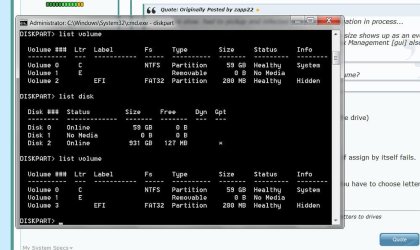
she says FAT32 however that is only part of the story as the size shows up as an even 200mb. what gets reflected under 'list disk', and is under Disk Management [gui] also is a size of 931GB
?
 

My Computer My Computer

At a glance

Windows XP Pro SP3, Windows 7 Pro 32-bit, Win...Pentium 4 3.2GHz, Pentium 4 3.4GHz 64bit, Atom,4GB matched, 1GB, 2.5GB, 4.0 GBGeforce 8400 GS and others
Computer Manufacturer/Model Number
HP DC7600, HP DC7600[2], HP DC7100, Samsung NC10
OS
Windows XP Pro SP3, Windows 7 Pro 32-bit, Windows 7 Ultimate 64bit, Windows XP Home SP3
CPU
Pentium 4 3.2GHz, Pentium 4 3.4GHz 64bit, Atom,
Motherboard
Dunno
Memory
4GB matched, 1GB, 2.5GB, 4.0 GB
Graphics Card(s)
Geforce 8400 GS and others
Sound Card
RealteK ALC260 and others
Monitor(s) Displays
Asus HD
Screen Resolution
1920x1080
Hard Drives
WD Caviar 640gb SATA
Cooling
We Be Cool
sorry to be slow. had to pickup and infected notebook - fumigation in process...

she says FAT32 however that is only part of the story as the size shows up as an even 200mb. what gets reflected under 'list disk', and is under Disk Management [gui] also is a size of 931GB
?

Does the 931 GB have a drive letter? What about the 200 MB volume?
 

My Computer My Computer

At a glance

Windows 7 Home Premium 64 BitIntel(R) Core(TM)2 Quad CPU Q9550 @ 2.83GHz6.00 GB Hundai HMT125U6BFR8C-H9ATI Radeon HD 4850
Computer Manufacturer/Model Number
HP Pavilion e9110t
OS
Windows 7 Home Premium 64 Bit
CPU
Intel(R) Core(TM)2 Quad CPU Q9550 @ 2.83GHz
Motherboard
Pegatron IPIEL-LA3
Memory
6.00 GB Hundai HMT125U6BFR8C-H9
Graphics Card(s)
ATI Radeon HD 4850
Sound Card
Realtek High Definition Audio/ATI High Definition Audio
Monitor(s) Displays
Acer AL2216W
Screen Resolution
1680x1050
Hard Drives
Hitachi HDP725050GLA360 ATA Device 500 GB
PSU
Unknown/installed by HP
Case
HP generic case
Cooling
Intel Stock Cooling
Keyboard
HP Keyboard
Mouse
HP Mouse
Internet Speed
Download: 19.15 Mbps Upload: 1.67 Mbps
Other Info
Network Adapter Realtek RTL8168D/8111D Family PCI-E Gigabit Ethernet NIC (NDIS 6.20)
Network Adapter 802.11n Wireless PCI Express Card LAN Adapter
Nope. neither.
why do they hate Fat volumes :roflmao:

sorry to be slow. had to pickup and infected notebook - fumigation in process...

she says FAT32 however that is only part of the story as the size shows up as an even 200mb. what gets reflected under 'list disk', and is under Disk Management [gui] also is a size of 931GB
?

Does the 931 GB have a drive letter? What about the 200 MB volume?
 

My Computer My Computer

At a glance

Windows XP Pro SP3, Windows 7 Pro 32-bit, Win...Pentium 4 3.2GHz, Pentium 4 3.4GHz 64bit, Atom,4GB matched, 1GB, 2.5GB, 4.0 GBGeforce 8400 GS and others
Computer Manufacturer/Model Number
HP DC7600, HP DC7600[2], HP DC7100, Samsung NC10
OS
Windows XP Pro SP3, Windows 7 Pro 32-bit, Windows 7 Ultimate 64bit, Windows XP Home SP3
CPU
Pentium 4 3.2GHz, Pentium 4 3.4GHz 64bit, Atom,
Motherboard
Dunno
Memory
4GB matched, 1GB, 2.5GB, 4.0 GB
Graphics Card(s)
Geforce 8400 GS and others
Sound Card
RealteK ALC260 and others
Monitor(s) Displays
Asus HD
Screen Resolution
1920x1080
Hard Drives
WD Caviar 640gb SATA
Cooling
We Be Cool
Nope. neither.
why do they hate Fat volumes :roflmao:

sorry to be slow. had to pickup and infected notebook - fumigation in process...

she says FAT32 however that is only part of the story as the size shows up as an even 200mb. what gets reflected under 'list disk', and is under Disk Management [gui] also is a size of 931GB
?

Does the 931 GB have a drive letter? What about the 200 MB volume?

Select each volume by using
select volume # (where # is the volume number associated with the drive)​
within diskpart. Then type
assign​
Alternatively, you can assign it a letter as follows and see if that works if assign by itself fails.
assign letter=Y​

Note: I used Y as that letter is likely not being used by another drive. You have to choose letters that are not already in use.

Does it assign letters to them now?
 
Last edited:

My Computer My Computer

At a glance

Windows 7 Home Premium 64 BitIntel(R) Core(TM)2 Quad CPU Q9550 @ 2.83GHz6.00 GB Hundai HMT125U6BFR8C-H9ATI Radeon HD 4850
Computer Manufacturer/Model Number
HP Pavilion e9110t
OS
Windows 7 Home Premium 64 Bit
CPU
Intel(R) Core(TM)2 Quad CPU Q9550 @ 2.83GHz
Motherboard
Pegatron IPIEL-LA3
Memory
6.00 GB Hundai HMT125U6BFR8C-H9
Graphics Card(s)
ATI Radeon HD 4850
Sound Card
Realtek High Definition Audio/ATI High Definition Audio
Monitor(s) Displays
Acer AL2216W
Screen Resolution
1680x1050
Hard Drives
Hitachi HDP725050GLA360 ATA Device 500 GB
PSU
Unknown/installed by HP
Case
HP generic case
Cooling
Intel Stock Cooling
Keyboard
HP Keyboard
Mouse
HP Mouse
Internet Speed
Download: 19.15 Mbps Upload: 1.67 Mbps
Other Info
Network Adapter Realtek RTL8168D/8111D Family PCI-E Gigabit Ethernet NIC (NDIS 6.20)
Network Adapter 802.11n Wireless PCI Express Card LAN Adapter

My Computer My Computer

At a glance

Windows 7 Home Premium 64 BitIntel(R) Core(TM)2 Quad CPU Q9550 @ 2.83GHz6.00 GB Hundai HMT125U6BFR8C-H9ATI Radeon HD 4850
Computer Manufacturer/Model Number
HP Pavilion e9110t
OS
Windows 7 Home Premium 64 Bit
CPU
Intel(R) Core(TM)2 Quad CPU Q9550 @ 2.83GHz
Motherboard
Pegatron IPIEL-LA3
Memory
6.00 GB Hundai HMT125U6BFR8C-H9
Graphics Card(s)
ATI Radeon HD 4850
Sound Card
Realtek High Definition Audio/ATI High Definition Audio
Monitor(s) Displays
Acer AL2216W
Screen Resolution
1680x1050
Hard Drives
Hitachi HDP725050GLA360 ATA Device 500 GB
PSU
Unknown/installed by HP
Case
HP generic case
Cooling
Intel Stock Cooling
Keyboard
HP Keyboard
Mouse
HP Mouse
Internet Speed
Download: 19.15 Mbps Upload: 1.67 Mbps
Other Info
Network Adapter Realtek RTL8168D/8111D Family PCI-E Gigabit Ethernet NIC (NDIS 6.20)
Network Adapter 802.11n Wireless PCI Express Card LAN Adapter
the issue is that 'list volume' does not see a volume associated with the bulk of the disk. see image attached

Nope. neither.
why do they hate Fat volumes :roflmao:

Does the 931 GB have a drive letter? What about the 200 MB volume?

Select each volume by using
select volume # (where # is the volume number associated with the drive)​
within diskpart. Then type
assign​
Alternatively, you can assign it a letter as follows and see if that works if assign by itself fails.
assign letter=Y​

Note: I used Y as that letter is likely not being used by another drive. You have to choose letters that are not already in use.

Does it assign letters to them now?
 

Attachments

  • diskpart.jpg
    diskpart.jpg
    68.7 KB · Views: 14

My Computer My Computer

At a glance

Windows XP Pro SP3, Windows 7 Pro 32-bit, Win...Pentium 4 3.2GHz, Pentium 4 3.4GHz 64bit, Atom,4GB matched, 1GB, 2.5GB, 4.0 GBGeforce 8400 GS and others
Computer Manufacturer/Model Number
HP DC7600, HP DC7600[2], HP DC7100, Samsung NC10
OS
Windows XP Pro SP3, Windows 7 Pro 32-bit, Windows 7 Ultimate 64bit, Windows XP Home SP3
CPU
Pentium 4 3.2GHz, Pentium 4 3.4GHz 64bit, Atom,
Motherboard
Dunno
Memory
4GB matched, 1GB, 2.5GB, 4.0 GB
Graphics Card(s)
Geforce 8400 GS and others
Sound Card
RealteK ALC260 and others
Monitor(s) Displays
Asus HD
Screen Resolution
1920x1080
Hard Drives
WD Caviar 640gb SATA
Cooling
We Be Cool
the issue is that 'list volume' does not see a volume associated with the bulk of the disk. see image attached

It is because of the GPT mark. Your volume is protected from being accessed. Is there any data on the disk that you do not want to lose?
 

My Computer My Computer

At a glance

Windows 7 Home Premium 64 BitIntel(R) Core(TM)2 Quad CPU Q9550 @ 2.83GHz6.00 GB Hundai HMT125U6BFR8C-H9ATI Radeon HD 4850
Computer Manufacturer/Model Number
HP Pavilion e9110t
OS
Windows 7 Home Premium 64 Bit
CPU
Intel(R) Core(TM)2 Quad CPU Q9550 @ 2.83GHz
Motherboard
Pegatron IPIEL-LA3
Memory
6.00 GB Hundai HMT125U6BFR8C-H9
Graphics Card(s)
ATI Radeon HD 4850
Sound Card
Realtek High Definition Audio/ATI High Definition Audio
Monitor(s) Displays
Acer AL2216W
Screen Resolution
1680x1050
Hard Drives
Hitachi HDP725050GLA360 ATA Device 500 GB
PSU
Unknown/installed by HP
Case
HP generic case
Cooling
Intel Stock Cooling
Keyboard
HP Keyboard
Mouse
HP Mouse
Internet Speed
Download: 19.15 Mbps Upload: 1.67 Mbps
Other Info
Network Adapter Realtek RTL8168D/8111D Family PCI-E Gigabit Ethernet NIC (NDIS 6.20)
Network Adapter 802.11n Wireless PCI Express Card LAN Adapter
yes, all of it. this is the backup.

what is the underlying cause?

the issue is that 'list volume' does not see a volume associated with the bulk of the disk. see image attached

It is because of the GPT mark. Your volume is protected from being accessed. Is there any data on the disk that you do not want to lose?
 

My Computer My Computer

At a glance

Windows XP Pro SP3, Windows 7 Pro 32-bit, Win...Pentium 4 3.2GHz, Pentium 4 3.4GHz 64bit, Atom,4GB matched, 1GB, 2.5GB, 4.0 GBGeforce 8400 GS and others
Computer Manufacturer/Model Number
HP DC7600, HP DC7600[2], HP DC7100, Samsung NC10
OS
Windows XP Pro SP3, Windows 7 Pro 32-bit, Windows 7 Ultimate 64bit, Windows XP Home SP3
CPU
Pentium 4 3.2GHz, Pentium 4 3.4GHz 64bit, Atom,
Motherboard
Dunno
Memory
4GB matched, 1GB, 2.5GB, 4.0 GB
Graphics Card(s)
Geforce 8400 GS and others
Sound Card
RealteK ALC260 and others
Monitor(s) Displays
Asus HD
Screen Resolution
1920x1080
Hard Drives
WD Caviar 640gb SATA
Cooling
We Be Cool
yes, all of it. this is the backup.

what is the underlying cause?

the issue is that 'list volume' does not see a volume associated with the bulk of the disk. see image attached

It is because of the GPT mark. Your volume is protected from being accessed. Is there any data on the disk that you do not want to lose?

I honestly do not know how it was changed from MBR to GPT without someone entering commands to do so... The only method I know to change back to MBR so you can access it in Windows is to use the Diskpart Clean command, but that will clear the partition table and you will lose your data.

Anyone else in these forums know a way to reclaim the drive without losing data?

I'll go try to seek you some help with this...
 
Last edited:

My Computer My Computer

At a glance

Windows 7 Home Premium 64 BitIntel(R) Core(TM)2 Quad CPU Q9550 @ 2.83GHz6.00 GB Hundai HMT125U6BFR8C-H9ATI Radeon HD 4850
Computer Manufacturer/Model Number
HP Pavilion e9110t
OS
Windows 7 Home Premium 64 Bit
CPU
Intel(R) Core(TM)2 Quad CPU Q9550 @ 2.83GHz
Motherboard
Pegatron IPIEL-LA3
Memory
6.00 GB Hundai HMT125U6BFR8C-H9
Graphics Card(s)
ATI Radeon HD 4850
Sound Card
Realtek High Definition Audio/ATI High Definition Audio
Monitor(s) Displays
Acer AL2216W
Screen Resolution
1680x1050
Hard Drives
Hitachi HDP725050GLA360 ATA Device 500 GB
PSU
Unknown/installed by HP
Case
HP generic case
Cooling
Intel Stock Cooling
Keyboard
HP Keyboard
Mouse
HP Mouse
Internet Speed
Download: 19.15 Mbps Upload: 1.67 Mbps
Other Info
Network Adapter Realtek RTL8168D/8111D Family PCI-E Gigabit Ethernet NIC (NDIS 6.20)
Network Adapter 802.11n Wireless PCI Express Card LAN Adapter
yes, all of it. this is the backup.

what is the underlying cause?

the issue is that 'list volume' does not see a volume associated with the bulk of the disk. see image attached

It is because of the GPT mark. Your volume is protected from being accessed. Is there any data on the disk that you do not want to lose?

Is this the backup of the data you recovered from your bad drive? If so, oiy! I assume you can access the drive in PartedMagic?
 

My Computer My Computer

At a glance

Windows 7 Home Premium 64 BitIntel(R) Core(TM)2 Quad CPU Q9550 @ 2.83GHz6.00 GB Hundai HMT125U6BFR8C-H9ATI Radeon HD 4850
Computer Manufacturer/Model Number
HP Pavilion e9110t
OS
Windows 7 Home Premium 64 Bit
CPU
Intel(R) Core(TM)2 Quad CPU Q9550 @ 2.83GHz
Motherboard
Pegatron IPIEL-LA3
Memory
6.00 GB Hundai HMT125U6BFR8C-H9
Graphics Card(s)
ATI Radeon HD 4850
Sound Card
Realtek High Definition Audio/ATI High Definition Audio
Monitor(s) Displays
Acer AL2216W
Screen Resolution
1680x1050
Hard Drives
Hitachi HDP725050GLA360 ATA Device 500 GB
PSU
Unknown/installed by HP
Case
HP generic case
Cooling
Intel Stock Cooling
Keyboard
HP Keyboard
Mouse
HP Mouse
Internet Speed
Download: 19.15 Mbps Upload: 1.67 Mbps
Other Info
Network Adapter Realtek RTL8168D/8111D Family PCI-E Gigabit Ethernet NIC (NDIS 6.20)
Network Adapter 802.11n Wireless PCI Express Card LAN Adapter
Back
Top