Failed to Connect to a windows service... Group Policy Client

Jaxel

New member
Local time
12:31 AM
Messages
22
Okay, I know other people have posted this same error; but my case is slightly different. In my case, this is a brand new computer I just built, just installed Windows 7 Home Premium. Have not installed any programs except the basic stuff like Chrome, Security Essentials, Windows Updates, Drivers, etc...

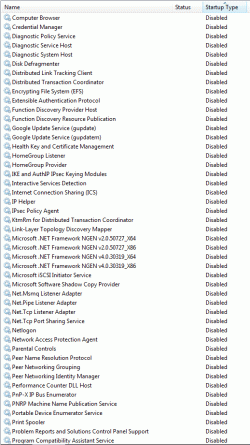
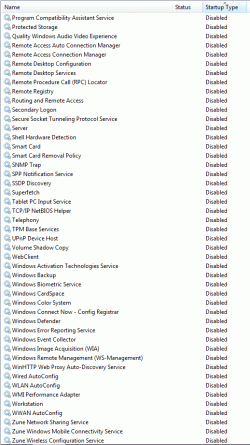
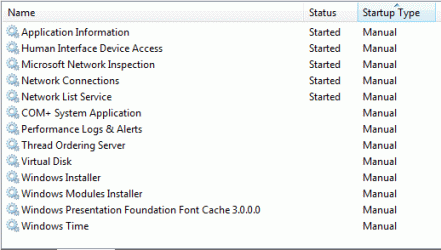
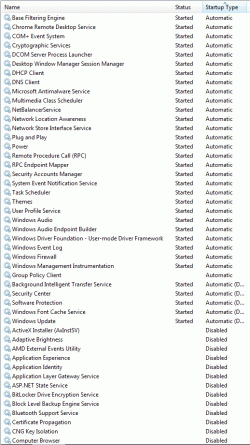
I am what I would consider myself a power user and I've done a TON of editing to my services. I've disabled pretty much everything that is non-essential. I am the ONLY user account on my computer, with administrator access. I've attached screenshots of my service settings because I have a feeling its related to something to do with that.

In my event logs I have 2 errors:
  • Error 7009, Service Control manager
    A timeout was reached (30000 milliseconds) while waiting for the Group Policy Client service to connect.
  • Error 7000, Service Control manager
    The Group Policy Client service failed to start due to the following error:
    The service did not respond to the start or control request in a timely fashion.

I have checked HKLM\Software\Microsoft\Windows NT\CurrentVersion\Winlogon\GPExtensions for the corresponding GUID of "555908d1-a6d7-4695-8e1e-26931d2012f4", but I can not find any references or keys to it in that folder.

I built two computers, the other computer doesn't have this issue.
 

Attachments
  • Untitled-1.gif
    Untitled-1.gif
    37.9 KB · Views: 69
  • Untitled-2.gif
    Untitled-2.gif
    37.9 KB · Views: 50
  • Untitled-3.gif
    Untitled-3.gif
    35 KB · Views: 32
  • Untitled-4.gif
    Untitled-4.gif
    13 KB · Views: 32

My Computer My Computer

At a glance

Windows 7 Home PremiumIntel Core i7-2600K Sandy Bridge 3.4GHzG.SKILL Ripjaws X Series 16GB (4 x 4GB) DDR3 ...HIS IceQ X Turbo Radeon HD 6950 2GB 256-bit GDDR
Computer Manufacturer/Model Number
Userbuilt
OS
Windows 7 Home Premium
CPU
Intel Core i7-2600K Sandy Bridge 3.4GHz
Motherboard
ASUS P8P67M-Pro REV3
Memory
G.SKILL Ripjaws X Series 16GB (4 x 4GB) DDR3 SDRAM
Graphics Card(s)
HIS IceQ X Turbo Radeon HD 6950 2GB 256-bit GDDR
Sound Card
Onboard Realtek HD Audio
Monitor(s) Displays
NEC MultiSync EA231WMi-B
Screen Resolution
1920 x 1080
Hard Drives
SAMSUNG 840 Pro Series 256GB SATA III MLC SSD
PSU
Thermaltake Black Widow 850W ATX
Case
LIAN LI PC-V354B Black MicroATX Mini Tower
Cooling
CORSAIR Hydro Series H80
Keyboard
Microsoft Natural Wireless Ergonomic Keyboard 7000
Mouse
Microsoft Natural Wireless Laser Mouse 7000
Internet Speed
http://www.speedtest.net/result/470816226.png
let it go Man...
wait SevenGuru teach you....
:rolleyes:
 

My Computer My Computer

At a glance

windows 7 ultimate x32My Mamma and My Pappa
OS
windows 7 ultimate x32
Memory
My Mamma and My Pappa
Huh?
 

My Computer My Computer

At a glance

Windows 7 Home PremiumIntel Core i7-2600K Sandy Bridge 3.4GHzG.SKILL Ripjaws X Series 16GB (4 x 4GB) DDR3 ...HIS IceQ X Turbo Radeon HD 6950 2GB 256-bit GDDR
Computer Manufacturer/Model Number
Userbuilt
OS
Windows 7 Home Premium
CPU
Intel Core i7-2600K Sandy Bridge 3.4GHz
Motherboard
ASUS P8P67M-Pro REV3
Memory
G.SKILL Ripjaws X Series 16GB (4 x 4GB) DDR3 SDRAM
Graphics Card(s)
HIS IceQ X Turbo Radeon HD 6950 2GB 256-bit GDDR
Sound Card
Onboard Realtek HD Audio
Monitor(s) Displays
NEC MultiSync EA231WMi-B
Screen Resolution
1920 x 1080
Hard Drives
SAMSUNG 840 Pro Series 256GB SATA III MLC SSD
PSU
Thermaltake Black Widow 850W ATX
Case
LIAN LI PC-V354B Black MicroATX Mini Tower
Cooling
CORSAIR Hydro Series H80
Keyboard
Microsoft Natural Wireless Ergonomic Keyboard 7000
Mouse
Microsoft Natural Wireless Laser Mouse 7000
Internet Speed
http://www.speedtest.net/result/470816226.png
My answer is simple. Do another clean install and then leave Windows Services alone. You will gain nothing mucking up Windows 7 Services.
 

My Computer My Computer

At a glance

Windows 10 Pro. 64/ version 1709 Windows 7 Pr...Intel i7-6800K @ 4.3Corsair Platinum 16 gig @2400EVGA GTX 1070 OC
Computer type
PC/Desktop
Computer Manufacturer/Model Number
Home made Desktop
OS
Windows 10 Pro. 64/ version 1709 Windows 7 Pro/64
CPU
Intel i7-6800K @ 4.3
Motherboard
ASUS X-99 Deluxe II
Memory
Corsair Platinum 16 gig @2400
Graphics Card(s)
EVGA GTX 1070 OC
Monitor(s) Displays
Asus 27" LED LCD/VE278Q
Screen Resolution
1920-1080 or 1280-720 HDMI
Hard Drives
INTEL SSD 730-240 Gb Sata 3.0/
PSU
EVGA Platium 1200W
Case
Phanteks Luxe Tempered Glass 8 fans/ one radiator
Cooling
XSPC/ Water Cooled CPU
Keyboard
Das 4 Professional
Mouse
Logitech M705/MX Anywhere 2-S
Internet Speed
100 mbits
Antivirus
Microsoft Security Essentials/ Malwarebytes Premium 3.0/ SAS
Browser
I.E. 11 default/Firefox/ ISP Time Warner Cable/Spectrum
Other Info
LG BluRay Burner/
Sound system-KLipsch-THX/
Icy Dock ssd Hot Swap bays.
My answer is simple. Do another clean install and then leave Windows Services alone. You will gain nothing mucking up Windows 7 Services.
Well I guess I can say thank you for the non-answer.
 

My Computer My Computer

At a glance

Windows 7 Home PremiumIntel Core i7-2600K Sandy Bridge 3.4GHzG.SKILL Ripjaws X Series 16GB (4 x 4GB) DDR3 ...HIS IceQ X Turbo Radeon HD 6950 2GB 256-bit GDDR
Computer Manufacturer/Model Number
Userbuilt
OS
Windows 7 Home Premium
CPU
Intel Core i7-2600K Sandy Bridge 3.4GHz
Motherboard
ASUS P8P67M-Pro REV3
Memory
G.SKILL Ripjaws X Series 16GB (4 x 4GB) DDR3 SDRAM
Graphics Card(s)
HIS IceQ X Turbo Radeon HD 6950 2GB 256-bit GDDR
Sound Card
Onboard Realtek HD Audio
Monitor(s) Displays
NEC MultiSync EA231WMi-B
Screen Resolution
1920 x 1080
Hard Drives
SAMSUNG 840 Pro Series 256GB SATA III MLC SSD
PSU
Thermaltake Black Widow 850W ATX
Case
LIAN LI PC-V354B Black MicroATX Mini Tower
Cooling
CORSAIR Hydro Series H80
Keyboard
Microsoft Natural Wireless Ergonomic Keyboard 7000
Mouse
Microsoft Natural Wireless Laser Mouse 7000
Internet Speed
http://www.speedtest.net/result/470816226.png
I don't give non answers. My answer is and was very clear. Windows 7 is not like XP, you don't need to do all those tweaks and on top of that Windows 7 doesn't want all those tweaks done. You will spend more time trying to undo things you did than just starting over and leave such things alone. No tune up programs, registry fixers and their is absolutely no gain in speed by messing with Windows 7 Services.
I have no idea what a power user is.
 

My Computer My Computer

At a glance

Windows 10 Pro. 64/ version 1709 Windows 7 Pr...Intel i7-6800K @ 4.3Corsair Platinum 16 gig @2400EVGA GTX 1070 OC
Computer type
PC/Desktop
Computer Manufacturer/Model Number
Home made Desktop
OS
Windows 10 Pro. 64/ version 1709 Windows 7 Pro/64
CPU
Intel i7-6800K @ 4.3
Motherboard
ASUS X-99 Deluxe II
Memory
Corsair Platinum 16 gig @2400
Graphics Card(s)
EVGA GTX 1070 OC
Monitor(s) Displays
Asus 27" LED LCD/VE278Q
Screen Resolution
1920-1080 or 1280-720 HDMI
Hard Drives
INTEL SSD 730-240 Gb Sata 3.0/
PSU
EVGA Platium 1200W
Case
Phanteks Luxe Tempered Glass 8 fans/ one radiator
Cooling
XSPC/ Water Cooled CPU
Keyboard
Das 4 Professional
Mouse
Logitech M705/MX Anywhere 2-S
Internet Speed
100 mbits
Antivirus
Microsoft Security Essentials/ Malwarebytes Premium 3.0/ SAS
Browser
I.E. 11 default/Firefox/ ISP Time Warner Cable/Spectrum
Other Info
LG BluRay Burner/
Sound system-KLipsch-THX/
Icy Dock ssd Hot Swap bays.
Agree with Jaxel

I agree with Jaxel. I'm suddenly having the same issue on initial boot-up, yet no other problems since I'm the only user account, and an administrator. One would think there's a quick-fix for this, though I'm currently baffled by it. I refuse to re-install Win7 or re-format, or delete my profile, etc. This should be a simple fix, but I've yet to figure it out. I've tried virtually all recommendations too... to no avail. An experienced user does not just "leave services alone." There is much to improve from a base/stock installation on a CPU/workstation. There are also various desires/requirements for each individual user. Modifying services and cleaning-up software, start-up programs, etc. is often essential.
 

My Computer My Computer

At a glance

Windows 7 Home Premium 64 bitAMD Athlon II x4 645 processor 3.10 GHz8.00 GBATI Radeon HD 4200 On-Board
Computer Manufacturer/Model Number
HP p7-1037c
OS
Windows 7 Home Premium 64 bit
CPU
AMD Athlon II x4 645 processor 3.10 GHz
Memory
8.00 GB
Graphics Card(s)
ATI Radeon HD 4200 On-Board
Sound Card
AMD HD Audio On-Board
Monitor(s) Displays
HP 2311 Wide LCD & Generic LCD (dual monitors)
Screen Resolution
1920 x 1080 & 1680 x 1050
Hard Drives
Hitachi HDS721010CLA332 SATA Disk Drive 1TB
Internet Speed
150Mbs (per Win7 network connection data)
I think this started happening on my machine after I disabled all the HP startup programs within the System Configuration startup tab. Clicked the startup button, bottom left circle in Win7, then typed msconfig (as usual). I want minimum startup programs running (and don't want all that HP junk). A future issue to modify is all the junk within Task Manager (automated tasks, etc.)...these should be minimized too.
 

My Computer My Computer

At a glance

Windows 7 Home Premium 64 bitAMD Athlon II x4 645 processor 3.10 GHz8.00 GBATI Radeon HD 4200 On-Board
Computer Manufacturer/Model Number
HP p7-1037c
OS
Windows 7 Home Premium 64 bit
CPU
AMD Athlon II x4 645 processor 3.10 GHz
Memory
8.00 GB
Graphics Card(s)
ATI Radeon HD 4200 On-Board
Sound Card
AMD HD Audio On-Board
Monitor(s) Displays
HP 2311 Wide LCD & Generic LCD (dual monitors)
Screen Resolution
1920 x 1080 & 1680 x 1050
Hard Drives
Hitachi HDS721010CLA332 SATA Disk Drive 1TB
Internet Speed
150Mbs (per Win7 network connection data)
Star Up Programs, HP Services or Start Up Programs from 3rd party programs and Services from 3rd parties is completely different from Windows 7 Services.
 

My Computer My Computer

At a glance

Windows 10 Pro. 64/ version 1709 Windows 7 Pr...Intel i7-6800K @ 4.3Corsair Platinum 16 gig @2400EVGA GTX 1070 OC
Computer type
PC/Desktop
Computer Manufacturer/Model Number
Home made Desktop
OS
Windows 10 Pro. 64/ version 1709 Windows 7 Pro/64
CPU
Intel i7-6800K @ 4.3
Motherboard
ASUS X-99 Deluxe II
Memory
Corsair Platinum 16 gig @2400
Graphics Card(s)
EVGA GTX 1070 OC
Monitor(s) Displays
Asus 27" LED LCD/VE278Q
Screen Resolution
1920-1080 or 1280-720 HDMI
Hard Drives
INTEL SSD 730-240 Gb Sata 3.0/
PSU
EVGA Platium 1200W
Case
Phanteks Luxe Tempered Glass 8 fans/ one radiator
Cooling
XSPC/ Water Cooled CPU
Keyboard
Das 4 Professional
Mouse
Logitech M705/MX Anywhere 2-S
Internet Speed
100 mbits
Antivirus
Microsoft Security Essentials/ Malwarebytes Premium 3.0/ SAS
Browser
I.E. 11 default/Firefox/ ISP Time Warner Cable/Spectrum
Other Info
LG BluRay Burner/
Sound system-KLipsch-THX/
Icy Dock ssd Hot Swap bays.
Reply

Not true. Right click on 'My Computer' then click on 'Manage' -- then select 'Services' -- On HP machines there are at least 3 "HP..." services listed. There are also other third-party programs which add their own custom 'services' in order to run or automate their programs (for instance 'Comodo' system clean-up program adds a service). Of course the administrator should be able to go-into services and enable or disable any of them, etc. In this particular case, the Group Policy Client service is not allowing anyong (even administrators) to adjust it's settings within services. I can send a screen-capture/snapshot of my services window, if desired.
 

My Computer My Computer

At a glance

Windows 7 Home Premium 64 bitAMD Athlon II x4 645 processor 3.10 GHz8.00 GBATI Radeon HD 4200 On-Board
Computer Manufacturer/Model Number
HP p7-1037c
OS
Windows 7 Home Premium 64 bit
CPU
AMD Athlon II x4 645 processor 3.10 GHz
Memory
8.00 GB
Graphics Card(s)
ATI Radeon HD 4200 On-Board
Sound Card
AMD HD Audio On-Board
Monitor(s) Displays
HP 2311 Wide LCD & Generic LCD (dual monitors)
Screen Resolution
1920 x 1080 & 1680 x 1050
Hard Drives
Hitachi HDS721010CLA332 SATA Disk Drive 1TB
Internet Speed
150Mbs (per Win7 network connection data)
I have never heard of a third party service that couldn't be turned on or off by a administrator. I have had some that I had to do from Safe Mode. My suggestion is concerning Windows 7 Services. I recommend leaving Windows 7 Services alone.
Have a nice day.
 

My Computer My Computer

At a glance

Windows 10 Pro. 64/ version 1709 Windows 7 Pr...Intel i7-6800K @ 4.3Corsair Platinum 16 gig @2400EVGA GTX 1070 OC
Computer type
PC/Desktop
Computer Manufacturer/Model Number
Home made Desktop
OS
Windows 10 Pro. 64/ version 1709 Windows 7 Pro/64
CPU
Intel i7-6800K @ 4.3
Motherboard
ASUS X-99 Deluxe II
Memory
Corsair Platinum 16 gig @2400
Graphics Card(s)
EVGA GTX 1070 OC
Monitor(s) Displays
Asus 27" LED LCD/VE278Q
Screen Resolution
1920-1080 or 1280-720 HDMI
Hard Drives
INTEL SSD 730-240 Gb Sata 3.0/
PSU
EVGA Platium 1200W
Case
Phanteks Luxe Tempered Glass 8 fans/ one radiator
Cooling
XSPC/ Water Cooled CPU
Keyboard
Das 4 Professional
Mouse
Logitech M705/MX Anywhere 2-S
Internet Speed
100 mbits
Antivirus
Microsoft Security Essentials/ Malwarebytes Premium 3.0/ SAS
Browser
I.E. 11 default/Firefox/ ISP Time Warner Cable/Spectrum
Other Info
LG BluRay Burner/
Sound system-KLipsch-THX/
Icy Dock ssd Hot Swap bays.
The only difference between my other computer and this computer is that my new computer has a Samsung 840 SSD... which starts up so fast that windows and all my startup programs are loaded before even my network controller has connected to the internet. It takes less than 12 seconds.

The interesting part is the error log says "A timeout was reached (30000 milliseconds) while waiting for the Group Policy Client service to connect"... but 30 seconds had not been reached. So I'm wondering if the issue is that my computer starts up TOO fast. And since users can not edit the state of GPC, maybe the computer starts up too fast and thus the state of GPC locks out before it can get up and running.
 

My Computer My Computer

At a glance

Windows 7 Home PremiumIntel Core i7-2600K Sandy Bridge 3.4GHzG.SKILL Ripjaws X Series 16GB (4 x 4GB) DDR3 ...HIS IceQ X Turbo Radeon HD 6950 2GB 256-bit GDDR
Computer Manufacturer/Model Number
Userbuilt
OS
Windows 7 Home Premium
CPU
Intel Core i7-2600K Sandy Bridge 3.4GHz
Motherboard
ASUS P8P67M-Pro REV3
Memory
G.SKILL Ripjaws X Series 16GB (4 x 4GB) DDR3 SDRAM
Graphics Card(s)
HIS IceQ X Turbo Radeon HD 6950 2GB 256-bit GDDR
Sound Card
Onboard Realtek HD Audio
Monitor(s) Displays
NEC MultiSync EA231WMi-B
Screen Resolution
1920 x 1080
Hard Drives
SAMSUNG 840 Pro Series 256GB SATA III MLC SSD
PSU
Thermaltake Black Widow 850W ATX
Case
LIAN LI PC-V354B Black MicroATX Mini Tower
Cooling
CORSAIR Hydro Series H80
Keyboard
Microsoft Natural Wireless Ergonomic Keyboard 7000
Mouse
Microsoft Natural Wireless Laser Mouse 7000
Internet Speed
http://www.speedtest.net/result/470816226.png
Bump. Anyone got any ideas?
 

My Computer My Computer

At a glance

Windows 7 Home PremiumIntel Core i7-2600K Sandy Bridge 3.4GHzG.SKILL Ripjaws X Series 16GB (4 x 4GB) DDR3 ...HIS IceQ X Turbo Radeon HD 6950 2GB 256-bit GDDR
Computer Manufacturer/Model Number
Userbuilt
OS
Windows 7 Home Premium
CPU
Intel Core i7-2600K Sandy Bridge 3.4GHz
Motherboard
ASUS P8P67M-Pro REV3
Memory
G.SKILL Ripjaws X Series 16GB (4 x 4GB) DDR3 SDRAM
Graphics Card(s)
HIS IceQ X Turbo Radeon HD 6950 2GB 256-bit GDDR
Sound Card
Onboard Realtek HD Audio
Monitor(s) Displays
NEC MultiSync EA231WMi-B
Screen Resolution
1920 x 1080
Hard Drives
SAMSUNG 840 Pro Series 256GB SATA III MLC SSD
PSU
Thermaltake Black Widow 850W ATX
Case
LIAN LI PC-V354B Black MicroATX Mini Tower
Cooling
CORSAIR Hydro Series H80
Keyboard
Microsoft Natural Wireless Ergonomic Keyboard 7000
Mouse
Microsoft Natural Wireless Laser Mouse 7000
Internet Speed
http://www.speedtest.net/result/470816226.png
Hi, I've had the same type of issue you do. Dont listen to all those wiseasses here - you dont have to do another system reinstall. I found the sollution which worked for me. Hope you didnt reinstall your system yet.
Well, even if you did, maybe this can help someone else.

- press win+r
- type regedit, hit enter
- go to: HKEY_LOCAL_MACHINE\SYSTEM\CurrentControlSet\services\gpsvc
- delete whole gpsvc folder
- download, run and hit yes: gpsvc.reg
- reboot your system


All credits go to narenxp from bleepingcomputer.com
Thank you!
 

My Computer My Computer

At a glance

win 7
OS
win 7
Must apologize in advance as I have limited skills in this area.
I'm experiencing group policy client error as described in this thread. The error started after installing windows updates.
Tried to apply the solution proposed by JFChrist but the OS doesn't let me delete the gpsvc registry. Access is denied as some files are opened or being used. Tried in safe mode but to no avail as well. Even tried to execute the gpsvc.reg without previously deleting the registry entry but the OS doesn't allow any changes to the registry. Can anybody help me, please? What must I do to delete gpsvc from registry?
P.S. - Yes, I have run gpsvc.reg as administrator. I've also reinstalled the OS but eventually the error came back after windows updates.
 

My Computer My Computer

At a glance

Windows 7 Ultimate x64
OS
Windows 7 Ultimate x64
Back
Top