
Solved Failed to connect to System Event Notification Service

Blackfang535

New member
Local time
6:00 PM
Messages
8
This Error popped up on my Screen today
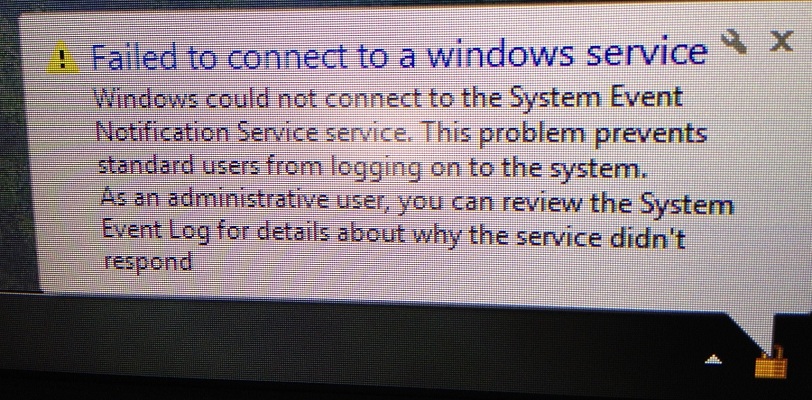
dhXjh.jpg


My Nvidia control panel, among other programs do not seem to start with windows any more ( i noticed this right away because my screen configuration had changed)
I have checked the service and all of its dependencies and all of them are working fine. a quick Google search yielded no fixes that worked for me and I'm stumped as how to solve this

Thanks In Advance

Garrett
 

My Computer My Computer

At a glance

Windows 7 Pro x64 Sp1Intel I7-3930K @ 4.3GHz & 1.35v16GB Corsair VengenceSLI EVGA Gtx 680 4gb Ftw
Computer type
PC/Desktop
Computer Manufacturer/Model Number
Custom Desktop
OS
Windows 7 Pro x64 Sp1
CPU
Intel I7-3930K @ 4.3GHz & 1.35v
Motherboard
Asus P9X79 Deluxe
Memory
16GB Corsair Vengence
Graphics Card(s)
SLI EVGA Gtx 680 4gb Ftw
Sound Card
Realtek Onboard 7.1
Monitor(s) Displays
3x Asus PA248Q 24"
Screen Resolution
3600*1920
Hard Drives
Crucial M4 128gb C400 SSD
Western Digital 1Tb Black
Western Digital 2Tb Green
PSU
Corsair HX 850
Case
Cooler Master HAF XM
Cooling
Corsiar H100i
Keyboard
Logitech G110
Mouse
Logitech G700
Internet Speed
15 Mbps
Antivirus
Avast Free
Browser
FireFox
Usually it's a driver or COM component that's causing this. What does your Application and System event log show you as warnings or errors?
 

My Computer My Computer

At a glance

Windows 10 Pro x64Intel Core i7 4790K @ 4.5GHz32GB DDR3Nvidia GeForce GTX970
Computer type
PC/Desktop
Computer Manufacturer/Model Number
Custom
OS
Windows 10 Pro x64
CPU
Intel Core i7 4790K @ 4.5GHz
Motherboard
Asus Maximus Hero VII
Memory
32GB DDR3
Graphics Card(s)
Nvidia GeForce GTX970
Sound Card
Realtek HD Audio
Screen Resolution
1920x1200
Hard Drives
1x Samsung 250GB SSD
4x WD RE 2TB (RAIDZ)
PSU
Corsair AX760i
Case
Fractal Design Define R4
Cooling
Noctua NH-D15
this is a freshly installed copy of windows, its only three days old. I installed all of the drivers from the manufacturer website, I have only installed Steam, iTunes, Avast, and origin.
This exact problem is sorta what pushed me to reload my system, that and it was getting sluggish. All my personal files and games are on a separate drive and a reinstall is not a big issue for me.
Below are the errors that i could find that have occurred since this error has popped up again, enjoy.

Errors That Occurs During or Shortly After start up

-Event filter with query "SELECT * FROM __InstanceModificationEvent WITHIN 60 WHERE TargetInstance ISA "Win32_Processor" AND TargetInstance.LoadPercentage > 99" could not be reactivated in namespace "//./root/CIMV2" because of error 0x80041003. Events cannot be delivered through this filter until the problem is corrected.

-The Windows Audio service hung on starting.

-The server {DCAB0989-1301-4319-BE5F-ADE89F88581C} did not register with DCOM within the required timeout.

This is a logged warning That occurs multiple times during startup

-The winlogon notification subscriber <GPClient> was unavailable to handle a critical notification event.

Nvidia Control Panel Error that logs Whenever i try to open it

-Faulting application name: nvcplui.exe, version: 4.4.730.0, time stamp: 0x4fb21569
Faulting module name: NVCPL.DLL, version: 8.17.13.142, time stamp: 0x4fb20590
Exception code: 0xc0000005
Fault offset: 0x0000000000059f17
Faulting process id: 0x1300
Faulting application start time: 0x01cd8be6a4fca74a
Faulting application path: C:\Program Files\NVIDIA Corporation\Control Panel Client\nvcplui.exe
Faulting module path: C:\Windows\system32\NVCPL.DLL
Report Id: 2b38b8f9-f7da-11e1-bf6c-0008ca272610

I am going to uninstall a couple of programs and reinstall some drivers, i hope its not hardware related because the system was just built a month ago

Thanks Again
 

My Computer My Computer

At a glance

Windows 7 Pro x64 Sp1Intel I7-3930K @ 4.3GHz & 1.35v16GB Corsair VengenceSLI EVGA Gtx 680 4gb Ftw
Computer type
PC/Desktop
Computer Manufacturer/Model Number
Custom Desktop
OS
Windows 7 Pro x64 Sp1
CPU
Intel I7-3930K @ 4.3GHz & 1.35v
Motherboard
Asus P9X79 Deluxe
Memory
16GB Corsair Vengence
Graphics Card(s)
SLI EVGA Gtx 680 4gb Ftw
Sound Card
Realtek Onboard 7.1
Monitor(s) Displays
3x Asus PA248Q 24"
Screen Resolution
3600*1920
Hard Drives
Crucial M4 128gb C400 SSD
Western Digital 1Tb Black
Western Digital 2Tb Green
PSU
Corsair HX 850
Case
Cooler Master HAF XM
Cooling
Corsiar H100i
Keyboard
Logitech G110
Mouse
Logitech G700
Internet Speed
15 Mbps
Antivirus
Avast Free
Browser
FireFox
The WMI error has been around since Vista, and is an easy fix:
http://support.microsoft.com/kb/2545227

The second error, the DCOM error (DCAB0989-1301-4319-BE5F-ADE89F88581C) is an NVidia service, so that would be driver related.

Given the other errors here, I'd install Windows but *don't install anything else* and see what sticks. I see you've got an NVidia video card, and the drivers for it are at least very possibly the root of your problems. Windows Update may install something (or Windows itself) during install, but don't attach it to a network or the internet if you reinstall, and see what you get there (keep WU from touching it during installation). Then, you can (one thing at a time, with at least 2 reboots between each component) layer things on. My money's still on the NVidia drivers though.
 

My Computer My Computer

At a glance

Windows 10 Pro x64Intel Core i7 4790K @ 4.5GHz32GB DDR3Nvidia GeForce GTX970
Computer type
PC/Desktop
Computer Manufacturer/Model Number
Custom
OS
Windows 10 Pro x64
CPU
Intel Core i7 4790K @ 4.5GHz
Motherboard
Asus Maximus Hero VII
Memory
32GB DDR3
Graphics Card(s)
Nvidia GeForce GTX970
Sound Card
Realtek HD Audio
Screen Resolution
1920x1200
Hard Drives
1x Samsung 250GB SSD
4x WD RE 2TB (RAIDZ)
PSU
Corsair AX760i
Case
Fractal Design Define R4
Cooling
Noctua NH-D15
ill work on reinstalling windows this weekend, and as you suggest slowly reinstall drivers and programs. ill post my results when and if this error graces me with its presence again

Thanks for the help
 

My Computer My Computer

At a glance

Windows 7 Pro x64 Sp1Intel I7-3930K @ 4.3GHz & 1.35v16GB Corsair VengenceSLI EVGA Gtx 680 4gb Ftw
Computer type
PC/Desktop
Computer Manufacturer/Model Number
Custom Desktop
OS
Windows 7 Pro x64 Sp1
CPU
Intel I7-3930K @ 4.3GHz & 1.35v
Motherboard
Asus P9X79 Deluxe
Memory
16GB Corsair Vengence
Graphics Card(s)
SLI EVGA Gtx 680 4gb Ftw
Sound Card
Realtek Onboard 7.1
Monitor(s) Displays
3x Asus PA248Q 24"
Screen Resolution
3600*1920
Hard Drives
Crucial M4 128gb C400 SSD
Western Digital 1Tb Black
Western Digital 2Tb Green
PSU
Corsair HX 850
Case
Cooler Master HAF XM
Cooling
Corsiar H100i
Keyboard
Logitech G110
Mouse
Logitech G700
Internet Speed
15 Mbps
Antivirus
Avast Free
Browser
FireFox
Q1. is this a custom build? Yes/No.
Q2. Is SP1 (service pack #1) installed? Yes/No.
Q3. Do you have a Win 7 DVD? Yes/No
Q4. The source of your Win 7 is _____________________?

Provide 4 answers.

You made a decent start on your system specs. This will enable you to thoroughly fill out your system specs:
Update your SevenForums System Specs
User CP (located on the top menu bar) |
Your Profile | Edit System Spec
(left-hand column)

To gather info, use Speccy (my favorite) or SIW or System Info

In the System Manufacturer Block, enter:
Ø Manufacturer and Model OR Custom build.
Ø ADD the word laptop, desktop, netbook or tablet.
For example:
Toshiba Satellite L305D notebook.

Provide full windows version info, for example:
MS Windows 7 Ultimate SP1 64-bit

Use the “Other Info” block for Optical Reader,
Mouse, touchpad, wifi adapter, speakers, monitor, etc

Scroll down and click on SAVE CHANGES.

With Speccy, you can select with your mouse/touchpad info from the display
and paste that info into your specs.

SIW is a marvelous program, but the free version does not offer
this capability.
 

My Computer My Computer

At a glance

MS Windows 7 Ultimate SP1 64-bitAMD A10-4600M6.00 GB Dual-Channel DDR3 @ 798MHz (11-11-12-28)AMD Radeon HD 7660G
Computer Manufacturer/Model Number
Toshiba Satellite S875D-S7239 laptop
OS
MS Windows 7 Ultimate SP1 64-bit
CPU
AMD A10-4600M
Motherboard
AMD Pumori (Socket FT1)
Memory
6.00 GB Dual-Channel DDR3 @ 798MHz (11-11-12-28)
Graphics Card(s)
AMD Radeon HD 7660G
Sound Card
High Definition Audio Device
Monitor(s) Displays
Generic PnP Monitor (1600x900@60Hz)
Screen Resolution
1600x900@60Hz
Hard Drives
SSD 119GB Corsair CSSD-V128GB2 ATA Device
Keyboard
Standard PS/2 Keyboard
Mouse
HP Wireless Optical Mobile Mouse Model FHA-3410
Internet Speed
What the local pub, local coffee shop offers.
Other Info
Optical Drive:MATSHITA BD-CMB UJ160B ATA Device


Also have an Asus ha1002xp netbook with Win 7 Ultimate installed.
Q1. is this a custom build? Yes/No.
Q2. Is SP1 (service pack #1) installed? Yes/No.
Q3. Do you have a Win 7 DVD? Yes/No
Q4. The source of your Win 7 is _____________________?

To answer your questions :
1. Yes
2. Yes
3. Yes, with SP1 on Disc
4. (if you mean, is it a legitimate copy) Yes, procured from NCIX.com

i have also added some more info to my system specs, i am at work right now and can't remember all of the details

this system ran for a few months with no issues, ran beautifully. destroyed every game i played across three screens. then all of the sudden that error popped up, nothing else changed, no new drivers or programs

this is why it has me stumped, I fell into a technician job at my local computer store and have seen a lot of strange stuff over the last year, but the fact that this showed up after a fresh install makes me wonder if its related to windows updates or failing hardware. ill continue with the windows reinstall this weekend and try to see when the error occurs

I'll keep you guys posted if i find out what the problem is/was
 

My Computer My Computer

At a glance

Windows 7 Pro x64 Sp1Intel I7-3930K @ 4.3GHz & 1.35v16GB Corsair VengenceSLI EVGA Gtx 680 4gb Ftw
Computer type
PC/Desktop
Computer Manufacturer/Model Number
Custom Desktop
OS
Windows 7 Pro x64 Sp1
CPU
Intel I7-3930K @ 4.3GHz & 1.35v
Motherboard
Asus P9X79 Deluxe
Memory
16GB Corsair Vengence
Graphics Card(s)
SLI EVGA Gtx 680 4gb Ftw
Sound Card
Realtek Onboard 7.1
Monitor(s) Displays
3x Asus PA248Q 24"
Screen Resolution
3600*1920
Hard Drives
Crucial M4 128gb C400 SSD
Western Digital 1Tb Black
Western Digital 2Tb Green
PSU
Corsair HX 850
Case
Cooler Master HAF XM
Cooling
Corsiar H100i
Keyboard
Logitech G110
Mouse
Logitech G700
Internet Speed
15 Mbps
Antivirus
Avast Free
Browser
FireFox
all answers good.

I have more questions, etc. but they can only be performed on your desktop.
 

My Computer My Computer

At a glance

MS Windows 7 Ultimate SP1 64-bitAMD A10-4600M6.00 GB Dual-Channel DDR3 @ 798MHz (11-11-12-28)AMD Radeon HD 7660G
Computer Manufacturer/Model Number
Toshiba Satellite S875D-S7239 laptop
OS
MS Windows 7 Ultimate SP1 64-bit
CPU
AMD A10-4600M
Motherboard
AMD Pumori (Socket FT1)
Memory
6.00 GB Dual-Channel DDR3 @ 798MHz (11-11-12-28)
Graphics Card(s)
AMD Radeon HD 7660G
Sound Card
High Definition Audio Device
Monitor(s) Displays
Generic PnP Monitor (1600x900@60Hz)
Screen Resolution
1600x900@60Hz
Hard Drives
SSD 119GB Corsair CSSD-V128GB2 ATA Device
Keyboard
Standard PS/2 Keyboard
Mouse
HP Wireless Optical Mobile Mouse Model FHA-3410
Internet Speed
What the local pub, local coffee shop offers.
Other Info
Optical Drive:MATSHITA BD-CMB UJ160B ATA Device


Also have an Asus ha1002xp netbook with Win 7 Ultimate installed.
So found out that my nvidia drivers wont uninstall properly, strange because i had been using these exact drivers from the beginning without any issue until this started

I am getting ready to reinstall windows, just downloading drivers for reinstall. if you want to ask any more questions now is the time
 

My Computer My Computer

At a glance

Windows 7 Pro x64 Sp1Intel I7-3930K @ 4.3GHz & 1.35v16GB Corsair VengenceSLI EVGA Gtx 680 4gb Ftw
Computer type
PC/Desktop
Computer Manufacturer/Model Number
Custom Desktop
OS
Windows 7 Pro x64 Sp1
CPU
Intel I7-3930K @ 4.3GHz & 1.35v
Motherboard
Asus P9X79 Deluxe
Memory
16GB Corsair Vengence
Graphics Card(s)
SLI EVGA Gtx 680 4gb Ftw
Sound Card
Realtek Onboard 7.1
Monitor(s) Displays
3x Asus PA248Q 24"
Screen Resolution
3600*1920
Hard Drives
Crucial M4 128gb C400 SSD
Western Digital 1Tb Black
Western Digital 2Tb Green
PSU
Corsair HX 850
Case
Cooler Master HAF XM
Cooling
Corsiar H100i
Keyboard
Logitech G110
Mouse
Logitech G700
Internet Speed
15 Mbps
Antivirus
Avast Free
Browser
FireFox
Why are you downloading any drivers? The only driver you might need to have on hand is for a WiFI or Ethernet connection, just in case, the Win 7 default driver doesn't do the job.

Remember: The installing of drivers started you into problems.

Win 7 is very smart. Install Win 7, then-without downloading and installing drivers-carry out the following:UPDATING YOUR WIN 7
1. ASSURE THAT YOU RECEIVE ALL UPDATES
WIN | type WINDOWS UPDATE | ENTER |
Change settings (left-hand column) |
checkmark all four of the boxes | OK
button

Approve any dialog boxes presented. Let Windows install any update features.

WIN is the key with the Microsoft flag on top.

2. INSTALL CRITICAL UPDATES
Check for Updates
(left-hand column)
Install ALL critical updates.
Restart your computer (even if not prompted)

Repeat this procedure until there are no more critical updates.

DO NOT TRUST the “Windows is up to date” in center of dialog. until you see that TWICE IN A ROW!

3. INSTALL IMPORTANT UPDATES
Use the “critical update” procedure until all important updates are installed.

4. INSTALL OPTIONAL UPDATES
Under Optional updates you will be presented with:
a) Microsoft Bing Desktop which is of questionable value
b) a list of about 34 language updates.

You can hide those updates so that aren't continually notified of those updates.
When you click on 34+ optional updates are available, then you
a) highlight all of the language updates,
b) right-click anywhere in the highlighted list.
c) click on Hide Updates,
d) OK button.
Install ALL other Optional Updates.
Use the “critical update” procedure.

UPDATE GOLDEN RULES

Install ALL, yes, ALL updates.
This is Win 7 and not Vista or XP (eXPired).

UPDATE IS HUNG –TAKING FOREVER
Hung is very doubtful unless you interrupted updates.

CTRL + SHIFT + ESC key combo will pop-up the Task Manager.
Lo and behold, Windows Update is still running!

You hold down the CTRL and SHIFT keys.
While holding them down, tap the ESC key once.
 

My Computer My Computer

At a glance

MS Windows 7 Ultimate SP1 64-bitAMD A10-4600M6.00 GB Dual-Channel DDR3 @ 798MHz (11-11-12-28)AMD Radeon HD 7660G
Computer Manufacturer/Model Number
Toshiba Satellite S875D-S7239 laptop
OS
MS Windows 7 Ultimate SP1 64-bit
CPU
AMD A10-4600M
Motherboard
AMD Pumori (Socket FT1)
Memory
6.00 GB Dual-Channel DDR3 @ 798MHz (11-11-12-28)
Graphics Card(s)
AMD Radeon HD 7660G
Sound Card
High Definition Audio Device
Monitor(s) Displays
Generic PnP Monitor (1600x900@60Hz)
Screen Resolution
1600x900@60Hz
Hard Drives
SSD 119GB Corsair CSSD-V128GB2 ATA Device
Keyboard
Standard PS/2 Keyboard
Mouse
HP Wireless Optical Mobile Mouse Model FHA-3410
Internet Speed
What the local pub, local coffee shop offers.
Other Info
Optical Drive:MATSHITA BD-CMB UJ160B ATA Device


Also have an Asus ha1002xp netbook with Win 7 Ultimate installed.
i know how important it is to let Windows update do its job, but Windows doesn't have 3/4 of the drivers for my motherboard( its the deluxe version, lots of gadgets and gizmos). i will do the reinstall now and get back to you once windows is back up and running

Thanks for the advice, see you on the other side
 

My Computer My Computer

At a glance

Windows 7 Pro x64 Sp1Intel I7-3930K @ 4.3GHz & 1.35v16GB Corsair VengenceSLI EVGA Gtx 680 4gb Ftw
Computer type
PC/Desktop
Computer Manufacturer/Model Number
Custom Desktop
OS
Windows 7 Pro x64 Sp1
CPU
Intel I7-3930K @ 4.3GHz & 1.35v
Motherboard
Asus P9X79 Deluxe
Memory
16GB Corsair Vengence
Graphics Card(s)
SLI EVGA Gtx 680 4gb Ftw
Sound Card
Realtek Onboard 7.1
Monitor(s) Displays
3x Asus PA248Q 24"
Screen Resolution
3600*1920
Hard Drives
Crucial M4 128gb C400 SSD
Western Digital 1Tb Black
Western Digital 2Tb Green
PSU
Corsair HX 850
Case
Cooler Master HAF XM
Cooling
Corsiar H100i
Keyboard
Logitech G110
Mouse
Logitech G700
Internet Speed
15 Mbps
Antivirus
Avast Free
Browser
FireFox
So...

I reinstalled windows, slowly went through driver updates, still good to go. created a system backup image and moved onto windows updates, once windows was updated and all was still good, created another backup. all that is left to do is get some programs installed.

i will leave this thread open for a while yet, just in case it reoccurs. if it does reoccur hopefully i can pinpoint it to a single event.

Thanks for your help guys
 
Last edited:

My Computer My Computer

At a glance

Windows 7 Pro x64 Sp1Intel I7-3930K @ 4.3GHz & 1.35v16GB Corsair VengenceSLI EVGA Gtx 680 4gb Ftw
Computer type
PC/Desktop
Computer Manufacturer/Model Number
Custom Desktop
OS
Windows 7 Pro x64 Sp1
CPU
Intel I7-3930K @ 4.3GHz & 1.35v
Motherboard
Asus P9X79 Deluxe
Memory
16GB Corsair Vengence
Graphics Card(s)
SLI EVGA Gtx 680 4gb Ftw
Sound Card
Realtek Onboard 7.1
Monitor(s) Displays
3x Asus PA248Q 24"
Screen Resolution
3600*1920
Hard Drives
Crucial M4 128gb C400 SSD
Western Digital 1Tb Black
Western Digital 2Tb Green
PSU
Corsair HX 850
Case
Cooler Master HAF XM
Cooling
Corsiar H100i
Keyboard
Logitech G110
Mouse
Logitech G700
Internet Speed
15 Mbps
Antivirus
Avast Free
Browser
FireFox
...this is going to sound ridiculous...

...but, it's the Audio service hang. This took me about two months to figure out. Try unplugging your computer speakers and rebooting. I think that'll (temporarily) solve your problem. It'll at least get you back to Aero, but I find that every couple of days I have to unplug/re-boot. No additional drivers necessary. No winsock reset...just unplug/re-boot.

Good luck!
 

My Computer My Computer

At a glance

Windows 7 64bitIntel(R) Core (TM) i5-2500k CPU16GbNvidia GeForce GTX 660
Computer type
PC/Desktop
Computer Manufacturer/Model Number
Velocity Micro
OS
Windows 7 64bit
CPU
Intel(R) Core (TM) i5-2500k CPU
Memory
16Gb
Graphics Card(s)
Nvidia GeForce GTX 660
Antivirus
Norton 360
Browser
Firefox
dadada
 

My Computer My Computer

At a glance

Win7 UltimateCeleron E1400 @ 2 gig dual core4 gig dual channelnVidia 6600LE 512mgs mem
Computer Manufacturer/Model Number
I made it
OS
Win7 Ultimate
CPU
Celeron E1400 @ 2 gig dual core
Motherboard
MSI MS-7529
Memory
4 gig dual channel
Graphics Card(s)
nVidia 6600LE 512mgs mem
Sound Card
On Board Realtek HD
Monitor(s) Displays
1 Sceptre Flat
Screen Resolution
I like 1280x800
Hard Drives
System Drive: 300 gig Maxtor SATA3 (It was cheap)

My Storage: 160 gig WD SATA3
Wife's Storage 160 gig WD SATA3
Keyboard
MS Dgital Media Pro
Mouse
MS Optical 3000
Internet Speed
1.5 DSL
i Guess I should have posted my fix here ages ago, but i forgot i had started this thread.

The issue was entirely caused by the audio drivers. about a month after the reload of windows i did back in September the issue reoccurred, since i had nothing to lose this time as i had my backup image. i just started uninstalling drivers, and after i uninstalled the realtek audio driver windows was able to start up normally and everything else was able to start up with it. After windows was functioning normally i was able to reinstall the audio drivers and the issue hasn't reoccurred since then.
 

My Computer My Computer

At a glance

Windows 7 Pro x64 Sp1Intel I7-3930K @ 4.3GHz & 1.35v16GB Corsair VengenceSLI EVGA Gtx 680 4gb Ftw
Computer type
PC/Desktop
Computer Manufacturer/Model Number
Custom Desktop
OS
Windows 7 Pro x64 Sp1
CPU
Intel I7-3930K @ 4.3GHz & 1.35v
Motherboard
Asus P9X79 Deluxe
Memory
16GB Corsair Vengence
Graphics Card(s)
SLI EVGA Gtx 680 4gb Ftw
Sound Card
Realtek Onboard 7.1
Monitor(s) Displays
3x Asus PA248Q 24"
Screen Resolution
3600*1920
Hard Drives
Crucial M4 128gb C400 SSD
Western Digital 1Tb Black
Western Digital 2Tb Green
PSU
Corsair HX 850
Case
Cooler Master HAF XM
Cooling
Corsiar H100i
Keyboard
Logitech G110
Mouse
Logitech G700
Internet Speed
15 Mbps
Antivirus
Avast Free
Browser
FireFox
Back
Top