failed to start file: \NST\NTLDR status: 0x000000f

JIMT

New member
Member
Local time
11:25 PM
Messages
26
I have installed a clone of my XP in a partition on my new Windows 7 64 bit laptop.
I went through this procedure EasyBCD many times. I have the dual boot show up but XP will not boot. It gives the error message
failed to start
file: \NST\NTLDR
status: 0x000000f
I did this
If you get Error loading Operating System after XP restarts:
  • Using your Windows 7 installation disc, boot to the command prompt at startup.
  • Type in these comands below, and press enter after each one.
    • bootrec /FixMbr
    • bootrec /FixBoot
    • bootrec /RebuildBcd
  • Exit the command prompt and restart the computer.
  • At this point, Windows 7 should boot up the same way before trying to install XP.
  • Continue to step 8 below and run EasyBCD from Windows 7 instead
It still will not boot xp.
Please help

Thank, JIMT
 

My Computer My Computer

At a glance

Windows 7 Home Premium 64bit
OS
Windows 7 Home Premium 64bit
Did you try using EasyBCD to add XP from Win7 to dual boot? If so, on Edit OS menu delete the XP entry, then Add it again on Add OS tab. It may offer boot files, accept to autocomplete, Save, Restart.

If this fails, post back a screenshot of your Win7 full Disk Management drive map and listings, using SNipping Tool in Start Menu.
 
Hello JIMT, welcome to Seven Forums!


I believe this is what Greg is referring to; be sure to post back with any further questions you may have and to keep us informed.

click to enlarge
EasyBCD.jpg
 

My Computer My Computer

At a glance

W 7 64-bit UltimateIntel Q9550 Yorkfield8GB Dominator 8500C5DATI : XFX 5870
Computer Manufacturer/Model Number
* BFK Customs *
OS
W 7 64-bit Ultimate
CPU
Intel Q9550 Yorkfield
Motherboard
ASUS P5Q Pro
Memory
8GB Dominator 8500C5D
Graphics Card(s)
ATI : XFX 5870
Sound Card
Realtek HD Audio 7-1
Monitor(s) Displays
1x 47" LCD HDMI & 3x 26" LCD HDMI
Screen Resolution
1920x1080P & 1920x1200
Hard Drives
1x 80GB Intel X25-M G2 SSD : 1x 500GB & 1x 640GB WD Caviar Black(s)
PSU
Corsair 620HX
Case
Cooler Master RC-690
Cooling
Tuniq Tower 120, 2x 140mm and 3x 120mm case fans
Keyboard
Microsoft 500
Mouse
Razer Diamondback 3G
Internet Speed
14 Mb/s
Other Info
1x Koutech 3Gb/s SATA HDD Hot Swap Rack
Thanks for getting back with me. I have two snips but I don't know how to attach them. Can you tell me how to do it.
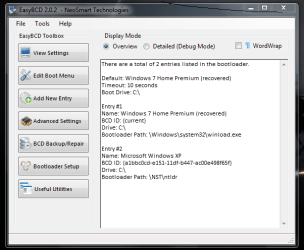
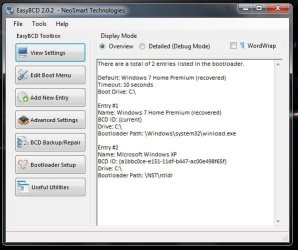
In the View Settings for XP is Drive C:\ Bootloader Path \NST\ntldr.
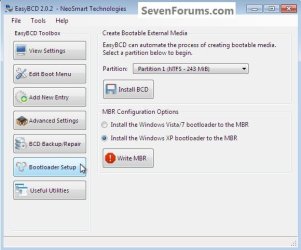
In the Bootloader Setup the selection is Windows Vista/7 bootloader to MBR.
If I Press the Write MBR then the computer will not boot and I have to use the Windows 7 disk to repair the operating system.
JIMT

moz-screenshot.png
Capturebcd.PNG
 

My Computer My Computer

At a glance

Windows 7 Home Premium 64bit
OS
Windows 7 Home Premium 64bit
My Computer My Computer

At a glance

W 7 64-bit UltimateIntel Q9550 Yorkfield8GB Dominator 8500C5DATI : XFX 5870
Computer Manufacturer/Model Number
* BFK Customs *
OS
W 7 64-bit Ultimate
CPU
Intel Q9550 Yorkfield
Motherboard
ASUS P5Q Pro
Memory
8GB Dominator 8500C5D
Graphics Card(s)
ATI : XFX 5870
Sound Card
Realtek HD Audio 7-1
Monitor(s) Displays
1x 47" LCD HDMI & 3x 26" LCD HDMI
Screen Resolution
1920x1080P & 1920x1200
Hard Drives
1x 80GB Intel X25-M G2 SSD : 1x 500GB & 1x 640GB WD Caviar Black(s)
PSU
Corsair 620HX
Case
Cooler Master RC-690
Cooling
Tuniq Tower 120, 2x 140mm and 3x 120mm case fans
Keyboard
Microsoft 500
Mouse
Razer Diamondback 3G
Internet Speed
14 Mb/s
Other Info
1x Koutech 3Gb/s SATA HDD Hot Swap Rack
Capturebcd.PNG

BOOTLOADER.JPG

Thank you for guide to attach snips.

In the View Settings for XP is Drive C:\ Bootloader Path \NST\ntldr. Windows search
says the file is in C: but it does not show in explorer.
In the Bootloader Setup the selection is Windows Vista/7 bootloader to MBR.
If I Press the Write MBR then the computer will not boot and I have to use the Windows 7 disk to repair the operating system.
JIMT
 

My Computer My Computer

At a glance

Windows 7 Home Premium 64bit
OS
Windows 7 Home Premium 64bit
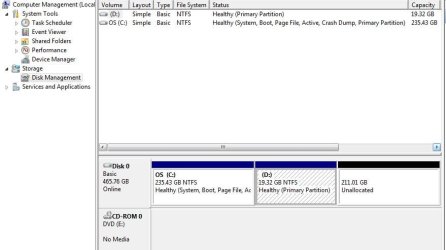
Need to see a Disk Management drive map and listings screenshot. Type Disk Management in Start Search box.

Not sure why you used the Write MBR option. You need to remove XP on Edit Boot menu tab and Add it again on Add OS tab.
 
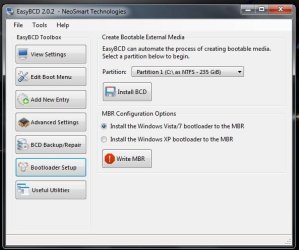
NEW BOOTLOADER.JPG

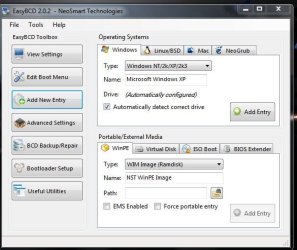
NEW OPERATING.JPG

NEW VIEW SETTING.JPG
I tried to boot after I made the changes and attachments. When I chose XP to boot a few seconds later I say a very brief flash of the XP screen. The problem may be in the XP os. I have the disk manage on the next e-mail.
 

My Computer My Computer

At a glance

Windows 7 Home Premium 64bit
OS
Windows 7 Home Premium 64bit
DISK MANAGE.JPG
 

My Computer My Computer

At a glance

Windows 7 Home Premium 64bit
OS
Windows 7 Home Premium 64bit
Gregrocker,
I have tried all of the above including installing an image of xp Pro. After reading a lot of information on Sevenforums I find that the very old software, orginally written in DOS, that I want on the laptop will not run on 64 bit.
Can I just reformat the drive and install the image of xp Pro 32 bit windows and xp work?

Thanks for all of the time and information you have done for me.

JIMT
 

My Computer My Computer

At a glance

Windows 7 Home Premium 64bit
OS
Windows 7 Home Premium 64bit
Did you delete XP in Edit Boot Menu tab, then add it again in Add New Entry tab?

Otherwise you may need to run a Repair Install of XP: Repair Windows XP - How to Perform a Repair Installation of Windows XP - Part 1 of 2

Afterwards you'll need to follow Method Two starting with Step 7 here:: http://www.sevenforums.com/tutorials/8057-dual-boot-installation-windows-7-xp.html

Please verify that you did indeed try to use EasyBCD "Edit Boot Menu" tab to delete XP and then add it back on the "Add OS" menu.

If you did that then follow the next step given above to restart XP by running a Repair Install. There is no reason to reinstall XP, if it will Repair Install it will keep your current install in place and start it up.

Then when you're ready add Win7 using the steps given above.
 
Yes I did delete XP and added XP in EasyBCD. I have reinstalled xp image twice and then an image of XP Pro. When I try to repair xp windows it get to just after installing SATA drivers and then stopped with "setup" on the screen. When I try the dual boot into XP it says windows did not load and then gives options of safe boot. During the boot Windows XP shows up on the screen for about 1 sec. and then goes back to the previous window. The purpose of buying the laptop was to replace an old dying xp laptop. The software that I run on the laptop is activated by a key that no longer works to transfer to an another computer. That is the reason for doing an image to capture the software and key and have them on a new computer.
 

My Computer My Computer

At a glance

Windows 7 Home Premium 64bit
OS
Windows 7 Home Premium 64bit
If you follow the steps to Repair XP in tutorial I posted above it shows you have to continue by selecting Setup until it discovers an Installation to Repair, then select R if that option is given. If it isn't, then XP is irreparable.

If it stalls during driver loading, then you may need to install your SATA controller driver at the F6 driver prompt during file loading, or slipstream it into the XP installer: http://www.sevenforums.com/tutorials/72185-sata-drivers-slipstream-into-windows-xp-cd.html?ltr=S XP is too old to have many SATA controller drivers in it's installer.

If this is a retail copy of XP you should be able to migrate it for life, or else call MS. If it came pre-installed on a machine already, then it can't be moved to other hardware anyway.
 
It is w XP that came with my old laptop.
Thanks for the help.
JIMT
 

My Computer My Computer

At a glance

Windows 7 Home Premium 64bit
OS
Windows 7 Home Premium 64bit
I have installed windows XP on a windows 7 desktop computer. This is not the laptop that you helped me. I gave on that one for now. The desktop set up dual boot successfully by following you instructions. Me new problem is that I can connect to the internet when in 7 but now when it is in XP. I have talked to the cable company and they were not able to solve the problem. In Network Connections shows that it is connected properly. The cable company reset the modem but that did not correct it. They think it must be some software issue with Windows XP. Can you give me a suggestion?
Thanks,
JIMT
 

My Computer My Computer

At a glance

Windows 7 Home Premium 64bit
OS
Windows 7 Home Premium 64bit
What is the Network adapter you are using? Does it have the latest driver?

Check Network Adapter listings in Device Manager and look for the latest driver on the computer maker's Support Downloads webpage. If you have a custom-built PC then look on the Network adapters Support Downloads webpage, by googling the maker of the adapter.

If there is a more recent one, download and install it as Admin.

If the driver is current, try Disabling then Enabling the network adapter in Control Panel>Network Connections.

Is this a wireless or Ethernet adapter? Have you installed the full software program for the adapter, or just the driver. Try both.
 
Hello again.


Have you installed the correct driver in XP for the internet setup?
 

My Computer My Computer

At a glance

W 7 64-bit UltimateIntel Q9550 Yorkfield8GB Dominator 8500C5DATI : XFX 5870
Computer Manufacturer/Model Number
* BFK Customs *
OS
W 7 64-bit Ultimate
CPU
Intel Q9550 Yorkfield
Motherboard
ASUS P5Q Pro
Memory
8GB Dominator 8500C5D
Graphics Card(s)
ATI : XFX 5870
Sound Card
Realtek HD Audio 7-1
Monitor(s) Displays
1x 47" LCD HDMI & 3x 26" LCD HDMI
Screen Resolution
1920x1080P & 1920x1200
Hard Drives
1x 80GB Intel X25-M G2 SSD : 1x 500GB & 1x 640GB WD Caviar Black(s)
PSU
Corsair 620HX
Case
Cooler Master RC-690
Cooling
Tuniq Tower 120, 2x 140mm and 3x 120mm case fans
Keyboard
Microsoft 500
Mouse
Razer Diamondback 3G
Internet Speed
14 Mb/s
Other Info
1x Koutech 3Gb/s SATA HDD Hot Swap Rack
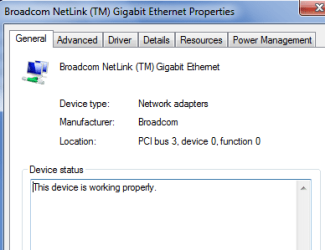
Computer is a Dell 580 with windows 7 Pro installed.

Dell 1.PNG

Dell 2.PNG

device.PNG

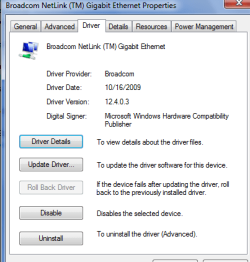
Driver.PNG

This is the information in Windows 7. I will get info from XP and put in next response.

Thanks,

JIMT
 

My Computer My Computer

At a glance

Windows 7 Home Premium 64bit
OS
Windows 7 Home Premium 64bit
When I've installed that Gigabit Ethernet driver in the past, it always says 10/100/1000 on the installed driver.

So I'd make sure I have the correct driver from the Dell Support Downloads webpage for your Tag number.
 
Back
Top