
You are using an out of date browser. It may not display this or other websites correctly.
You should upgrade or use an alternative browser.
You should upgrade or use an alternative browser.
failed to start file: \NST\NTLDR status: 0x000000f
- Thread starter JIMT
- Start date


- Local time
- 11:59 PM
- Messages
- 50,634
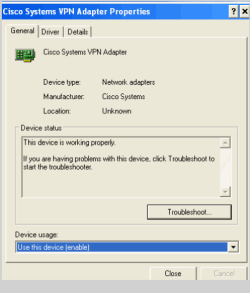
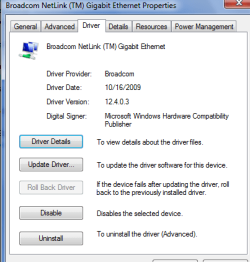
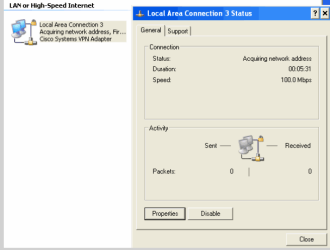
Are you running XP virtually from within Win7? I'm not sure why you have a VPN adapter as the enabled network adapter, which is stuck at trying to acquire a network address.
Is the XP driver for your Gigabit ethernet adapter installed from the Dell Support Downloads webpage for your Dell Model's Tag number? Install and enable it.
Is the XP driver for your Gigabit ethernet adapter installed from the Dell Support Downloads webpage for your Dell Model's Tag number? Install and enable it.
Greg,
I posted a reply but it does not show here. I am not running virtual XP.
The Dell 580 came with windows 7. I connected a new hard drive with Windows XP Home and other data on it. I install dual boot by your instructions and the dual boot works and both versions of windows work fine. I down loaded up dated drivers package from Microsoft for XP and installed them. I am trying to determine what the Gigabit driver is the correct one to load.
JIMT
I posted a reply but it does not show here. I am not running virtual XP.
The Dell 580 came with windows 7. I connected a new hard drive with Windows XP Home and other data on it. I install dual boot by your instructions and the dual boot works and both versions of windows work fine. I down loaded up dated drivers package from Microsoft for XP and installed them. I am trying to determine what the Gigabit driver is the correct one to load.
JIMT
My Computer
At a glance
Windows 7 Home Premium 64bit
- OS
- Windows 7 Home Premium 64bit
- Local time
- 11:59 PM
- Messages
- 50,634
Go to the Dell Support Downloads webpage: Dell - Drivers and Downloads
Put in the Service Tag number off of your Dell sticker on computer.
Use the dropdown menu to choose XP drivers. Scroll down to Network or Ethernet drivers, download the one for XP to CD or flash stick.
Install it to Dell by rightclicking application to Run as Administrator. Sometimes it will only extract the driver installer to a Dell file in the root of C: drive. If so, look in there for application to run, rightclick to Run as Admin.
Let us know if you need any further help.
Put in the Service Tag number off of your Dell sticker on computer.
Use the dropdown menu to choose XP drivers. Scroll down to Network or Ethernet drivers, download the one for XP to CD or flash stick.
Install it to Dell by rightclicking application to Run as Administrator. Sometimes it will only extract the driver installer to a Dell file in the root of C: drive. If so, look in there for application to run, rightclick to Run as Admin.
Let us know if you need any further help.
Greg,
I went to Dell support, entered tag # and chose the drivers and downloads but there is no XP drivers. It just shows drivers home and drivers support. Clicked each and no XP drivers only Windows 7 64bit. Scrolled down to Support by topic and clicked Windows XP and still no XP drivers only Windows 7 64bit. I am trying different Dell models to get one with W XP.I will get back with you if it works.
I am sorry that you have spent so much on my problems.
I am giving this one last try and then my daughter in law will be using Windows 7.
Thank you for all of your help.
JIMT
I went to Dell support, entered tag # and chose the drivers and downloads but there is no XP drivers. It just shows drivers home and drivers support. Clicked each and no XP drivers only Windows 7 64bit. Scrolled down to Support by topic and clicked Windows XP and still no XP drivers only Windows 7 64bit. I am trying different Dell models to get one with W XP.I will get back with you if it works.
I am sorry that you have spent so much on my problems.
I am giving this one last try and then my daughter in law will be using Windows 7.
Thank you for all of your help.
JIMT
My Computer
At a glance
Windows 7 Home Premium 64bit
- OS
- Windows 7 Home Premium 64bit
I tried a different Dell models with W XP and downloaded and installed a network driver. It did not work.
I am sorry that you have spent so much on my problems.
My daughter in law will be using Windows 7.
Thanks you for all of your help.
JIMT
I am sorry that you have spent so much on my problems.
My daughter in law will be using Windows 7.
Thanks you for all of your help.
JIMT
My Computer
At a glance
Windows 7 Home Premium 64bit
- OS
- Windows 7 Home Premium 64bit
- Local time
- 11:59 PM
- Messages
- 50,634
Maybe this Dell is so new it only has 64 bit Win7 drivers. Did you use the dropdown menu to choose an OS? If you report back your Dell tag number I can check with certainty.
If there are no Dell XP drivers for the Gigabit ethernet adapter, then the next step is to Google the exact name of the ethernet adapter + XP driver to find a download for the driver.
If the Device Manager listing for the Ethernet adapter doesn't give you enough information to determine which exact XP driver it uses via Google, then follow these steps to get the exact Gigabit hardware ID to find the driver: http://www.sevenforums.com/tutorials/73420-hardware-identification.html
If you have a wireless adapter to plug in temporarily, you can also search Windows Updates for the driver on the Driver Update tab>Search automatically.
You can also have Device manager>Ethernet adapter>Driver Update> browse for Drivers, then browse to your Win7 partition>Windows>System32>Drivers and >Driverstore files to see if the drivers stored there will be picked up and work.
Ask back if you need any further help. This is a process of trial and error which should suceed unless the Gigabit adapter is so new it isn't backwards compatible with XP.
If there are no Dell XP drivers for the Gigabit ethernet adapter, then the next step is to Google the exact name of the ethernet adapter + XP driver to find a download for the driver.
If the Device Manager listing for the Ethernet adapter doesn't give you enough information to determine which exact XP driver it uses via Google, then follow these steps to get the exact Gigabit hardware ID to find the driver: http://www.sevenforums.com/tutorials/73420-hardware-identification.html
If you have a wireless adapter to plug in temporarily, you can also search Windows Updates for the driver on the Driver Update tab>Search automatically.
You can also have Device manager>Ethernet adapter>Driver Update> browse for Drivers, then browse to your Win7 partition>Windows>System32>Drivers and >Driverstore files to see if the drivers stored there will be picked up and work.
Ask back if you need any further help. This is a process of trial and error which should suceed unless the Gigabit adapter is so new it isn't backwards compatible with XP.
In review, The Dell 580 came with windows 7. I connected a new hard drive with Windows XP Home and other data on it. I install dual boot by your instructions and the dual boot works and both versions of windows work fine. The tag # is 287ZKN1 This is snip is of the network adapter and the driver when in windows 7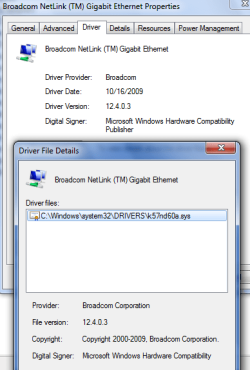 . As you can see in Permalink 21 the same snips in XP do not show the same network adapter and no driver. It seems to me that XP is not activating the network adapter and not sending the driver to the network adapter. The network adapter is the same for both XP and 7 since the network cable is plugged into the same hole and is never disconnected. I have copied the drivers from my own XP desktop and copied them to the same location in the Dell in XP. The snip of W 7 adapter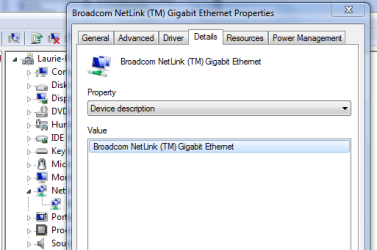
Thanks,
JIMT
. As you can see in Permalink 21 the same snips in XP do not show the same network adapter and no driver. It seems to me that XP is not activating the network adapter and not sending the driver to the network adapter. The network adapter is the same for both XP and 7 since the network cable is plugged into the same hole and is never disconnected. I have copied the drivers from my own XP desktop and copied them to the same location in the Dell in XP. The snip of W 7 adapter Thanks,
JIMT
My Computer
At a glance
Windows 7 Home Premium 64bit
- OS
- Windows 7 Home Premium 64bit
- Local time
- 11:59 PM
- Messages
- 50,634
There should be a different XP driver for that Broadcom Netlink adapter than for Win7.
Win7 only comes with that Dell Inspiron 580 desktop in 64 bit, so if your XP is 32 bit you'll have to try the Vista 32 bit driver from the Driver Downloads page: http://support.dell.com/support/dow...1&SystemID=INSP_DSKTP_580&TabIndex=&typeid=-1
Only 64 bit Win7 and 32 bit Vista are supported on that model.
If XP is 32 bit and the Vista driver doesn't work when installed, you'll need to figure out which Broadcom Netlink XP driver it uses from the webpage here. Since it doesn't say which 57xx model it is, I'd try to determine it using the tutorial I listed to parse the Hardware ID, or just try the 3 different XP drivers given for Netlink models: http://www.broadcom.com/support/ethernet_nic/downloaddrivers.php
Win7 only comes with that Dell Inspiron 580 desktop in 64 bit, so if your XP is 32 bit you'll have to try the Vista 32 bit driver from the Driver Downloads page: http://support.dell.com/support/dow...1&SystemID=INSP_DSKTP_580&TabIndex=&typeid=-1
Only 64 bit Win7 and 32 bit Vista are supported on that model.
If XP is 32 bit and the Vista driver doesn't work when installed, you'll need to figure out which Broadcom Netlink XP driver it uses from the webpage here. Since it doesn't say which 57xx model it is, I'd try to determine it using the tutorial I listed to parse the Hardware ID, or just try the 3 different XP drivers given for Netlink models: http://www.broadcom.com/support/ethernet_nic/downloaddrivers.php
Last edited:
Greg,
Success!!!!!!!!!!
I downloaded the Desktop System Software and the Vista driver from Dell, they would not run in Windows 7 but did run in XP. XP connected to the internet on the first try. I then connected to the internet in Windows 7 just to make sure.
Thank you very much. What is SevenFourums, is it a company or just a bunch of people helping everyone?
JIMT
Success!!!!!!!!!!
I downloaded the Desktop System Software and the Vista driver from Dell, they would not run in Windows 7 but did run in XP. XP connected to the internet on the first try. I then connected to the internet in Windows 7 just to make sure.
Thank you very much. What is SevenFourums, is it a company or just a bunch of people helping everyone?
JIMT
My Computer
At a glance
Windows 7 Home Premium 64bit
- OS
- Windows 7 Home Premium 64bit

Greg,
Success!!!!!!!!!!
I downloaded the Desktop System Software and the Vista driver from Dell, they would not run in Windows 7 but did run in XP. XP connected to the internet on the first try. I then connected to the internet in Windows 7 just to make sure.
Thank you very much. What is SevenFourums, is it a company or just a bunch of people helping everyone?
JIMT
Good to see you got it running and thanks for the update; just a bunch of people that give their time to help others.
My Computer
At a glance
W 7 64-bit UltimateIntel Q9550 Yorkfield8GB Dominator 8500C5DATI : XFX 5870
- Computer Manufacturer/Model Number
- * BFK Customs *
- OS
- W 7 64-bit Ultimate
- CPU
- Intel Q9550 Yorkfield
- Motherboard
- ASUS P5Q Pro
- Memory
- 8GB Dominator 8500C5D
- Graphics Card(s)
- ATI : XFX 5870
- Sound Card
- Realtek HD Audio 7-1
- Monitor(s) Displays
- 1x 47" LCD HDMI & 3x 26" LCD HDMI
- Screen Resolution
- 1920x1080P & 1920x1200
- Hard Drives
- 1x 80GB Intel X25-M G2 SSD : 1x 500GB & 1x 640GB WD Caviar Black(s)
- PSU
- Corsair 620HX
- Case
- Cooler Master RC-690
- Cooling
- Tuniq Tower 120, 2x 140mm and 3x 120mm case fans
- Keyboard
- Microsoft 500
- Mouse
- Razer Diamondback 3G
- Internet Speed
- 14 Mb/s
- Other Info
- 1x Koutech 3Gb/s SATA HDD Hot Swap Rack
- Local time
- 11:59 PM
- Messages
- 50,634
Jim -
Really glad to hear it.
You may now get newer drivers via Windows Updates once it scans that and other devices.
Always check your optional Windows Updates for this reason.
Really glad to hear it.
You may now get newer drivers via Windows Updates once it scans that and other devices.
Always check your optional Windows Updates for this reason.