Failing to install Windows7 on Z390 mobo

InterFC

New member
Local time
5:36 AM
Messages
8
Hello everyone,

I have been trying to install Windows7 on my secondary SSD but I'm having issues.

Until 2 days ago, my motherboard was a Asus Prime z370-A and I had no problems installing and using Windows7 as second OS (my main OS is Windows10)

I then had to change motherboard because the z370 had issues and I bought a z390. Now i can not seem to be able to install Windows7 anymore.

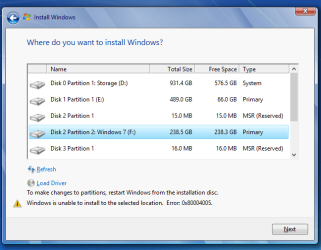
If I try to install Win7 on my 2nd empty SSD (properly formatted using Diskgenius) from Win10 emulating a disk, I receive this error (it was always working before i changed mobo):

Screenshot by Lightshot

If i try installing Windows7 using a USB boot pendrive, the installer will not launch. The bios does detect the pendrive, but it will ignore it even though it's set as primary boot.

Do you have any idea how to fix this?

I understand the z390 does not support Win7, but the worst case scenario would be not having certain drivers. I should still be able to install Win7.

Thanks!!
 

My Computer My Computer

At a glance

Windows 7 64 bit8700k16 GB 3000 MHZ
Computer type
PC/Desktop
OS
Windows 7 64 bit
CPU
8700k
Motherboard
Asus PRIME Z390-A
Memory
16 GB 3000 MHZ
Welcome to the Forum.

Witch brand and model is your z390 MB? Please edit your profile with ALL your hardware specs.
Please don't use external links. Use the paper clip, browse to the file on your computer - upload.

How did you install Win 7 on the z370? Did you install from Win 10?
I'm not sure if you can install Win 7 on a Z390.

First rule to do a fresh install is to detach ALL other disks from the MB or you may end with the boot loader on one disk and Windows on another disk.

- New MBs, as a Z390, comes with the default to install Win 10. So you must set BIOS and disable Secure boot and fast boot.
- You can install as Legacy - MBR or EFI - GPT. On my computer I choose to install as EFI - GPT.
- How did you made the USB boot pendrive? Did you use Rufus?
- Did you added the Z390 SATA and USB3.x drivers to the installation disk?
 
Last edited:

My Computers My Computers

  • At a glance

    Windows 7 HP 64i5 6600K - 800MHz to 4200MHz4+4G GSkill DDR4 3000IG - Intel 530
    Computer type
    PC/Desktop
    Computer Manufacturer/Model Number
    custom build
    OS
    Windows 7 HP 64
    CPU
    i5 6600K - 800MHz to 4200MHz
    Motherboard
    GA-Z170-HD3P
    Memory
    4+4G GSkill DDR4 3000
    Graphics Card(s)
    IG - Intel 530
    Monitor(s) Displays
    Samsung 226BW
    Screen Resolution
    1680x1050
    Hard Drives
    (1) -1 SM951 – 128GB M.2 AHCI PCIe SSD drive for Windows 7 and Lubuntu
    (2) -1 WD SATA 3 - 1T for Data
    (3) -1 WD SATA 3 - 1T for backup
    PSU
    Thermaltake 450W TR2 gold
    Keyboard
    Old and good Chicony mechanical keyboard
    Mouse
    Logitech mX performance - 9 buttons (had to disable some)
    Internet Speed
    500Mb/s
    Browser
    Firefox 64
    Other Info
    TinyWall firewall
  • At a glance

    Windows 7 Proi7-4500U 800MHz to 3.0GHz(4+4)G DDR3 1600IG intel 4400 + NVIDIA GeForce GT 745M
    Computer type
    Laptop
    System Manufacturer/Model Number
    Asus Q550LF
    OS
    Windows 7 Pro
    CPU
    i7-4500U 800MHz to 3.0GHz
    Motherboard
    Asus Q550LF
    Memory
    (4+4)G DDR3 1600
    Graphics Card(s)
    IG intel 4400 + NVIDIA GeForce GT 745M
    Sound Card
    Realtek
    Monitor(s) Displays
    LG Display LP156WF4-SPH1
    Screen Resolution
    1920 x 1080
    Hard Drives
    BX500 120G SSD for Windows and programs +
    1T HDD for data
    Internet Speed
    500 Mb/s
    Browser
    Firefox
    Other Info
    TinyWall firewall

Attachments

  • download.png
    download.png
    26.2 KB · Views: 82

My Computer My Computer

At a glance

Windows 7 64 bit8700k16 GB 3000 MHZ
Computer type
PC/Desktop
OS
Windows 7 64 bit
CPU
8700k
Motherboard
Asus PRIME Z390-A
Memory
16 GB 3000 MHZ
The easiest way to transition a boot drive from a z370 board to a z390 board is change the disk controller driver to the generic "standard ahci 1.1 driver" while still using the z370 board, then just swap boards. Windows will boot on the new board but will not be able to use the usb ports natively, as you probably know already since it is also true of z370

If that ship has sailed and you have no choice but to do a fresh install you are correct, win7 should at least install on the board. Have you disabled secureboot in bios and also enabled CSM in bios?
 

My Computer My Computer

At a glance

Win7 pro x64stock i7 7700kCorsair Vengeance LPX 16GB (2x8GB) DDR4 @ 320...integrated Intel HD 630
Computer type
PC/Desktop
Computer Manufacturer/Model Number
diy
OS
Win7 pro x64
CPU
stock i7 7700k
Motherboard
Gigabyte Z270N-WIFI mini-ITX
Memory
Corsair Vengeance LPX 16GB (2x8GB) DDR4 @ 3200MHz
Graphics Card(s)
integrated Intel HD 630
Sound Card
onboard Realtek ALC1220
Monitor(s) Displays
two vertically mounted samsung 55" 4k un55mu8000
Screen Resolution
1920x1280
Hard Drives
256GB Samsung EVO 960 M.2 pci-e NVMe SSD
PSU
SilverStone Nightjar ST45NF 450Watt Fanless
Case
No case. Motherboard is mounted directly onto power supply
Cooling
Evercool low profile 815EP with Panaflow 12L fan at 7v
Keyboard
Ortek MCK-86 mini
Mouse
Belkin 5-button USB
Internet Speed
spectrum 400mbps
Please don't use external links. Use the paper clip, browse to the file on your computer - upload.
 

My Computers My Computers

  • At a glance

    Windows 7 HP 64i5 6600K - 800MHz to 4200MHz4+4G GSkill DDR4 3000IG - Intel 530
    Computer type
    PC/Desktop
    Computer Manufacturer/Model Number
    custom build
    OS
    Windows 7 HP 64
    CPU
    i5 6600K - 800MHz to 4200MHz
    Motherboard
    GA-Z170-HD3P
    Memory
    4+4G GSkill DDR4 3000
    Graphics Card(s)
    IG - Intel 530
    Monitor(s) Displays
    Samsung 226BW
    Screen Resolution
    1680x1050
    Hard Drives
    (1) -1 SM951 – 128GB M.2 AHCI PCIe SSD drive for Windows 7 and Lubuntu
    (2) -1 WD SATA 3 - 1T for Data
    (3) -1 WD SATA 3 - 1T for backup
    PSU
    Thermaltake 450W TR2 gold
    Keyboard
    Old and good Chicony mechanical keyboard
    Mouse
    Logitech mX performance - 9 buttons (had to disable some)
    Internet Speed
    500Mb/s
    Browser
    Firefox 64
    Other Info
    TinyWall firewall
  • At a glance

    Windows 7 Proi7-4500U 800MHz to 3.0GHz(4+4)G DDR3 1600IG intel 4400 + NVIDIA GeForce GT 745M
    Computer type
    Laptop
    System Manufacturer/Model Number
    Asus Q550LF
    OS
    Windows 7 Pro
    CPU
    i7-4500U 800MHz to 3.0GHz
    Motherboard
    Asus Q550LF
    Memory
    (4+4)G DDR3 1600
    Graphics Card(s)
    IG intel 4400 + NVIDIA GeForce GT 745M
    Sound Card
    Realtek
    Monitor(s) Displays
    LG Display LP156WF4-SPH1
    Screen Resolution
    1920 x 1080
    Hard Drives
    BX500 120G SSD for Windows and programs +
    1T HDD for data
    Internet Speed
    500 Mb/s
    Browser
    Firefox
    Other Info
    TinyWall firewall
The easiest way to transition a boot drive from a z370 board to a z390 board is change the disk controller driver to the generic "standard ahci 1.1 driver" while still using the z370 board, then just swap boards. Windows will boot on the new board but will not be able to use the usb ports natively, as you probably know already since it is also true of z370

If that ship has sailed and you have no choice but to do a fresh install you are correct, win7 should at least install on the board. Have you disabled secureboot in bios and also enabled CSM in bios?

Thank you a lot!

I enabled CSM and now the Windows installation starts up.

I'm going to need to get a PS2 mouse now so that i can start the installation and hopefully once Windows is installed i'll be able to install the USB3 drivers that i found.
 

My Computer My Computer

At a glance

Windows 7 64 bit8700k16 GB 3000 MHZ
Computer type
PC/Desktop
OS
Windows 7 64 bit
CPU
8700k
Motherboard
Asus PRIME Z390-A
Memory
16 GB 3000 MHZ
I'm going to need to get a PS2 mouse now so that i can start the installation and hopefully once Windows is installed i'll be able to install the USB3 drivers that i found.
The section in the below link titled:
Windows 7 USB Driver Install 2.2: Set Drivers To Install at Boot

details how to get your usb drivers to install at boot without having to buy a ps/2 keyboard. Its a ryzen thread but the procedure still applies.

How To Get Ryzen Working on Windows 7 x64

--------------------------

Here is the best thread I've seen discussing getting a z370+coffee lake machine running fully with win7, except for the IGP which I assume you are not needing. Should also work for Z390.

How to install Windows 7 on Coffee Lake PC (Z370 chipset MB - Asus Maximus X Hero) - Overclock.net - An Overclocking Community
 

My Computer My Computer

At a glance

Win7 pro x64stock i7 7700kCorsair Vengeance LPX 16GB (2x8GB) DDR4 @ 320...integrated Intel HD 630
Computer type
PC/Desktop
Computer Manufacturer/Model Number
diy
OS
Win7 pro x64
CPU
stock i7 7700k
Motherboard
Gigabyte Z270N-WIFI mini-ITX
Memory
Corsair Vengeance LPX 16GB (2x8GB) DDR4 @ 3200MHz
Graphics Card(s)
integrated Intel HD 630
Sound Card
onboard Realtek ALC1220
Monitor(s) Displays
two vertically mounted samsung 55" 4k un55mu8000
Screen Resolution
1920x1280
Hard Drives
256GB Samsung EVO 960 M.2 pci-e NVMe SSD
PSU
SilverStone Nightjar ST45NF 450Watt Fanless
Case
No case. Motherboard is mounted directly onto power supply
Cooling
Evercool low profile 815EP with Panaflow 12L fan at 7v
Keyboard
Ortek MCK-86 mini
Mouse
Belkin 5-button USB
Internet Speed
spectrum 400mbps

Attachments

  • da73411f-ed4e-4c5e-9921-ee1a64c4f5f4.jpg
    da73411f-ed4e-4c5e-9921-ee1a64c4f5f4.jpg
    175.1 KB · Views: 4

My Computer My Computer

At a glance

Windows 7 64 bit8700k16 GB 3000 MHZ
Computer type
PC/Desktop
OS
Windows 7 64 bit
CPU
8700k
Motherboard
Asus PRIME Z390-A
Memory
16 GB 3000 MHZ
I followed a guide to inject the USB driver into the pendrive, but i still get the same error :/
 

My Computer My Computer

At a glance

Windows 7 64 bit8700k16 GB 3000 MHZ
Computer type
PC/Desktop
OS
Windows 7 64 bit
CPU
8700k
Motherboard
Asus PRIME Z390-A
Memory
16 GB 3000 MHZ

My Computer My Computer

At a glance

Win7 pro x64stock i7 7700kCorsair Vengeance LPX 16GB (2x8GB) DDR4 @ 320...integrated Intel HD 630
Computer type
PC/Desktop
Computer Manufacturer/Model Number
diy
OS
Win7 pro x64
CPU
stock i7 7700k
Motherboard
Gigabyte Z270N-WIFI mini-ITX
Memory
Corsair Vengeance LPX 16GB (2x8GB) DDR4 @ 3200MHz
Graphics Card(s)
integrated Intel HD 630
Sound Card
onboard Realtek ALC1220
Monitor(s) Displays
two vertically mounted samsung 55" 4k un55mu8000
Screen Resolution
1920x1280
Hard Drives
256GB Samsung EVO 960 M.2 pci-e NVMe SSD
PSU
SilverStone Nightjar ST45NF 450Watt Fanless
Case
No case. Motherboard is mounted directly onto power supply
Cooling
Evercool low profile 815EP with Panaflow 12L fan at 7v
Keyboard
Ortek MCK-86 mini
Mouse
Belkin 5-button USB
Internet Speed
spectrum 400mbps
I followed a guide to inject the USB driver into the pendrive, but i still get the same error :/
Just saw your post. If the guide I just posted a couple minutes ago is what you already followed and it did not work, then I am assuming the issue is that the usb3 drivers you injected into the pen drive are not being recognized. Note that the only way to get usb3 ports working on a 370/390 board is to use the Win10 drivers designed for that board. The drivers will work on win7. BUT, in order to bypass the windows message of "your version is not compatible with this driver" you have to follow the instructions in the overclock.net link I posted yesterday, which discusses how to extract the drivers from the win10 driver zip file.
 

My Computer My Computer

At a glance

Win7 pro x64stock i7 7700kCorsair Vengeance LPX 16GB (2x8GB) DDR4 @ 320...integrated Intel HD 630
Computer type
PC/Desktop
Computer Manufacturer/Model Number
diy
OS
Win7 pro x64
CPU
stock i7 7700k
Motherboard
Gigabyte Z270N-WIFI mini-ITX
Memory
Corsair Vengeance LPX 16GB (2x8GB) DDR4 @ 3200MHz
Graphics Card(s)
integrated Intel HD 630
Sound Card
onboard Realtek ALC1220
Monitor(s) Displays
two vertically mounted samsung 55" 4k un55mu8000
Screen Resolution
1920x1280
Hard Drives
256GB Samsung EVO 960 M.2 pci-e NVMe SSD
PSU
SilverStone Nightjar ST45NF 450Watt Fanless
Case
No case. Motherboard is mounted directly onto power supply
Cooling
Evercool low profile 815EP with Panaflow 12L fan at 7v
Keyboard
Ortek MCK-86 mini
Mouse
Belkin 5-button USB
Internet Speed
spectrum 400mbps
Unfortunately i follow that guide but i still get the same problem.. any other ideas? :(
 

My Computer My Computer

At a glance

Windows 7 64 bit8700k16 GB 3000 MHZ
Computer type
PC/Desktop
OS
Windows 7 64 bit
CPU
8700k
Motherboard
Asus PRIME Z390-A
Memory
16 GB 3000 MHZ
Just saw your post. If the guide I just posted a couple minutes ago is what you already followed and it did not work, then I am assuming the issue is that the usb3 drivers you injected into the pen drive are not being recognized. Note that the only way to get usb3 ports working on a 370/390 board is to use the Win10 drivers designed for that board. The drivers will work on win7. BUT, in order to bypass the windows message of "your version is not compatible with this driver" you have to follow the instructions in the overclock.net link I posted yesterday, which discusses how to extract the drivers from the win10 driver zip file.

Sorry to bother you again :(

How to install Windows 7 on Coffee Lake PC (Z370 chipset MB - Asus Maximus X Hero) - Overclock.net - An Overclocking Community

from this link, which package do i need to download exactly? (u meantion the win10 driver zip file, not sure which one it is)

thank u a lot for ur help
 

My Computer My Computer

At a glance

Windows 7 64 bit8700k16 GB 3000 MHZ
Computer type
PC/Desktop
OS
Windows 7 64 bit
CPU
8700k
Motherboard
Asus PRIME Z390-A
Memory
16 GB 3000 MHZ
Its no bother, but I don't think I can describe it any more clearly than the 11 steps listed in the very first post of the referenced link. You will be downloading from the asus website. The drivers are not specific to asus, they are intel drivers. As it says in the second post, you will need to click "show all drivers" to find the ones the thread starter talks about. The usb drivers are a part of the chipset driver, but I recommend you follow all the steps.
 

My Computer My Computer

At a glance

Win7 pro x64stock i7 7700kCorsair Vengeance LPX 16GB (2x8GB) DDR4 @ 320...integrated Intel HD 630
Computer type
PC/Desktop
Computer Manufacturer/Model Number
diy
OS
Win7 pro x64
CPU
stock i7 7700k
Motherboard
Gigabyte Z270N-WIFI mini-ITX
Memory
Corsair Vengeance LPX 16GB (2x8GB) DDR4 @ 3200MHz
Graphics Card(s)
integrated Intel HD 630
Sound Card
onboard Realtek ALC1220
Monitor(s) Displays
two vertically mounted samsung 55" 4k un55mu8000
Screen Resolution
1920x1280
Hard Drives
256GB Samsung EVO 960 M.2 pci-e NVMe SSD
PSU
SilverStone Nightjar ST45NF 450Watt Fanless
Case
No case. Motherboard is mounted directly onto power supply
Cooling
Evercool low profile 815EP with Panaflow 12L fan at 7v
Keyboard
Ortek MCK-86 mini
Mouse
Belkin 5-button USB
Internet Speed
spectrum 400mbps
So after researching i finally came to the conclusion that Windows 7 can not be installed in any possible way when using a z390

there are no drivers compatible.

the only way would be to use an external pci-e -> usb card but it's honestly too much work, im just gonna return my z390 and get a prime II z370 instead

Thank you for the help anyway!:)
 

My Computer My Computer

At a glance

Windows 7 64 bit8700k16 GB 3000 MHZ
Computer type
PC/Desktop
OS
Windows 7 64 bit
CPU
8700k
Motherboard
Asus PRIME Z390-A
Memory
16 GB 3000 MHZ
Back
Top