Solved Possible to install Windows 7 on Z390 Board with No PS/2 Ports?

Ten2O

New member
Local time
7:25 PM
Messages
21
I want to install Windows 7 on the Z390 Aorus Pro Wifi and it has no PS/2 ports and when I get into the installation the keyboard and mouse don't work because it has no Windows 7 drivers. I heard that other people have gotten this to work by buying a PCIE usb card, but I've also heard that some cards don't work, so I don't wanna risk buying one if I'm not sure whether it'll work. I have a DVD drive if it cannot be installed without one.

Is this possible? If so, how do I go about doing it?
 

My Computer My Computer

At a glance

Windows 10 Pro x64Processor Intel(R) Core(TM) i7-9700K CPU @ 3....16gb Corsair Vengeance ProGeForce GTX 1660 TI
Computer type
PC/Desktop
Computer Manufacturer/Model Number
custom build
OS
Windows 10 Pro x64
CPU
Processor Intel(R) Core(TM) i7-9700K CPU @ 3.60GHz, 3600 Mhz
Motherboard
Z390 Aorus Pro Wifi
Memory
16gb Corsair Vengeance Pro
Graphics Card(s)
GeForce GTX 1660 TI
Case
Cooler Master MB500
Browser
Google Chrome
You can integrate the drivers into the wim images before installing

It can be done with this tool Update your Win 7 installation media

( if you only want to integrate the drivers included with the tool - it is not necessary to download simplix update pack)


Just download the 7upv50.zip and extract the zip to your hard disk.

Then extract the win7 installation iso - you can use the included extract-iso.cmd to do it.

Then rt click and run as admin on 7updaterv50.cmd

View attachment Intel 300 series IO_USB drivers - x64.zip

View attachment Intel 300 series_USB driversx86.zip
 
Last edited:

My Computers My Computers

  • At a glance

    7 X64i5 84002x8gb 3200mhz
    Computer type
    PC/Desktop
    OS
    7 X64
    CPU
    i5 8400
    Motherboard
    gigabyte b365m ds3h
    Memory
    2x8gb 3200mhz
    Hard Drives
    various
    PSU
    pure power 11 400w cm
    Case
    Coolermaster
    Cooling
    cryorig m9i
  • At a glance

    7x64g54008gb ddr4 2400
    Computer type
    PC/Desktop
    OS
    7x64
    CPU
    g5400
    Motherboard
    ga b365m ds3h
    Memory
    8gb ddr4 2400
    PSU
    xfx pro 450w
You can integrate the drivers into the wim images before installing

It can be done with this tool Update your Win 7 installation media

( if you only want to integrate the drivers included with the tool - it is not necessary to download simplix update pack)


Just download the 7upv50.zip and extract the zip to your hard disk.

Then extract the win7 installation iso - you can use the included extract-iso.cmd to do it.

Then rt click and run as admin on 7updaterv50.cmd

View attachment 411709

View attachment 411710

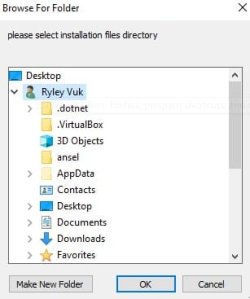
Every time I try to do it I get this error. I have extracted the ISO file to my documents folder, as it doesn't let me select anything on my C:/ drive. I select the EXTRACTED_ISO folder and choose to mount boot.wim, but it just returns this error.

Error: 2

Unable to access the image.
Make sure that the image path and the Windows directory for the image exist and you have Read permissions on the folder.

The DISM log file can be found at C:\Windows\Logs\DISM\dism.log


CHECKING FOR DRIVERS IN DRIVERS\Bootx64


Deployment Image Servicing and Management tool
Version: 10.0.18362.1


Error: 2

Unable to access the image.
Make sure that the image path and the Windows directory for the image exist and you have Read permissions on the folder.

The DISM log file can be found at C:\Windows\Logs\DISM\dism.log

ERROR: The system was unable to find the specified registry key or value.

ERROR: Error accessing the registry.

ERROR: The parameter is incorrect.


Extracting file data: 125 KiB of 125 KiB (100%) done
Done extracting files.

The system cannot find the path specified.
0 file(s) copied.

Press any key to unmount boot.wim
 

My Computer My Computer

At a glance

Windows 10 Pro x64Processor Intel(R) Core(TM) i7-9700K CPU @ 3....16gb Corsair Vengeance ProGeForce GTX 1660 TI
Computer type
PC/Desktop
Computer Manufacturer/Model Number
custom build
OS
Windows 10 Pro x64
CPU
Processor Intel(R) Core(TM) i7-9700K CPU @ 3.60GHz, 3600 Mhz
Motherboard
Z390 Aorus Pro Wifi
Memory
16gb Corsair Vengeance Pro
Graphics Card(s)
GeForce GTX 1660 TI
Case
Cooler Master MB500
Browser
Google Chrome
it doesn't let me select anything on my C:/ drive.

There is something weird on your system with permissions. Have you some way of restoring a previously made system image or a system restore to a point before the permissions problem?

You could try copying the 7up folder from documents to c:\ and see if that is any better.
 

My Computers My Computers

  • At a glance

    7 X64i5 84002x8gb 3200mhz
    Computer type
    PC/Desktop
    OS
    7 X64
    CPU
    i5 8400
    Motherboard
    gigabyte b365m ds3h
    Memory
    2x8gb 3200mhz
    Hard Drives
    various
    PSU
    pure power 11 400w cm
    Case
    Coolermaster
    Cooling
    cryorig m9i
  • At a glance

    7x64g54008gb ddr4 2400
    Computer type
    PC/Desktop
    OS
    7x64
    CPU
    g5400
    Motherboard
    ga b365m ds3h
    Memory
    8gb ddr4 2400
    PSU
    xfx pro 450w
Have you got win10 installed on that machine already?

If so, you could create another partition - apply the win7 image to the new partition - integrate drivers to the applied image - add a boot menu entry for the new partition.

Then boot into it.

You can do the applying image and integrating drivers from within your existing os. Dism++ is useful for that.

It is in the BIN\x64\tools folder
 

My Computers My Computers

  • At a glance

    7 X64i5 84002x8gb 3200mhz
    Computer type
    PC/Desktop
    OS
    7 X64
    CPU
    i5 8400
    Motherboard
    gigabyte b365m ds3h
    Memory
    2x8gb 3200mhz
    Hard Drives
    various
    PSU
    pure power 11 400w cm
    Case
    Coolermaster
    Cooling
    cryorig m9i
  • At a glance

    7x64g54008gb ddr4 2400
    Computer type
    PC/Desktop
    OS
    7x64
    CPU
    g5400
    Motherboard
    ga b365m ds3h
    Memory
    8gb ddr4 2400
    PSU
    xfx pro 450w
There is something weird on your system with permissions. Have you some way of restoring a previously made system image or a system restore to a point before the permissions problem?

You could try copying the 7up folder from documents to c:\ and see if that is any better.

I'm saying that the windows that pops up only goes straight to my user and it has nowhere to input a file path or anything. It just goes straight to my user folder. Picture is attached.
 

Attachments

  • weird.jpg
    weird.jpg
    13.5 KB · Views: 125

My Computer My Computer

At a glance

Windows 10 Pro x64Processor Intel(R) Core(TM) i7-9700K CPU @ 3....16gb Corsair Vengeance ProGeForce GTX 1660 TI
Computer type
PC/Desktop
Computer Manufacturer/Model Number
custom build
OS
Windows 10 Pro x64
CPU
Processor Intel(R) Core(TM) i7-9700K CPU @ 3.60GHz, 3600 Mhz
Motherboard
Z390 Aorus Pro Wifi
Memory
16gb Corsair Vengeance Pro
Graphics Card(s)
GeForce GTX 1660 TI
Case
Cooler Master MB500
Browser
Google Chrome
Have you got win10 installed on that machine already?

If so, you could create another partition - apply the win7 image to the new partition - integrate drivers to the applied image - add a boot menu entry for the new partition.

Then boot into it.

You can do the applying image and integrating drivers from within your existing os. Dism++ is useful for that.

It is in the BIN\x64\tools folder

I got Windows 7 installed using this, and the USB ports all work, but I have no wifi. Are there any drivers for that?
 

My Computer My Computer

At a glance

Windows 10 Pro x64Processor Intel(R) Core(TM) i7-9700K CPU @ 3....16gb Corsair Vengeance ProGeForce GTX 1660 TI
Computer type
PC/Desktop
Computer Manufacturer/Model Number
custom build
OS
Windows 10 Pro x64
CPU
Processor Intel(R) Core(TM) i7-9700K CPU @ 3.60GHz, 3600 Mhz
Motherboard
Z390 Aorus Pro Wifi
Memory
16gb Corsair Vengeance Pro
Graphics Card(s)
GeForce GTX 1660 TI
Case
Cooler Master MB500
Browser
Google Chrome
find the pnp device id

msinfo32>components>problem devices>file>export as .txt

If it is

PCI\VEN_8086&DEV_A370&SUBSYS_00348086&REV_10
I think you are out of luck . You could use a cheap wifi dongle that has win7 drivers

Forum - [Solution] ACPITME / EHCI(AMT) driver for win7 64bit of new Intel chipset systems

Forum - RE: [Solution] Win7 drivers for USB 3.0/3.1 Controllers of new Intel chipset systems - 14
Need Intel Wireless AC 9560 driver for Windows 7 - Windows 7 - MSFN

Forum - RE: USB 3.0/3.1 Drivers (original and modded) - 142
 
Last edited:

My Computers My Computers

  • At a glance

    7 X64i5 84002x8gb 3200mhz
    Computer type
    PC/Desktop
    OS
    7 X64
    CPU
    i5 8400
    Motherboard
    gigabyte b365m ds3h
    Memory
    2x8gb 3200mhz
    Hard Drives
    various
    PSU
    pure power 11 400w cm
    Case
    Coolermaster
    Cooling
    cryorig m9i
  • At a glance

    7x64g54008gb ddr4 2400
    Computer type
    PC/Desktop
    OS
    7x64
    CPU
    g5400
    Motherboard
    ga b365m ds3h
    Memory
    8gb ddr4 2400
    PSU
    xfx pro 450w
find the pnp device id

msinfo32>components>problem devices>file>export as .txt

If it is

PCI\VEN_8086&DEV_A370&SUBSYS_00348086&REV_10
I think you are out of luck . You could use a cheap wifi dongle that has win7 drivers

Forum - [Solution] ACPITME / EHCI(AMT) driver for win7 64bit of new Intel chipset systems

Forum - RE: [Solution] Win7 drivers for USB 3.0/3.1 Controllers of new Intel chipset systems - 14
Need Intel Wireless AC 9560 driver for Windows 7 - Windows 7 - MSFN

Forum - RE: USB 3.0/3.1 Drivers (original and modded) - 142

It says what you said. (it says PCI\VEN_8086&DEV_A370&SUBSYS_00348086&REV_10\3&11583659&0&A3) and I looked up my wifi card, and it has absolutely no Windows 7 drivers from Intel. I've just resorted to using an old USB wifi dongle that I had laying around and it works perfectly. Thank you very much for taking the time to help me with installing Windows 7 on this machine. If you are wondering, the wifi card is Intel(R) Wireless-AC 9560 160MHz. (I looked at it in device manager on Windows 10). Have a nice day/afternoon/night. I am very glad I finally have Windows 7.
 

My Computer My Computer

At a glance

Windows 10 Pro x64Processor Intel(R) Core(TM) i7-9700K CPU @ 3....16gb Corsair Vengeance ProGeForce GTX 1660 TI
Computer type
PC/Desktop
Computer Manufacturer/Model Number
custom build
OS
Windows 10 Pro x64
CPU
Processor Intel(R) Core(TM) i7-9700K CPU @ 3.60GHz, 3600 Mhz
Motherboard
Z390 Aorus Pro Wifi
Memory
16gb Corsair Vengeance Pro
Graphics Card(s)
GeForce GTX 1660 TI
Case
Cooler Master MB500
Browser
Google Chrome

My Computers My Computers

  • At a glance

    7 X64i5 84002x8gb 3200mhz
    Computer type
    PC/Desktop
    OS
    7 X64
    CPU
    i5 8400
    Motherboard
    gigabyte b365m ds3h
    Memory
    2x8gb 3200mhz
    Hard Drives
    various
    PSU
    pure power 11 400w cm
    Case
    Coolermaster
    Cooling
    cryorig m9i
  • At a glance

    7x64g54008gb ddr4 2400
    Computer type
    PC/Desktop
    OS
    7x64
    CPU
    g5400
    Motherboard
    ga b365m ds3h
    Memory
    8gb ddr4 2400
    PSU
    xfx pro 450w
Have you got win10 installed on that machine already?

If so, you could create another partition - apply the win7 image to the new partition - integrate drivers to the applied image - add a boot menu entry for the new partition.

Then boot into it.

You can do the applying image and integrating drivers from within your existing os. Dism++ is useful for that.

It is in the BIN\x64\tools folder


Hi SIW2,


I'm a little slow with computers, and have this same problem reported with my Z390-A. But I do have a windows 10 license installed, and have installed the 3.0 windows 7 update using the MSI mobo disc.


But how do I integrate these drivers with my pen drive that contains windows 7 pro?
 

My Computer My Computer

At a glance

windows 7 x64 proffessionalintel i5
Computer type
PC/Desktop
Computer Manufacturer/Model Number
Medion
OS
windows 7 x64 proffessional
CPU
intel i5
Motherboard
z390-a
Camaban, Welcome to the Forum.

You should start a new thread. This is already set by Ten20 as solved.
 

My Computers My Computers

  • At a glance

    Windows 7 HP 64i5 6600K - 800MHz to 4200MHz4+4G GSkill DDR4 3000IG - Intel 530
    Computer type
    PC/Desktop
    Computer Manufacturer/Model Number
    custom build
    OS
    Windows 7 HP 64
    CPU
    i5 6600K - 800MHz to 4200MHz
    Motherboard
    GA-Z170-HD3P
    Memory
    4+4G GSkill DDR4 3000
    Graphics Card(s)
    IG - Intel 530
    Monitor(s) Displays
    Samsung 226BW
    Screen Resolution
    1680x1050
    Hard Drives
    (1) -1 SM951 – 128GB M.2 AHCI PCIe SSD drive for Windows 7 and Lubuntu
    (2) -1 WD SATA 3 - 1T for Data
    (3) -1 WD SATA 3 - 1T for backup
    PSU
    Thermaltake 450W TR2 gold
    Keyboard
    Old and good Chicony mechanical keyboard
    Mouse
    Logitech mX performance - 9 buttons (had to disable some)
    Internet Speed
    500Mb/s
    Browser
    Firefox 64
    Other Info
    TinyWall firewall
  • At a glance

    Windows 7 Proi7-4500U 800MHz to 3.0GHz(4+4)G DDR3 1600IG intel 4400 + NVIDIA GeForce GT 745M
    Computer type
    Laptop
    System Manufacturer/Model Number
    Asus Q550LF
    OS
    Windows 7 Pro
    CPU
    i7-4500U 800MHz to 3.0GHz
    Motherboard
    Asus Q550LF
    Memory
    (4+4)G DDR3 1600
    Graphics Card(s)
    IG intel 4400 + NVIDIA GeForce GT 745M
    Sound Card
    Realtek
    Monitor(s) Displays
    LG Display LP156WF4-SPH1
    Screen Resolution
    1920 x 1080
    Hard Drives
    BX500 120G SSD for Windows and programs +
    1T HDD for data
    Internet Speed
    500 Mb/s
    Browser
    Firefox
    Other Info
    TinyWall firewall
Back
Top