Solved Failure Configuring Windows Updates Message While PC is Restarting

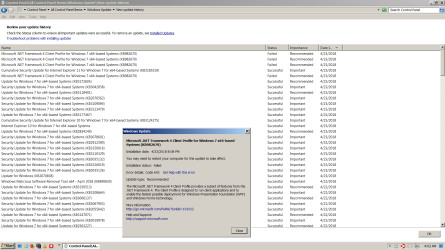
I didn't mention that when I tried to do "Update Driver" for "ACPI x64 based PC" in Device Manager and failed as I showed in the picture (a few posts back), next time when I rebooted/restarted the laptop, it'd crash/fail to restart and went into the "repair mode". It's kind of scary. After ~30 seconds it'd offer to "system restore" and it'd then reboot successfully after some more (too many !) minutes. It's a bit scary and so I decided to do a "Repair Install", instead of playing with "ACPI x64 based PC". Too bad that I didn't keep machine.inf (etc.) to compare :-)
 
Last edited:

My Computer

Computer type
PC/Desktop
Computer Manufacturer/Model Number
Dell Latitude
OS
Windows 7 x64
CPU
Intel(R) Core(TM) i5-4300M CPU @ 2.6 GHz
Memory
8 GB
Graphics Card(s)
Intel(R) HD Graphics 4600
Antivirus
Trent Micro OfficeScan
Browser
Internet Explorer 11, Google Chrome

My Computer

Computer type
PC/Desktop
Computer Manufacturer/Model Number
HP Desktop & Compaq Laptop
OS
Win 10 x64, Linux Lite, Win 7 x64, BlackArch, & Kali
Hard Drives
Samsung 850 Pro 256Gb,
Hitachi HDD 1Tb,
Crucial MX SSD 250Gb
Segate 3Tb USB 3.0 Ext. Backup HDD
Internet Speed
150Mbps dn, 20Mbps up
Antivirus
Avast Free, Malwarebytes Anti-Exploit & Anti-Ransomware
Browser
Firefox, Chrome, Opera, & VPN
Thanks. But it's too late as I've done all the updates anyway :-) There is hopefully no more next time :-) That rollup link has "2016/05" and I see many (half ?) of the updates were after ~2016, as new updates often supersede/replace the old ones.

I think, my problem all arose in a "blue screen" crash during the Windows Updates including the rollup unfortunately (when the "update" was in a stage of work after shutdown ...). Next time, I'd immediately try to go back to the existing good "system restore point" and try to do the windows updates again. This time, when I became aware and realized, I've done too many "windows updates" and each time of the "windows updates", a new system restore point was created and the old good ones was eventually erased.
 

My Computer

Computer type
PC/Desktop
Computer Manufacturer/Model Number
Dell Latitude
OS
Windows 7 x64
CPU
Intel(R) Core(TM) i5-4300M CPU @ 2.6 GHz
Memory
8 GB
Graphics Card(s)
Intel(R) HD Graphics 4600
Antivirus
Trent Micro OfficeScan
Browser
Internet Explorer 11, Google Chrome
Hello. Here is what happened regarding the repair install of Windows 7 on my dual boot system.

The repair install of Windows 7 seemed to go okay for me while it was being done. Windows XP boots and seems to function okay.

After the repair install completed, the disable Windows 7 Libraries fix was applied to prevent the computer from bogging down (and because I just really don't like the Libraries feature). Then I restarted the computer and let it set there for a bit to sort itself out some more. Then I shut it down so I could reconnect my speakers and the external hard drive. It said "Please do not power off or unplug your machine. Installing update 1 of 101." I didn't expect that, and I thought I would have more time after the repair install during which I could use that convenience rollup thing, but that''s not the way things happened so I let Windows update itself automatically because it was already downloading so much stuff to install, and I hoped Windows would know what order to install it all.

The automatic installation of Windows updates seemed to go okay, after which I installed whatever appeared next each time the computer restarted after installing an update or updates. There were no "Failure configuring Windows update" messages since the repair install.

I had a similar or the same issue with .NET Framework as Kin experienced, which he described in post #55 of this thread. I went to try doing what Kin did for that, but I couldn't see a C:\Windows\Installer folder even when Show hidden files, folders, and drives is selected. (I also don't see a C:\Windows.old folder or C:\$INPLACE.~TR if that's a folder, but I do see a C:\WINDOWS.~Q folder.) I did not try those other things Kin tried that did not help him with the .NET Framework issue that resulted from his repair install.

On my computer system, there was something like that (missing updates in Installed Updates) going on before the repair install. When Brds7t7 suggested uninstalling the February and January Security Monthly Quality Rollups and then trying again to install the most recent Security Monthly Quality Rollup, I went to uninstall those in Installed Updates, but they weren't listed even though they were listed in View Windows Update History as successful.

There was a lot of updates missing in Installed Updates, so i just decided to do the repair install, hoping that would fix whatever all that was about too.

I don't know exactly when all those updates went missing from Installed Updates, or if it had anything to do with following suggestions such as deleting the contents of SoftwareDistribution\Download, resetting Windows Updates with a batch file thing, etc., but the updates all went missing from Installed Updates during the course of this thread. Here is a screenshot taken when I first started this thread after the March Security Monthly Quality Rollup failed. (542 updates installed.)

Screenshot Installed Updates March 20 2018.png

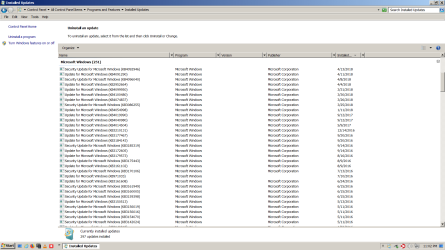
And here is a screenshot from April 13. (297 updates installed.)
Screenshot Installed Updates April 13 2018.png

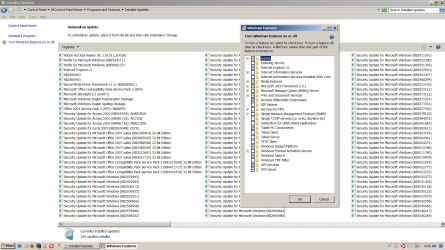
And here is what it looks like now in Installed Updates and Turn Windows Features On/Off. (Please notice .NET Framework 3.5.1.)
Screenshot Installed Updates and Windows Features April 24 2018.png

I used an application that depends on (or whatever) .NET Framework to function after all those updates went missing from Installed Updates. That same application does not launch now after the Repair Install, which makes it seem like the current .NET Framework issue resulted from the repair install for me too, as it did for Kin.

During the past day or so, new Windows updates available slowed to a trickle. There has been almost nothing presented in Windows Update besides an update for .NET Framework that the computer keeps trying and failing to install. I switched off automatic updates and unchecked that update in Windows Update hoping the computer will stop trying to install it.
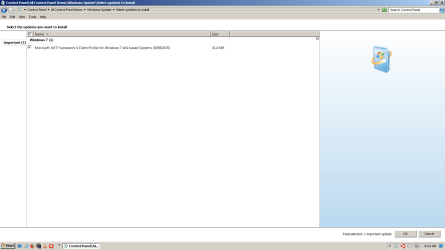
Screenshot Available Windows Updates April 24 2018.png
Screenshot Failed update for NET Framework April 24 2018.png

Thank you all for trying during the past month to help me avoid reformatting the hard drive and reinstalling Windows from scratch (clean install or whatever it's called) and for sharing your solutions, Kin. I appreciate it--can't really describe the gratitude I feel.

I am wondering if anyone can think of something I might be able to do to fix this .NET Framework problem and the matter of not being able to see C:\Windows.old, C:\$INPLACE.~TR, or C:\Windows\Installer folders even with Show hidden files, folders, and drives ticked so I might be able to continue using that computer without starting over with a cleared hard drive. I can't even just try what Kin did about the NET Framework matter after his repair install because I can't see the Installer folder.

It seems like none of my problems were caused by malware or whatever. I had Malwarebytes Premium installed on that computer for a long time, I have been in the habit for a long time of frequently running default settings scans and occasional in-depth scans with Malwarebytes and Windows Malicious Software Removal Tool like I'm compulsive about it or something, and I don't go to websites where humans download free (pirated) music, movies, and games or other suspicious websites. And I ran full scans with both Malwarebytes and Windows Malicious Software Removal Tool on both computers prior the repair install. I don't ever see any infections, or whatever it's called, in the scan results. By the way, since I switched from using Avast to Bitdefender on the Windows 7 Home Premium 32-bit computer, only one website has been blocked when I tried to go there. Check out this screenshot. (Please notice the URL/address/whatever thingo.) LOL

Screenshot BD Blocks SF.png

Sorry this is so long. Thank you for reading.

 
Last edited:

My Computer

Computer type
PC/Desktop
Computer Manufacturer/Model Number
I do not know. It was put together with separately purchased parts.
OS
Windows 7 Ultimate 64-bit SP1
CPU
Intel Core i5-3570K
Motherboard
ASUS P8Z77-V PRO
Memory
Corsair Vengeance Blue 4x8 GB
Graphics Card(s)
Nvidia GTX 1060
Sound Card
M-Audio Delta 1010LT
Monitor(s) Displays
2 Asus VS247H-P 23.6-Inch LED-Lit LCD monitors
Screen Resolution
1920x1080
Hard Drives
Western Digital WD1002FAEX Caviar Black 1TB SATA III
(no SSD)
My Passport Ultra external hard drive 2TB
PSU
CORSAIR RM650 650W 80 PLUS GOLD Full Modular PSU
Case
Corsair Obsidian Series Black 550D Mid Tower
Cooling
Zalman CNPS9500AT CPU Cooler
Keyboard
Azio Large Print Tri-Color Backlit Wired Keyboard (KB505U)
Mouse
Logitech Gaming Mouse G300
Internet Speed
6-8Mbps down, 2Mbps up
Antivirus
Malwarebytes Premium
Browser
IE, Firefox, Chrome
Other Info
2nd PC: Dell Dimension 4600
OS: Windows 7 Home Premium 32-bit SP1
PSU: EVGA 500W 80+ thingo
CPU: Intel Pentium 4
RAM: 3.00 GB Dual Channel DDR @ 199MHz
MB: Dell 02Y832
GPU: 512MB Nvidia GeForce 6200
HDD: 465GB WDC WD5000AAKS-00A7B2 ATA (SATA)
Opt Drive: HL-DT-ST DVD-ROM GDR8162B ATA Device
Opt Drive: TSSTcorp CD-RW TS-H292C ATA Device
Audio: Creative SB Live
Monitor: Asus-VS247H-P
Hi Efdy,

I figured out my .Net problem after I tried to install .Net stuff manually. Do you know what was the highest version of your .Net environment ? Have you tried to install a version of .Net (as new as possible by downloading from Microsoft) ?

If you install a new version, you may succeed. Or when you fail, you will get a log file which may say that you already have a higher version. Then , you may find the key in the log file like I did and when you search for that key the registry, it should point to a location which may not be the same as mine. You may then execute that MSI to install.

Have you done all these ?

Kin

PS: my .Net problem was with .Net4 (that the windows updates couldn't update .Net4 stuff). Somehow, .Net3 was taken care by the Updates.
 

My Computer

Computer type
PC/Desktop
Computer Manufacturer/Model Number
Dell Latitude
OS
Windows 7 x64
CPU
Intel(R) Core(TM) i5-4300M CPU @ 2.6 GHz
Memory
8 GB
Graphics Card(s)
Intel(R) HD Graphics 4600
Antivirus
Trent Micro OfficeScan
Browser
Internet Explorer 11, Google Chrome
A more direct answer to Efdy's question :

I re-read Efdy's paragraphs ... I think Efdy has not UN-clicked "Hide protected operating system files (Recommended)" as shown in my Capture.JPG ? [ This is in Windows Explorer, under "Tools" -> "Folders Options" -> "View". ]

You need to unclick that to show c:\windows\installer or C:\$INPLACE.~TR etc.

[ I don't have Windows.old either after the repair install, but I do have C:\$INPLACE.~TR and C:\$WINDOWS.~Q . ]


I just tested it in my laptop. You do need to "unclick" the above "Hide protected..." to see C:\windows\installer. But you still need to know which .msi (in C:\windows\installer) to click by going through what I went through.

You may click that "Hide protected ..." back after you solve your problem as unclicking it shows some files on your desktop etc. that you may not want to see all the time.

Kin
 

Attachments

  • Capture.JPG
    Capture.JPG
    47.8 KB · Views: 16
Last edited:

My Computer

Computer type
PC/Desktop
Computer Manufacturer/Model Number
Dell Latitude
OS
Windows 7 x64
CPU
Intel(R) Core(TM) i5-4300M CPU @ 2.6 GHz
Memory
8 GB
Graphics Card(s)
Intel(R) HD Graphics 4600
Antivirus
Trent Micro OfficeScan
Browser
Internet Explorer 11, Google Chrome
When you rename the software distribution folder, this data store also contains your Windows Update History files. If you delete them you will lose your Update history. Moreover, the next time you run Windows Update, it will result in a longer detection time.

After you do a upgrade install, you will also see the option Files discarded by Windows upgrade option in Disk Cleanup. This would be for the C:\Windows.old , C:\$INPLACE.~TR , and C:\$WINDOWS.~Q files left over from the previous operating system.

I don't rely on M$ for these folders/files, and don't rely on (system restore which I have disabled), I always create a full system backup, data only (system image) with 3rd party backup software.
 

My Computer

Computer type
PC/Desktop
Computer Manufacturer/Model Number
HP Desktop & Compaq Laptop
OS
Win 10 x64, Linux Lite, Win 7 x64, BlackArch, & Kali
Hard Drives
Samsung 850 Pro 256Gb,
Hitachi HDD 1Tb,
Crucial MX SSD 250Gb
Segate 3Tb USB 3.0 Ext. Backup HDD
Internet Speed
150Mbps dn, 20Mbps up
Antivirus
Avast Free, Malwarebytes Anti-Exploit & Anti-Ransomware
Browser
Firefox, Chrome, Opera, & VPN
Hi,

I've just noticed that Efdy's Windows Update was trying to update ".NET Framework 4 Client Profile". Does this mean that Efdy's .NET4 environment was/older than 4.5 ?! According to https://docs.microsoft.com/en-us/dotnet/framework/deployment/client-profile, "Starting with the .NET Framework 4.5, the Client Profile has been discontinued ...".

[ I can't be completely sure because I did see the "Client Profile" in my "Program and Features" when 4.7.1 etc. were not shown there before I solved my problem. I un-installed this "Client Profile" without any known good/bad effect. But my Windows Updates were trying to update the full .Net Framework 4.7.1, 4.5...and ... lower 4.x etc. (and failed), not this "Client Profile". ]

...I just saw that Efdy had that .Net 4.7.1 updates installed in Windows update screen. You may probably uninstall the "client profile" stuff as it's discontinued.

Does Efdy see .Net Framework 4.7.1 in "Programs and Features" ? If so, you may just right-click to "repair" it.

Kin
 
Last edited:

My Computer

Computer type
PC/Desktop
Computer Manufacturer/Model Number
Dell Latitude
OS
Windows 7 x64
CPU
Intel(R) Core(TM) i5-4300M CPU @ 2.6 GHz
Memory
8 GB
Graphics Card(s)
Intel(R) HD Graphics 4600
Antivirus
Trent Micro OfficeScan
Browser
Internet Explorer 11, Google Chrome
Thank you all for taking time to make some further replies. I appreciate your consideration.

When you rename the software distribution folder, this data store also contains your Windows Update History files. If you delete them you will lose your Update history. Moreover, the next time you run Windows Update, it will result in a longer detection time.

Okay. I kind of understand. I knew some things were successfully installed in the past even with a blank View Windows Update History because I had taken screenshots of everything in View Windows Update History going back to 2015, scrolling farther down the list for each screen capture, if you know what I mean.

After you do a upgrade install, you will also see the option Files discarded by Windows upgrade option in Disk Cleanup. This would be for the C:\Windows.old , C:\$INPLACE.~TR , and C:\$WINDOWS.~Q files left over from the previous operating system.

Oh, well, maybe that's why I don't see C:\Windows.old folder or C:\$INPLACE.~TR now. I did do that disk cleanup after the repair install, with only Files discarded by Windows Upgrade selected, but I didn't realize that included C:\Windows.old folder or C:\$INPLACE.~TR. I guess I just thought that meant leftover stuff of no use, and those seemed like important folders to still have. I wonder why I do have a C:\WINDOWS.~Q folder still. Anyway, then that's pretty good to know because now I understand why those folders are not there, and maybe if I'm lucky the only problem I have is with .NET Framework.

I don't rely on M$ for these folders/files, and don't rely on (system restore which I have disabled), I always create a full system backup, data only (system image) with 3rd party backup software.

That's how I want to do things from now on. I'm going to purchase one those of backup software packages you guys talk about for two computers, either AOMEI or Macrium, I guess. Do you use a free version or a paid for version of something to make system images? How often do you make a system image, Snick? Where do you save it to? I was thinking of buying a second external hard drive just for that while continuing to back up my files daily on the external hard drive I already do that with.

I don't have Windows.old either after the repair install, but I do have C:\$INPLACE.~TR and C:\$WINDOWS.~Q .

Oh, really? Hmm.

Do you know what was the highest version of your .Net environment ?

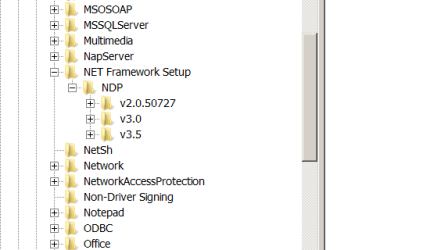
Before the repair install? No, but at least one application I use daily requires .NET Framework 4.6.1, so I guess I had that installed. Currently, in the registry--I didn't edit anything, just looked around--it shows these versions since the repair install.

NET Framework Versions Installed After Repair Install.png

And you can see in that other screenshot in my previous post what is listed in Programs and Features, Turn Windows features on or off, v3.5.1. A Microsoft web page I read says v3.5.1 gets installed with Windows 7.

Have you tried to install a version of .Net (as new as possible by downloading from Microsoft) ?

I had not tried anything yet when I last made a post to this thread, but since then I tried installing more than one version of .NET Framework higher than 3.5.1, all of which came from the place where you get them from Microsoft. I also tried using the .NET Framework Repair Tool thing. I got the same results you got with all of that when you first tried doing those things.

If you install a new version, you may succeed. Or when you fail, you will get a log file which may say that you already have a higher version. Then , you may find the key in the log file like I did and when you search for that key the registry, it should point to a location which may not be the same as mine.

I will try to do that. I still have the logs.

I re-read Efdy's paragraphs ... I think Efdy has not UN-clicked "Hide protected operating system files (Recommended)" as shown in my Capture.JPG ?

Yes, that is it. I didn't even notice that option. For some reason, I only noticed the option that says Show hidden files, folders, and drives, and I just thought that would show everything. Thank you, Kin. I see the Installer folder now. Hopefully, I can just do what you did to get things back in working order. That would be nice.

I'll let you know. Thank you guys again so much for your help and for your patience with me.
 

My Computer

Computer type
PC/Desktop
Computer Manufacturer/Model Number
I do not know. It was put together with separately purchased parts.
OS
Windows 7 Ultimate 64-bit SP1
CPU
Intel Core i5-3570K
Motherboard
ASUS P8Z77-V PRO
Memory
Corsair Vengeance Blue 4x8 GB
Graphics Card(s)
Nvidia GTX 1060
Sound Card
M-Audio Delta 1010LT
Monitor(s) Displays
2 Asus VS247H-P 23.6-Inch LED-Lit LCD monitors
Screen Resolution
1920x1080
Hard Drives
Western Digital WD1002FAEX Caviar Black 1TB SATA III
(no SSD)
My Passport Ultra external hard drive 2TB
PSU
CORSAIR RM650 650W 80 PLUS GOLD Full Modular PSU
Case
Corsair Obsidian Series Black 550D Mid Tower
Cooling
Zalman CNPS9500AT CPU Cooler
Keyboard
Azio Large Print Tri-Color Backlit Wired Keyboard (KB505U)
Mouse
Logitech Gaming Mouse G300
Internet Speed
6-8Mbps down, 2Mbps up
Antivirus
Malwarebytes Premium
Browser
IE, Firefox, Chrome
Other Info
2nd PC: Dell Dimension 4600
OS: Windows 7 Home Premium 32-bit SP1
PSU: EVGA 500W 80+ thingo
CPU: Intel Pentium 4
RAM: 3.00 GB Dual Channel DDR @ 199MHz
MB: Dell 02Y832
GPU: 512MB Nvidia GeForce 6200
HDD: 465GB WDC WD5000AAKS-00A7B2 ATA (SATA)
Opt Drive: HL-DT-ST DVD-ROM GDR8162B ATA Device
Opt Drive: TSSTcorp CD-RW TS-H292C ATA Device
Audio: Creative SB Live
Monitor: Asus-VS247H-P
Hi Efdy,

Before and after you find the right .MSI in c:\Windows\installer to install,

do you see .Net Framework 4.7.1 in "Programs and Features" (in Control Panel) ?

I saw it only after I executed the . MSI program as I described.
I right-clicked on it inside "Programs and Features" to "repair" it. Not sure whether this step is critical or not.

Kin
 

My Computer

Computer type
PC/Desktop
Computer Manufacturer/Model Number
Dell Latitude
OS
Windows 7 x64
CPU
Intel(R) Core(TM) i5-4300M CPU @ 2.6 GHz
Memory
8 GB
Graphics Card(s)
Intel(R) HD Graphics 4600
Antivirus
Trent Micro OfficeScan
Browser
Internet Explorer 11, Google Chrome
No version of NET Framework was listed in Programs and Features after the repair install even though the registry said v2.0, v3.0, and v3.5 were installed, and v3.5.1 was showing in Turn Windows Features on or off. Then after doing exactly what you did after reading exactly the same things you mentioned in those logs that are generated when NET Framework fails to install (newer version already installed, 4.7.1, and so on), then NET Framework 4.7.1 was listed in Programs and Features. I decided to do the repair thing too to be safe after double-clicking that .msi thingo in the Installer folder.

The application I use daily that requires NET Framework 4.6.1 and didn't work after the repair install now works again after applying Kin's fix for NET Framework 4.7.1.

I should apologize, Kin. I realize you already asked before I made my previous post if NET Framework 4.7.1 was listed in Programs and Features. I didn't even look at the screenshot I posted before that, which I referred to in my reply about it, thinking that screenshot was an answer to your question. I thought I had opened Turn Windows Features on/off while I was in Programs and Features and took that screenshot then, but I had opened Turn Windows Features on/off while Installed Updates was displayed, and took that screenshot then. So I had the idea in my head that the screenshot showed something besides what it does.

And I'm sorry about marking this thread solved after accepting advice to do a repair install and writing something about suggesting others start threads where they may get help specifically dealing with their affected computer systems. I didn't mean to shut anyone out or end this discussion prematurely. It seems to me to be normal to use advice and solutions that worked for someone else--that's what I just did a bunch of including Kin's fix for NET Framework--but I kept reading all over the place at Seven Forums where it says not to apply solutions provided for someone else's computer to your computer, to start your own thread and get advice for your specific computer. Which I also understand the logic of.

Anyway, I was trying so hard not to do something wrong that I did something that didn't make proper sense. Sorry about that. Thank you all for sticking around and helping me fix the same issue on my computer after the repair install that Kin had with NET Framework after the repair install on his computer.
 
Last edited:

My Computer

Computer type
PC/Desktop
Computer Manufacturer/Model Number
I do not know. It was put together with separately purchased parts.
OS
Windows 7 Ultimate 64-bit SP1
CPU
Intel Core i5-3570K
Motherboard
ASUS P8Z77-V PRO
Memory
Corsair Vengeance Blue 4x8 GB
Graphics Card(s)
Nvidia GTX 1060
Sound Card
M-Audio Delta 1010LT
Monitor(s) Displays
2 Asus VS247H-P 23.6-Inch LED-Lit LCD monitors
Screen Resolution
1920x1080
Hard Drives
Western Digital WD1002FAEX Caviar Black 1TB SATA III
(no SSD)
My Passport Ultra external hard drive 2TB
PSU
CORSAIR RM650 650W 80 PLUS GOLD Full Modular PSU
Case
Corsair Obsidian Series Black 550D Mid Tower
Cooling
Zalman CNPS9500AT CPU Cooler
Keyboard
Azio Large Print Tri-Color Backlit Wired Keyboard (KB505U)
Mouse
Logitech Gaming Mouse G300
Internet Speed
6-8Mbps down, 2Mbps up
Antivirus
Malwarebytes Premium
Browser
IE, Firefox, Chrome
Other Info
2nd PC: Dell Dimension 4600
OS: Windows 7 Home Premium 32-bit SP1
PSU: EVGA 500W 80+ thingo
CPU: Intel Pentium 4
RAM: 3.00 GB Dual Channel DDR @ 199MHz
MB: Dell 02Y832
GPU: 512MB Nvidia GeForce 6200
HDD: 465GB WDC WD5000AAKS-00A7B2 ATA (SATA)
Opt Drive: HL-DT-ST DVD-ROM GDR8162B ATA Device
Opt Drive: TSSTcorp CD-RW TS-H292C ATA Device
Audio: Creative SB Live
Monitor: Asus-VS247H-P
Hi Efdy,

IF I understand correctly, you basically did what I did for .NET framework (4.7.1) and your problem has been solved !!

If so, that's great !

I also noticed the problem of .NET because a couple applications didn't work after the repair install and had to do what I did.

Kin
 

My Computer

Computer type
PC/Desktop
Computer Manufacturer/Model Number
Dell Latitude
OS
Windows 7 x64
CPU
Intel(R) Core(TM) i5-4300M CPU @ 2.6 GHz
Memory
8 GB
Graphics Card(s)
Intel(R) HD Graphics 4600
Antivirus
Trent Micro OfficeScan
Browser
Internet Explorer 11, Google Chrome
Yes, that's right. I saw the same exact words and numbers in the NET Framework setup logs (or whatever they're called) that you quoted in post #55, and I did the same exact things you did about it. Which seems to have given me the same results. Thank you again for helping me that way, Kin.
 

My Computer

Computer type
PC/Desktop
Computer Manufacturer/Model Number
I do not know. It was put together with separately purchased parts.
OS
Windows 7 Ultimate 64-bit SP1
CPU
Intel Core i5-3570K
Motherboard
ASUS P8Z77-V PRO
Memory
Corsair Vengeance Blue 4x8 GB
Graphics Card(s)
Nvidia GTX 1060
Sound Card
M-Audio Delta 1010LT
Monitor(s) Displays
2 Asus VS247H-P 23.6-Inch LED-Lit LCD monitors
Screen Resolution
1920x1080
Hard Drives
Western Digital WD1002FAEX Caviar Black 1TB SATA III
(no SSD)
My Passport Ultra external hard drive 2TB
PSU
CORSAIR RM650 650W 80 PLUS GOLD Full Modular PSU
Case
Corsair Obsidian Series Black 550D Mid Tower
Cooling
Zalman CNPS9500AT CPU Cooler
Keyboard
Azio Large Print Tri-Color Backlit Wired Keyboard (KB505U)
Mouse
Logitech Gaming Mouse G300
Internet Speed
6-8Mbps down, 2Mbps up
Antivirus
Malwarebytes Premium
Browser
IE, Firefox, Chrome
Other Info
2nd PC: Dell Dimension 4600
OS: Windows 7 Home Premium 32-bit SP1
PSU: EVGA 500W 80+ thingo
CPU: Intel Pentium 4
RAM: 3.00 GB Dual Channel DDR @ 199MHz
MB: Dell 02Y832
GPU: 512MB Nvidia GeForce 6200
HDD: 465GB WDC WD5000AAKS-00A7B2 ATA (SATA)
Opt Drive: HL-DT-ST DVD-ROM GDR8162B ATA Device
Opt Drive: TSSTcorp CD-RW TS-H292C ATA Device
Audio: Creative SB Live
Monitor: Asus-VS247H-P
It's good that what I wrote actually works for other people, too ! Great !
 

My Computer

Computer type
PC/Desktop
Computer Manufacturer/Model Number
Dell Latitude
OS
Windows 7 x64
CPU
Intel(R) Core(TM) i5-4300M CPU @ 2.6 GHz
Memory
8 GB
Graphics Card(s)
Intel(R) HD Graphics 4600
Antivirus
Trent Micro OfficeScan
Browser
Internet Explorer 11, Google Chrome
Yeah, that was a relief for me. Hopefully that fix you figured out will prove to have been sufficient.

And for anyone who came to the end of this thread first looking for clues to a possible solution for the March/April Security Monthly Quality Rollup updates problem that may not involve a repair install (in-place upgrade) of Windows 7, in post #55 of this thread Kin elaborates on the following quote from his post.

I was wondering whether to do "Repair Install". But then, I probably found the culprit that screwed those Mar./Apr. security/rollup Windows Updates.
 

My Computer

Computer type
PC/Desktop
Computer Manufacturer/Model Number
I do not know. It was put together with separately purchased parts.
OS
Windows 7 Ultimate 64-bit SP1
CPU
Intel Core i5-3570K
Motherboard
ASUS P8Z77-V PRO
Memory
Corsair Vengeance Blue 4x8 GB
Graphics Card(s)
Nvidia GTX 1060
Sound Card
M-Audio Delta 1010LT
Monitor(s) Displays
2 Asus VS247H-P 23.6-Inch LED-Lit LCD monitors
Screen Resolution
1920x1080
Hard Drives
Western Digital WD1002FAEX Caviar Black 1TB SATA III
(no SSD)
My Passport Ultra external hard drive 2TB
PSU
CORSAIR RM650 650W 80 PLUS GOLD Full Modular PSU
Case
Corsair Obsidian Series Black 550D Mid Tower
Cooling
Zalman CNPS9500AT CPU Cooler
Keyboard
Azio Large Print Tri-Color Backlit Wired Keyboard (KB505U)
Mouse
Logitech Gaming Mouse G300
Internet Speed
6-8Mbps down, 2Mbps up
Antivirus
Malwarebytes Premium
Browser
IE, Firefox, Chrome
Other Info
2nd PC: Dell Dimension 4600
OS: Windows 7 Home Premium 32-bit SP1
PSU: EVGA 500W 80+ thingo
CPU: Intel Pentium 4
RAM: 3.00 GB Dual Channel DDR @ 199MHz
MB: Dell 02Y832
GPU: 512MB Nvidia GeForce 6200
HDD: 465GB WDC WD5000AAKS-00A7B2 ATA (SATA)
Opt Drive: HL-DT-ST DVD-ROM GDR8162B ATA Device
Opt Drive: TSSTcorp CD-RW TS-H292C ATA Device
Audio: Creative SB Live
Monitor: Asus-VS247H-P
Back
Top