I'm new here...thank you in advance.
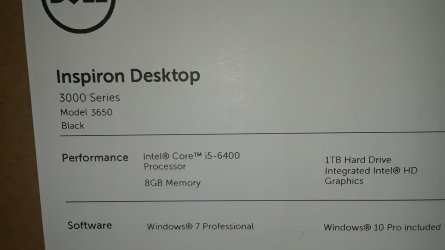
I am using a Dell desktop, approx. 1 year old, with Win 7, SP1. I bought it last year, directly from Dell. I've had a lot of odd experiences with it and have managed to fix them all, but the current problem has me stumped.
I used the machine a good bit yesterday and I shut it down completely when I was done. Today, when I started it, it booted up but stopped on the screen where the user would click his/her icon and then be allowed to use the correct desktop and icons. FWIW, I am the only user with an account on that machine and I am also the only actual user, unless the dog is smarter than I think...
I've seen that screen before and have always just clicked through to my desktop. Today, I found that neither the mouse nor the keyboard, both of which are wire-connected USB devices, would work. I tried swapping the keyboards and the mice from another machine without any change in symptoms.
I used another machine to try to get some help and was not successful...found lots of answers but most of them involve using "Safe Mode". I found that I could not get to that mode - tapping F8 wouldn't get me there, so was unable to try any other fixes.
Other info -
As I mentioned, the machine stops on the screen described above. Today, the screen displayed a small rectangular icon in the lower-left corner. In the rectangle is a square and in the square is a small circle of what appear to be dots, like the face of a clock, and there are lines that seem to be positioned to indicate three o'clock. Those lines do not move, so I guess that it's telling me something, but I don't know what, and I don't recall seeing that icon before.
The mouse (optical, of course) seems to be a Dell product - it came with the machine. While the boot-up is in process, the red light on the bottom is lit, but it shuts off after coming to the screen I described.
The KB also came with the machine. I activated "Num Lock" months ago; for some reason, the "Num Lock" light stays ON even when the KB seems dead.
I can't do diagnostics or use the control panel or any other function on the machine. I will appreciate any information and/or assistance that might be provided to me. Many thanks!
Steve E.
I am using a Dell desktop, approx. 1 year old, with Win 7, SP1. I bought it last year, directly from Dell. I've had a lot of odd experiences with it and have managed to fix them all, but the current problem has me stumped.
I used the machine a good bit yesterday and I shut it down completely when I was done. Today, when I started it, it booted up but stopped on the screen where the user would click his/her icon and then be allowed to use the correct desktop and icons. FWIW, I am the only user with an account on that machine and I am also the only actual user, unless the dog is smarter than I think...
I've seen that screen before and have always just clicked through to my desktop. Today, I found that neither the mouse nor the keyboard, both of which are wire-connected USB devices, would work. I tried swapping the keyboards and the mice from another machine without any change in symptoms.
I used another machine to try to get some help and was not successful...found lots of answers but most of them involve using "Safe Mode". I found that I could not get to that mode - tapping F8 wouldn't get me there, so was unable to try any other fixes.
Other info -
As I mentioned, the machine stops on the screen described above. Today, the screen displayed a small rectangular icon in the lower-left corner. In the rectangle is a square and in the square is a small circle of what appear to be dots, like the face of a clock, and there are lines that seem to be positioned to indicate three o'clock. Those lines do not move, so I guess that it's telling me something, but I don't know what, and I don't recall seeing that icon before.
The mouse (optical, of course) seems to be a Dell product - it came with the machine. While the boot-up is in process, the red light on the bottom is lit, but it shuts off after coming to the screen I described.
The KB also came with the machine. I activated "Num Lock" months ago; for some reason, the "Num Lock" light stays ON even when the KB seems dead.
I can't do diagnostics or use the control panel or any other function on the machine. I will appreciate any information and/or assistance that might be provided to me. Many thanks!
Steve E.
My Computer
- Computer type
- PC/Desktop
- Computer Manufacturer/Model Number
- Dell
- OS
- Windows 7 Professional SP1
- CPU
- Intel Core i5-6400 (x64) 270GHz
- Motherboard
- Unknown
- Memory
- 8GB RAM
- Graphics Card(s)
- Unknown
- Hard Drives
- 1 hard drive, 1TB
- Antivirus
- Norton
- Browser
- Firefox, current version as of 18 Aug 18